








English | 简体中文 | 繁體中文 | 한국어 | Español | 日本語 | हिन्दी | Русский | Português | తెలుగు | Français | Deutsch | Italiano | Tiếng Việt | العربية | اردو | বাংলা | فارسی | Türkçe |
用于推理和训练的最先进预训练模型

Transformers 作为模型定义框架,支持文本、计算机 视觉、音频、视频和多模态模型的最先进机器学习,适用于推理和训练。
它集中管理模型定义,以便在整个生态系统中就这一定义达成一致。transformers 是跨框架的枢纽:如果支持某个模型定义,它将与大多数训练框架(Axolotl, Unsloth, DeepSpeed, FSDP, PyTorch-Lightning, ...)、推理引擎(vLLM, SGLang, TGI, ...)以及相邻的建模库(llama.cpp, mlx, ...)兼容,这些库利用了来自 transformers 的模型定义。
我们承诺通过使模型定义简单、可定制且高效,来帮助支持最新的前沿模型并推动其使用的普及。
在 Hugging Face Hub 上有超过 100 万个 Transformers 模型检查点 可供使用。
今天探索 Hub],寻找一个模型,并使用 Transformers 立即开始上手。
安装
Transformers works with Python 3.10+, and PyTorch 2.5+.
使用 venv 或 uv(一个基于 Rust 的快速 Python 包和项目管理器)创建并激活虚拟环境。
# venv
python -m venv .my-env
source .my-env/bin/activate
# uv
uv venv .my-env
source .my-env/bin/activate
在你的虚拟环境中安装 Transformers。
# pip
pip install "transformers[torch]"

# uv
uv pip install "transformers[torch]"
如果你想要获取库中的最新更改或有意参与贡献,请从源代码安装 Transformers。但是,最新版本可能不稳定。如果你遇到错误,请随时提交一个 issue。
git clone https://github.com/huggingface/transformers.git
cd transformers

# pip
pip install '.[torch]'

# uv
uv pip install '.[torch]'
快速入门
立即使用 Pipeline API 开始使用 Transformers。Pipeline 是一个高级推理类,支持文本、音频、视觉和多模态任务。它负责预处理输入并返回相应的输出。
实例化一个 pipeline 并指定用于文本生成的模型。该模型会被下载并缓存,以便您可以轻松再次使用。最后,传入一些文本以提示模型。
from transformers import pipeline

pipeline = pipeline(task="text-generation", model="Qwen/Qwen2.5-1.5B")
pipeline("the secret to baking a really good cake is ")
[{'generated_text': 'the secret to baking a really good cake is 1) to use the right ingredients and 2) to follow the recipe exactly. the recipe for the cake is as follows: 1 cup of sugar, 1 cup of flour, 1 cup of milk, 1 cup of butter, 1 cup of eggs, 1 cup of chocolate chips. if you want to make 2 cakes, how much sugar do you need? To make 2 cakes, you will need 2 cups of sugar.'}]要与模型进行对话,使用模式是相同的。唯一的区别是,你需要构建你与系统之间的对话历史(Pipeline 的输入)。
[!TIP] 只要
transformers serve正在运行,你也可以直接从命令行与模型进行对话。transformers chat Qwen/Qwen2.5-0.5B-Instruct
import torch
from transformers import pipeline

chat = [
    {"role": "system", "content": "You are a sassy, wise-cracking robot as imagined by Hollywood circa 1986."},
    {"role": "user", "content": "Hey, can you tell me any fun things to do in New York?"}
]

pipeline = pipeline(task="text-generation", model="meta-llama/Meta-Llama-3-8B-Instruct", dtype=torch.bfloat16, device_map="auto")
response = pipeline(chat, max_new_tokens=512)
print(response[0]["generated_text"][-1]["content"])
展开以下示例,查看 Pipeline 在不同模态和任务中的工作方式。
自动语音识别
from transformers import pipeline

pipeline = pipeline(task="automatic-speech-recognition", model="openai/whisper-large-v3")
pipeline("https://huggingface.co/datasets/Narsil/asr_dummy/resolve/main/mlk.flac")
{'text': ' I have a dream that one day this nation will rise up and live out the true meaning of its creed.'}
图像分类
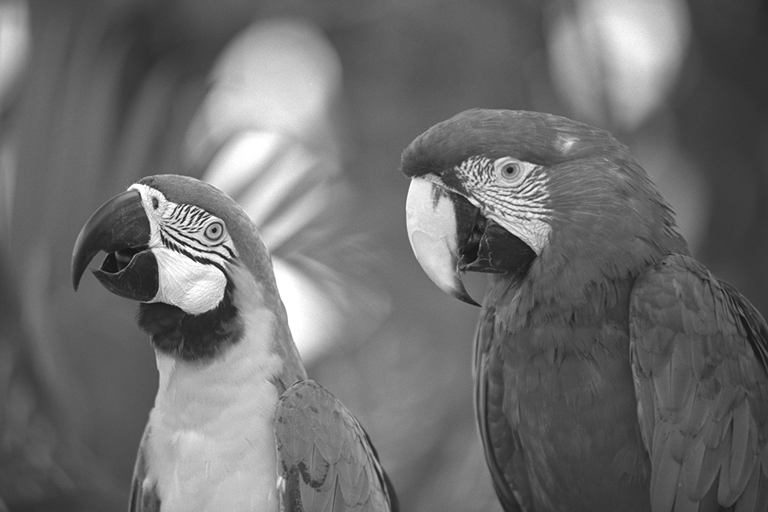
from transformers import pipeline

pipeline = pipeline(task="image-classification", model="facebook/dinov2-small-imagenet1k-1-layer")
pipeline("https://huggingface.co/datasets/Narsil/image_dummy/raw/main/parrots.png")
[{'label': 'macaw', 'score': 0.997848391532898},
 {'label': 'sulphur-crested cockatoo, Kakatoe galerita, Cacatua galerita',
  'score': 0.0016551691805943847},
 {'label': 'lorikeet', 'score': 0.00018523589824326336},
 {'label': 'African grey, African gray, Psittacus erithacus',
  'score': 7.85409429227002e-05},
 {'label': 'quail', 'score': 5.502637941390276e-05}]
视觉问答

from transformers import pipeline

pipeline = pipeline(task="visual-question-answering", model="Salesforce/blip-vqa-base")
pipeline(
    image="https://huggingface.co/datasets/huggingface/documentation-images/resolve/main/transformers/tasks/idefics-few-shot.jpg",
    question="What is in the image?",
)
[{'answer': 'statue of liberty'}]
我为什么应该使用 Transformers?
-
易于使用的最先进模型:
- 在自然语言理解与生成、计算机视觉、音频、视频和多模态任务上具有高性能。
- 研究人员、工程师和开发者的入门门槛低。
- 面向用户的抽象很少,只需学习三个类。
- 使用我们所有预训练模型的统一 API。
-
更低的计算成本,更小的碳足迹:
- 共享已训练的模型,而不是从头开始训练。
- 减少计算时间和生产成本。
- 涵盖所有模态的数百种模型架构和 100 万+ 预训练检查点。
-
为模型生命周期的每个部分选择合适的框架:
- 用 3 行代码训练最先进模型。
- 随意在 PyTorch/JAX/TF2.0 框架之间迁移单个模型。
- 为训练、评估和生产选择合适的框架。
-
轻松根据需求定制模型或示例:
- 我们为每种架构提供示例,以复现其原始作者发布的结果。
- 模型内部结构尽可能一致地暴露出来。
- 模型文件可以独立于库用于快速实验。
我什么时候不应该使用 Transformers?
- 本库并非用于构建神经网络的模块化组件工具箱。模型文件中的代码有意未通过额外的抽象进行重构,以便研究人员能够快速迭代每个模型,而无需深入额外的抽象/文件。
- 训练 API 针对 Transformers 提供的 PyTorch 模型进行了优化。对于通用的机器学习循环,您应该使用 Accelerate 等其他库。
- 示例脚本 仅为示例。它们不一定能直接适用于您的特定用例,您需要调整代码才能使其正常工作。
100 个使用 Transformers 的项目
Transformers 不仅仅是一个使用预训练模型的工具包,它还是一个围绕该库和 Hugging Face Hub 构建的项目社区。我们希望 Transformers 能够赋能开发者、研究人员、学生、教授、工程师以及 其他任何人来构建他们梦想中的项目。
为了庆祝 Transformers 获得 100,000 个 star,我们希望通过 awesome-transformers 页面将聚光灯投向 社区,该页面列出了 100 个 使用 Transformers 构建的令人惊叹的项目。
如果您拥有或使用了一个认为应该列入该列表的项目,请提交一个 PR 来添加它!
示例模型
您可以直接在它们的 Hub 模型页面 上测试我们的大多数模型。
展开以下每种模态,以查看适用于各种用例的几个示例模型。
Audio
计算机视觉
多模态
- 使用 Voxtral 或 Audio Flamingo 进行音频或文本到文本的转换
- 使用 LayoutLMv3 进行文档问答
- 使用 Qwen-VL 进行图像或文本到文本的转换
- 使用 BLIP-2 进行图像描述
- 使用 GOT-OCR2 进行基于 OCR 的文档理解
- 使用 TAPAS 进行表格问答
- 使用 Emu3 进行统一的多模态理解与生成
- 使用 Llava-OneVision 进行视觉到文本的转换
- 使用 Llava 进行视觉问答
- 使用 Kosmos-2 进行视觉指代表达分割
NLP
引用
我们现在有一篇你可以引用的关于 🤗 Transformers 库的论文:
@inproceedings{wolf-etal-2020-transformers,
    title = "Transformers: State-of-the-Art Natural Language Processing",
    author = "Thomas Wolf and Lysandre Debut and Victor Sanh and Julien Chaumond and Clement Delangue and Anthony Moi and Pierric Cistac and Tim Rault and Rémi Louf and Morgan Funtowicz and Joe Davison and Sam Shleifer and Patrick von Platen and Clara Ma and Yacine Jernite and Julien Plu and Canwen Xu and Teven Le Scao and Sylvain Gugger and Mariama Drame and Quentin Lhoest and Alexander M. Rush",
    booktitle = "Proceedings of the 2020 Conference on Empirical Methods in Natural Language Processing: System Demonstrations",
    month = oct,
    year = "2020",
    address = "Online",
    publisher = "Association for Computational Linguistics",
    url = "https://aclanthology.org/2020.emnlp-demos.6/",
    pages = "38--45"
}