

使用 %%metro 指令从 Mermaid 图定义生成地铁图风格的 SVG 图表。专为将生物信息学流水线工作流(例如 nf-core 流水线)可视化为地铁风格地图而设计,其中每条分析路线都是一条彩色的“地铁线路”。

无需安装即可试用: nf-metro 游乐场 在您的浏览器中运行完整的布局引擎。编辑 .mmd 文件,实时预览结果,直接导入 Nextflow -with-dag 图表,并调整布局选项——无需 Python,无需 CLI。
nf-metro 的功能
- 静态 SVG - 一个自包含的图表,您可以将其提交、嵌入到 README 中,或放入文档中。
- 交互式 HTML - 平移、缩放、悬停查看站点详情,点击图例中的线条以隔离该线路并缩放至其范围。
- 实时进度叠加层 - 当 Nextflow 流水线运行时,使用
nf-metro serve配合 Nextflow 的-with-weblog实时点亮站点。 - 仪表板模式 -
nf-metro serve-multi在一页上并排托管多个流水线或运行实例。 - Nextflow DAG 导入 - 使用
nf-metro convert(或在render上使用--from-nextflow)将-with-dagMermaid 导出转换为地铁图。 - 嵌入式数据清单 - 每个 SVG 都携带一个机器可读的 JSON 清单,以便叠加层和下游工具无需重新运行布局引擎即可定位站点。
安装
pip (PyPI)
pip install nf-metroConda(Bioconda)
conda install bioconda::nf-metro容器(Seqera Containers)
可通过 Seqera Containers 获取预构建的容器:
docker pull community.wave.seqera.io/library/pip_nf-metro:611b1ba39c6007f1开发
pip install -e ".[dev]"需要 Python 3.10+。
快速开始
从 .mmd 文件渲染地铁地图:
nf-metro render examples/simple_pipeline.mmd -o pipeline.svg在不渲染的情况下验证您的输入:
nf-metro validate examples/simple_pipeline.mmd检查结构(章节、行、车站):
nf-metro info examples/simple_pipeline.mmd请参阅 指南,了解编写 .mmd 文件的逐步操作指南。
CLI 参考
nf-metro render
将 Mermaid 地铁图定义渲染为 SVG 或交互式 HTML。
nf-metro render [OPTIONS] INPUT_FILE以下每个布局/渲染选项在 .mmd 文件中都有一个对应的 %%metro 指令;显式传递的标志会覆盖该指令。
| 选项 | 默认值 | 描述 |
|---|---|---|
-o, --output PATH | <input>.<format> | 输出文件路径 |
--format [svg|html] | svg | 输出格式:svg 或交互式 html |
--theme [nfcore|light|seqera] | 来自 style:,否则为 nfcore | 视觉主题 |
--legend TEXT | auto | 图例+标志位置(关键字、keyword | canvas、keyword | dx,dy 或 x,y) |
--line-spread [bundle|centered|rails] | bundle | 共享同一车站的线路在垂直方向上的关系 |
--width INTEGER | auto | SVG 宽度(像素) |
--height INTEGER | auto | SVG 高度(像素) |
--x-spacing FLOAT | auto | 层之间的水平间距 |
--y-spacing FLOAT | auto | 轨道之间的垂直间距 |
--fold-threshold INTEGER | 15 | 在换行到下一行之前,节行可达到的最大站点列数 |
--animate / --no-animate | off | 添加沿线路移动的动画球体 |
--directional / --no-directional | off | 沿每条路线绘制指向流向的静态箭头 |
--strict / --no-strict | off | 将布局不变量违规视为错误而非警告 |
--debug / --no-debug | off | 显示调试覆盖层(端口、隐藏站点、边缘航点) |
--logo PATH | none | 标志图像路径(覆盖 %%metro logo: 指令) |
--line-order [definition|span] | definition | 线路排序策略:definition 保留 .mmd 顺序,span 按节跨度排序 |
--diamond-style [straight|symmetric] | straight | 分叉-合并布局:straight 将上部分支保留在主轨道上;symmetric 均匀展开 |
--center-ports / --no-center-ports | off | 在两个相连区段中较短的区段上居中显示区段间端口 |
--compact-offsets / --no-compact-offsets | off | 仅根据实际经过该站的线路来设定每个站点的尺寸 |
--section-x-gap FLOAT | 50 | 区段之间的水平间距 |
--section-y-gap FLOAT | 50 | 区段之间的垂直间距 |
--label-angle FLOAT | theme default | 站点标签的角度(以度为单位) |
--font-scale FLOAT | 1.0 | 缩放文本及驱动布局间距的标签度量 |
--logo-scale FLOAT | 1.0 | 缩放图例中的标志 |
--legend-min-height FLOAT | 0 | 图例内容的最小高度(以像素为单位) |
--legend-logo-gap FLOAT | auto | 标志与图例条目之间的间距 |
--validate | off | 对绘制的 SVG 运行 render-geometry oracle 并报告违规项 |
--from-nextflow | off | 在渲染前转换 Nextflow -with-dag mermaid 输入 |
--title TEXT | none | 管道标题(覆盖 %%metro title: 指令) |
嵌入选项
用于生成 SVG 以嵌入到其他页面或应用的标志。有关何时使用每个选项,请参阅 嵌入指南。
| 选项 | 默认值 | 描述 |
|---|---|---|
--responsive / --no-responsive | off | 仅输出 viewBox(无固定 width/height),以便宿主可以通过 CSS 进行缩放 |
--embed-font / --no-embed-font | off | 将 Inter 内联为 base64 @font-face,以便 SVG 在任何宿主上都能以相同方式渲染 |
--text-to-paths / --no-text-to-paths | off | 将文本转换为矢量路径(无字体依赖;失去可选文本;需要 fonttools[woff]) |
--bare / --no-bare | off | 省略标题和外边距,使画布紧贴内容(保留水印) |
--svg-class-prefix TEXT | none | 为每个 SVG 表现类添加前缀,以便同一页面上的多个地图不会冲突 |
--no-dark-mode-css | off | 当宿主管理自己的主题时,抑制 prefers-color-scheme: dark 块 |
--no-chrome-css | off | 烘焙具体的 chrome 颜色,而不是使用 --nfm-* var()(栅格导出所需,例如 cairosvg) |
--logo 标志允许你使用相同的 .mmd 文件,并根据不同主题使用不同的标志:
nf-metro render pipeline.mmd -o pipeline_dark.svg --theme nfcore --logo logo_dark.png
nf-metro render pipeline.mmd -o pipeline_light.svg --theme light --logo logo_light.png
交互式 HTML 输出
--format html 生成一个自包含的 .html 文件,其中内联了 SVG,并附带一层小型 JS/CSS(无外部依赖,无网络请求):
nf-metro render pipeline.mmd --format html -o pipeline.html该页面提供:
- 拖拽平移,滚动缩放(嵌入模式下使用 Cmd/Ctrl+滚动)。
- 悬停站点以查看其标签、区段以及经过该站点的线路。
- 点击图例中的线路以隔离显示。不承载该线路的站点和区段将消失,视图会缩放到剩余内容的边界框。再次点击、按
Esc或使用 Reset 按钮可恢复。 - Embed... 打开一个复制代码片段的面板,包含三个选项:
- Inline HTML - 一个自包含的
<div>,可粘贴到任何 HTML 宿主中(MkDocs、Confluence、Notion、博客模板)。保留完整交互性,无需 iframe。 - iframe - 指向托管的
.html文件的一行代码。 - Static SVG - 用于剥离脚本环境的原始
<svg>标记。
- Inline HTML - 一个自包含的
GitHub README 会剥离 <script> 标签,因此请在那里以静态 SVG 形式嵌入(或链接到托管版本)。大多数静态站点生成器和内部 wiki 会原样运行内联 HTML 片段。
嵌入数据清单
每个渲染的 SVG 都携带一个机器可读的清单,因此提交的文件是一个自包含的工件 - 下游工具可以定位覆盖层、重新样式化节点,或查找节点代表哪些进程,而无需重新运行布局引擎。数据以 JSON 块的形式存储在 <metadata id="diagram-manifest"> 元素中,并作为每个站点 <g> 元素上的 data-node-* 属性。
设置 %%metro manifest: false(或 --no-manifest)以输出不带清单的绘制地图。请参阅 Data manifest 文档以获取完整模式及如何消费它。
nf-metro validate
检查 .mmd 文件中的错误,不产生任何输出。
nf-metro validate [OPTIONS] INPUT_FILE| 选项 | 默认值 | 描述 |
|---|---|---|
--with-layout | off | 同时使用完整的不变量套件运行布局引擎 |
--strict | off | 将警告视为错误 |
nf-metro validate-svg
在已渲染的 SVG 上运行几何检查(无需重新运行布局引擎)。
nf-metro validate-svg [OPTIONS] SVG_FILE| 选项 | 默认值 | 描述 |
|---|---|---|
--geometry | off | 检查路线是否未穿过站点标签或标记,且不同线路是否未合并为一条笔画 |
nf-metro info
打印解析后地图的摘要:章节、线路、车站和边。
nf-metro info INPUT_FILEnf-metro convert
将 Nextflow -with-dag mermaid 文件转换为 nf-metro .mmd 格式。输出可以直接渲染,也可以先进行手动调整。
nf-metro convert [OPTIONS] INPUT_FILE| 选项 | 默认值 | 描述 |
|---|---|---|
-o, --output PATH | stdout | 输出 .mmd 文件路径 |
--title TEXT | auto | 转换输出的流水线标题 |
若要一步完成转换和渲染,请在 render 上使用 --from-nextflow 标志。有关详细信息,请参阅 从 Nextflow 导入。
nf-metro serve
托管一张地铁地图,并在 Nextflow 流水线运行时实时点亮站点。将 Nextflow 的 -with-weblog 指向服务器;随着任务完成,站点状态将从 pending 变为 running,再变为 done。无需 Seqera Platform,也无需插件。
nf-metro serve path/to/map.mmd --port 8080
# then in another shell:
nextflow run my/pipeline -with-weblog http://localhost:8080/events| 选项 | 默认值 | 描述 |
|---|---|---|
--port | 8080 | 监听端口 |
--host | 127.0.0.1 | 绑定接口(0.0.0.0 以接受远程连接) |
--theme | nfcore | 视觉主题(nfcore、light、seqera) |
--overlay | ring | 状态叠加样式:ring、pulse、dot、led |
--token | none | 要求 /events 上的 ?token= 或 X-Metro-Token 头 |
站点必须使用 %%metro process: 指令映射到 Nextflow 进程名称(参见 指令参考 和 实时进度指南)。
nf-metro serve-multi
长生命周期仪表盘模式:每个流水线或运行注册自己的映射,并获得一个稳定的 /r/<id>/ URL。适用于并行运行多个流水线或保留运行历史。
nf-metro serve-multi --port 8080

# register a map (returns JSON with "id" and "events")
curl -s --data-binary @map.mmd "http://localhost:8080/maps?name=myrun"
# point Nextflow at the per-run events endpoint
nextflow run my/pipeline -with-weblog "http://localhost:8080/r/<id>/events"
请参阅 实时进度指南,了解完整的仪表板工作流以及可自动处理注册的可选 Nextflow 插件。
nf-metro check-mapping
针对真实的 Nextflow 进程图,审计 .mmd 文件中的 %%metro process: 指令并报告偏差:没有站点的进程(不可见)、匹配不到任何内容的过时模式,以及匹配多个站点的进程(进度重复)。当发现问题时以非零状态退出,从而可用于 CI 门禁。
nextflow run my/pipeline -with-dag dag.mmd -preview
nf-metro check-mapping path/to/map.mmd --dag dag.mmd| 选项 | 默认值 | 描述 |
|---|---|---|
--dag <file> | - | Nextflow -with-dag Mermaid 导出 |
--processes <file> | - | 以换行符分隔的进程名称列表(--dag 的替代方案) |
--ignore <regex> | - | 故意未映射的进程(例如 .*:DUMPSOFTWAREVERSIONS)。可重复使用。 |
示例
examples/ 目录包含可直接渲染的 .mmd 文件:
| 示例 | 描述 |
|---|---|
simple_pipeline.mmd | 无章节的最小两行流水线 |
rnaseq_auto.mmd | 完全自动推断布局的 nf-core/rnaseq |
rnaseq_sections.mmd | 手动网格覆盖的 nf-core/rnaseq |
拓扑图库
examples/topologies/ 目录包含 38 个示例,涵盖多种布局模式。请参阅 拓扑 README 获取描述和渲染预览,或浏览 在线图库。
一些亮点:
| Wide Fan-Out | Section Diamond | Variant Calling |
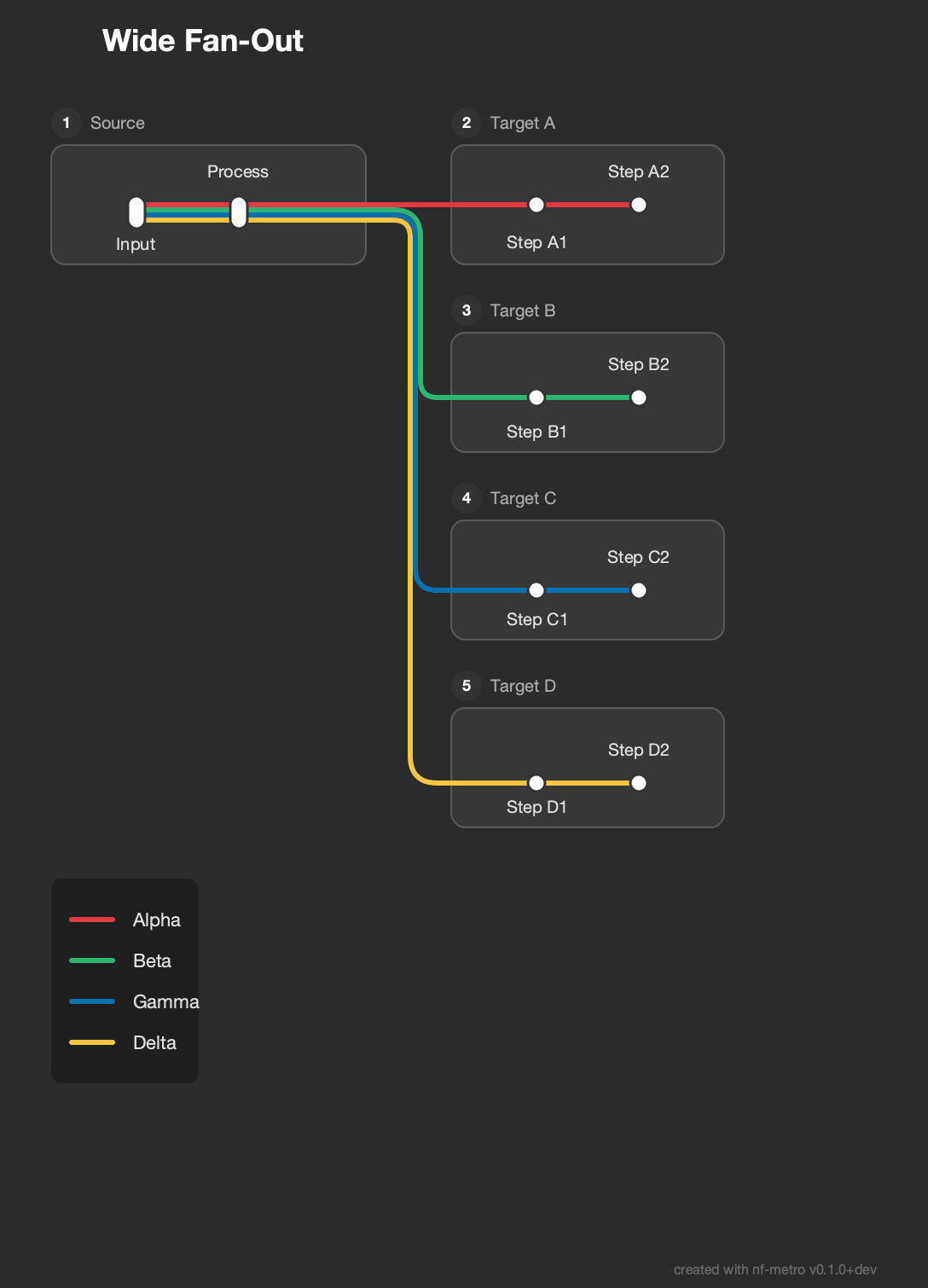 | 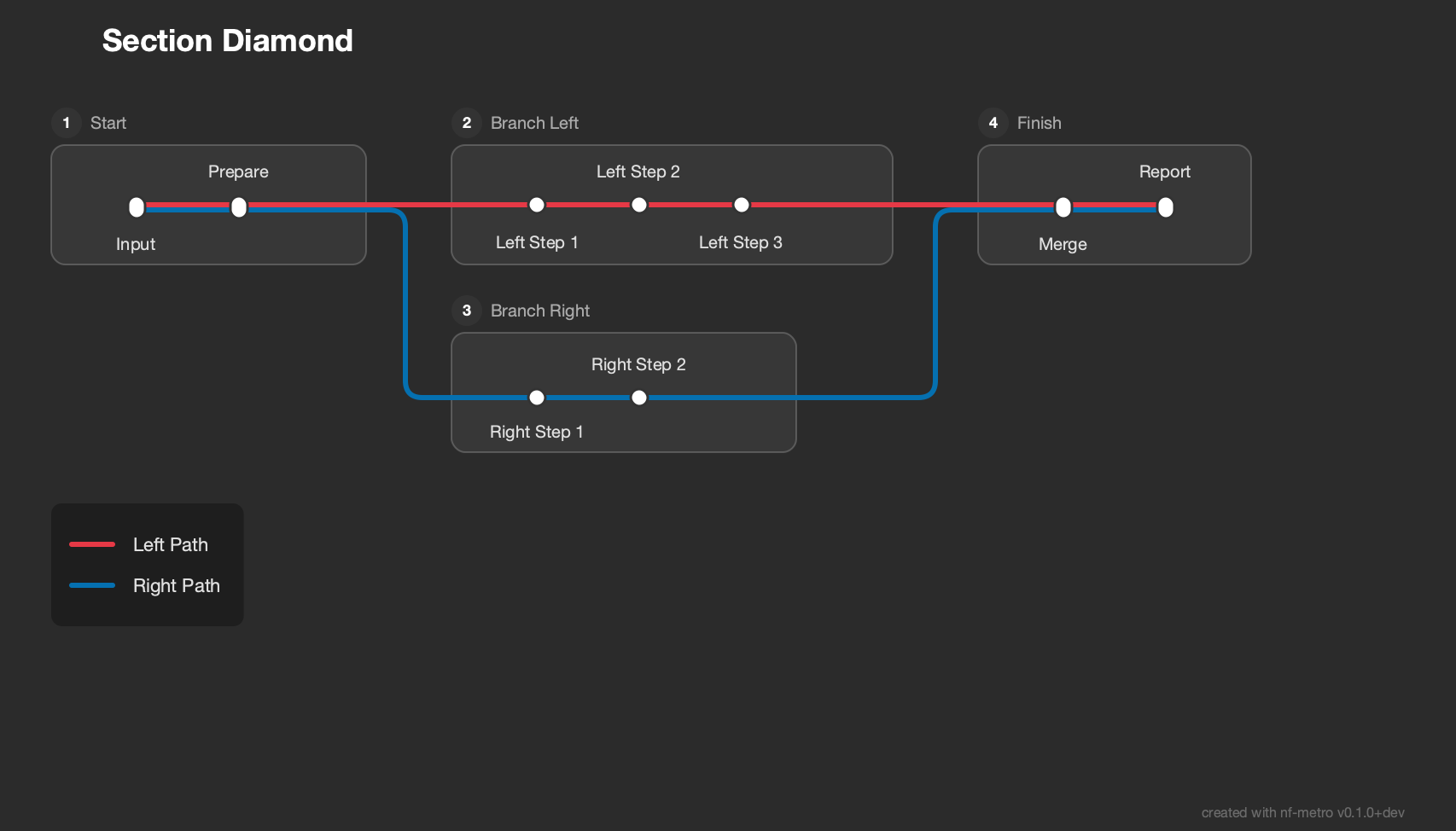 | 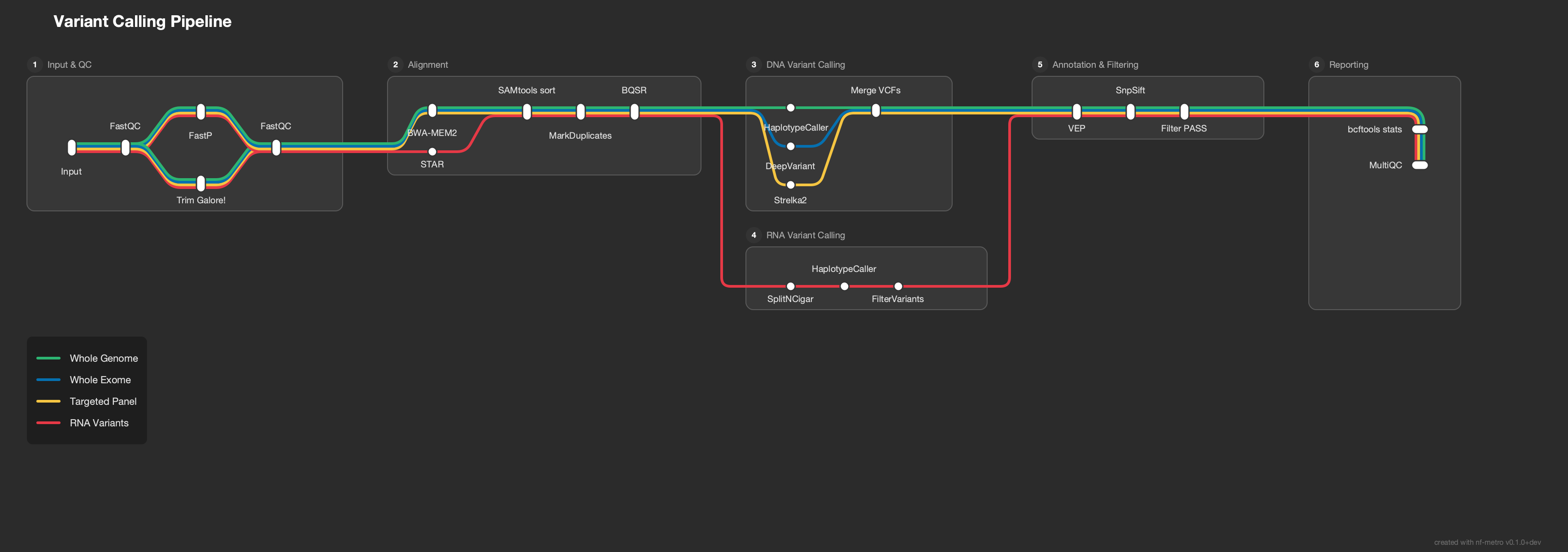 |
| Fold Serpentine | Multi-Line Bundle | RNA-seq Lite |
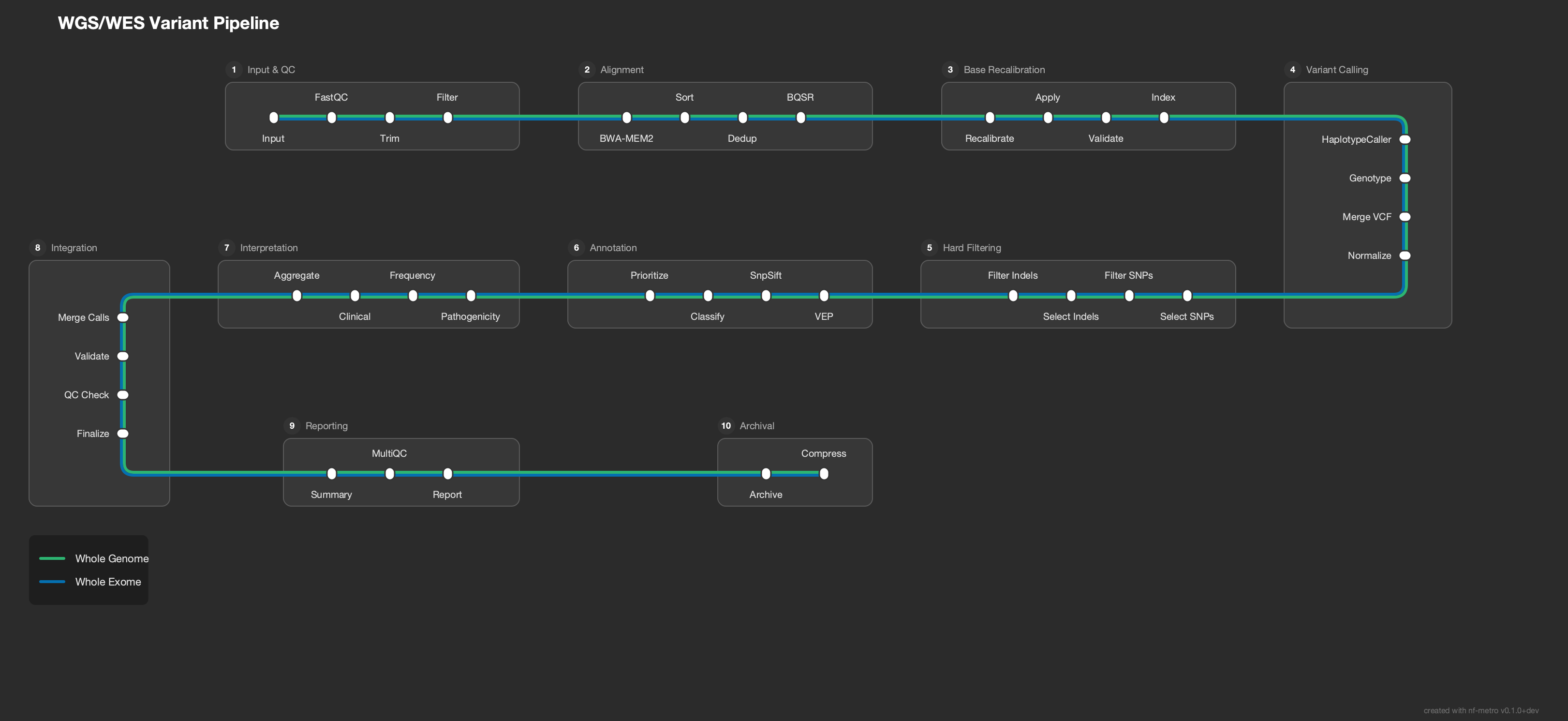 | 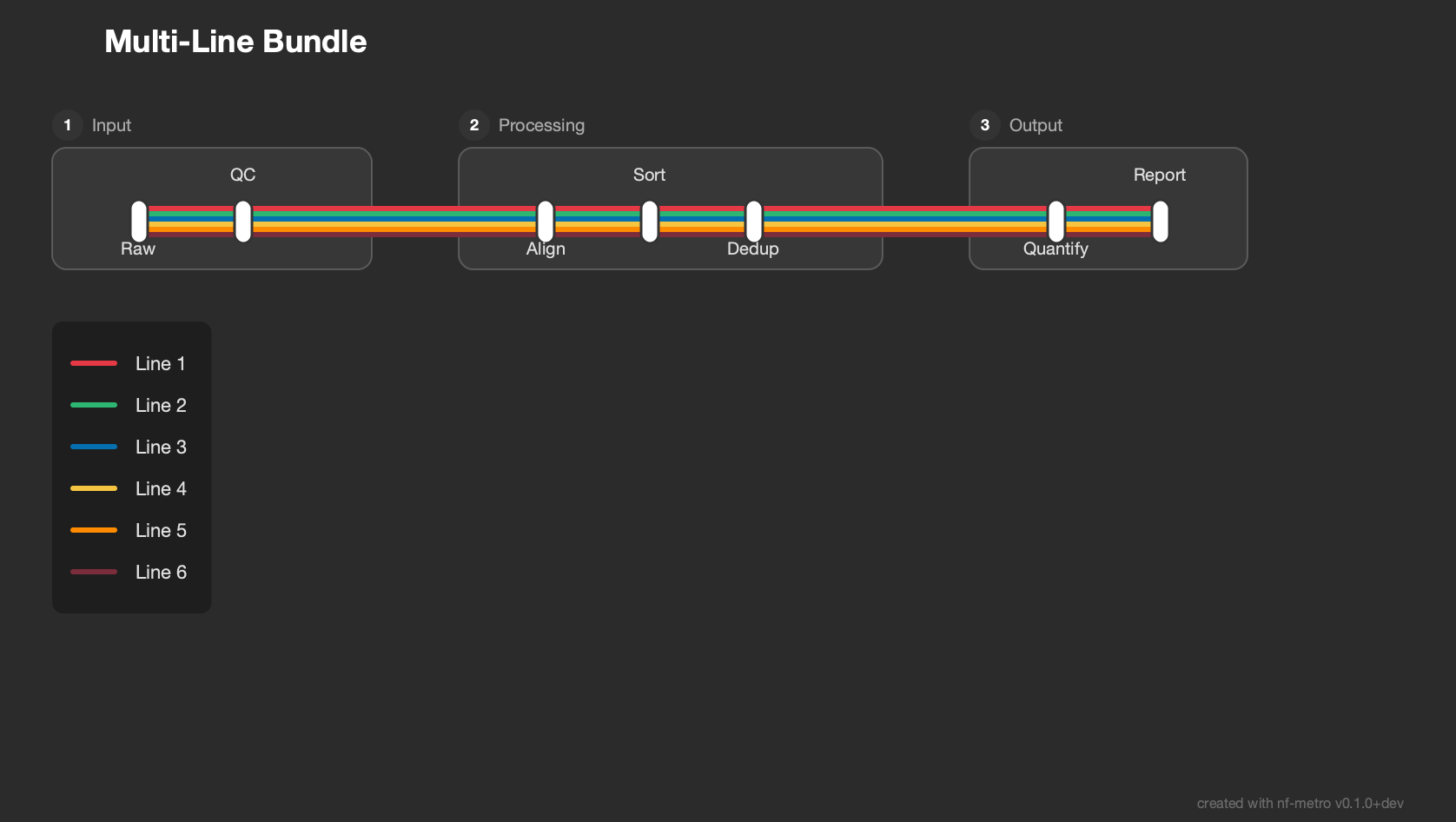 | 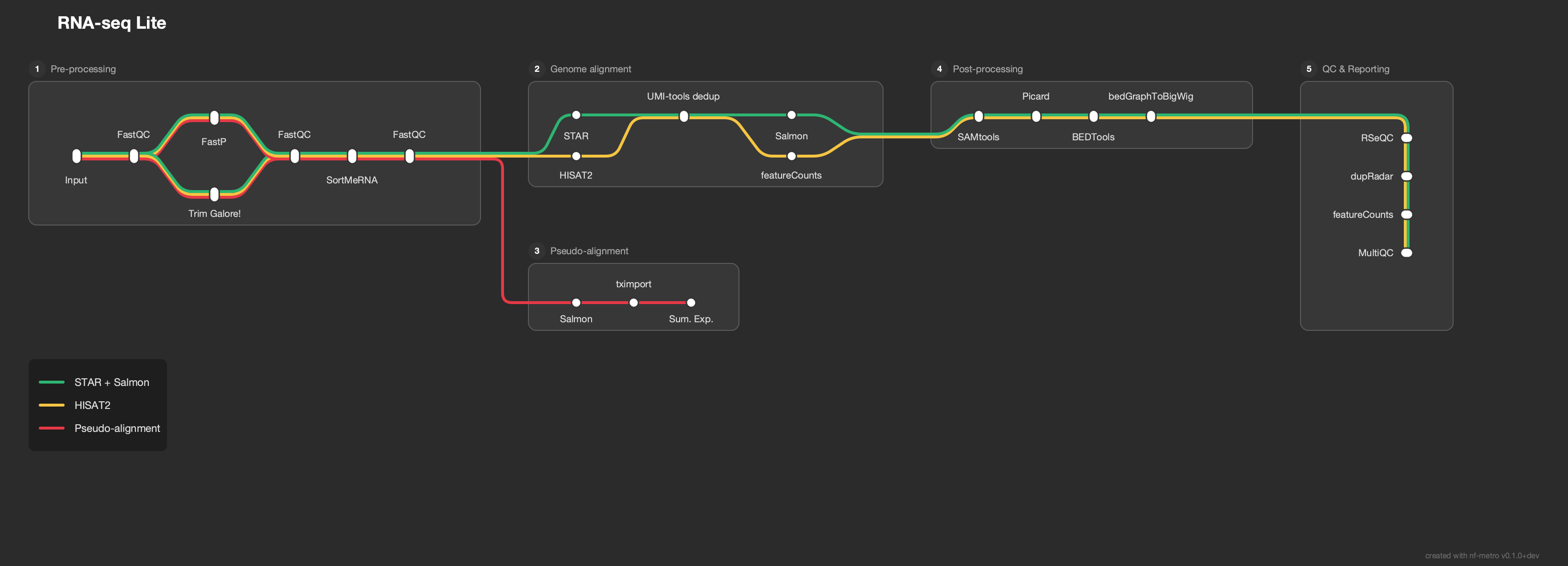 |
输入格式
输入文件使用 Mermaid graph LR 语法的一个子集,并扩展了 %%metro 指令。该格式包含三个层次:配置整体地图的全局指令、控制章节布局的 subgraph 块内的章节指令,以及定义站点之间连接的边。
指南 逐步介绍了该格式,从最小的扁平流水线到具有自定义网格布局的多章节地图。以下概述涵盖了关键概念。
示例:nf-core/rnaseq
完整示例位于 examples/rnaseq_sections.mmd。
全局指令
%%metro title: nf-core/rnaseq
%%metro logo: examples/nf-core-rnaseq_logo_dark.png
%%metro style: dark
title:设置地图标题(除非提供了 logo,否则显示在左上角)logo:嵌入 PNG 图像以替代文本标题style:选择主题(dark或light)
Lines (routes)
每条地铁线路代表管道中的一条独立路径:
%%metro line: star_rsem | Aligner: STAR, Quantification: RSEM | #0570b0
%%metro line: star_salmon | Aligner: STAR, Quantification: Salmon (default) | #2db572
%%metro line: hisat2 | Aligner: HISAT2, Quantification: None | #f5c542
%%metro line: pseudo_salmon | Pseudo-aligner: Salmon, Quantification: Salmon | #e63946
%%metro line: pseudo_kallisto | Pseudo-aligner: Kallisto, Quantification: Kallisto | #7b2d3b
可选的第四个字段用于设置描边样式:solid(默认)、dashed 或 dotted。
网格布局
各部分通过拓扑排序自动放置,但也可以设置明确的位置:
%%metro grid: postprocessing | 2,0,2
%%metro grid: qc_report | 1,2,1,2
格式为 section_id | col,row[,rowspan[,colspan]]。
章节
章节是 Mermaid subgraph 块。入口和出口提示控制端口出现在哪一侧:
graph LR
    subgraph preprocessing [Pre-processing]
        %%metro exit: right | star_salmon, star_rsem, hisat2
        %%metro exit: bottom | pseudo_salmon, pseudo_kallisto
        cat_fastq[cat fastq]
        fastqc_raw[FastQC]
        ...
    end
%%metro entry: <side> | <line_ids>- 哪些线条进入以及从哪一侧进入(left,right,top,bottom)%%metro exit: <side> | <line_ids>- 哪些线条退出以及向哪一侧退出%%metro direction: <dir>- 区块流向方向:LR(默认)、RL(从右到左)或TB(从上到下)%%metro number: <positive_integer>- 覆盖区块的编号徽章
站点与边
站点使用 Mermaid 节点语法。边携带以逗号分隔的线条 ID:
        cat_fastq -->|star_salmon,star_rsem,hisat2,pseudo_salmon,pseudo_kallisto| fastqc_raw
        star -->|star_rsem| rsem
        star -->|star_salmon| umi_tools_dedup
区段间边
不同区段中车站之间的边位于所有 subgraph/end 块之外。它们会被自动重写为在扇出点带有汇接车站的端口到端口连接:
    sortmerna -->|star_salmon,star_rsem| star
    sortmerna -->|hisat2| hisat2_align
    sortmerna -->|pseudo_salmon| salmon_pseudo
    sortmerna -->|pseudo_kallisto| kallisto
指令参考
| 指令 | 作用域 | 描述 |
|---|---|---|
%%metro title: <text> | 全局 | 地图标题 |
%%metro logo: <path> | 全局 | 标志图像(替换标题文本) |
%%metro logo_scale: <factor> | 全局 | 在图例块内缩放标志 |
%%metro style: <name> | Global | 主题:dark, light |
%%metro line: <id> | <name> | <color> [| <style>] | Global | 定义一条地铁线路。可选样式:solid(默认)、dashed、dotted |
%%metro grid: <section> | <col>,<row>[,<rowspan>[,<colspan>]] | Global | 将部分固定到网格位置 |
%%metro legend: <position> | Global | 图例位置:tl、tr、bl、br、bottom、right、none(追加 | canvas、| <dx>,<dy>,或使用 <x>,<y> - 参见 指南) |
%%metro line_order: <strategy> | Global | 线路排序:definition(默认)或 span |
%%metro file: <station> | <label> [| <name>] [| banner] | Global | 使用文档图标将站点标记为文件终点 |
%%metro files: <station> | <label> [| <name>] [| banner] | Global | 使用堆叠文档图标标记一个站点(例如,配对文件) |
%%metro dir: <station> | <label> [| <name>] | Global | 使用文件夹图标标记一个站点 |
%%metro off_track: <station>[, <station>...] | Global | 将列出的站点提升至主轨道上方,并锚定到其生产者/消费者 |
%%metro process: <station> | <regex> | Global | 将站点映射到 Nextflow 进程名称正则表达式以显示实时进度;可重复使用 |
%%metro compact_offsets: true | Global | 使用紧凑的每站点偏移量,而非全局行优先级槽位 |
%%metro center_ports: true | Global | 将跨区段端口居中于两个连接区段中较短的一个 |
%%metro line_spread: <mode>[ | <section>...] | Global / Section | 共享同一车站的行在垂直方向上的关系:bundle(默认)、centered、rails |
%%metro animate: true | Global | 添加沿线路移动的动画球体(与 --animate 相同) |
%%metro directional: true | Global | 绘制静态流向箭头(与 --directional 相同) |
%%metro manifest: false | Global | 从渲染的 SVG 中省略嵌入的数据清单 |
%%metro legend_min_height: <pixels> | Global | 图例内容的最小高度(像素) |
%%metro entry: <side> | <lines> | Section | 入口端口提示 |
%%metro exit: <side> | <lines> | Section | 出口端口提示 |
%%metro direction: <dir> | Section | 流方向: LR, RL, TB |
%%metro number: <positive_integer> | Section | 覆盖该部分的数字徽章 |
实时进度
nf-metro 可以在 Nextflow 流水线运行时实时点亮地铁地图。使用 %%metro process: 指令将地图站点映射到 Nextflow 进程,然后启动服务器:
nf-metro serve path/to/map.mmd
nextflow run my/pipeline -with-weblog http://localhost:8080/events
随着任务的提交和完成,站点会从 pending 过渡到 running,再到 done。布局仅计算一次;叠加层绘制在其上方,因此运行期间地图不会重新流动。
对于多流水线仪表板、持久化历史记录以及自动处理连接的可选 Nextflow 插件,请参阅 实时进度指南。
Python API
nf-metro 是一个命令行工具。其 Python 模块可以导入,但内部
API(解析器、布局引擎、渲染器)不属于公共的、语义化版本稳定的接口,
且可能在不另行通知的情况下在版本之间发生变化。请通过 nf-metro
CLI(或 python -m nf_metro)来驱动 nf-metro,以获得稳定的行为。
贡献
请参阅 贡献指南,了解设置、测试、如何添加拓扑测试夹具、处理布局不变量以及视觉审查流程。