
版本发布 8
# Readonly Architecture + Integrate with ALL StableDiffusion clients ## 1. Readonly Architecture Breadboard no longer writes parsed metadata back to the files. 1. **100% safe:** No longer worry about images getting corrupted because of the metadata 2. **Wider Integration:** Now breadboard can support all kinds of metadata formats with no restriction (For example, supporting much wider variety of Stable Diffusion clients--more on this in the next section), because it no longer needs to touch the source files. 3. **Sidecar v0.0.1 alpha:** - **What is it?:** Since no metadata is written back to the original image files, breadboard sometimes needs to store this information somewhere, in case the user needs some portable way to store them. - **When are they stored?:** There are two classes of metadata: **agent generated** and **user generated** 1. **agent generated:** The metadata automatically attached by stable diffusion clients (prompt, negative prompt, cfg scale, steps, seed, etc.) - **These are NOT stored as files by default** - Only exception is StableDiffusion clients that do not embed metadata in files (Currently Diffusionbee). For these cases, the users actually **want** the agent generated metadata stored in separate files for portability. So Breadboard stores the agent generated metadata as sidecar files in this case. 2. **user generated:** user generated metadata (tags, favorite, etc.) - These are ONLY stored when the user manually takes some action to tag files, etc. - **Where are they stored?:** Under `~/__breadboard__/gm` - **More to come:** This is just the most basic rollout. The next release will be entirely about sidecars, adding more flexibility and more utility. ## 2. Integrate with ALL StableDiffusion clients Now with the new metadata architecture, it's trivial to integrate with all kinds of SD clients. This release has added integrations with **all existing SD clients** that embed metadata into images: 1. **Drawthings:** https://drawthings.ai/ 2. **Easydiffusion:** https://github.com/cmdr2/stable-diffusion-ui 3. **Imaginairy:** https://github.com/brycedrennan/imaginAIry 5. **Mochidiffusion:** https://github.com/godly-devotion/MochiDiffusion 6. **NMKD:** https://nmkd.itch.io/t2i-gui 7. **NovelAI:** https://novelai.net/ 8. **Sygil:** https://github.com/Sygil-Dev/sygil-webui # Other feature updates 1. **Re-index selected items:** Now you can select items and press the "re-index" button inside the bottom bar to re-index just the selected items 2. **Zoom rage up to 600:** Previously 300 3. **Remember image viewer zoom ratio:** When flipping through images, if you zoom in or zoom out, the zoom ratio will be preserved throughout the rest of the session (until you refresh the page)
# Controlnet + Infinite Image Viewer + More metadata ## Controlnet 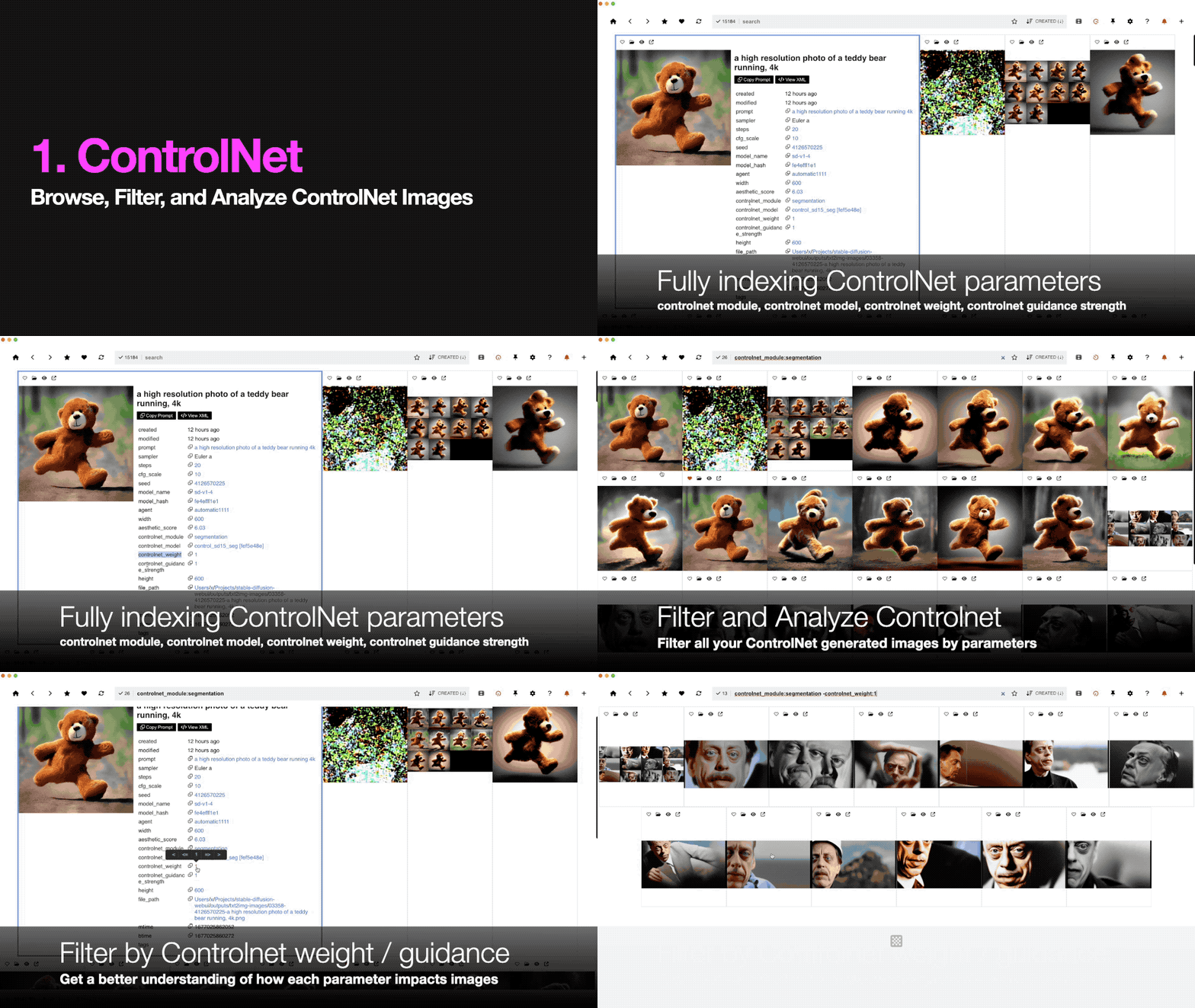 Now supporting Controlnet https://github.com/lllyasviel/ControlNet - Indexes the following attributes: - controlnet_module: string - controlnet_model: string - controlnet_weight: float - controlnet_guidance_strength: float ## Infinite Image Viewer 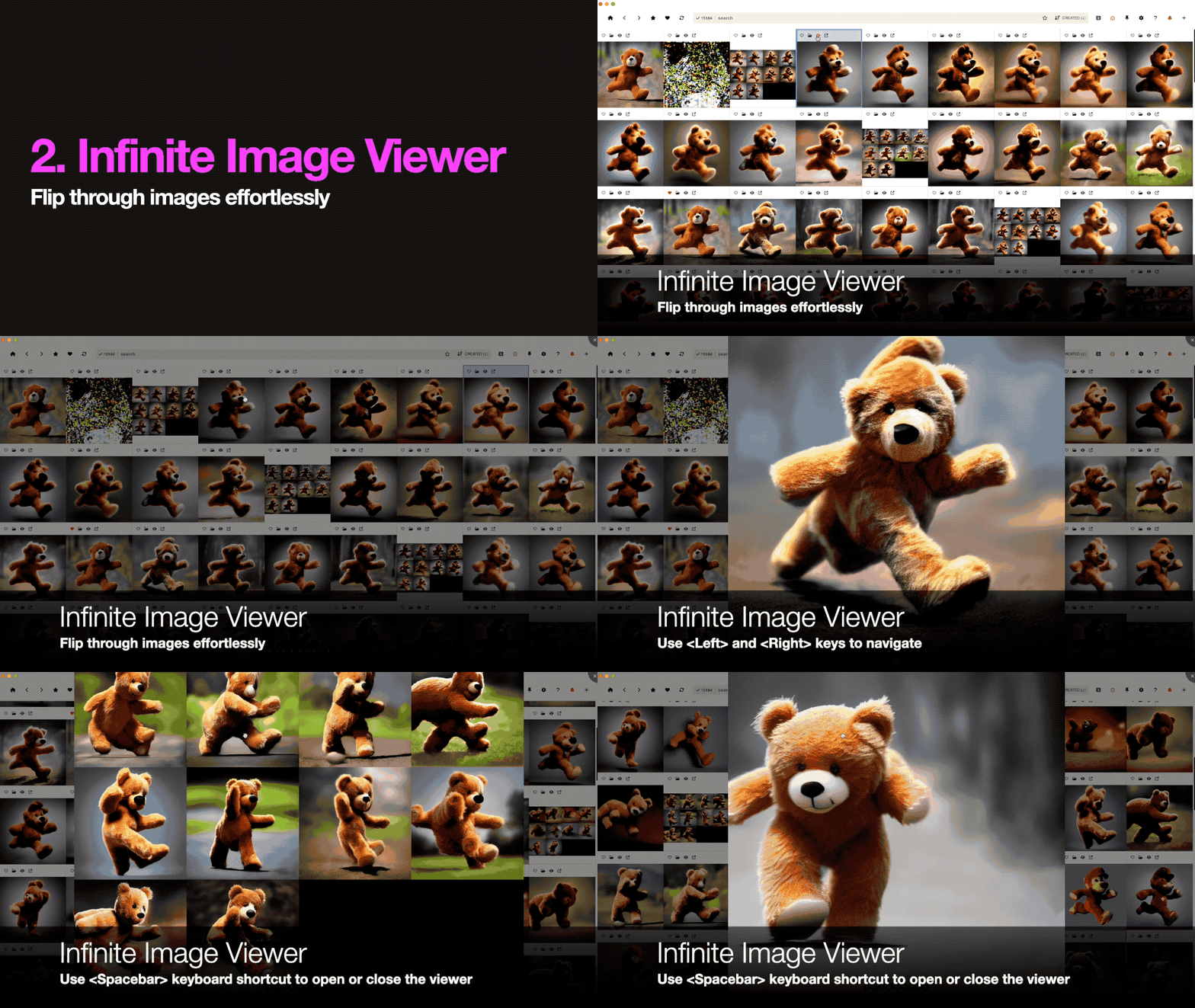 Now you can flip through images in the full screen image viewer with keyboard shortcuts: 1. `spacebar`: Open or close the currently selected item in the full screen image viewer 2. `left/up`: view the previous image on breadboard. The selection in the background ALSO changes 3. `right/down`: view the next image on breadboard. The selection in the background ALSO changes 4. `delete`: delete the currently selected image (Deletion always requires a confirmation dialog for now) ## Index more attributes This update is all about indexing more attributes. **Make sure to install and do a full re-index to get all the new attributes.** Other newly supported attributes: 1. **aesthetic score:** support all aesthetic score plugins: now supporting the "Score" attribute created by https://github.com/vladmandic/sd-extension-aesthetic-scorer 2. **img2img image strength:** index input strength for img2img: when running img2img, you can specify the input image strength. The higher the strength, the more the output sticks to the original input image. This is stored by multiple SD clients using the following attributes: - diffusionbee: `inp_img_strength` - auto1111: `Denoising strength` - invokeai: `strength` ## Misc bug fixes - The card configuration modal is now displayed correctly even in a smaller screen - Keyboard shortcut bug: If you are in the search bar and press "delete", "ctrl-A", "left", "right", etc., the expected behavior is the keyboard inputs will only manipulate the contents of the input field, for example deleting the input text, selecting the input text, or moving around inside the search input. However this was not how it worked previously. Previously the key inputs would apply globally, so for example if you had some items selected on breadboard, pressing "delete" inside the search input would delete the selected items instead of just deleting a character in the search input. Also pressing left and right would move the selected items instead of moving around the caret within the search input field, and so on. This has been fixed. - Realtime index bug: Sometimes the images are STILL broken when indexing realtime because breadboard indexes the files before they are fully stored. This bug will be FUNDAMENTALLY fixed soon, but until then, another attempt at dealing with this edge case. Added a slight more delay to the realtime indexing.
Unfortunately we've found some terrible bugs in the 0.3.0 release, so rolling back for now. 1. If you haven't downloaded 0.3.0, just keep using the current version for now. 2. If you've downloaded 0.3.0 and ran it once already, and experience issues, please update to this release (0.3.1). Sorry for the inconvenience. Will fix the bugs and make a new release soon (with all the features in 0.3.0)
# Messenger > Breadboard: Making Stable Diffusion Realtime. 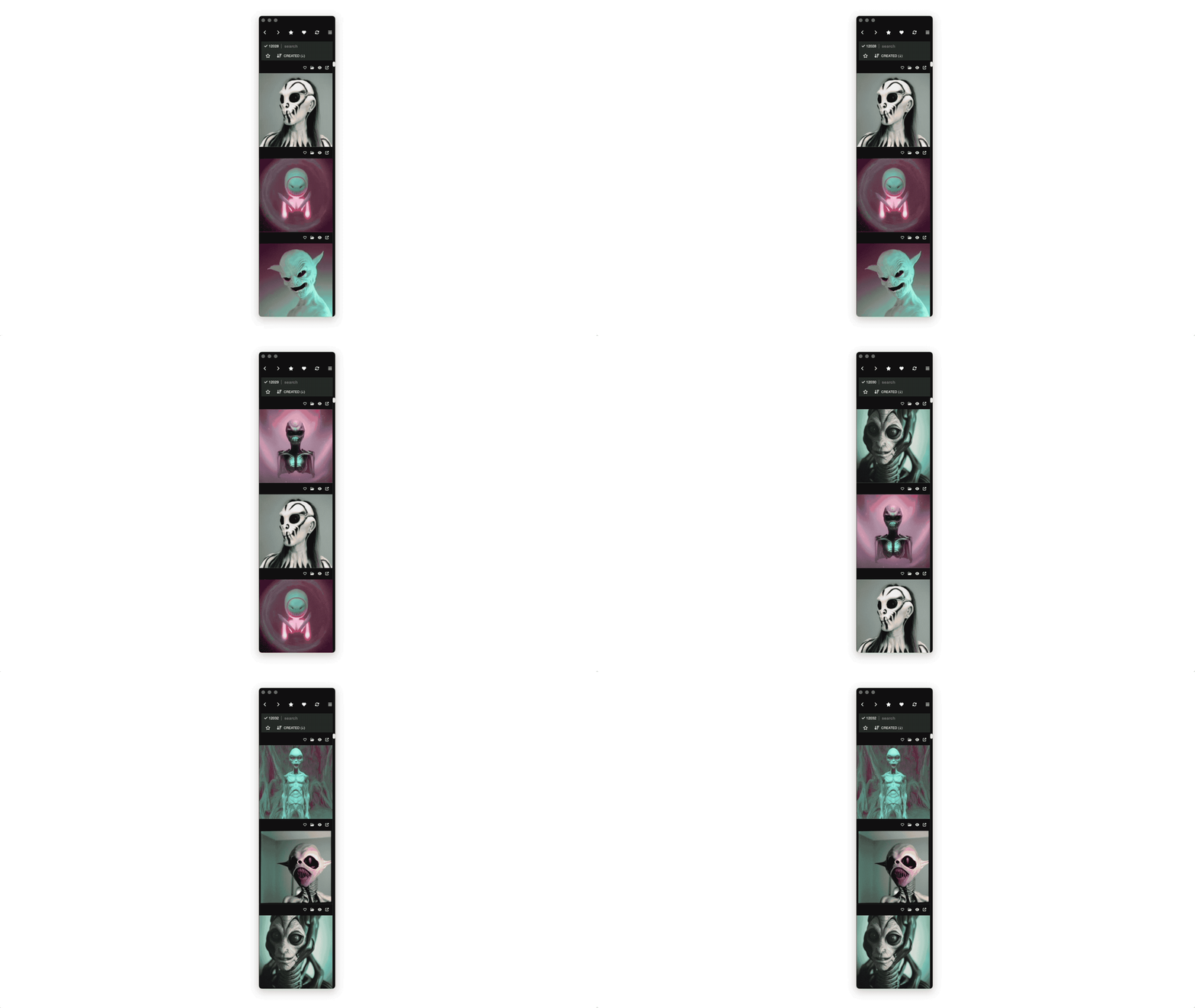 The core theme of this update is: 1. **Customizability:** customize the cards as much as you want 2. **Efficiency:** while making the rendering engine efficient 3. **Realtime:** make breadboard work in realtime There are other useful features added as well. # Main update ## 1. Customizability You can now customize the card size (previously it was just an "anything goes" approach). 1. **Aspect ratio:** You can customize the aspect ratio for the cards. The card can be square or rectangle, with your own custom aspect ratio 2. **Image display mode:** You can set the image display mode within the cards. contain (letterbox), cover (expand as much as possible and some cases may expand out of the frame), stretch (expand both width and height to fit the parent frame, may distort the image dimension) 3. **Expanded mode:** You can set the width ratio when expanded 4. **Image width in expanded mode:** You can set the image width (in proportion to the card width) when expanded 5. **LIVE Customization:** You can make all these customizations in realtime. as you tweak the configs, you'll see the card sizes change in realtime, and therefore be able to customize them exactly as you please (without having to jump back and forth between the settings page and the home page) ## 2. Efficiency Overhauled the rendering engine to: 1. Make the image load faster and efficiently 2. Save memory usage If you use the recycled view (default), no matter how many images you have, the memory usage will not increase after certain point because the card elements get recycled instead of getting added In some situations, recycled views may not be what you want. For example when you're trying to select multiple cards across multiple pages, recycled views won't let you do that because you can't select multiple cards across many pages without them getting recycled. (only a couple of pages around your viewport are active, and the rest of the cards that move out of this zone will keep getting recycled). In this case you can use non-recycled view. May be useful for loading hundreds of items and selecting them to bulk tag or delete them. You can turn the "recycled view" option on and off in the "card customization" menu on the top navbar. ## 3. Messenger Mode 1. **Realtime update:** Now breadboard works in realtime. Monitoring all your connected folders and sending them to you as notifications when there are new images - Can toggle live update vs. manual update (via sync): Sync still works for both modes, and if something goes wrong with the realtime mode you can still click the sync button to synchronize to get them indexed - Turn sound on/off: By default the notification sound is on, but you can turn it off 7. **Multiple windows:** Now you can open multiple breadboard windows, just like any web browser. - `ctrl-n` or `cmd-n` to open a new window - or press the `+` button on the top navbar to open a new window - you can also `cmd+click` or `ctrl+click` on links to open them in new windows (for example when you're trying to open a new filter page, by default it will open the page in the same window, but when you `cmd-click` or `ctrl-click`, they will open up in a new window. - **popup cards:** now you can open every card in a new window. Click the top right button in each card, and they will open up in a new window. Clicking on the image in a popup will close them. This will let you keep multiple cards open and even compare them side by side 8. **Messenger mode view:** Now breadboard has a fully responsive design that automatically adapts when you make the window narrower. This means you can use breadboard as you used to (grid mode) but also can use it as narrow column mode (one or two columns) 9. **Pin to top:** Sometimes you may want to pin breadboard to the top level of your entire screen, so it's visible regardless of where you are. Click the "pin" button to achieve this 10. **Empty filters:** Even if a query has no results, you can keep the window open, and it will fill itself and notify you when relevant images are generated. just open a window and start listening even if there are no results. they will stream in. ## 4. More features 1. **More metadata attributes:** Now indexing more metadata attributes: - **cfg_scale** (float) - **seed** (integer) - **aesthetic_score** (float) - **steps** (integer) 2. **Truncate long prompts:** often the prompt is too long, in these cases they are truncated, and you can show or hide them 3. **Horizontal card view:** now the card displays in horizontal mode, in order to display as much information as possible when expanded ## 5. Bug fixes 1. **Prompt parser fix:** There were some issues when prompts had some XML-like syntax in them (such as Lora, textual inversion, etc.) Now they are parsed correctly. To fix this, **re-index from scratch**, and they will all show up correctly. 2. **Image viewer fix:** The top of the image viewer used to be hidden behind the nav bar, and this was fixed.
# 0.2.0 - "Filterverse" The theme for this release is "Filters", providing all kinds of new ways to filter, browse, and manage your Stablediffusion files. # Main features - **Dimension filter:** New index attributes introduced - width and height - Width and height can be used to filter files in detail - Width and height can be used to sort files - Can filter the width and height in conjunction. For example `-width:512 +height:512` - Also can be combined with other queries. For exmaple `analog diffusion -width:512 +height:512` - Also, every card includes hyperfilters that let you easily surf all these attributes WITHOUT having to type them into the search bar manually - **Hyperfilter:** Previously the filters were one dimensional, now they are multi-dimensional. Every filter can be used in multiple ways - width/height: can be used to filter in the following ways: - exact match: `width:512` - less than: `-width:512` - less than or equal to: `-=width:512` - greater than: `+width:512` - greater than or equal to: `+=width:512` - tag, prompt keyword, file_path: these attributes can now be filtered in two ways: - Positive: only filter the items that include the attribute - prompt examples - `analog style`: all items that include `analog style` in the prompt - tag examples - `tag:nsfw`: all items that are tagged as `tag:nsfw` - file_path examples - `file_path:temp_images`: all items with a folder path that includes `temp_images` - `file_path:txt2img-grids`: all items with a folder path that includes `txt2img-grids` - Negative: only filter the items that do NOT include the attribute. You can use negative filters simply by prepending the filter with `-` - prompt examples - `-:cat`: all items that DO NOT include the term `cat` in the prompt - `-:"analog style"` all items that DO NOT include the term `analog diffusion` in the prompt - tags - `-tag:nsfw`: Exclude all items tagged as `tag:nsfw` - file_path - `-file_path:temp_images`: Exclude all files under the `temp_images` directory (technically it's "exclude all files with a file path that includes `temp_images`) - `file_path:txt2img-grids`: Exclude all files under the `txt2img-grids` directory - Composable: You can compose the filters as much as you want - `analog style -file_path:txt2img-grids`: Get all files with "analog style" prompt, but exclude the files under the `stable-diffusion-ui` folder - `anime -tag:nsfw -tag:personal`: Get all results for "anime", but exclude items tagged as `tag:nsfw` and `tag:personal`. - Hyperfilter: Every filter is surfable. You can either directly enter the filter in the search bar, or click inside the card to get the multiple options. - **God filter:** You can now promote bookmarked filters to "god mode". - A "God filter" is applied to all your queries (including the home page) in the background. - You can apply as many God filters as you want, and they will all be applied to every query. For example, if you add `-tag:nsfw` and `-tag:private`, every search or query you make will automatically have those conditions applied. - God filters work in the background. They are not displayed inside the search bar. If you have `-tag:nsfw` and `-tag:private` added to God filters and type "cat" on the search bar, the search bar will just display "cat", but the displayed page will be a query result for `cat -tag:nsfw -tag:private` # Other features - Minimal UI: Super minimal UI. Just images. When clicked they expand. Also, all cards are automatically expanded to fit the full width of the viewport. - Display item count for every page at the top bar - Allow tags with spaces - Save time: Make the workflow much more efficient and don't waste time - Super efficient add/remove folders - removing a folder does not need re-sync, simply the folder items are deleted in place - adding a folder does not send users to the home page and automatically re-synchronize (This is annoying when you want to add multiple folders and synchronize once in the end). Instead it displays a "Synchronize" button - Also, adding folders doesn't re-index the entire thing from scratch. it only synchronizes the newly added folders - Now you can re-index PER folder. Previously if there was some issue with a folder and want to re-index, you had no choice but to re-index every single folder added. - Favoriting an item does not refresh the page - Import txt files: Some apps like Automatic1111 provides an option to store metadata in the txt file. Breadboard can now import these and properly parse the metadata. Note that breadboard will attach a standardized metadata back to the image file after indexing. - Can drag anywhere to select: Previously you had to drag from outside of each card to select them. Now you can drag anywhere to select - Keyboard shortcut - cmd-a to select all - Added a dedicated "favorites" tab - model_hash filter # Bug fixes - Don't display "undefined" for files that don't have prompts - Fix alphabetical sort for edge cases - There is no flicker whenever a page changes or when a page loads - The search bar works on the settings and the favorites pages - Correctly filter by agent names even when the agent name has spaces - When trying to drag an unselected image, it used to crash. This has been fixed. - Correctly parse prompts - Advanced prompts from Auto1111 and InvokeAI are all handled properly now. Including embeddings, etc. - Newline characters: Even if there's a newline character in the prompt it's properly parsed - Correctly parses punctuations - In some Linux systems the "create time" (birthtime) of files are always 0. This is problematic because the indexer uses the create time as a checkpoint to determine how much it's synchronized (so it doesn't synchronize from scratch every time). To mitigate this issue, in these systems Breadboard uses modify time instead of create time for checkpointing files. - Exclude "prev next" buttons from the fullscrreen viewer since they are not used - Fix dragging bug: Previously when you drag items to outside and come back, it would mess up the whole dragging engine and the app became unusable. This has been fixed. Now you can feel free to drag files outside
# Big New Features 1. **Native UI for Windows:** close, minimize, maximize button 2. **Dark mode** 3. **Browser:** Breadboard is now a full fledged browser for AI generated images. search bar, home, back, forward, bookmark buttons, etc. 4. **Hyperlink Everywhere!:** everything is surf-able - prompts, tags, favorites, filters, etc. - Filter by model name - Filter by filename 5. **Tagging:** You can now use Breadboard to organize your files in a super flexible manner. - Categorize items by tagging them, and filter them as much as you want. - Can even filter based on multiple tags simultaneously. 6. **Bookmark files:** Favorite files. Once you favorite, you can filter by search and tags among ONLY the favorited items 7. **Bookmarking search and filters:** It's not just the files you can bookmark. You can bookmark EVERY SINGLE page, for example bookmarking search queries, filters, etc. # Other New Features 1. **Powerful sort:** Sort by create time modify time, alphabetical order 2. **Recursive folder connect:** Just add a folder, and all its child folders are added automatically! 3. **Instant Copy button:** copy prompts, tags, model names, etc with one click 4. **Automatic metadata unification:** When Breadboard indexes files, it automatically re-writes a standardized version of the parsed metadata back to each file. - This means, regardless of which app you got the image from, you will always have the same metadata format stored (in addition to the original metadata) - This ALSO means, breadboard will attach the standardized metadata to the files even for the apps that don't store metadata on each file, making all your files 100% portable across multiple SD apps. - Saving the standardized metadata back to the files means, even when the breadboard gets corrupted or crashes, you can simply "re-index" from the files, because each file is a self-contained archive of the metadata. 5. **Keyboard shortcuts** - arrow keys to select - shift-arrow keys to bulk select - delete key to delete 6. **Re-index:** - You can now re-index Breadboard whenever you want. Whenever you feel like the database has become corrupted, you can simply re-index everything without losing any data. - Also, whenever you disconnect a folder, it automatically re-indexes your connected folders in order to remove all the files previously indexed from the now-deleted folders. 7. **Super optimized Memory usage:** - Breadboard was re-architected to minimize memory usage - Now Breadboard literally functions like a web browser, meaning whenever every page is loaded it loads them up from scratch, meaning every page load garbage collects the memory automatically so there is no memory leak. 8. **Industry standard metadata storage (XMP)** - Breadboard automatically converts the existing metadata to an industry standard metadata format called [XMP](https://en.wikipedia.org/wiki/Extensible_Metadata_Platform) (XML based media metadata storage standard) - This means all your metadata can be directly viewed on most image viewer apps (Adobe apps, Gimp, etc.) - This also means now your image metadata are machine processable. 9. **Font size configuration:** You can enlarge or shrink the default font size 10. **Auto update check:** Breadboard now automatically checks the [Github releases](https://github.com/cocktailpeanut/breadboard/releases) RSS feed to notify you whenever there's a new release. 11. **Full screen image view:** In addition to the default "expand and collapsed" UX, now there's a "full screen viewer" button for each card that lets you view the images in a full screen viewer (which lets you easily zoom in and out, and even rotate images inline) 12. **Open the file in file explorer:** With one click, you can now open each file in its original folder location using your default file explorer (Finder on Mac, Explorer on Windows) # Bug Fixes - some image loading issues due to a file name encoding bug => Fixed - remove added folders => remove folders and re-synchronize - Fix some metadata parsing error for automatic1111 (steps, model)
0.0.9 more here: https://breadboard.me 
0.0.8