
just





just 是一种保存和运行特定项目命令的便捷方式。
本 readme 也可作为 book 获取。 该书籍反映的是最新发行版,而 readme on GitHub 反映的是最新的 master。
(中文文档在 这里, 快看过来!)
命令,称为配方,存储在一个名为 justfile 的文件中,其语法
受 make 启发:
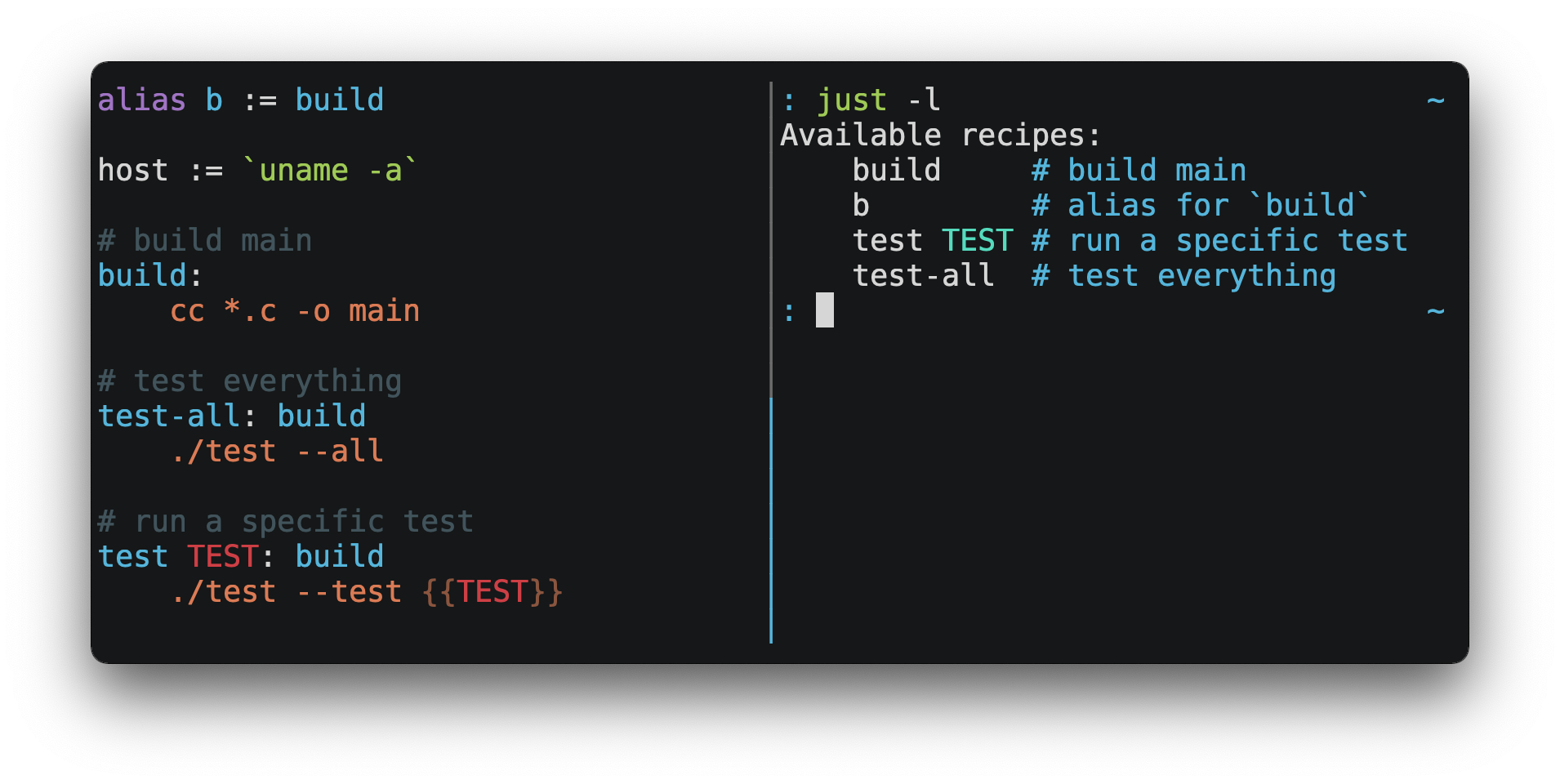
然后你可以使用 just RECIPE 运行它们:
$ just test-all
cc *.c -o main
./test --all
Yay, all your tests passed!
just 拥有大量实用功能,并且相比 make 有许多改进:
-
just是一个命令运行器,而非构建系统,因此避免了大量make's complexity and idiosyncrasies。 无需.PHONY配方! -
支持 Linux、macOS、Windows 以及其他合理的类 Unix 系统,且无需 额外依赖。(但如果你的系统没有
sh, 你需要 choose a different shell。) -
错误信息具体且信息丰富,语法错误会连同其源代码上下文一起报告。
-
配方可以接受 command line arguments,包括 flags and options。
-
just拥有丰富的 expression language 以及许多 内置函数。 -
在可能的情况下,错误会在静态阶段解决。未知的配方和 循环依赖会在任何操作运行之前被报告。
-
justloads.envfiles,使得填充 环境变量变得容易。 -
命令行补全脚本是 available for most popular shells。
-
配方可以用 arbitrary languages 编写,例如 Python 或 Node.js。
-
just可以从任何子目录调用,而不仅仅是包含justfile的目录。 -
还有 much more!
如果你在使用 just 时需要帮助,请随时提交 issue 或在
Discord 上联系我。功能请求和 bug 报告
始终欢迎!
安装
可以直接使用你喜欢的 package manager 安装,通过
下载 pre-built binaries,或者使用
cargo install just 从源码构建。
先决条件
just 应该可以在任何具有合理 sh 的系统上运行,包括 Linux、macOS
和 BSD 系列。
Windows
在 Windows 上,just 可与 Git for Windows、
GitHub Desktop 或
Cygwin 提供的 sh 配合使用。安装后,sh 必须位于
你希望从中调用 just 的 shell 的 PATH 中。
如果你不想安装 sh,可以使用 shell 设置来使用
你选择的 shell。
类似于 PowerShell:
# use PowerShell instead of sh:
set shell := ["powershell.exe", "-c"]

hello:
  Write-Host "Hello, world!"
……或 cmd.exe:
# use cmd.exe instead of sh:
set shell := ["cmd.exe", "/c"]

list:
  dir
你也可以使用命令行参数来设置 shell。例如,要使用
PowerShell,请使用 --shell powershell.exe --shell-arg -c 启动 just。
(PowerShell 在 Windows 7 SP1 和 Windows Server 2008 R2
SP1 及更高版本中默认安装,且 cmd.exe 相当繁琐,因此建议大多数
Windows 用户使用 PowerShell。)
软件包
跨平台
| 包管理器 | 包 | 命令 |
|---|---|---|
| arkade | just | arkade get just |
| asdf | just |
asdf plugin add justasdf install just <version>
|
| Cargo | just | cargo install just |
| Cargo Binstall | just | cargo binstall just |
| Conda | just | conda install -c conda-forge just |
| Homebrew | just | brew install just |
| Nix | just | nix-env -iA nixpkgs.just |
| npm | rust-just | npm install -g rust-just |
| pipx | rust-just | pipx install rust-just |
| Snap | just | snap install --edge --classic just |
| Spack | just | spack install just |
| uv | rust-just | uv tool install rust-just |
BSD
| 操作系统 | 包管理器 | 软件包 | 命令 |
|---|---|---|---|
| FreeBSD | pkg | just | pkg install just |
| OpenBSD | pkg_* | just | pkg_add just |
Linux
| 操作系统 | 包管理器 | 软件包 | 命令 |
|---|---|---|---|
| Alpine | apk-tools | just | apk add just |
| Arch | pacman | just | pacman -S just |
| Debian 13 和 Ubuntu 24.04 衍生版 | apt | just | apt install just |
| Fedora | DNF | just | dnf install just |
| Gentoo | Portage | dev-build/just |
emerge -av dev-build/just
|
| NixOS | Nix | just | nix-env -iA nixos.just |
| openSUSE | Zypper | just | zypper in just |
| Solus | eopkg | just | eopkg install just |
| Void | XBPS | just | xbps-install -S just |
Windows
| 包管理器 | 软件包 | 命令 |
|---|---|---|
| Chocolatey | just | choco install just |
| Scoop | just | scoop install just |
| Windows Package Manager | Casey/Just | winget install --id Casey.Just --exact |
macOS
| 包管理器 | 软件包 | 命令 |
|---|---|---|
| MacPorts | just | port install just |

预构建二进制文件
Linux、macOS 和 Windows 的预构建二进制文件可在 the releases page 上找到。
您可以在 Linux、macOS 或 Windows 上使用以下命令下载
最新版本,只需将 DEST 替换为您希望放置
just 的目录即可:
curl --proto '=https' --tlsv1.2 -sSf https://just.systems/install.sh | bash -s -- --to DEST例如,要将 just 安装到 ~/bin:
# create ~/bin
mkdir -p ~/bin

# download and extract just to ~/bin/just
curl --proto '=https' --tlsv1.2 -sSf https://just.systems/install.sh | bash -s -- --to ~/bin

# add `~/bin` to the paths that your shell searches for executables
# this line should be added to your shell's initialization file,
# e.g. `~/.bashrc` or `~/.zshrc`
export PATH="$PATH:$HOME/bin"

# just should now be executable
just --help请注意,install.sh 在 GitHub Actions 或许多机器共享 IP 地址的其他环境中可能会失败。install.sh 会调用 GitHub API 以确定要安装的 just 的最新版本,而这些 API 调用是按 IP 地址进行速率限制的。为了使 install.sh 在此类情况下更加可靠,请使用 --tag 传递一个特定的标签进行安装。
避免速率限制的另一种方法是向 install.sh 传递一个名为 GITHUB_TOKEN 的环境变量形式的 GitHub 身份验证令牌,使其能够对其请求进行身份验证。
Releases 包含一个 SHA256SUM 文件,可用于验证预构建二进制归档的完整性。
要验证发布版本,请下载预构建的二进制归档以及 SHA256SUM 文件,并运行:
shasum --algorithm 256 --ignore-missing --check SHA256SUMSGitHub Actions
just 可以通过几种方式安装在 GitHub Actions 上。
使用 GitHub Actions 运行器上 macOS 预装的包管理器 brew install just,以及 Windows 上的 choco install just。
- uses: extractions/setup-just@v3
  with:
    just-version: 1.5.0  # optional semver specification, otherwise latest
或者使用 taiki-e/install-action:
- uses: taiki-e/install-action@justDocker
just 以 Docker 镜像的形式提供,可从
the GitHub Container Registry 获取。
要将 just 复制到 Docker 镜像中,请在您的
Dockerfile 中添加以下行:
COPY --from=ghcr.io/casey/just:latest /just /usr/local/bin/复制完成后,just 也可用作 docker build 的一部分:
RUN just发布 RSS 源
RSS feed 的 just 个发布版本
可供使用 here。
Node.js 安装
just-install 可用于自动化
在 Node.js 应用中安装 just。
just 是 npm 脚本的一个更强大、更健壮的替代方案。如果你希望
在 Node.js 应用的依赖项中包含 just,just-install
将作为 npm install
命令的一部分安装一个本地的、特定平台的二进制文件。这消除了每位开发者
使用上述任一流程独立安装 just
的需要。安装后,
just 命令可在 npm 脚本或 npx 中正常工作。这对于希望
尽可能简化项目设置流程的团队来说非常有用。
有关更多信息,请参阅 just-install README file。
Nix Flake
just 仓库包含一个
[flake.nix,它定义了
一个 nix flake,允许你将 just
作为另一个 flake 的输入:
{
  inputs = {
    just.url = "github:casey/just";
  }

  outputs = {self, nixpkgs, just}: {
  }
}
Backwards Compatibility
With the release of version 1.0, just features a strong commitment to
backwards compatibility and stability.
Future releases will not introduce backwards incompatible changes that make
existing justfiles stop working, or break working invocations of the
command-line interface.
This does not, however, preclude fixing outright bugs, even if doing so might
break justfiles that rely on their behavior.
There will never be a just 2.0. Any desirable backwards-incompatible changes
will be opt-in on a per-justfile basis, so users may migrate at their
leisure.
Features that aren't yet ready for stabilization are marked as unstable and may
be changed or removed at any time. Using unstable features produces an error by
default, which can be suppressed by passing the --unstable flag,
set unstable, or setting the environment variable JUST_UNSTABLE to any
value other than false, 0, or the empty string.
Requiring a Minimum Just Version
If you use features of just which require a particular version, you may use
the minimum-version1.55.0 setting to make it an error to use older
versions of just:
set minimum-version := '1.55.0'
如果 just 遇到一个大于其自身版本的最小版本,它将
打印一条包含所需版本的错误消息,这比它原本可能产生的
令人困惑的错误消息要好得多。
minimum-version 设置应放置在 justfile 的顶部,
在任何使用该设置所保护的新功能之前。
任何以向前不兼容的方式更改词法分析器的功能,仍然 会产生无用的错误消息,因为最小版本检查是在解析器中实现的, 而解析器在词法分析器之后运行。
编辑器支持
justfile 语法与 make 足够接近,您可能希望告诉您的
编辑器对 just 使用 make 语法高亮。
Vim 和 Neovim
Vim 版本 9.1.1042 或更高版本以及 Neovim 版本 0.11 或更高版本 开箱即支持 Justfile 语法高亮,这要归功于 pbnj。
vim-just
vim-just 插件为 justfile 提供语法
高亮。
使用您喜欢的包管理器进行安装,例如 Plug:
call plug#begin()

Plug 'NoahTheDuke/vim-just'

call plug#end()
或者使用 Vim 内置的包支持:
mkdir -p ~/.vim/pack/vendor/start
cd ~/.vim/pack/vendor/start
git clone https://github.com/NoahTheDuke/vim-just.git
tree-sitter-just
tree-sitter-just 是 Nvim Treesitter 插件 用于 Neovim。
Emacs
just-mode 提供 justfile 的语法
高亮和自动缩进。它可在
MELPA 上以 just-mode 的形式获取。
justl 提供用于执行和 列出配方的命令。
您可以在单个 justfile 中添加以下内容,以按文件
启用 make 模式:
# Local Variables:
# mode: makefile
# End:
Visual Studio Code
VS Code 的扩展是 available here。
不再维护的 VS Code 扩展包括 skellock/vscode-just 和 sclu1034/vscode-just。
JetBrains IDEs
由 linux_china 提供的 JetBrains IDEs 插件是 available here。
Kakoune
Kakoune 开箱即支持 justfile 语法高亮,感谢
TeddyDD。
Helix
Helix 自 23.05 版本起
开箱即支持 justfile 语法高亮。
Sublime Text
由
nk9 提供的 Just package,包含 just 语法及其他一些工具,
可在 PackageControl 上获取。
Micro
Micro 开箱即支持 Justfile 语法高亮, 感谢 tomodachi94。
Zed
由 jackTabsCode 提供的 zed-just 扩展可在 Zed extensions page 上获取。
Other Editors
欢迎向我发送在您的首选编辑器中启用语法高亮所需的命令,以便我将其收录于此。
Language Server Protocol
just-lsp 提供了一个 language server protocol 实现,支持诸如跳转定义、内联诊断 和代码补全等功能。
Model Context Protocol
just-mcp 提供了一个
model context protocol
适配器,允许 LLMs 查询 justfiles 的内容并运行配方。
Quick Start
请参阅安装部分了解如何在您的计算机上安装 just。尝试
运行 just --version 以确保其已正确安装。
如需了解语法概览,请查看 this cheatsheet。
一旦 just 安装并正常工作,请在
项目根目录创建一个名为 justfile 的文件,内容如下:
recipe-name:
  echo 'This is a recipe!'

# this is a comment
another-recipe:
  @echo 'This is another recipe.'
当你调用 just 时,它会在当前目录及上级目录中查找名为 justfile 的文件,因此你可以从项目的任何子目录中调用它。
对 justfile 的搜索不区分大小写,因此任何大小写形式,如 Justfile、
JUSTFILE 或 JuStFiLe,都可以正常工作。just 还会查找名为
.justfile 的文件,以防你希望隐藏一个 justfile。
默认情况下,不带参数运行 just 会执行
justfile 中的第一个配方:
$ just
echo 'This is a recipe!'
This is a recipe!
一个或多个参数指定要运行的配方:
$ just another-recipe
This is another recipe.
just 在执行每条命令之前会将其打印到标准错误,这就是
echo 'This is a recipe!' 被打印的原因。对于以 @ 开头的行,此行为会被抑制,
这就是 echo 'This is another recipe.' 未被打印的原因。
如果某条命令失败,Recipes 将停止运行。此处 cargo publish 仅在
cargo test 成功时才会运行:
publish:
  cargo test
  # tests passed, time to publish!
  cargo publish
配方可以依赖于其他配方。此处 test 配方依赖于
build 配方,因此 build 将在 test 之前运行:
build:
  cc main.c foo.c bar.c -o main

test: build
  ./test

sloc:
  @echo "`wc -l *.c` lines of code"
$ just test
cc main.c foo.c bar.c -o main
./test
testing… all tests passed!
没有依赖关系的 Recipes 将按照命令行中给出的顺序执行:
$ just build sloc
cc main.c foo.c bar.c -o main
1337 lines of code
依赖项始终会首先运行,即使它们被传递到依赖于它们的配方之后:
$ just test build
cc main.c foo.c bar.c -o main
./test
testing… all tests passed!
配方可以依赖于子模块中的配方:
mod foo

baz: foo::bar
示例
在
examples directory 和
GitHub 上可以找到各种 justfile。
配方
默认配方
当调用 just 时未指定配方,它会运行带有
[default] 属性的配方,或者在 justfile 中运行第一个配方(如果没有配方具有
[default] 属性)。
此配方可能是项目中运行最频繁的命令,例如 运行测试:
test:
  cargo test
您也可以使用依赖项来默认运行多个配方:
default: lint build test

build:
  echo Building…

test:
  echo Testing…

lint:
  echo Linting…
If no recipe makes sense as the default recipe, you can use
default-list1.52.0 to list the available recipes instead:
set default-list := true
配方参数
配方可以具有参数。此处配方 build 有一个名为
target 的参数:
build target:
  @echo 'Building {{target}}…'
  cd {{target}} && make
要在命令行上传递参数,请将其放在配方名称之后:
$ just build my-awesome-project
Building my-awesome-project…
cd my-awesome-project && make
要将参数传递给依赖项,请将依赖项连同参数一起放在括号中:
default: (build "main")

build target:
  @echo 'Building {{target}}…'
  cd {{target}} && make
变量也可以作为参数传递给依赖项:
target := "main"

_build version:
  @echo 'Building {{version}}…'
  cd {{version}} && make

build: (_build target)
命令的参数可以通过将依赖项放在括号中并附带参数来传递给依赖项:
build target:
  @echo "Building {{target}}…"

push target: (build target)
  @echo 'Pushing {{target}}…'
参数可以具有默认值:
default := 'all'

test target tests=default:
  @echo 'Testing {{target}}:{{tests}}…'
  ./test --tests {{tests}} {{target}}
带有默认值的参数可以省略:
$ just test server
Testing server:all…
./test --tests all server
或提供:
$ just test server unit
Testing server:unit…
./test --tests unit server
默认值可以是任意表达式,但包含
+、&&、|| 或 / 运算符的表达式必须用括号括起来:
arch := "wasm"

test triple=(arch + "-unknown-unknown") input=(arch / "input.dat"):
  ./test {{triple}}
配方的最后一个参数可以是可变参数,通过在参数名前使用 + 或
* 来指示:
backup +FILES:
  scp {{FILES}} me@server.com:
以 + 为前缀的可变参数接受 一个或多个 参数,并展开为包含这些参数且以空格分隔的字符串:
$ just backup FAQ.md GRAMMAR.md
scp FAQ.md GRAMMAR.md me@server.com:
FAQ.md                  100% 1831     1.8KB/s   00:00
GRAMMAR.md              100% 1666     1.6KB/s   00:00
以 * 为前缀的可变参数接受 零个或多个 参数,
并展开为包含这些参数(以空格分隔)的字符串,或者在没有参数时为空
字符串:
commit MESSAGE *FLAGS:
  git commit {{FLAGS}} -m "{{MESSAGE}}"
可变参数可以分配默认值。这些值会被命令行上传入的参数覆盖:
test +FLAGS='-q':
  cargo test {{FLAGS}}
The number of arguments a variadic parameter accepts may be limited with the
[arg(ARG, min=MIN)] and [arg(ARG, max=MAX)] attributes1.56.0,
which require lists to be enabled:
set unstable
set lists

[arg('FILES', min='2', max='4')]
backup +FILES:
  scp {{FILES}} me@server.com:
min 和 max 也适用于默认值。
{{…}} 如果替换项包含空格,则可能需要加引号。例如,如果你有如下配方:
search QUERY:
  lynx https://www.google.com/?q={{QUERY}}
然后你输入:
$ just search "cat toupee"just 将执行命令 lynx https://www.google.com/?q=cat toupee,该命令
将被 sh 解析为 lynx、https://www.google.com/?q=cat 和
toupee,而不是预期的 lynx 和 https://www.google.com/?q=cat toupee。
你可以通过添加引号来修复此问题:
search QUERY:
  lynx 'https://www.google.com/?q={{QUERY}}'
以 $ 为前缀的参数将被导出为环境变量:
foo $bar:
  echo $bar
Parameters may be constrained to match regular expression patterns using the
[arg("name", pattern=PATTERN)] attribute1.45.0:
[arg('n', pattern='\d+')]
double n:
  echo $(({{n}} * 2))
The value of pattern may be a const expression1.55.0.
A leading ^ and trailing $ are added to the pattern, so it must match the
entire argument value.
You may constrain the pattern to a number of alternatives using the |
operator:
[arg('flag', pattern='--help|--version')]
info flag:
  just {{flag}}
Regular expressions are provided by the
Rust regex crate. See the
syntax documentation for usage
examples.
Usage information for a recipe may be printed with the --usage
subcommand1.46.0:
$ just --usage foo
Usage: just foo [OPTIONS] bar

Arguments:
  bar
可以使用 [arg(ARG, help=HELP)] 属性为参数添加帮助字符串:
[arg("bar", help="hello")]
foo bar:
The value help may be a const expression1.55.0.
$ just --usage foo
Usage: just foo bar

Arguments:
  bar hello
配方标志与选项
配方参数默认为位置参数。
在此 justfile 中:
@foo bar:
  echo bar={{bar}}
参数 bar 是位置参数:
$ just foo hello
bar=hello
The [arg(ARG, long=OPTION)]1.46.0 attribute can be used to make a
parameter a long option.
In this justfile:
[arg("bar", long="bar")]
foo bar:
参数 bar 通过 --bar 选项给出:
$ just foo --bar hello
bar=hello
选项也可以通过 --name=value 语法传递:
$ just foo --bar=hello
bar=hello
long 的值可以省略,在这种情况下,该选项默认为
参数的名称。使用以下 justfile,可以通过
--bar 传递 bar:
[arg("bar", long)]
foo bar:
The [arg(ARG, short=OPTION)]1.46.0 attribute can be used to make a
parameter a short option.
In this justfile:
[arg("bar", short="b")]
foo bar:
参数 bar 通过 -b 选项给出:
$ just foo -b hello
bar=hello
short 的值可以省略,在这种情况下,该选项默认为参数名称的第一个字符。使用以下 justfile 时,
可以通过 -b 传递 bar:
[arg("bar", short)]
foo bar:
If a parameter has both a long and short option, it may be passed using either.
Multiple short options may be combined1.55.0, for example -abc is
equivalent to -a -b -c. A short option which takes a value may appear last,
for example -abcd VALUE.
Variadic * and + parameters may be options, in which case the option is
repeatable, with each occurrence contributing one value:
[arg('file', long)]
backup +file:
  scp {{file}} me@server.com:
$ just backup --file FAQ.md --file GRAMMAR.md
scp FAQ.md GRAMMAR.md me@server.com:
As with positional variadic parameters, + options must be passed at least
once, whereas * options may be omitted.
The [arg(ARG, value=VALUE, …)]1.46.0 attribute can be used with
long or short to make a parameter a flag which does not take a value.
VALUE may be an expression1.54.0.
In this justfile:
[arg("bar", long="bar", value="hello")]
foo bar:
参数 bar 通过 --bar 选项给出,但不接受值,而是采用 [arg] 属性中给出的值:
$ just foo --bar
bar=hello
这对于无条件地在危险命令上要求 --force 标志很有用。
如果其参数具有默认值,则该标志是可选的:
[arg("bar", long="bar", value="hello")]
foo bar="goodbye":
在调用中未传入时,使其接收默认值:
$ just foo
bar=goodbye
避免参数拆分
给定此 justfile:
foo argument:
  touch {{argument}}
以下命令将创建两个文件,some 和 argument.txt:
$ just foo "some argument.txt"用户的 shell 会将 "some argument.txt" 解析为单个参数,但
当 just 用 touch some argument.txt 替换 touch {{argument}} 时,
引号未被保留,touch 将接收到两个参数。
有几种方法可以避免这种情况:引号、位置参数和导出 参数。
引号
可以在 {{argument}} 插值周围添加引号:
foo argument:
  touch '{{argument}}'
这保留了 just 在运行前捕获变量名拼写错误的能力,
例如,如果你编写了 {{argument}},但如果 argument 的值包含单引号,
则不会按预期工作。
位置参数
positional-arguments 设置会将所有参数作为
位置参数传递,从而可以通过 $1、$2、… 以及
$@ 访问它们,然后可以对其进行双引号处理,以避免 shell 进一步拆分:
set positional-arguments

foo argument:
  touch "$1"
这破坏了 just 捕获拼写错误的能力,例如,如果你输入了 $2
而不是 $1,但它适用于 argument 的所有可能值,包括
包含双引号的值。
导出的参数
当设置 export 时,所有参数都会被导出:
set export

foo argument:
  touch "$argument"
或者,通过在参数前添加 $ 前缀来导出单个参数:
foo $argument:
  touch "$argument"
这破坏了 just 捕获拼写错误的能力,例如如果你输入
$argument,但它适用于 argument 的所有可能值,包括那些
包含双引号的值。
位置参数
如果 positional-arguments 为 true,配方参数将作为
位置参数传递给命令。对于 shell 配方,参数 $0 将是
配方的名称。
例如,运行此配方:
set positional-arguments

@foo bar:
  echo $0
  echo $1
将产生以下输出:
$ just foo hello
foo
hello
当使用与 sh 兼容的 shell(例如 bash 或 zsh)时,$@ 会展开为
传递给该 recipe 的位置参数,从 1 开始。当在双引号内以 "$@" 的形式使用时,
包含空格的参数将如同被双引号引用一样传递。也就是说,"$@" 等价于 "$1" "$2"…
当没有位置参数时,"$@" 和 $@ 将展开为空
(即它们会被移除)。
此示例 recipe 将逐行打印参数:
set positional-arguments

@test *args='':
  bash -c 'while (( "$#" )); do echo - $1; shift; done' -- "$@"
使用_两个_参数运行它:
$ just test foo "bar baz"
- foo
- bar baz
Positional arguments may also be turned on a per-recipe basis with the
[positional-arguments] attribute1.29.0:
[positional-arguments]
@foo bar:
  echo $0
  echo $1
请注意,PowerShell 处理位置参数的方式与其他 shell 不同,因此启用位置参数可能会破坏使用 PowerShell 的配方。
如果使用 PowerShell 7.4 或更高版本,-CommandWithArgs 标志将使位置参数按预期工作:
set shell := ['pwsh.exe', '-CommandWithArgs']
set positional-arguments

print-args a b c:
  Write-Output @($args[1..($args.Count - 1)])
依赖项
依赖项在依赖它们的配方之前运行:
a: b
  @echo A

b:
  @echo B
$ just a
B
A
在 just 的某次调用中,具有相同参数的配方只会运行一次,无论它在命令行调用中出现多少次,或作为依赖项出现多少次:
a:
  @echo A

b: a
  @echo B

c: a
  @echo C
$ just a a a a a
A
$ just b c
A
B
C
多个配方可能依赖于执行某种设置的配方, 当这些配方运行时,该设置只会执行一次:
build:
  cc main.c

test-foo: build
  ./a.out --test foo

test-bar: build
  ./a.out --test bar
$ just test-foo test-bar
cc main.c
./a.out --test foo
./a.out --test bar
在特定运行中,只有当配方接收到相同的参数时,它们才会被跳过:
build:
  cc main.c

test TEST: build
  ./a.out --test {{TEST}}
$ just test foo test bar
cc main.c
./a.out --test foo
./a.out --test bar
在配方末尾运行配方
配方的常规依赖项总是在配方开始之前运行。也就是说,被依赖方总是先于依赖方运行。这些依赖项被称为“前置依赖项”。
配方还可以具有后续依赖项,它们在配方之后立即运行,并通过 && 引入:
a:
  echo 'A!'

b: a && c d
  echo 'B!'

c:
  echo 'C!'

d:
  echo 'D!'
…运行 b 时输出:
$ just b
echo 'A!'
A!
echo 'B!'
B!
echo 'C!'
C!
echo 'D!'
D!
在配方中间运行配方
just 不支持在另一个配方中间运行配方,但你可以在配方中间递归调用 just。给定以下
justfile:
a:
  echo 'A!'

b: a
  echo 'B start!'
  just c
  echo 'B end!'

c:
  echo 'C!'
…运行 b 时输出:
$ just b
echo 'A!'
A!
echo 'B start!'
B start!
echo 'C!'
C!
echo 'B end!'
B end!
这存在局限性,因为配方 c 是通过全新的 just 调用执行的:
赋值将被重新计算,依赖项可能会运行两次,并且
命令行参数不会传播到子 just 进程。
并行性
依赖项可以通过 [parallel] 属性并行运行。
在此 justfile 中,当运行
main 时,foo、bar 和 baz 将并行执行:
[parallel]
main: foo bar baz

foo:
  sleep 1

bar:
  sleep 1

baz:
  sleep 1
The number of simultaneously running recipes may be limited with the --jobs
option1.56.0. The num_jobs() function returns the number of jobs,
falling back to the empty list if --jobs was not passed.
GNU parallel may be used to run recipe lines concurrently:
parallel:
  #!/usr/bin/env -S parallel --shebang --ungroup --jobs {{ num_cpus() }}
  echo task 1 start; sleep 3; echo task 1 done
  echo task 2 start; sleep 3; echo task 2 done
  echo task 3 start; sleep 3; echo task 3 done
  echo task 4 start; sleep 3; echo task 4 done
文档注释
紧跟在配方之前的注释将显示在 just --list 中:
# build stuff
build:
  ./bin/build

# test stuff
test:
  ./bin/test
$ just --list
Available recipes:
    build # build stuff
    test # test stuff
[doc] 属性可用于设置或抑制配方的文档注释:
# This comment won't appear
[doc('Build stuff')]
build:
  ./bin/build

# This one won't either
[doc]
test:
  ./bin/test
$ just --list
Available recipes:
    build # Build stuff
    test
The value of [doc] may be a const expression1.56.0.
Groups
Recipes and modules may be annotated with one or more group names:
[group('lint')]
js-lint:
    echo 'Running JS linter…'

[group('rust recipes')]
[group('lint')]
rust-lint:
    echo 'Running Rust linter…'

[group('lint')]
cpp-lint:
  echo 'Running C++ linter…'

# not in any group
email-everyone:
    echo 'Sending mass email…'
配方按组列出:
$ just --list
Available recipes:
    email-everyone # not in any group

    [lint]
    cpp-lint
    js-lint
    rust-lint

    [rust recipes]
    rust-lint
just --list --unsorted 在每个组内按照 justfile 中的顺序打印配方:
$ just --list --unsorted
Available recipes:
    (no group)
    email-everyone # not in any group

    [lint]
    js-lint
    rust-lint
    cpp-lint

    [rust recipes]
    rust-lint
可以使用 --groups 列出组:
$ just --groups
Recipe groups:
  lint
  rust recipes
使用 just --groups --unsorted 按照 justfile 中的顺序打印组。
别名
别名允许使用替代名称在命令行中调用配方:
alias b := build

build:
  echo 'Building!'
$ just b
echo 'Building!'
Building!
别名(alias)的目标可以是子模块中的一个配方(recipe):
mod foo

alias baz := foo::bar
Or a module1.55.0:
mod frontend

alias f := frontend
$ just f build私有配方
名称以 _ 开头的配方和别名将从 just --list 中省略:
test: _test-helper
  ./bin/test

_test-helper:
  ./bin/super-secret-test-helper-stuff
$ just --list
Available recipes:
    test
并且从 just --summary:
$ just --summary
test
The [private] attribute1.10.0 may also be used to hide recipes or
aliases without needing to change the name:
[private]
foo:

[private]
alias b := bar

bar:
$ just --list
Available recipes:
    bar
This is useful for helper recipes which are only meant to be used as dependencies of other recipes.
Enabling and Disabling Items
The [android], [dragonfly], [freebsd], [linux], [macos], [netbsd],
[openbsd], [unix], and [windows] attributes are conditional attributes.
By default, items are always enabled. An item with one or more conditional
attributes will only be enabled when one or more of those conditional
attributes is active.
The conditional attributes originally applied only to recipes, but may now be applied to all top-level items1.56.0.
This can be used to write justfiles that behave differently depending on
which operating system they run on. The run recipe in this justfile will
compile and run main.c, using a different C compiler and using the correct
output binary name for that compiler depending on the operating system:
[unix]
run:
  cc main.c
  ./a.out

[windows]
run:
  cl main.c
  main.exe
类似地,可以将设置设置为基于当前操作系统的条件:
[unix]
set shell := ['sh', '-cu']

[windows]
set shell := ['cmd', '/c']
允许重复配方
如果 allow-duplicate-recipes 设置为 true,则定义多个同名配方不会报错,并且使用最后一个定义。默认为
false。
set allow-duplicate-recipes

@foo:
  echo foo

@foo:
  echo bar
$ just foo
bar
表达式
变量与赋值
模块级变量可通过使用 := 为其赋值来创建:
foo := "hello"
bar := "world"

baz:
  echo {{ foo + " " + bar }}
模块中的所有变量均可打印:
$ just --evaluate
bar := "world"
foo := "hello"
或者单个变量的值:
$ just --evaluate foo
hello
All variables in a submodule or a single variable in a submodule may be printed with a path to the submodule or variable1.49.0:
$ just --evaluate bob::bar
x := "world"
y := "hello"
$ just --evaluate bob::bar::y
hello
The format of exported variables may be controlled with
--evaluate-format1.49.0:
$ just --evaluate --evaluate-format shell
bar="world"
foo="hello"
默认格式为 --evaluate-format just:
$ just --evaluate --evaluate-format just
bar := "world"
foo := "hello"
允许重复变量
如果 allow-duplicate-variables 设置为 true,定义多个同名变量不会报错,且使用最后一个定义。默认为
false。
set allow-duplicate-variables

a := "foo"
a := "bar"

@foo:
  echo {{a}}
$ just foo
bar
Lazy
The lazy setting1.47.0 causes the evaluator to skip evaluating
unused variables. This can be beneficial when a justfile contains variables
that are expensive to evaluate but only sometimes used.
In the following justfile, token will be skipped when only invoking bar:
set lazy

token := `expensive-script-to-get-credentials`

foo:
  curl -H "Authorization: Bearer {{ token }}" https://example.com/foo

bar:
  cargo test
由于 just 无法确定导出的变量何时被使用,使用 export 的赋值以及带有 set export 的模块中的赋值始终会被求值。
表达式与替换
表达式中支持各种运算符和函数调用,这些表达式可用于赋值、默认配方参数以及配方主体中的 {{…}} 替换。
tmpdir  := `mktemp -d`
version := "0.2.7"
tardir  := tmpdir / "awesomesauce-" + version
tarball := tardir + ".tar.gz"
config  := quote(config_dir() / ".project-config")

publish:
  rm -f {{tarball}}
  mkdir {{tardir}}
  cp README.md *.c {{ config }} {{tardir}}
  tar zcvf {{tarball}} {{tardir}}
  scp {{tarball}} me@server.com:release/
  rm -rf {{tarball}} {{tardir}}
连接
+ 运算符返回左操作数与右操作数连接后的结果:
foobar := 'foo' + 'bar'
Logical Operators
The logical operators && and || can be used to coalesce
values1.37.0, similar to Python's and and or. The only false
value is the empty list []; every other value, including the empty string
'', is true.
These operators require set lists1.53.0, which is currently
unstable.
The && operator returns the empty list if the left-hand argument is false,
otherwise it returns the right-hand argument:
foo := [] && 'goodbye'      # []
bar := 'hello' && 'goodbye' # 'goodbye'
|| 运算符在左侧参数为真时返回左侧参数,否则返回右侧参数:
foo := [] || 'goodbye'      # 'goodbye'
bar := 'hello' || 'goodbye' # 'hello'
连接路径
/ 运算符可用于用斜杠连接两个字符串:
foo := "a" / "b"
$ just --evaluate foo
a/b
请注意,即使已经存在一个,也会添加一个 /:
foo := "a/"
bar := foo / "b"
$ just --evaluate bar
a//b
Absolute paths can also be constructed1.5.0:
foo := / "b"
$ just --evaluate foo
/b
/ 运算符使用 / 字符,即使在 Windows 上也是如此。因此,应避免在使用通用命名约定 (UNC) 的路径中使用 /
运算符,即那些以 \\ 开头的路径,因为 UNC 路径不支持正斜杠。
转义 {{
要编写包含 {{ 的配方,请使用 {{{{:
braces:
  echo 'I {{{{LOVE}} curly braces!'
(未匹配的 }} 会被忽略,因此无需转义。)
另一个选项是将您想要转义的所有文本放在一个 插值中:
braces:
  echo '{{'I {{LOVE}} curly braces!'}}'
另一个选项是使用 {{ "{{" }}:
braces:
  echo 'I {{ "{{" }}LOVE}} curly braces!'
字符串
支持 'single'、"double" 和 '''triple''' 中的带引号的字符串字面量。与配方主体不同,字符串内部不支持 {{…}} 插值。
双引号字符串支持转义序列:
carriage-return   := "\r"
double-quote      := "\""
newline           := "\n"
no-newline        := "\
"
slash             := "\\"
tab               := "\t"
unicode-codepoint := "\u{1F916}"
$ just --evaluate
"arriage-return   := "
double-quote      := """
newline           := "
"
no-newline        := ""
slash             := "\"
tab               := "     "
unicode-codepoint := "🤖"
The unicode character escape sequence \u{…}1.36.0 accepts up to
six hex digits.
Strings may contain line breaks:
single := '
hello
'

double := "
goodbye
"
单引号字符串不识别转义序列:
escapes := '\t\n\r\"\\'
$ just --evaluate
escapes := "\t\n\r\"\\"
支持由三个单引号或双引号分隔的缩进单引号和双引号字符串。缩进字符串行会 去除行首的换行符,以及所有非空行共有的前导空白:
# this string will evaluate to `foo\nbar\n`
x := '''
  foo
  bar
'''

# this string will evaluate to `abc\n  wuv\nxyz\n`
y := """
  abc
    wuv
  xyz
"""
Similar to unindented strings, indented double-quoted strings process escape sequences, and indented single-quoted strings ignore escape sequences. Escape sequence processing takes place after unindentation. The unindentation algorithm does not take escape-sequence produced whitespace or newlines into account.
Shell-expanded strings
Strings prefixed with x are shell expanded1.27.0:
foobar := x'~/$FOO/${BAR}'
| Value | Replacement |
|---|---|
$VAR | value of environment variable VAR |
${VAR} | value of environment variable VAR |
${VAR:-DEFAULT} | value of environment variable VAR, or DEFAULT if VAR is not set |
Leading ~ | path to current user's home directory |
Leading ~USER | path to USER's home directory |
This expansion is performed at compile time, so variables from .env files and
exported just variables cannot be used. However, this allows shell expanded
strings to be used in places like settings and import paths, which cannot
depend on just variables and .env files.
Format strings
Strings prefixed with f are format strings1.44.0:
name := "world"
message := f'Hello, {{name}}!'
格式字符串可以包含由 {{…}} 分隔的插值,其中包含
表达式。格式字符串求值为拼接的字符串片段和
求值后的表达式。
使用 {{{{ 在格式字符串中包含字面量 {{:
foo := f'I {{{{LOVE} curly braces!'
Lists
The lists setting1.53.0 allows values that are lists of strings.
It is currently unstable and will change in backwards incompatible ways. This
section documents changes in behavior when set lists is enabled.
It has not yet been decided how lists should behave with many of the built-in
functions. Functions that have been updated to accept lists are mentioned in
this section. Using lists with any other function is an error. The
join_list() function can be used to convert lists into space-separated
strings for use with un-upgraded functions. Feedback on how built-in functions
should behave with lists, and on lists in general, is most welcome! Feel free
to open an issue or leave a comment in the
set lists tracking issue.
Variadic recipe parameters are lists of strings instead of single space-separated strings.
List literals are written [a, b, c]. List literals flatten their arguments,
since lists may only contain strings and not other lists. For example,
[["a", "b"], [], "c"] evaluates to ["a", "b", "c"].
Lists in recipe and f-string interpolations are joined with spaces into a
single string.
Each argument to a dependency binds to exactly one parameter, and supplying extra arguments to a variadic dependency is an error.
Dependencies may be invoked once per element of a list with
*(recipe *argument).
A parameter evaluates to the default when the argument is the empty list.
Passing an empty list to a non-* parameter without a default is an error.
else 可以省略 if,在这种情况下,当 if 的条件为假时,其求值结果为 []。
assert(condition, message) 和 [confirm(message)] 中的消息值在显示时以空格连接。
+ 和 / 运算符用于组合字符串和列表。字符串与非空列表的组合方式是将字符串与列表中的每个元素进行拼接。
两个长度相同的列表组合为一个包含两个操作数中成对拼接元素的列表。
组合两个长度不同的列表是一个错误。
++ 运算符执行列表拼接。
布尔值
规范的布尔真值是字符串 "true",规范的布尔假值是空列表 []。除空列表外的所有值均为真值,包括 ''。
if 或 assert() 的条件可以是任何表达式,该表达式将被求值以判断其真值性。
比较运算符 ==、!=、=~ 和 !~ 可以在任何地方使用,而不仅仅是在 if 和 assert() 中,并且求值结果为 "true" 或 []。
如果 value 中的任何元素匹配 regexes 中的任何正则表达式,则 value =~ regexes 为真。
如果 value 或 regexes 为空,则为假。
如果 value 中的任何元素都不匹配 regexes 中的任何正则表达式,则 value !~ regexes 为真。
如果 value 或 regexes 为空,则为真。
值可以使用 ! 进行取反。如果 expression 为 [],则 !expression 求值结果为 "true",
否则求值结果为 []。
设置
script-interpreter、shell 和 windows-shell 设置会像列表字面量一样展平其元素。
When positional-arguments is set, list arguments are space-joined unless they
are variadic, in which case they are passed as one positional argument per
element.
The --dotenv-filename and --dotenv-path options may be passed multiple
times, and the dotenv-filename and dotenv-path settings accept lists, in
which case multiple environment files may be loaded. The values of
dotenv-path are tried first. If none are found the current directory is
searched for the names in dotenv-filename, followed by its ancestors,
stopping in the first directory that contains any of them and loading all
matching files in that directory. If multiple environment files are loaded,
variables in files later in list take precedence over earlier ones.
Each element of the value of set dotenv-command is run as a command, with
variables from commands later in the list taking precedence over variables from
commands earlier in the list.
Attributes
The [arg(flag)] attribute makes the parameter a flag which does not take a
value on the command line. For example, with [arg('foo', long, flag)], foo
will be "true" when --foo is passed, and [] otherwise. Flag parameters
may not have a default.
The [arg(multiple)] attribute allows an option or flag to be passed more than
once, assigning the list of passed values to the parameter. When combined with
flag or value=VALUE, "true" or VALUE, respectively, are repeated for
each occurance of the flag.
The [arg(min=MIN)] and [arg(max=MAX)] attributes1.56.0 can be
used to limit the number of values an option or flag may receive.
[arg(help)] 的值可以是一个列表,在这种情况下,帮助字符串是
列表元素用空格连接而成的字符串。如果列表为空,则该参数
没有帮助字符串。
[arg(pattern)] 的值可以是一个列表,在这种情况下,如果参数
匹配列表中的任何模式,则接受该参数。如果值为空列表,
则接受任何参数。例如,对于
[arg('foo', pattern=['--help', '--version'])],foo 可以是 --help 或
--version。
在 [env(variable, value)] 中,如果 value 为 [],则不设置 variable。
否则,将其设置为用空格连接的 value。
函数
-
absolute_path()- 逐个应用于每个列表元素。 -
append()- 逐个应用于每个列表元素,并且不按空白字符拆分 元素。 -
assert(condition, message)- 求值为condition。 -
bool(value)将value转换为规范布尔值。当value为"""0""false"或[]时,返回[]; 当value为"1"或"true"时,返回"true"。所有其他值均为错误。可用于解析 作为参数或环境变量传递的布尔值。 -
env(keys, default)按顺序检查keys中命名的环境变量,并返回第一个已设置变量的值。如果 均未设置,则返回default;如果省略default,则返回错误。 -
is_dependency()- 返回规范布尔值。 -
join_list(value, separator)- 将value连接为单个字符串。元素 使用separator连接,如果省略separator, 则使用单个空格连接。 -
len(value)- 返回value中的元素数量。 -
path_exists()- 返回规范布尔值。 -
prepend()- 逐个应用于每个列表元素,并且不按空白字符拆分 元素。 -
quote()- 逐个应用于每个列表元素。 -
semver_matches()- 返回规范布尔值。 -
show(value)- 将value转换为包含其字面 表示的字符串。空列表和多元素列表使用方括号,例如"[]"和"["foo", "bar"]",但单元素列表不使用,例如"foo"。 -
split(string, separator)- 在string中每次出现separator的位置将其拆分为列表。如果省略separator,则按空白字符拆分string, 并修剪前导和尾随空白。 -
which()- 当未找到可执行文件时,返回空列表。
示例
每个列表元素都单独进行 quote() 处理:
set unstable
set lists

@foo *args:
  printf '%s\n' {{ quote(args) }}
$ just foo bar 'baz bob'
bar
baz bob
quote(args) 的返回值为 'bar' 'baz bob',而不是
'bar baz bob'(在没有 set lists 的情况下本应如此)。
可变位置参数:
set unstable
set lists
set positional-arguments

foo *args: (bar args 'bob') (baz args)

@bar first second:
  echo first=$1
  echo second=$2

@baz *args:
  echo '$1='$1
  echo '$2='$2
$ just foo one two
first=one two
second=bob
$1=one
$2=two
映射依赖项会针对其带星号参数的每个元素调用一次,
[parallel] 用于并行执行它们:
set unstable
set lists

[parallel]
build target *platform: *(compile target *platform)

@compile target platform:
  echo compiling {{ target }} for {{ platform }}…
$ just build x86 foo bar
compiling foo for x86…
compiling bar for x86…
推荐的选项默认值为规范假值 []:
set unstable
set lists

[arg('bar', long)]
foo bar=[]:
条件表达式
if/else 表达式根据两个表达式是否求值为相同的值来评估不同的分支:
foo := if "2" == "2" { "Good!" } else { "1984" }

bar:
  @echo "{{foo}}"
$ just bar
Good!
也可以测试不等式:
foo := if "hello" != "goodbye" { "xyz" } else { "abc" }

bar:
  @echo {{foo}}
$ just bar
xyz
并与正则表达式进行匹配:
foo := if "hello" =~ 'hel+o' { "match" } else { "mismatch" }

bar:
  @echo {{foo}}
$ just bar
match
正则表达式由 regex crate 提供,其语法记录在 docs.rs 上。由于正则表达式 通常使用反斜杠转义序列,因此建议使用单引号字符串 字面量,这样可以将斜杠原封不动地传递给正则表达式解析器。
条件表达式会短路求值,这意味着它们只评估其中一个 分支。这可以用于确保反引号表达式在不应执行时不会 运行。
foo := if env_var("RELEASE") == "true" { `get-something-from-release-database` } else { "dummy-value" }
条件语句可以在配方中使用:
bar foo:
  echo {{ if foo == "bar" { "hello" } else { "goodbye" } }}
多个条件语句可以链式使用:
foo := if "hello" == "goodbye" {
  "xyz"
} else if "a" == "a" {
  "abc"
} else {
  "123"
}

bar:
  @echo {{foo}}
$ just bar
abc
使用反引号进行命令求值
反引号可用于存储命令的结果:
localhost := `dumpinterfaces | cut -d: -f2 | sed 's/\/.*//' | sed 's/ //g'`

serve:
  ./serve {{localhost}} 8080
缩进的代码块,由三个反引号界定,其去缩进方式与缩进字符串相同:
# This backtick evaluates the command `echo foo\necho bar\n`, which produces the value `foo\nbar\n`.
stuff := ```
    echo foo
    echo bar
  ```
有关去缩进的详细信息,请参阅 Strings 部分。
反引号不能以 #! 开头。此语法保留用于未来的升级。
shell(…) function 提供了一种更通用的机制
来调用外部命令,包括将变量的内容作为命令执行,以及向命令传递参数的能力。
使用错误停止执行
可以使用 error 函数来停止执行。例如:
foo := if "hello" == "goodbye" {
  "xyz"
} else if "a" == "b" {
  "abc"
} else {
  error("123")
}
运行时会产生以下错误:
error: Call to function `error` failed: 123
   |
16 |   error("123")
Built-in Functions
just provides many built-in functions for use in expressions, including
recipe body {{…}} substitutions, assignments, and default parameter values.
All functions ending in _directory can be abbreviated to _dir. So
home_directory() can also be written as home_dir(). In addition,
invocation_directory_native() can be abbreviated to
invocation_dir_native().
User-defined functions
New functions may be defined1.49.0:
set unstable

hello(name) := f"Hello, {{ name }}!"

foo:
  echo '{{ hello("World") }}'
用户定义函数目前不稳定。
函数可以引用同一模块中的赋值:
set unstable

base := "foo"

join(extension) := base + "." + extension

create:
  touch {{ join("c") }}
  touch {{ join("html") }}
  touch {{ join("txt") }}
执行
符号
Shell 配方中的命令可以以符号 -、@ 和 ? 的任意组合作为前缀。
@ 符号用于切换命令回显:
foo:
  @echo "This line won't be echoed!"
  echo "This line will be echoed!"

@bar:
  @echo "This line will be echoed!"
  echo "This line won't be echoed!"
- 符号使配方执行在命令返回非零退出状态时继续:
# execution will continue, even if bar doesn't exist
foo:
  -rmdir bar
  mkdir bar
  echo 'so much good stuff' > bar/stuff.txt
The ? sigil1.47.0 causes the current recipe to stop executing if
the command exits with status code 1, however execution of other recipes will
continue. Exit status 0 causes the current recipe to continue execution as
normal. All other exit codes are reserved and should not be used, as they may
be given meaning in a future version of just.
If the guards setting is unset or false, ? sigils are ignored and instead
treated as part of the command.
set guards

@foo: bar
  echo FOO

@bar:
  ?[[ -f baz ]]
  echo BAR
$ just foo
FOO
$ touch baz
$ just foo
BAR
FOO
静默配方
配方名称可以以 @ 作为前缀,以反转每行之前 @ 的含义:
@quiet:
  echo hello
  echo goodbye
  @# all done!
现在只有以 @ 开头的行会被回显:
$ just quiet
hello
goodbye
# all done!
justfile 中的所有配方都可以通过 set quiet 设置为静默模式:
set quiet

foo:
  echo "This is quiet"

@foo2:
  echo "This is also quiet"
[no-quiet] 属性会覆盖此设置:
set quiet

foo:
  echo "This is quiet"

[no-quiet]
foo2:
  echo "This is not quiet"
Shebang 配方默认是静默的:
foo:
  #!/usr/bin/env bash
  echo 'Foo!'
$ just foo
Foo!
在 shebang 配方名称中添加 @ 会使 just 在执行前打印该配方:
@bar:
  #!/usr/bin/env bash
  echo 'Bar!'
$ just bar
#!/usr/bin/env bash
echo 'Bar!'
Bar!
just normally prints error messages when a recipe line fails. These error
messages can be suppressed using the [no-exit-message]1.7.0
attribute on individual recipes, or module-wide with
set no-exit-message1.39.0. You may find this especially useful
with a recipe that wraps a tool:
git *args:
    @git {{args}}
$ just git status
fatal: not a git repository (or any of the parent directories): .git
error: Recipe `git` failed on line 2 with exit code 128
添加该属性以在工具以非零代码退出时抑制退出错误消息:
[no-exit-message]
git *args:
    @git {{args}}
$ just git status
fatal: not a git repository (or any of the parent directories): .git
Shebang 配方
以 #! 开头的配方称为 shebang 配方,其执行方式为
将配方主体保存至文件并运行。这允许您使用
不同的语言编写配方:
polyglot: python js perl sh ruby nu

python:
  #!/usr/bin/env python3
  print('Hello from python!')

js:
  #!/usr/bin/env node
  console.log('Greetings from JavaScript!')

perl:
  #!/usr/bin/env perl
  print "Larry Wall says Hi!\n";

sh:
  #!/usr/bin/env sh
  hello='Yo'
  echo "$hello from a shell script!"

nu:
  #!/usr/bin/env nu
  let hello = 'Hola'
  echo $"($hello) from a nushell script!"

ruby:
  #!/usr/bin/env ruby
  puts "Hello from ruby!"
$ just polyglot
Hello from python!
Greetings from JavaScript!
Larry Wall says Hi!
Yo from a shell script!
Hola from a nushell script!
Hello from ruby!
在类 Unix 操作系统(包括 Linux 和 macOS)上,shebang 配方通过以下方式执行:将配方主体保存到临时目录中的一个文件,将该文件标记为可执行,然后执行它。操作系统随后解析 shebang 行以生成命令行并调用它,其中包含该文件的路径。例如,如果一个配方以 #!/usr/bin/env bash 开头,操作系统最终执行的命令类似于 /usr/bin/env bash /tmp/PATH_TO_SAVED_RECIPE_BODY。
Shebang 行的拆分取决于操作系统。当传递带有参数的命令时,你可能需要使用 -S 标志明确告知 env 进行拆分:
run:
  #!/usr/bin/env -S bash -x
  ls
Windows does not support shebang lines. On Windows, just splits the shebang
line into a command and arguments, saves the recipe body to a file, and invokes
the split command and arguments, adding the path to the saved recipe body as
the final argument. For example, on Windows, if a recipe starts with #! py,
the final command the OS runs will be something like
py C:\Temp\PATH_TO_SAVED_RECIPE_BODY.
Script Recipes
Recipes with a [script(COMMAND)]1.32.0 attribute are run as
scripts interpreted by COMMAND. This avoids some of the issues with shebang
recipes, such as the use of cygpath on Windows, the need to use
/usr/bin/env, inconsistencies in shebang line splitting across Unix OSs, and
requiring a temporary directory from which files can be executed.
Recipes with an empty [script] attribute are executed with the value of set script-interpreter := […]1.33.0, defaulting to sh -eu, and not
the value of set shell.
The body of the recipe is evaluated, written to disk in the temporary
directory, and run by passing its path as an argument to COMMAND.
With set default-script := true1.52.0, recipes default to script
recipes instead of shell recipes, unless overridden with the [shell]
attribute1.52.0.
Script and Shebang Recipe Temporary Files
Both script and shebang recipes write the recipe body to a temporary file for
execution. Script recipes execute that file by passing it to a command, while
shebang recipes execute the file directly. Shebang recipe execution will fail
if the filesystem containing the temporary file is mounted with noexec or is
otherwise non-executable.
The directory that just writes temporary files to may be configured in a
number of ways, from highest to lowest precedence:
-
Globally with the
--tempdircommand-line option or theJUST_TEMPDIRenvironment variable1.41.0. -
On a per-module basis with the
tempdirsetting. -
Globally on Linux with the
XDG_RUNTIME_DIRenvironment variable. -
Falling back to the directory returned by std::env::temp_dir.
Safer Bash Shebang Recipes
If you're writing a bash shebang recipe, consider adding set -euxo pipefail:
foo:
  #!/usr/bin/env bash
  set -euxo pipefail
  hello='Yo'
  echo "$hello from Bash!"
It isn't strictly necessary, but set -euxo pipefail turns on a few useful
features that make bash shebang recipes behave more like normal, shell just
recipes:
-
set -emakesbashexit if a command fails. -
set -umakesbashexit if a variable is undefined. -
set -xmakesbashprint each script line before it's run. -
set -o pipefailmakesbashexit if a command in a pipeline fails. This isbash-specific, so isn't turned on in normal shelljustrecipes.
Together, these avoid a lot of shell scripting gotchas.
Shebang Recipe Execution on Windows
On Windows, shebang interpreter paths containing a / are translated from
Unix-style paths to Windows-style paths using cygpath, a utility that ships
with Cygwin.
For example, to execute this recipe on Windows:
echo:
  #!/bin/sh
  echo "Hello!"
解释器路径 /bin/sh 在执行前会使用 cygpath 转换为 Windows 风格的路径。
如果解释器路径不包含 /,则不会进行转换,直接执行。这在 cygpath 不可用时,或者你希望向解释器传递 Windows 风格的路径时非常有用。
缩进
配方行可以使用空格或制表符进行缩进,但不能混用两者。同一配方的所有行必须使用相同类型的缩进,但同一 justfile 中的不同配方可以使用不同的缩进。
每个配方必须至少比 recipe-name 缩进一级,之后可以进一步缩进。
下面是一个 justfile,其中配方分别使用空格(表示为 ·)和制表符(表示为 →)进行缩进。
[windows]
set shell := ["pwsh", "-NoLogo", "-NoProfileLoadTime", "-Command"]

set ignore-comments

list-space directory:
··#!pwsh
··foreach ($item in $(Get-ChildItem {{directory}} )) {
····echo $item.Name
··}
··echo ""

# indentation nesting works even when newlines are escaped
list-tab directory:
→ @foreach ($item in $(Get-ChildItem {{directory}} )) { \
→ → echo $item.Name \
→ }
→ @echo ""
PS > just list-space ~
Desktop
Documents
Downloads

PS > just list-tab ~
Desktop
Documents
Downloads
多行结构
没有初始 shebang 的配方会逐行评估并执行,这意味着多行结构可能不会按预期工作。
例如,对于以下 justfile:
conditional:
  if true; then
    echo 'True!'
  fi
conditional 配方第二行前的额外前导空白
将导致解析错误:
$ just conditional
error: Recipe line has extra leading whitespace
  |
3 |         echo 'True!'
  |     ^^^^^^^^^^^^^^^^
为了绕过此问题,你可以在一行中编写条件语句,使用斜杠转义换行符,或在配方中添加 shebang。下面提供了一些多行结构的示例以供参考。
if 语句
conditional:
  if true; then echo 'True!'; fi
conditional:
  if true; then \
    echo 'True!'; \
  fi
conditional:
  #!/usr/bin/env sh
  if true; then
    echo 'True!'
  fi
for 循环
for:
  for file in `ls .`; do echo $file; done
for:
  for file in `ls .`; do \
    echo $file; \
  done
for:
  #!/usr/bin/env sh
  for file in `ls .`; do
    echo $file
  done
while 循环
while:
  while `server-is-dead`; do ping -c 1 server; done
while:
  while `server-is-dead`; do \
    ping -c 1 server; \
  done
while:
  #!/usr/bin/env sh
  while `server-is-dead`; do
    ping -c 1 server
  done
配方主体之外
带括号的表达式可以跨多行:
abc := ('a' +
        'b'
         + 'c')

abc2 := (
  'a' +
  'b' +
  'c'
)

foo param=('foo'
      + 'bar'
    ):
  echo {{param}}

bar: (foo
        'Foo'
     )
  echo 'Bar!'
Lines ending with a backslash continue on to the next line as if the lines were joined by whitespace1.15.0:
a := 'foo' + \
     'bar'

foo param1 \
  param2='foo' \
  *varparam='': dep1 \
                (dep2 'foo')
  echo {{param1}} {{param2}} {{varparam}}

dep1: \
    # this comment is not part of the recipe body
  echo 'dep1'

dep2 \
  param:
    echo 'Dependency with parameter {{param}}'
反斜杠续行也可以用于插值中。反斜杠后的下一行必须缩进。
recipe:
  echo '{{ \
  "This interpolation " + \
    "has a lot of text." \
  }}'
  echo 'back to recipe body'
在配方中设置变量
配方行由 shell 解释,而非 just,因此无法在配方中间设置 just 变量:
foo:
  x := "hello" # This doesn't work!
  echo {{x}}
可以使用 shell 变量,但还有另一个问题。每个 配方行都由一个新的 shell 实例执行,因此在一行中设置的变量不会 在下一行中设置:
foo:
  x=hello && echo $x # This works!
  y=bye
  echo $y            # This doesn't, `y` is undefined here!
解决此问题的最佳方法是使用 shebang 配方。Shebang 配方的主体部分会被提取并作为脚本运行,因此单个 shell 实例将执行整个过程:
foo:
  #!/usr/bin/env bash
  set -euxo pipefail
  x=hello
  echo $x
配置 Shell
配置 shell 配方(shell recipes)的方式有多种,当配方不以 #! shebang 开头时,这些即为默认配置。其优先级从高到低依次为:
--shell和--shell-arg命令行选项。传递其中任意一个选项都会导致just忽略当前 justfile 中的任何设置。set windows-shell := [...](已弃用)set windows-powershell(已弃用)set shell := [...]
使用 [windows] 和 [unix] 属性配合 set shell 可在 Windows 上使用不同的 shell。
Shell
shell 设置控制用于调用配方行和反引号的命令。Shebang 配方不受影响。默认 shell 为 sh -cu。
# use python3 to execute recipe lines and backticks
set shell := ["python3", "-c"]

# use print to capture result of evaluation
foos := `print("foo" * 4)`

foo:
  print("Snake snake snake snake.")
  print("{{foos}}")
just 将待执行的命令作为参数传递。许多 shell 需要
一个额外的标志,通常是 -c,以使其评估第一个参数。
Windows Shell
just 在 Windows 上默认使用 sh。要在 Windows 上使用不同的 shell,
请在 shell 设置上使用 [windows] 属性:
[windows]
set shell := ["powershell.exe", "-NoLogo", "-Command"]

hello:
  Write-Host "Hello, world!"
参见 powershell.just 了解一个在所有平台上使用 PowerShell 的 justfile。
Python 3
set shell := ["python3", "-c"]
Bash
set shell := ["bash", "-uc"]
Z Shell
set shell := ["zsh", "-uc"]
Fish
set shell := ["fish", "-c"]
Nushell
set shell := ["nu", "-c"]
如果您想将默认表格模式更改为 light:
set shell := ['nu', '-m', 'light', '-c']
Nushell 使用 Rust 编写,并且支持 Windows / macOS 和 Linux 的跨平台。
环境变量
获取和设置环境变量
导出 just 变量
以 export 关键字开头的赋值将作为环境变量导出到配方中:
export RUST_BACKTRACE := "1"

test:
  # will print a stack trace if it crashes
  cargo test
以 $ 为前缀的参数将被导出为环境变量:
test $RUST_BACKTRACE="1":
  # will print a stack trace if it crashes
  cargo test
您还可以使用 [env(NAME, VALUE)] 属性将环境变量导出到特定的 recipe:
[env("RUST_BACKTRACE", "1")]
test:
  # will print a stack trace if it crashes
  cargo test
导出的变量和参数不会导出到同一作用域中的反引号。
export WORLD := "world"
# This backtick will fail with "WORLD: unbound variable"
BAR := `echo hello $WORLD`
# Running `just a foo` will fail with "A: unbound variable"
a $A $B=`echo $A`:
  echo $A $B
When export is set, all just variables are exported as environment
variables.
Unexporting Environment Variables
Environment variables can be unexported with the unexport
keyword1.29.0:
unexport FOO

@foo:
  echo $FOO
$ export FOO=bar
$ just foo
sh: FOO: unbound variable
从环境中获取环境变量
来自环境的环境变量会自动传递给 配方。
print_home_folder:
  @echo "HOME is: '${HOME}'"
$ just
HOME is: '/home/myuser'从环境变量设置 just 变量
可以使用 env() 函数将环境变量传播到 just 变量。
参见
environment-variables。
Dotenv 设置
如果设置了 dotenv-load、dotenv-filename、dotenv-override、dotenv-path、
或 dotenv-required 中的任意一个,just 将尝试从文件中加载环境变量。
如果设置了 dotenv-path,just 将在给定路径查找文件,该路径
可以是绝对路径,也可以是相对于工作目录的路径。
命令行选项 --dotenv-path,简写形式为 -E,可用于在运行时设置或
覆盖 dotenv-path。
如果设置了 dotenv-filename,just 将在给定路径查找文件,
该路径相对于工作目录及其每个祖先目录。
命令行选项 --dotenv-filename,简写形式为 -F,可用于
在运行时设置或覆盖 dotenv-filename。
如果未设置 dotenv-filename,但设置了 dotenv-load 或 dotenv-required,
just 将查找名为 .env 的文件,该路径相对于工作目录
及其每个祖先目录。
dotenv-filename 和 dotenv-path 类似,但 dotenv-path 仅
相对于工作目录进行检查,而 dotenv-filename 则相对于工作目录
及其每个祖先目录进行检查。
如果未找到环境文件,这不算错误,除非
设置了 dotenv-required。
加载的变量是环境变量,而不是 just 变量,因此
必须在配方和反引号中使用 $VARIABLE_NAME 进行访问。
如果设置了 dotenv-override,环境文件中的变量将覆盖
现有的环境变量。
如果设置了 dotenv-command,just 将使用配置的 shell 运行它,并加载
其标准输出作为环境文件。
这对于从密钥管理器或保险库中获取密钥非常有用:
set dotenv-command := 'sops -d .enc.env'
命令行选项 --dotenv-command 可用于在运行时设置或覆盖
dotenv-command,