
c0dejump/HExHTTP · 文件 下载 ZIP
文件最后提交记录最后更新时间
README.md
以下内容由 AI 翻译,如有问题请点此提交 issue 反馈
HExHTTP

HExHTTP 是一款旨在对 HTTP 头执行测试并分析结果以识别漏洞和有趣行为的工具。


📰 新闻 | ⚙️ 安装 | 💻 用法 | 🧩 示例 | 🚀 特性 | 🧠 待办事项
安装
按照以下步骤安装 HExHTTP:
- Clone the repository to your local machine:
git clone https://github.com/c0dejump/HExHTTP.git - Change Directory
cd HExHTTP - Install the required dependencies:
pip install .
- dev mod
pip install -e ".{dev]"- Ensure HExHTTP is running correctly:
./hexhttp.py -u 'https://target.tld/'
   # OR
python3 hexhttp.py -u 'https://target.tld/'
或者你可以执行 pip install hexhttp
如需更高级的用法,请查看下方的 Usage 部分。
Docker
docker build -t hexhttp:latest .
docker run --rm -it --net=host -v "$PWD:/hexhttp/" hexhttp:latest -u 'https://target.tld/'
Burp Suite 集成设置
前提条件:
- Burp Suite Community 或 Professional
- Python 3.x
- Jython(用于 Burp 扩展)
安装自定义扩展
下载扩展 ./utils/burp_extension_issue.py
在 Burp Suite 中,前往 Extensions > Add
选择 Python 作为扩展类型
> Click Select file and choose burp_extension_issue.py
> Click Next and then Close
在 Extensions 选项卡中验证扩展已加载
使用 Burp 代理集成
HExHTTP 现在支持灵活的代理配置:
# Send behavior and confirmed findings to Burp (default: 127.0.0.1:8080)
» ./hexhttp.py -u 'https://target.tld/' --burp

# Use custom Burp proxy address
» ./hexhttp.py -u 'https://target.tld/' --burp 192.168.1.100:8080
使用 --burp 时,HExHTTP 将在 Burp Suite 中自动创建以下问题:
- 行为发现:中等严重性问题
- 已确认漏洞:高严重性问题
代理配置
HExHTTP 支持针对不同使用场景的灵活代理配置:
通用代理(--proxy)
将所有 HTTP 请求通过指定的代理服务器路由:
# Custom proxy server
» ./hexhttp.py -u 'https://target.tld/' --proxy 10.0.0.1:3128

# Default proxy (127.0.0.1:8080)
» ./hexhttp.py -u 'https://target.tld/' --proxy
组合使用
同时使用这两个选项以获得最大灵活性:
# Route all traffic through a corporate proxy, but send findings to Burp
» ./hexhttp.py -u 'https://target.tld/' --proxy corporate.proxy:3128 --burp 127.0.0.1:8080
支持的格式
host:port- 例如,127.0.0.1:8080host- 使用默认端口 8080,例如,localhosthttp://host:port- 完整 URL 格式https://host:port- HTTPS 代理支持
用法
usage: hexhttp.py [-h] [-u URL] [-f URL_FILE] [-H CUSTOM_HEADER] [-A USER_AGENT] [-a AUTH] [-hu HUMANS] [-t THREADS] [-s] [-l LOG] [-L LOG_FILE] [-v] [-o [FILE]] [-p [PROXY]] [--burp [BURP]] [--ocp]

options:
  -h, --help            show this help message and exit

> General:
  -u URL, --url URL     URL to test [required] if no -f/--file provided
  -f URL_FILE, --file URL_FILE
                        File of URLs

> Request Settings:
  -H CUSTOM_HEADER, --header CUSTOM_HEADER
                        Add a custom HTTP Header
  -A USER_AGENT, --user-agent USER_AGENT
                        Add a custom User Agent
  -a AUTH, --auth AUTH  Add an HTTP authentication. Ex: --auth admin:admin
  -hu HUMANS, --humans HUMANS
                        Performs a timesleep to reproduce human behavior (Default: 0s) value: 'r' or 'random'
  -t THREADS, --threads THREADS
                        Threads numbers for multiple URLs. Default: 10
  -s, --stealth         Enable TLS fingerprint impersonation (requires curl_cffi)

> Log settings:
  -l LOG, --log LOG     Set the logging level (DEBUG, INFO, WARNING, ERROR, CRITICAL)
  -L LOG_FILE, --log-file LOG_FILE
                        The file path pattern for the log file. Default: error_logs/
  -v, --verbose         Increase verbosity (can be used multiple times)
  -o [FILE], --output-html [FILE]
                        Generate HTML report. Default: results/<date>_report.html)

> Proxy Settings:
  -p [PROXY], --proxy [PROXY]
                        Proxy all requests through this proxy (format: host:port, default: 127.0.0.1:8080)
  --burp [BURP]         Send behavior and confirmed requests to Burp proxy (format: host:port, default: 127.0.0.1:8080)

> Tips:
  --ocp, --only-cp      Only cache poisoning modules
参数
# Scan only one domain
» ./hexhttp.py -u 'https://target.tld/'

# Scan a list of domains with behavior feature
» ./hexhttp.py -f domains.lst

# if the application is very sensitive (waf or not)
» ./hexhttp.py -u 'https://target.tld/' -hu r

# Add custom User-Agent
» ./hexhttp.py -u 'https://target.tld/' --user-agent "Mozilla/5.0 (X11; Ubuntu; Linux x86_64) Firefox/123.0-BugBounty"

# Use a custom Header and authentication
» ./hexhttp.py --header 'Foo: bar' -H 'plip: plop' --auth 'user:passwd' -u 'https://target.tld/'

# Proxy all requests through a custom proxy
» ./hexhttp.py -u 'https://target.tld/' --proxy 127.0.0.1:8080

# Send interesting findings to Burp Suite for analysis
» ./hexhttp.py -u 'https://target.tld/' --burp 127.0.0.1:8080

# Use both general proxy and Burp (general traffic through proxy, findings to Burp)
» ./hexhttp.py -u 'https://target.tld/' --proxy 10.0.0.1:3128 --burp 127.0.0.1:8080

# Use default Burp proxy (127.0.0.1:8080)
» ./hexhttp.py -u 'https://target.tld/' --burp
示例
针对公开目标的示例
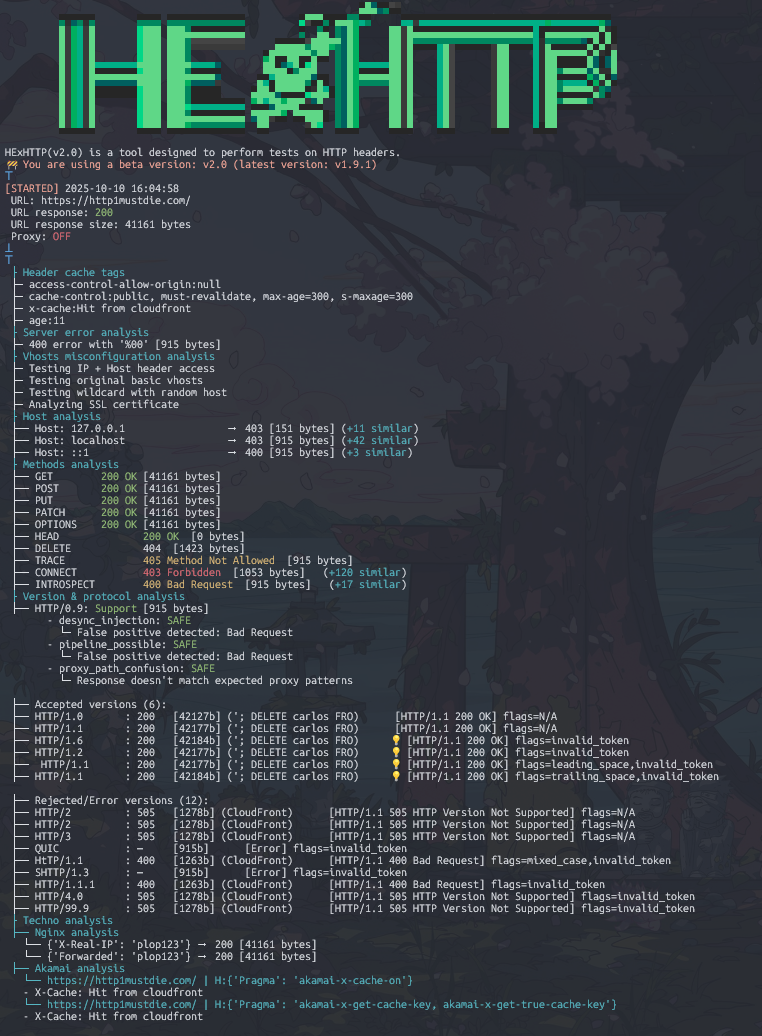
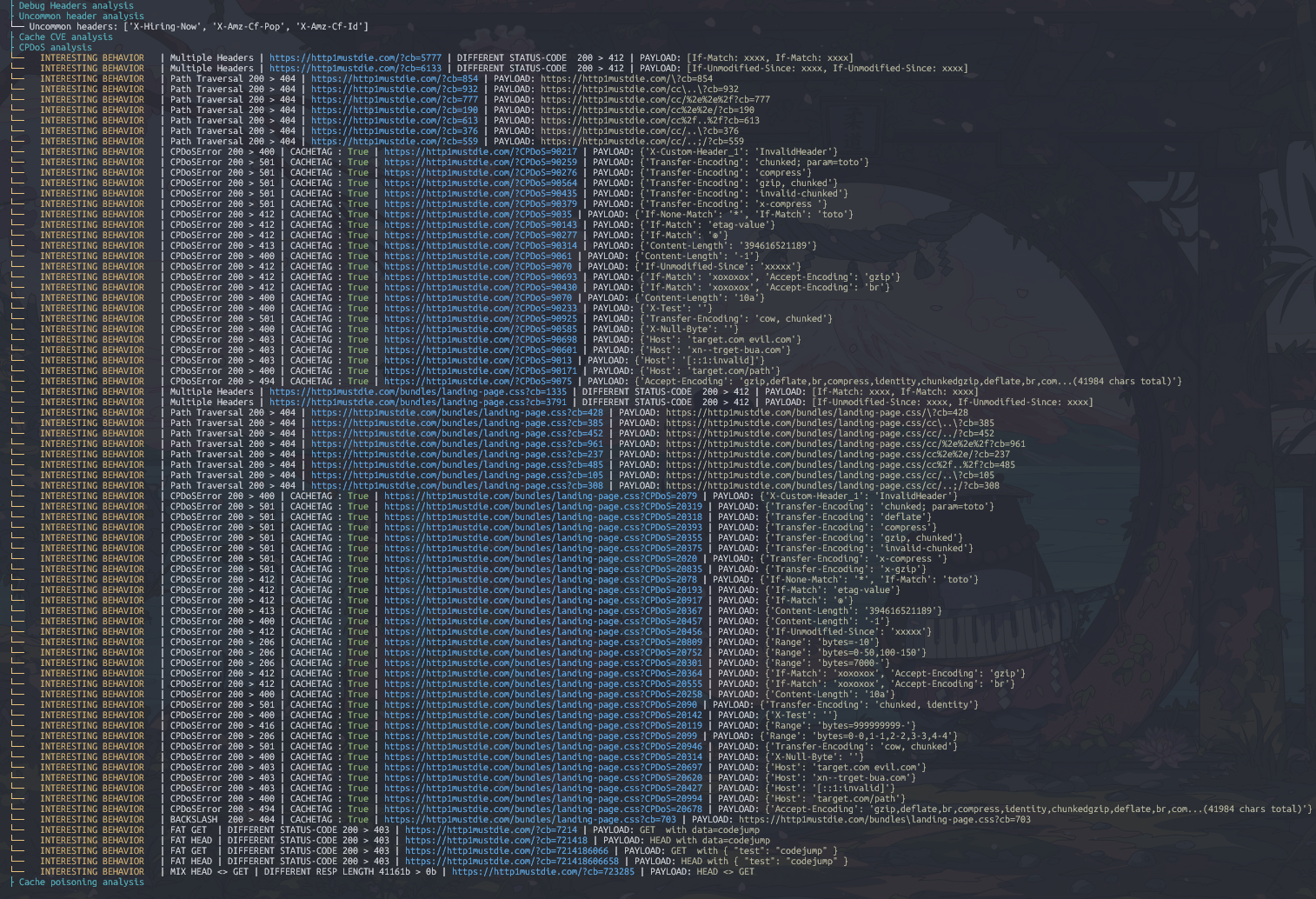
针对已确认的 Cache Poisoning 漏洞的示例
你可以在 Web Security Academy 的易受攻击的实验室中测试此工具,例如 Web cache poisoning with an unkeyed header。预期结果应与下文相同。

HExHTTP HTML 报告示例
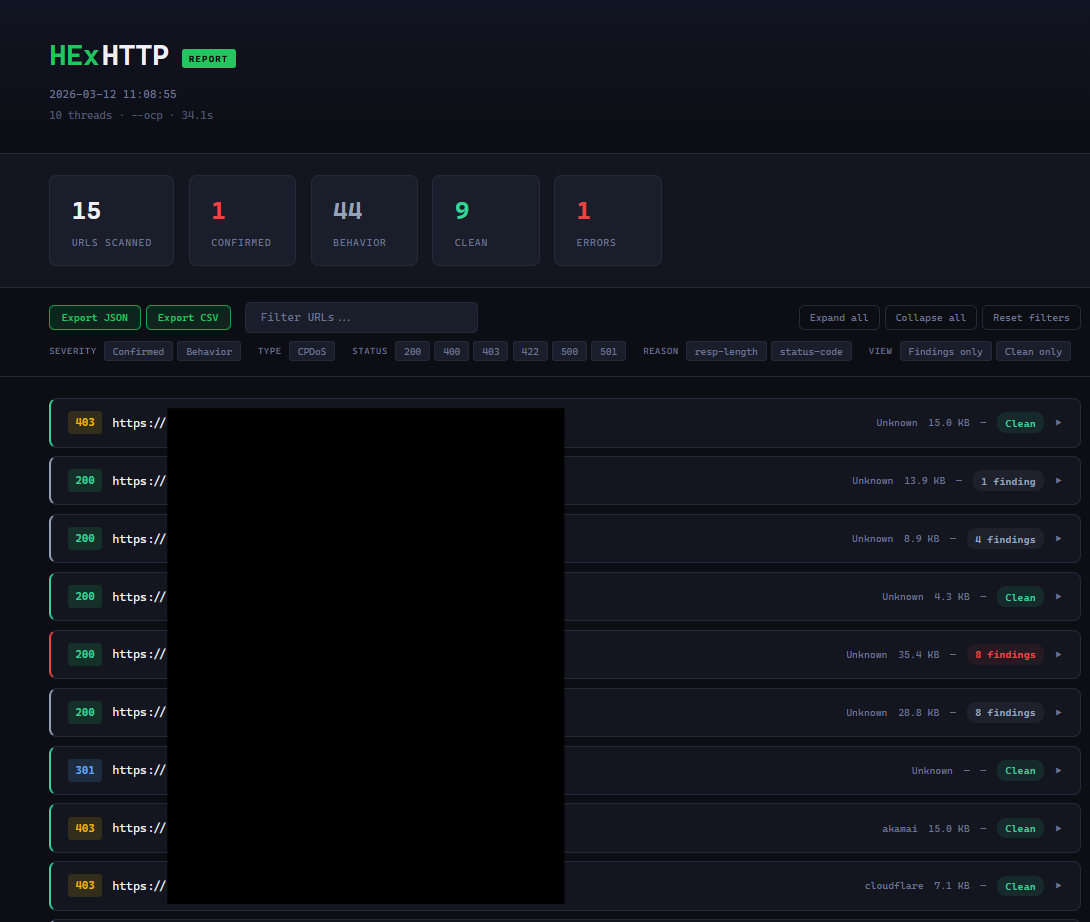
工具提示
- 如果基础 URL 返回 403,请尝试移除 utils/configure_session.py 中的注释(搜索 DECOMMENTHIS)并重启。
- 如果 WAF 敏感,请尝试使用 "-hu r" 选项
- 如果某个链接触发了大量误报,请尝试手动检查,如果确实是工具的故障,请随时告知我!
功能
- 服务器错误响应检查
- 虚拟主机检查
- Localhost 头响应分析
- 方法响应分析
- HTTP 版本与协议分析 [实验性]
- CDN/代理分析 (Envoy/Apache/Akamai/Nginx) [进行中]
- 调试头分析
- 不常见头分析
- HTTP 类型 CVE 检查
- 缓存投毒拒绝服务 (CPDoS) 技术
- Web 缓存投毒
- 灵活的代理支持 (通用代理 + Burp Suite 集成)
- 人工扫描 (速率限制 + 超时随机化) [进行中] -- 可用但正在清理、代码检查等...
待办事项
- 重做 "session" 处理器/包装器 [进行中]
- 过滤 WAF 拦截导致的误报 [进行中]
- 优先扫描以在触发 WAF 之前快速测试主要的缓存投毒向量
- 为 "static" 文件 (js/css 等) 的扫描添加深度选项
- 参数伪装
- 回归测试测试床
基于
- YWH HTTP Header Exploitation
- Cache Poisoning at Scale
- abusing http hop-by-hop request headers
- Web Cache Entanglement: Novel Pathways to Poisoning
- Practical Web Cache Poisoning
- Exploiting cache design flaws
- Responsible denial of service with web cache poisoning
- CPDoS.org
- Autopoisoner
- Rachid.A research
贡献
欢迎提交 Pull requests。请随时为这个工具做出贡献并进行改进!