

multiple-entity-row
在 Home Assistant 的 Lovelace UI 中,于实体行上显示多个实体的状态、属性和图标




注意: 这并非一个独立的 lovelace 卡片,而是 entities 卡片的一行元素。
需要 Home Assistant 2024.4 或更高版本。
安装
使用 HACS 安装(推荐):

如果在 YAML 模式下,请同时添加:
lovelace:
  resources:
    - url: /hacsfiles/lovelace-multiple-entity-row/multiple-entity-row.js
      type: module
或者 手动将 multiple-entity-row.js
添加到您的 <config>/www/ 文件夹,并在 configuration.yaml 文件中添加以下内容:
lovelace:
  resources:
    - url: /local/multiple-entity-row.js?v=4.7.0
      type: module
如果不使用 YAML,上述配置可以在 配置 -> 仪表板 -> 资源 面板中管理。
配置
此卡片生成一个 entity-row,因此必须作为 entities 卡片中的一个实体进行配置。
提供了一个可视化编辑器:通过实体卡片的 UI 编辑器编辑 custom:multiple-entity-row 行时,该行会打开一个基于表单的编辑器,包含主实体和每个附加实体的选项卡(添加 / 重新排序 / 复制 / 粘贴 / 删除),以及次要信息、基于状态的图标、每个实体的自定义 CSS 和点按/长按/双击操作的部分。以下所有内容仍可通过 YAML 配置;少数高级选项(hide_if、带数字后缀的格式如 precision5、templates)仅限 YAML —— 包含模板的配置将直接在代码编辑器中打开。
| Name | Type | Default | Description |
|---|---|---|---|
| type | string | Required | custom:multiple-entity-row |
| entity | string | Required | 实体 ID (domain.my_entity_id) |
| attribute | string | 显示属性而非状态值 | |
| name | string/bool | friendly_name | 覆盖名称;false 同时释放其空间 |
| unit | string/bool | unit_of_measurement | 覆盖实体的测量单位 |
| icon | string | icon | 覆盖实体图标或图像 |
| icon_color | string | 实体图标的 CSS 颜色 | |
| state_icon | object | 状态值 → 图标覆盖的映射 | |
| image | string | 显示图像而非图标 | |
| toggle | bool | false | 显示切换开关(如果支持)而非状态 |
| show_state | bool | true | 设置为 false 以隐藏主实体 |
| show_state_first | bool | false | 在其他实体之前显示主状态 |
| state_header | string | 在主实体状态上方显示标题文本 | |
| color | string | state | state, none, 主题颜色或 CSS 颜色 |
| state_color | bool | deprecated | 已被 color 取代 |
| column | bool | false | 以列而非行显示实体 |
| wrap | bool | false | 换行显示而非溢出 |
| align | string | center | 垂直对齐:top, center 或 bottom |
| default | string | 当状态隐藏时显示此值 | |
| hide_unavailable | bool | false | 如果不可用则隐藏状态值 |
| hide_if | object/any | Hiding | 如果条件匹配则隐藏状态值 |
| styles | object | 为状态元素添加自定义 CSS 样式 | |
| format | string | Formatting | 格式化主状态/属性值 |
| template | string | Templating | 用模板结果替换状态值 |
| vars | object | 模板 | 在此作用域的模板中可重用的命名值 |
| entities | list | 实体对象 | 额外的实体 ID 或实体对象 |
| secondary_info | string/object | 次要信息 | 自定义 secondary_info 实体 |
| tap_action | object | 操作 | 实体行和状态值上的自定义点按操作 |
| hold_action | object | 实体行上的自定义长按操作 | |
| double_tap_action | object | 实体行上的自定义双击操作 |
实体对象
与默认的 HA entities 卡片类似,每个实体都可以使用实体 ID 字符串指定,
或者使用允许更多自定义和配置的对象。
如果你将实体定义为对象,则每个选项都是可选的。仅当你要显示来自上述主实体之外的另一个实体的数据时,entity 才是必需的——如果希望再次显示主实体的状态,请将其省略(即使单独使用 - {} 也不要包含),这在 ID 事先未知的情况下(例如在 custom:auto-entities 下)非常有用。如果你要显示实体属性值而不是状态值,则 attribute 是必需的。icon 允许你显示图标而不是状态或属性值
(与自定义 tap_action 配合使用效果很好)。
无法解析的实体 ID 会标记一个警告图标,而不是被静默丢弃,因此重命名或移除的实体是可见的。使用 hide_unavailable: true 可以隐藏它,或使用 default: 显示一个占位值。
timer 实体显示其剩余时间,而不是原始状态:空闲时显示本地化状态,运行时显示倒计时 mm:ss,
暂停时显示 mm:ss (Paused)。显式的 attribute: 或 template: 会覆盖此行为。
| Name | Type | Default | Description |
|---|---|---|---|
| entity | string | 有效的 entity_id(或留空以使用主实体) | |
| attribute | string | 实体的有效属性键 | |
| name | string/bool | friendly_name | 覆盖实体友好名称(或 false 以隐藏) |
| unit | string/bool | unit_of_measurement | 覆盖实体测量单位(或 false 以隐藏) |
| toggle | bool | false | 如果域支持,则显示切换开关 |
| icon | string/bool | false | 显示默认或自定义图标,而不是状态或属性值 |
| color | string | state | state、none、主题颜色或 CSS 颜色 |
| state_color | bool | deprecated | 已被 color 取代 |
| icon_color | string | 实体图标的 CSS 颜色 | |
| state_icon | object | 状态值 → 图标覆盖的映射 | |
| default | string | 如果实体不存在或隐藏,则显示此值 | |
| hide_unavailable | bool | false | 如果实体不可用或不存在,则隐藏实体 |
| hide_if | object/any | Hiding | 如果实体的值匹配指定的值或条件,则隐藏实体 |
| styles | object | 为实体元素添加自定义 CSS 样式 | |
| format | string | Formatting | 格式化实体值 |
| template | string | Templating | 用模板结果替换实体值 |
| vars | object | Templating | 在此作用域的模板中可重用的命名值 |
| tap_action | object | Actions | 自定义实体点击操作 |
| hold_action | object | Actions | 自定义实体长按操作 |
| double_tap_action | object | Actions | 自定义实体双击操作 |
default 还显示实体被 hide_unavailable 或 hide_if 隐藏时的情况,而不仅仅是实体缺失时。
特殊属性
通过设置 attribute 字段为以下值,可以显示来自 HA 的某些特殊数据字段:
| 值 | 描述 |
|---|---|
last-changed | 如果可用,则渲染实体的 last_changed 状态 |
last-updated | 如果可用,则渲染实体的 last_updated 状态 |
次要信息
secondary_info 字段可以是 任意字符串(如果您只想显示一些文本),
一个包含以下配置选项的对象,或来自 HA 的任意默认字符串值
(entity-id、last-changed、last-updated、last-triggered、position、tilt-position、brightness)。
| Name | Type | Default | Description |
|---|---|---|---|
| entity | string | 有效的 entity_id(或留空以使用主实体) | |
| attribute | string | 实体的有效属性键 | |
| name | string/bool | friendly_name | 覆盖实体友好名称(或 false 以隐藏) |
| unit | string/bool | unit_of_measurement | 覆盖实体测量单位(或 false 以隐藏) |
| hide_unavailable | bool | false | 如果其实体不可用,则隐藏次要信息 |
| hide_if | object/any | Hiding | 如果其值匹配给定条件,则隐藏次要信息 |
| format | string | Formatting | 格式化次要信息值 |
| template | string | Templating | 用模板结果替换次要信息值 |
| vars | object | Templating | 在此作用域的模板中可重用的命名值 |
Actions
此卡片支持所有默认的 HA 操作。请参阅 Lovelace Actions 以获取更详细的描述和示例。
| 名称 | 类型 | 默认值 | 描述 |
|---|---|---|---|
| action | string | 必填 | more-info, toggle, call-service, url, navigate, fire-dom-event, none |
| entity | string | 当 action 为 more-info 时覆盖 entity-id | |
| service | string | 当 action 为 call-service 时调用的服务 | |
| service_data | object | 当 action 为 call-service 时包含的可选数据 | |
| url_path | string | 当 action 为 url 时打开的 URL | |
| navigation_path | string | 当 action 为 navigate 时导航到的路径 | |
| confirmation | bool/object | false | 启用确认对话框 |
| haptic | string | none | 触觉反馈 (success, warning, failure, light, medium, heavy, selection) |
格式化
format 选项支持以下值:
| 值 | 类型 | 描述 |
|---|---|---|
| relative | timestamp | 将值转换为相对时间 (5 minutes ago) |
| total | timestamp | 将值转换为相对时间 (5 minutes) |
| date | timestamp | 将时间戳值转换为日期 |
| time | timestamp | 将时间戳值转换为时间 |
| datetime | timestamp | 将时间戳值转换为日期和时间 |
| brightness | number | 将亮度值转换为百分比 |
| percent | number | 将分数值乘以 100 并附加 % (0.25 -> 25 %) |
| duration | number | 将秒数转换为持续时间 (5:38:50) |
| duration-m | number | 将毫秒数转换为持续时间 (5:38:50) |
| duration-h | number | 将小时数转换为持续时间 (5:38:50) |
| invert | number | 将数字从正数转换为负数,或反之 |
| kilo / kilo<0-9> | number | 将数值除以 1,000 (例如 1500 -> 1.5) |
| mega / mega<0-9> | number | 将数值除以 1,000,000(例如 2500000 -> 2.5) |
| milli / milli<0-9> | number | 将数值乘以 1,000(例如 0.2 -> 200) |
| position | number | 反转位置百分比(例如 70% open -> 30% closed) |
| precision<0-9> | number | 设置数值的十进制精度(precision3 -> 18.123) |
| celsius_to_fahrenheit | number | 将摄氏温度转换为等效的华氏温度 |
| fahrenheit_to_celsius | number | 将华氏温度转换为等效的摄氏温度 |
| upper | string | 将值转换为大写 |
| lower | string | 将值转换为小写 |
| capitalize | string | 将值的第一个字母大写 |
| title | string | 将值的每个单词首字母大写 |
kilo/mega/milli 默认情况下最多显示 2 位小数。在末尾添加一个数字(kilo3、mega1、milli0、...)以请求精确的小数精度,方式与 precision<0-9> 相同。
kilo/mega/milli/invert/position 均不会更改显示的单位——它们仅对数值进行缩放或转换。如果希望单位标签与之匹配(例如 W -> kW),请在格式旁边显式设置 unit::
- entity: sensor.power_usage
  type: custom:multiple-entity-row
  format: kilo
  unit: kW
显式指定 unit:(或 unit: false)会使卡片直接格式化该值,而不是委托给 HA 的状态格式化器——这对于那些会转换单位的集成(例如 Analytics Insights)是必要的,因为格式化器会重新应用其自身的单位。HA 的区域设置规则和实体的显示精度设置仍然适用,但由实体自身单位驱动的格式化器渲染效果会丢失:特别是,在覆盖设置下,device_class: monetary 实体会失去 HA 的货币样式($4.00),因此请勿在货币实体上设置 unit。
数字格式可以通过逗号分隔进行组合——值会依次通过每个格式,并在最后进行一次性格式化。显式指定的 precision<N> 会控制其出现位置的小数位数;否则,将应用最后一个格式自身的默认值:
format: invert, precision3   # -18.123
format: kilo, precision1     # 1500 -> 1.5
format: invert, kilo3 # 1500 -> -1.500仅数字转换格式可以组合(brightness、percent、invert、position、kilo/mega/milli、precision、温度转换)——持续时间、时间戳和文本转换无法组合。在可视化编辑器中,在 Format 下拉菜单中选择 Custom… 以输入组合格式。
Hiding
hide_if 选项可用于在实体状态或属性值符合指定条件时隐藏该实体。
它可以直接与字符串、数字或布尔值(即 hide_if: 'off')一起使用,
作为包含多个值的列表使用,
或作为包含以下一个或多个选项的对象使用。
| Name | Type | Description |
|---|---|---|
| above | number | 如果实体 number 值高于指定值,则隐藏 |
| below | number | 如果实体 number 值低于指定值,则隐藏 |
| value | list/any | 如果值与指定值或列表中的任意值匹配,则隐藏 |
| entity | string | 针对此实体而非其自身评估条件 |
| attribute | string | 针对此属性的值评估条件 |
| template | string | 如果 template 渲染为 true,则隐藏 |
例如,仅在报警布防时显示报警退出状态传感器:
- type: custom:multiple-entity-row
  entity: switch.dsc_armed_away
  toggle: true
  entities:
    - entity: sensor.dsc_exit_state
      hide_if:
        entity: switch.dsc_armed_away
        value: 'off'
hide_if 和 hide_unavailable 在顶层隐藏主实体的状态值(该行本身仍然可见);设置 default 时,它会显示在该位置。
模板
显示选项接受 Jinja 模板,由 Home Assistant 在服务器端渲染,并在其引用的实体发生变化时实时更新。任何包含 {{ }} 或 {% %} 的受支持选项的值都被视为模板:name、icon、icon_color、color、secondary_info 文本、hide_if、一个完全替换显示值的 template 选项,以及 tap_action/hold_action/double_tap_action 内的任何值。entity 变量持有所属实体的 id,而 vars 允许你为在一行中重复使用的值命名。
- type: custom:multiple-entity-row
  entity: sensor.next_ferry
  name: "Next ferry {{ state_attr(entity, 'time') }}"
  hide_if: "{{ is_state('binary_sensor.ferry_service', 'off') }}"
  entities:
    - entity: sensor.travel_time
      name: Drive
      template: "{{ states(entity) | round(0) }} min"
请参阅 docs/templating.md 获取完整文档:支持的选项、值模板语义、隐藏条件、加载/错误行为以及更多示例。模板化行仅限 YAML — 当配置包含模板时,可视化编辑器会切换到代码编辑器。
图标样式
color 遵循 Home Assistant 的图标颜色选项,并接受 state(按实体状态着色)、none(从不着色)、主题颜色名称(red、deep-purple、accent)或任意 CSS 颜色。它应用于主行图标以及渲染图标的附加实体。默认值为 state,与实体卡片一致:
- entity: light.kitchen
  type: custom:multiple-entity-row
  color: state
  entities:
    - entity: binary_sensor.back_door
      icon: true
      color: red
    - entity: sensor.humidity
      icon: true
      color: none
主题颜色名称和 state 需要 Home Assistant 2026.8 或更高版本才能用于主行图标;在旧版本中,请在那里使用 icon_color。state_color 仍被接受为已弃用的别名 — true 意味着 color: state,false 意味着 color: none。
icon_color 接受任何 CSS 颜色值(red、#ff0000、var(--my-color)),并将其应用于实体的图标,无论状态如何,这是 color 无法表达的唯一一点。设置它还会将该实体的默认值切换为 color: none,因此两者不会冲突;显式的 color 仍然优先。state_icon 将状态值映射到图标覆盖,当当前状态匹配时,其优先级高于 icon:
- entity: binary_sensor.front_door
  type: custom:multiple-entity-row
  icon_color: 'var(--accent-color)'
  state_icon:
    'on': mdi:door-open
    'off': mdi:door-closed
  entities:
    - entity: binary_sensor.back_door
      icon: true
      icon_color: red
示例
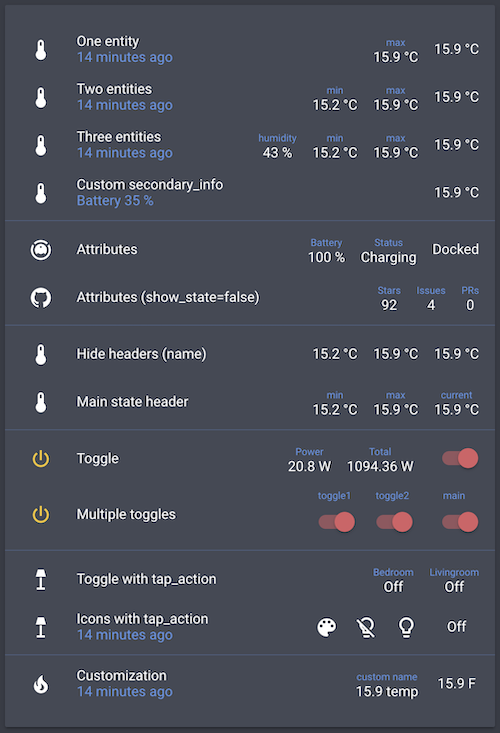
type: entities
entities:
  - entity: sensor.bedroom_temperature
    type: custom:multiple-entity-row
    name: One entity
    secondary_info: last-changed
    entities:
      - sensor.bedroom_max_temp

  - entity: sensor.bedroom_temperature
    type: custom:multiple-entity-row
    name: Two entities
    secondary_info: last-changed
    entities:
      - sensor.bedroom_min_temp
      - sensor.bedroom_max_temp

  - entity: sensor.bedroom_temperature
    type: custom:multiple-entity-row
    name: Three entities
    secondary_info: last-changed
    entities:
      - entity: sensor.bedroom_humidity
        name: humidity
      - sensor.bedroom_min_temp
      - sensor.bedroom_max_temp

  - entity: sensor.bedroom_temperature
    type: custom:multiple-entity-row
    name: Custom secondary_info
    secondary_info:
      attribute: battery_level
      name: Battery
      unit: '%'

  - type: section
  - entity: vacuum.xiaomi_vacuum_cleaner
    type: custom:multiple-entity-row
    name: Attributes
    entities:
      - attribute: battery_level
        name: Battery
        unit: '%'
      - attribute: status
        name: Status

  - entity:  sensor.lovelace_multiple_entity_row
    type: custom:multiple-entity-row
    name: Attributes (show_state=false)
    show_state: false
    entities:
      - attribute: stargazers
        name: Stars
      - attribute: open_issues
        name: Issues
      - attribute: open_pull_requests
        name: PRs

  - type: section
  - entity: sensor.bedroom_temperature
    type: custom:multiple-entity-row
    name: Hide headers (name)
    entities:
      - entity: sensor.bedroom_min_temp
        name: false
      - entity: sensor.bedroom_max_temp
        name: false

  - entity: sensor.bedroom_temperature
    type: custom:multiple-entity-row
    name: Main state header
    state_header: current
    entities:
      - sensor.bedroom_min_temp
      - sensor.bedroom_max_temp

  - type: section
  - entity: switch.livingroom_tv
    type: custom:multiple-entity-row
    name: Toggle
    toggle: true
    state_color: true
    entities:
      - entity: sensor.livingroom_tv_power
        name: Power
      - entity: sensor.livingroom_tv_power_total
        name: Total

  - entity: switch.livingroom_tv
    type: custom:multiple-entity-row
    name: Multiple toggles
    state_header: main
    toggle: true
    state_color: true
    entities:
      - entity: switch.livingroom_light
        name: toggle1
        toggle: true
      - entity: switch.livingroom_light_2
        name: toggle2
        toggle: true

  - type: section
  - entity: light.living_room
    type: custom:multiple-entity-row
    name: Toggle with hold_action
    state_header: Livingroom
    toggle: false
    hold_action:
      action: toggle
    entities:
      - entity: light.nightstand
        name: Bedroom
        tap_action:
          action: toggle

  - entity: light.living_room
    type: custom:multiple-entity-row
    name: Icons with tap_action
    secondary_info: last-changed
    entities:
      - entity: light.living_room
        icon: mdi:palette
      - icon: mdi:lightbulb-off-outline
        state_color: true
        tap_action:
          action: call-service
          service: light.turn_off
          service_data:
            entity_id: light.living_room
      - icon: mdi:lightbulb-outline
        state_color: true
        tap_action:
          action: call-service
          service: light.turn_on
          service_data:
            entity_id: light.living_room
          confirmation:
            text: 'Are you sure?'

  - type: section
  - entity: sensor.bedroom_temperature
    type: custom:multiple-entity-row
    name: Customization
    icon: mdi:fire
    unit: °F
    secondary_info: last-changed
    entities:
      - entity: sensor.bedroom_max_temp
        name: custom name
        unit: temp

  - type: section
  - entity: sensor.bedroom_temperature
    type: custom:multiple-entity-row
    name: Styles
    styles:
      width: 80px
      text-align: right
    secondary_info:
      attribute: battery_level
      styles:
        font-weight: bold
    entities:
      - entity: sensor.bedroom_max_temp
        styles:
          width: 80px
          text-align: left
主题
实体标题的颜色(每个值上方的小名称)可以通过 --multiple-entity-row-header-color CSS 变量进行覆盖,无论是从主题还是通过 styles 针对单个实体:
entities:
  - entity: sensor.bedroom_max_temp
    styles:
      '--multiple-entity-row-header-color': red
开发
yarn install
yarn build      # lint + type-check, run tests, then bundle multiple-entity-row.js
yarn test       # run the unit test suite
yarn coverage   # run tests with a coverage report
代码库正在从 JavaScript 逐步迁移到 TypeScript:.ts 和 .js 共存(allowJs),Babel 在打包过程中会剥离类型,并且 tsc --noEmit 作为 yarn lint 的一部分进行类型检查。新代码应使用 TypeScript;现有模块在修改时酌情迁移。
为了针对真实的 Home Assistant 实例测试更改,可通过 Docker 使用一次性的本地测试环境:
yarn ha:up      # first run also creates .dev/ha-config from the example
# → HA boots at http://localhost:8130 (~1 min on first start)
# → onboard a throwaway user, then add a card of type: custom:multiple-entity-row
编辑完源代码并运行 yarn build 后,请强制刷新浏览器以加载重新构建的 bundle。有关测试环境的管理,请参阅 yarn ha:down、yarn ha:logs 和 yarn ha:reset。
我的卡片
xiaomi-vacuum-card |
multiple-entity-row |
github-entity-row |
battery-entity-row |
attribute-entity-row