
TravelTibet/Snap7_Server · 文件
文件最后提交记录最后更新时间
README.md
S7VirtualPLC - 模拟西门子Snap7服务端

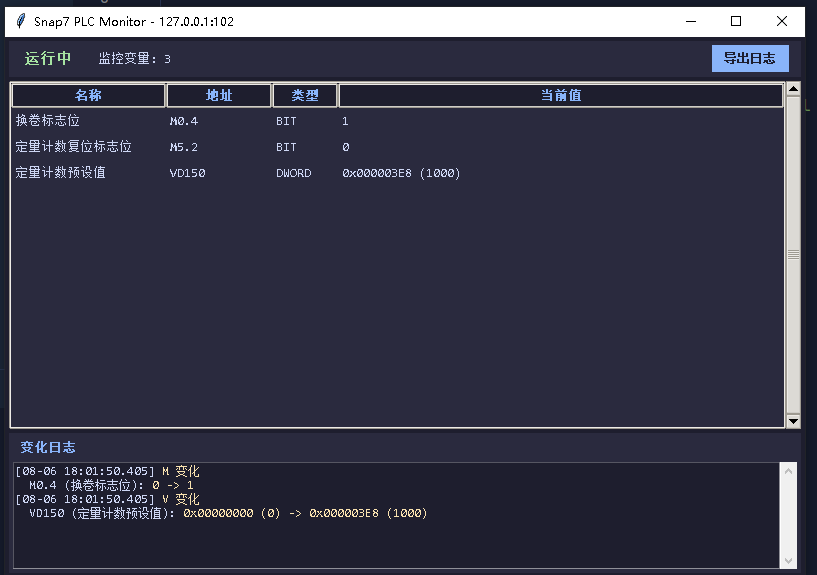
一个基于 Snap7 的西门子 S7 PLC 模拟服务器,用于没有真实 PLC 环境时测试 SCADA、HMI、MES 和工业软件通信。 启动时打印所有配置项的初始值,运行时自动检测并输出变化,可以导出日志方便调试。
运行窗口示例
环境要求
- Python 3.12
- 依赖列表见 requirements.txt,执行
pip install -r requirements.txt安装
快速开始
pip install python-snap7
python main.py           # GUI 模式(默认)
python main.py --console # 控制台模式
项目结构
Snap7 Server/
├── main.py                # 主入口 - 命令行解析、启动服务器和监控
├── config.py              # 配置加载、数据类型定义、西门子寻址
├── plc_monitor.py         # PLCMonitor - 内存监控、快照对比、复位规则
├── gui.py                 # MonitorGUI - tkinter 图形界面
├── logger.py              # 日志导出工具
├── monitor_config.json    # 监控配置文件
├── README.md
└── log/                   # 日志导出目录(运行时自动生成)
各模块职责
| 文件 | 职责 |
|---|---|
main.py | 入口:加载配置 → 启动 Server → 启动 Monitor → 启动 GUI/Console |
config.py | DATA_TYPE_INFO(Bit/Byte/Word/DWord 的编解码)、siemens_addr()、load_config() |
plc_monitor.py | PLCMonitor 类:注册内存块、后台轮询、快照比较、复位规则 |
gui.py | MonitorGUI 类:tkinter 窗口、变量表格、日志显示、导出按钮 |
logger.py | export_log() 函数:将日志写入 ./log/ 目录 |
PLC IP 设置
配置文件中的 plc_ip 决定了服务器监听在哪个 IP 上。必须是本机网卡已绑定的 IP,否则会报 WinError 10049。
本地测试(推荐)
C++ 客户端和 Python 服务器在同一台 PC 上运行:
"plc_ip": "127.0.0.1"C++ 客户端连接 127.0.0.1:102。
局域网内测试
如果 C++ 客户端在另一台机器上,填 PC 的局域网 IP:
# 查看本机 IP
ipconfig"plc_ip": "192.168.0.27"C++ 客户端连 192.168.0.27:102。
monitor_config.json 配置说明
顶层字段
| 字段 | 类型 | 默认 | 说明 |
|---|---|---|---|
plc_ip | string | "0.0.0.0" | 服务器监听 IP |
plc_port | number | 102 | S7 协议端口(西门子标准) |
poll_interval | number | 0.5 | 监控轮询间隔(秒) |
m_size | number | 0 | M 区最小字节数,若 items 需求更大则取较大值 |
db_size | number | 0 | 每个 DB 块的最小字节数,同上 |
items | array | [] | 监控项列表 |
init_values | array | [] | 启动初值列表,启动时写入指定变量 |
reset_rules | array | [] | 复位规则列表 |
items 字段
| 字段 | 类型 | 必填 | 说明 |
|---|---|---|---|
name | string | 是 | 变量名称,显示用 |
area | string | 是 | "M" 或 "V" |
db_number | number | V 区必填 | DB 块编号,模拟 S7-200 全部设为 1 |
byte_offset | number | 是 | 起始字节偏移,即西门子地址中的数字部分 |
bit_offset | number | Bit 必填 | 位偏移 (0~7),仅 data_type: "Bit" 需要 |
data_type | string | 是 | "Bit" / "Byte" / "WORD" / "DWORD" (大小写不敏感) |
init_values 字段
启动时向指定变量写入初值(在保存初始快照之前执行,因此不会触发变化事件)。字段结构与 items 相同,另加 value:
| 字段 | 类型 | 必填 | 说明 |
|---|---|---|---|
area | string | 是 | "M" 或 "V" |
db_number | number | V 区必填 | DB 块编号 |
byte_offset | number | 是 | 起始字节偏移 |
bit_offset | number | Bit 必填 | 位偏移 (0~7) |
data_type | string | 是 | "Bit" / "Byte" / "WORD" / "DWORD" |
value | number | 是 | 初值(Bit 填 0/1,其余填数值) |
"init_values": [
{
"area": "M",
"byte_offset": 0,
"bit_offset": 4,
"data_type": "Bit",
"value": 1
},
{
"area": "M",
"byte_offset": 5,
"bit_offset": 2,
"data_type": "Bit",
"value": 0
},
{
"area": "V",
"db_number": 1,
"byte_offset": 150,
"data_type": "DWORD",
"value": 1000
}
]
西门子寻址对照
byte_offset 直接对应西门子地址中的数字(以V区为例,M区同理):
| 配置写法 | 西门子地址 | 含义 | 字节范围 |
|---|---|---|---|
byte_offset: 0, bit_offset: 0, data_type: "Bit" | V0.0 | V区字节 0 的第 0 位 | VB0(1 字节) |
byte_offset: 1, data_type: "Byte" | VB1 | V区字节 1 | VB0(1 字节) |
byte_offset: 2, data_type: "WORD" | VW2 | V区字节 2 开始的 2 字节 | VB2~VB3 |
byte_offset: 4, data_type: "DWORD" | VD4 | V区字节 4 开始的 4 字节 | VB4~VB7 |
配置示例
{
  "plc_ip": "127.0.0.1",
  "plc_port": 102,
  "poll_interval": 0.5,
  "m_size": 32,
  "db_size": 2000,
  "items": [
    {
      "name": "换卷标志位",
      "area": "M",
      "byte_offset": 0,
      "bit_offset": 4,
      "data_type": "Bit"
    },
    {
      "name": "定量计数复位标志位",
      "area": "M",
      "byte_offset": 5,
      "bit_offset": 2,
      "data_type": "Bit"
    },
    {
      "name": "定量计数预设值",
      "area": "V",
      "db_number": 1,
      "byte_offset": 150,
      "data_type": "DWORD"
    }
  ],
  "init_values": [
    {
      "area": "M",
      "byte_offset": 0,
      "bit_offset": 4,
      "data_type": "Bit",
      "value": 1
    },
    {
      "area": "M",
      "byte_offset": 5,
      "bit_offset": 2,
      "data_type": "Bit",
      "value": 0
    },
    {
      "area": "V",
      "db_number": 1,
      "byte_offset": 150,
      "data_type": "DWORD",
      "value": 1000
    }
  ],
  "reset_rules": [
    {
      "trigger": {
        "area": "M",
        "byte_offset": 5,
        "bit_offset": 2,
        "data_type": "Bit"
      },
      "condition": 1,
      "targets": [
        {
          "area": "M",
          "byte_offset": 5,
          "bit_offset": 2,
          "data_type": "Bit",
          "value": 0
        }
      ]
    }
  ]
}
运行效果
启动时
============================================================
  Snap7 Server - PLC 内存监控 (配置文件驱动)
============================================================

配置文件: D:\code\Snap7 Server\monitor_config.json
监控项数: 10
  - 启动信号: M0.0
  - 急停信号: M0.1
  - 运行状态: MB1
  - 产量计数: VD0
  ...

>>> 注册内存区域...
  [注册] M  大小: 32 字节  (内部 index=0)
  [注册] V  大小: 2000 字节  (内部 index=1)
  [注册] V  大小: 2000 字节  (内部 index=2)

>>> 监控项初始值:
  名称             地址             类型     初始值
  -------------- -------------- ------ --------------------
  启动信号           M0.0           BIT    0
  运行状态           MB1            BYTE   0x00 (0)
  产量计数           VD0            DWORD  0x00000000 (0)
  ...

[启动] S7 服务器已在 127.0.0.1:102 运行。
[监控] 已启动,轮询间隔 0.5s,检测到变化将自动输出。
运行中检测到变化
已配置的监控项 — 按数据类型格式化,显示旧值 -> 新值:
[14:32:17.024] M 变化检测
  ├─ M0.0 (启动信号): 0 -> 1
  ├─ MB1 (运行状态): 0x00 (0) -> 0x01 (1)

[14:32:17.025] V 变化检测
  ├─ VD150 (VD150预设值): 0x00000000 (0) -> 0x00000064 (100)
  ├─ VW4 (速度设定): 0x0000 (0) -> 0x03E8 (1000)
未配置的地址 — 只显示原始字节值,提醒你补配置:
[14:32:18.500] M 变化检测
  ├─ [未监控] MB5: 0x04 (4)

[14:32:18.501] V 变化检测
  ├─ [未监控] VB153: 0x64 (100)
出现
[未监控]时,把对应地址加到items里即可获得类型化输出。
注意事项
plc_ip必须是本机已绑定的 IP,否则启动失败。本地测试用127.0.0.1。db_number不是地址偏移,它是内存块编号。模拟 S7-200 时所有 item 都设"db_number": 1。byte_offset对应西门子地址中的数字。例如 VD150 的byte_offset为 150,不是 0。- Bit 类型必须填
bit_offset(0~7),Byte/Word/DWord 不需要。 - 大端序:S7 协议使用 Big-Endian,WORD 和 DWORD 解码时已自动处理。