
Quasimorph Camera To Exits
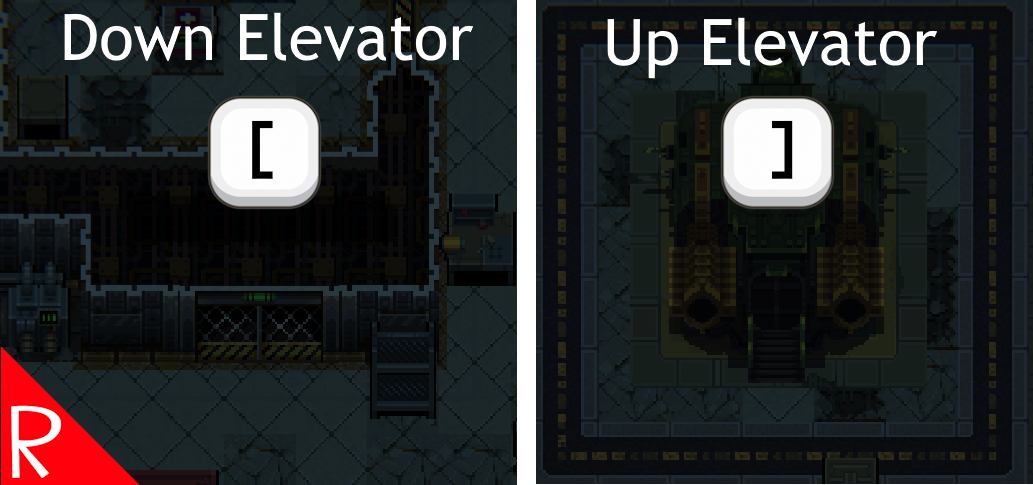
Adds a hotkey to move the camera view to the current level's exits. Helpful when the player is moving loot back to the shuttle from multiple floors.
Press left bracket for move to the down elevator or the drop pod. Press right bracket to move to the up elevator or shuttle.
The camera will only move if the target has already been explored.
The hotkeys can be configured.
Configuration
This mod includes MCM configuration. Some values can be edited in the Mods screen, while the rest will be display only. All options can be configured in the config file.
The configuration file will be created on the first game run and can be found at %AppData%\..\LocalLow\Magnum Scriptum Ltd\Quasimorph_ModConfigs\CameraToExits\config.json.
| Name | Default | Description |
|---|---|---|
| MoveToDownElevatorKey | Left Bracket | When pressed, moves to the elevator that goes down. |
| MoveToUpElevatorKey | Right Bracket | When pressed, moves to the elevator that goes up or the shuttle. |
| CycleMilliseconds | 1000 | he minimum amount of time that the user has to press the same key to cycle between targets. |
Key List
The list of valid keyboard keys can be found at the bottom of https://docs.unity3d.com/ScriptReference/KeyCode.html Beware that numbers 0-9 are Alpha0 - Alpha9. Most of the other keys are as expected such as X for X. Use "None" to not bind the key.
Buy Me a Coffee
If you enjoy my mods and want to buy me a coffee, check out my Ko-Fi page. Thanks!
Credits
- Special thanks to Crynano for his excellent Mod Configuration Menu.
Source Code
Source code is available on GitHub at https://github.com/NBKRedSpy/QM_CameraToExits
Change Log
See CHANGELOG.md at https://github.com/NBKRedSpy/QM_CameraToExits