
Darwin Eligibility Override
[!WARNING] 如果您希望继续使用此仓库,请勿更新到 macOS 15.4 Beta 1 或更高版本。
Apple 已更新 eligibilityd 的实现,导致本仓库使用的 override 文件方案不再可用。
更多详情,请参阅 #73
本仓库仅支持 macOS 15.0 - 15.3.1。
本项目旨在实现 Xcode LLM / Apple Intelligence / iPhone Mirroring 在任何 Mac 上的永久使用, 而无需禁用系统完整性保护 (SIP) 或仅禁用一次。
[!NOTE] Xcode LLM 仅支持 macOS 15.0+
Apple Intelligence 仅支持 macOS 15.1+
XcodeLLM、Apple Intelligence 和 ChatGPT 集成已在 Mac mini (M4 Pro, 2024) + macOS 15.2 上测试正常。
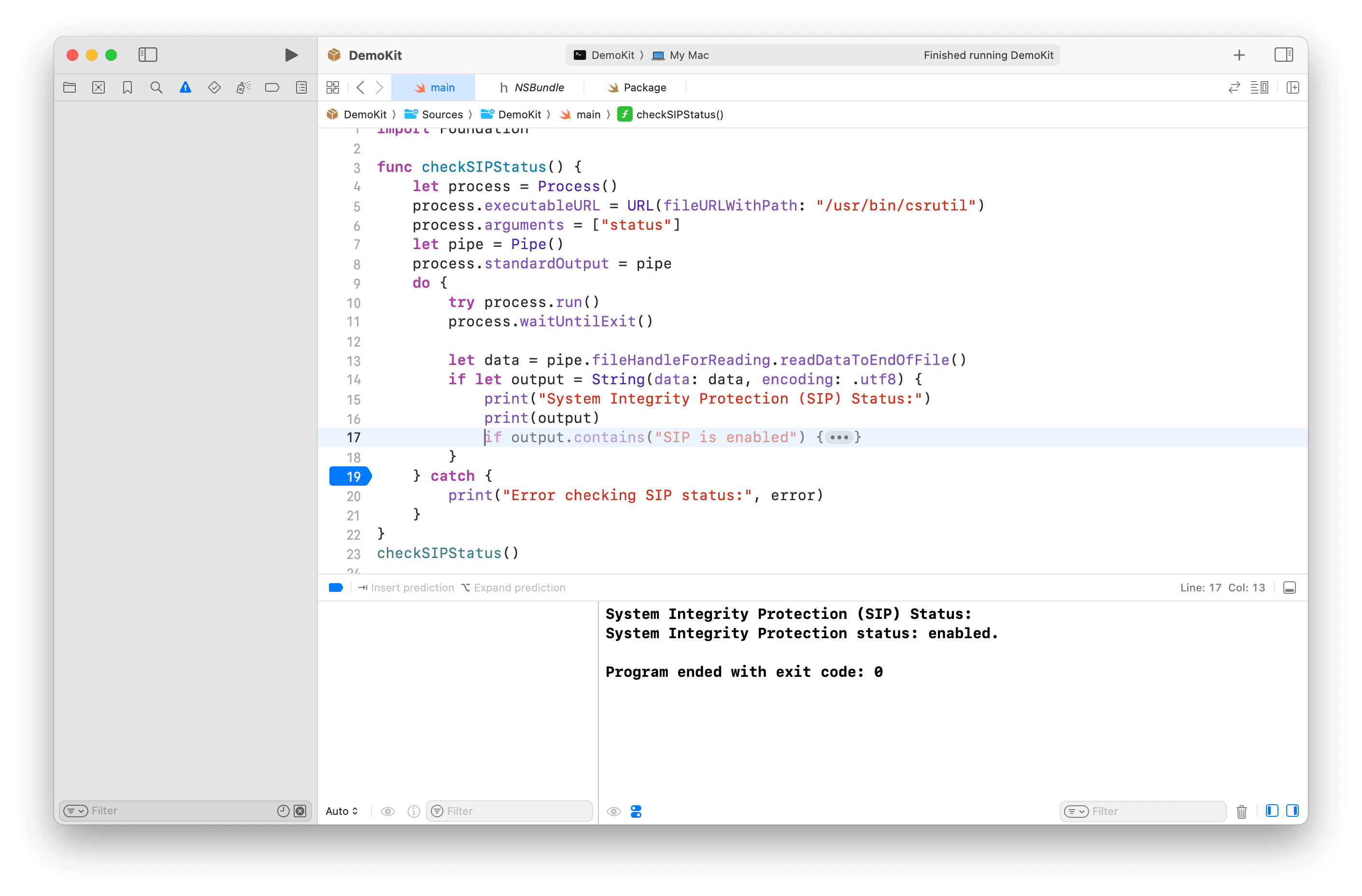
备注
本项目仅用于学习和研究目的。
如果您选择使用本项目,则需自行承担风险,并负责遵守任何适用的法律法规。
本项目的作者不对因您使用本项目而可能产生的任何后果负责。
用法
方法 1:util 工具(推荐)
需要在脚本运行期间一次性禁用 SIP 并设置 boot-args 为 "amfi_get_out_of_my_way=1"。
[!TIP] 如果您在如何禁用 SIP 或设置 boot-args 方面遇到问题,请参阅 手动执行 部分以获取更多详细信息。
# For XcodeLLM
curl -L https://raw.githubusercontent.com/Kyle-Ye/XcodeLLMEligible/release/0.2/scripts/override.sh | bash -s -- install util xcodellm
# For Apple Intelligence
curl -L https://raw.githubusercontent.com/Kyle-Ye/XcodeLLMEligible/release/0.2/scripts/override.sh | bash -s -- install util greymatter
# For Cleanup
curl -L https://raw.githubusercontent.com/Kyle-Ye/XcodeLLMEligible/release/0.2/scripts/override.sh | bash -s -- install util strontium
# For iPhone Mirroring
curl -L https://raw.githubusercontent.com/Kyle-Ye/XcodeLLMEligible/release/0.2/scripts/override.sh | bash -s -- install util iron
方法 2:覆盖文件
完全不需要禁用 SIP。
# For XcodeLLM
curl -L https://raw.githubusercontent.com/Kyle-Ye/XcodeLLMEligible/release/0.2/scripts/override.sh | bash -s -- install override xcodellm
# For Apple Intelligence
curl -L https://raw.githubusercontent.com/Kyle-Ye/XcodeLLMEligible/release/0.2/scripts/override.sh | bash -s -- install override greymatter
# For Apple Intelligence + Cleanup
curl -L https://raw.githubusercontent.com/Kyle-Ye/XcodeLLMEligible/release/0.2/scripts/override.sh | bash -s -- install override greymatter+strontium
# For XcodeLLM + Apple Intelligence + Cleanup
curl -L https://raw.githubusercontent.com/Kyle-Ye/XcodeLLMEligible/release/0.2/scripts/override.sh | bash -s -- install override xcodellm+greymatter+strontium
# For iPhone Mirroring
curl -L https://raw.githubusercontent.com/Kyle-Ye/XcodeLLMEligible/release/0.2/scripts/override.sh | bash -s -- install override iron
[!NOTE] 覆盖文件方法互斥。
此仓库仅为 Xcode LLM 和 Apple Intelligence 提供独立的覆盖文件。
如果您想覆盖多个键,请使用 util 工具方法并导出覆盖文件以供将来使用。
卸载
方法 1:util 工具
# For XcodeLLM:
curl -L https://raw.githubusercontent.com/Kyle-Ye/XcodeLLMEligible/release/0.2/scripts/override.sh | bash -s -- uninstall util xcodellm
# For Apple Intelligence
curl -L https://raw.githubusercontent.com/Kyle-Ye/XcodeLLMEligible/release/0.2/scripts/override.sh | bash -s -- uninstall util greymatter
# For Clenaup
curl -L https://raw.githubusercontent.com/Kyle-Ye/XcodeLLMEligible/release/0.2/scripts/override.sh | bash -s -- uninstall util strontium
# For iPhone Mirroring
curl -L https://raw.githubusercontent.com/Kyle-Ye/XcodeLLMEligible/release/0.2/scripts/override.sh | bash -s -- uninstall util iron
方法 2:覆盖文件
# For XcodeLLM:
curl -L https://raw.githubusercontent.com/Kyle-Ye/XcodeLLMEligible/release/0.2/scripts/override.sh | bash -s -- uninstall override xcodellm
# For Apple Intelligence
curl -L https://raw.githubusercontent.com/Kyle-Ye/XcodeLLMEligible/release/0.2/scripts/override.sh | bash -s -- uninstall override greymatter
# For Apple Intelligence + Cleanup
curl -L https://raw.githubusercontent.com/Kyle-Ye/XcodeLLMEligible/release/0.2/scripts/override.sh | bash -s -- uninstall override greymatter+strontium
# For XcodeLLM + Apple Intelligence + Cleanup
curl -L https://raw.githubusercontent.com/Kyle-Ye/XcodeLLMEligible/release/0.2/scripts/override.sh | bash -s -- uninstall override xcodellm+greymatter+strontium
# For iPhone Mirroring
curl -L https://raw.githubusercontent.com/Kyle-Ye/XcodeLLMEligible/release/0.2/scripts/override.sh | bash -s -- uninstall override iron
手动执行
方法 1:util 工具(推荐)
-
在恢复模式下使用
csrutil disable禁用 SIP -
通过
sudo nvram boot-args="amfi_get_out_of_my_way=1"添加启动参数并重启 -
从 release page 下载
eligibility_util并添加可执行权限。
以下命令示例假设下载的文件位于
~/Downloads文件夹中。
chmod +x ~/Downloads/eligibility_util- 执行以下命令
cd ~/Downloads
# For XcodeLLM (macOS 15.0+ required)
./eligibility_util forceDomainAnswer --domain-name OS_ELIGIBILITY_DOMAIN_XCODE_LLM --answer 4
# For Apple Intelligence (macOS 15.1+ required)
./eligibility_util forceDomainAnswer --domain-name OS_ELIGIBILITY_DOMAIN_GREYMATTER --answer 4
# For Cleanup (macOS 15.1 Beta 3+ required)
./eligibility_util forceDomainAnswer --domain-name OS_ELIGIBILITY_DOMAIN_STRONTIUM --answer 4
# For iPhone Mirroring (macOS 15.0+ required)
./eligibility_util forceDomainAnswer --domain-name OS_ELIGIBILITY_DOMAIN_IRON --answer 4-
在恢复模式下使用
csrutil enable启用 SIP 并重启。 -
通过
sudo nvram -d boot-args移除启动参数
如果您不熟悉 SIP 操作,请阅读 禁用和启用系统完整性保护。
您只能在恢复模式下或已禁用 SIP 的正常模式下设置 boot-args。
设置 boot-args 后,请记得重启以使更改生效。
[!TIP]
如需更多技术细节,请参阅 Kyle-Ye/eligibility
方法 2:覆盖文件
总共无需禁用任何 SIP。
- 从发布页面下载对应的
*.eligibility_overrides.data文件,并将其重命名为eligibility_overrides.data
对于 Xcode LLM,请下载 xcodellm.eligibility_overrides.data
对于 Apple Intelligence,请下载 greymatter.eligibility_overrides.data
- 在
/private/var/root/Library/Daemon\ Containers下查找eligibilityd的正确容器 uuid
使用以下命令列出所有容器 uuid:
sudo ls /private/var/root/Library/Daemon\ Containers- 将第一步中下载的文件移动到相应 Deamon 容器的
Data/Library/Caches/NeverRestore/文件夹中。如果您不确定哪个是 eligibilityd 的正确容器目录,您可以逐个尝试,或者将下载的文件添加到所有 Deamon 容器中。
sudo mkdir /private/var/root/Library/Daemon\ Containers/<UUID>/Data/Library/Caches/NeverRestore
sudo cp eligibility_overrides.data /private/var/root/Library/Daemon\ Containers/<UUID>/Data/Library/Caches/NeverRestore/- 重新启动
eligibilityd服务
sudo pkill -9 eligibilityd
sudo launchctl kickstart -k system/com.apple.eligibilityd
故障排除
[!TIP] eligibility_util 和 eligibility_util_sip 的区别在于,前者用于 SIP 禁用的环境,后者用于 SIP 启用的环境。
方法 1 的问题:util 工具
- 如果你看到以下输出
zsh: no such file or directory: ./eligibility_util请确保当前工作目录中包含 eligibility_util 文件。
- 如果您看到以下输出
zsh: permission denied: ./eligibility_util请确保你已通过 chmod +x ./eligibility_util 为 eligibility_util 文件添加了可执行权限。(参见 手动执行 中的步骤 3)
- 如果你看到以下输出
>[1] 61672 killed ./eligibility_util请确保您已禁用 SIP 并正确设置 boot-args。(检查 手动执行 中的步骤 1 和 2)
- 其他问题
curl -L https://raw.githubusercontent.com/Kyle-Ye/XcodeLLMEligible/release/0.2/scripts/override.sh | bash -s -- doctor方法 2 的问题:覆盖文件
如果您无法访问 Daemon Container 相关文件夹,请检查您使用的终端应用是否具有完全磁盘访问权限。
路径:设置.app > 安全性与隐私 > 完全磁盘访问权限 -> 将您的终端应用添加到列表中并启用它。
其他 Xcode LLM 相关问题
- 确认覆盖已生效且您拥有正确的答案。
./eligibility_util_sip getDomainAnswer --domain-name OS_ELIGIBILITY_DOMAIN_XCODE_LLM
- 重新启用 SIP,然后打开 Xcode 以下载 Model。
详见 #4
其他 Apple Intelligence 相关问题
[!IMPORTANT] 建议:
- 使用美国 Apple ID 登录
- 将地区设置为美国,并将英语设为主要语言
- 将 Siri 语言设置为英语(美国)
- 确认覆盖已生效,并且您得到了正确的答案。
./eligibility_util_sip getDomainAnswer --domain-name OS_ELIGIBILITY_DOMAIN_GREYMATTER
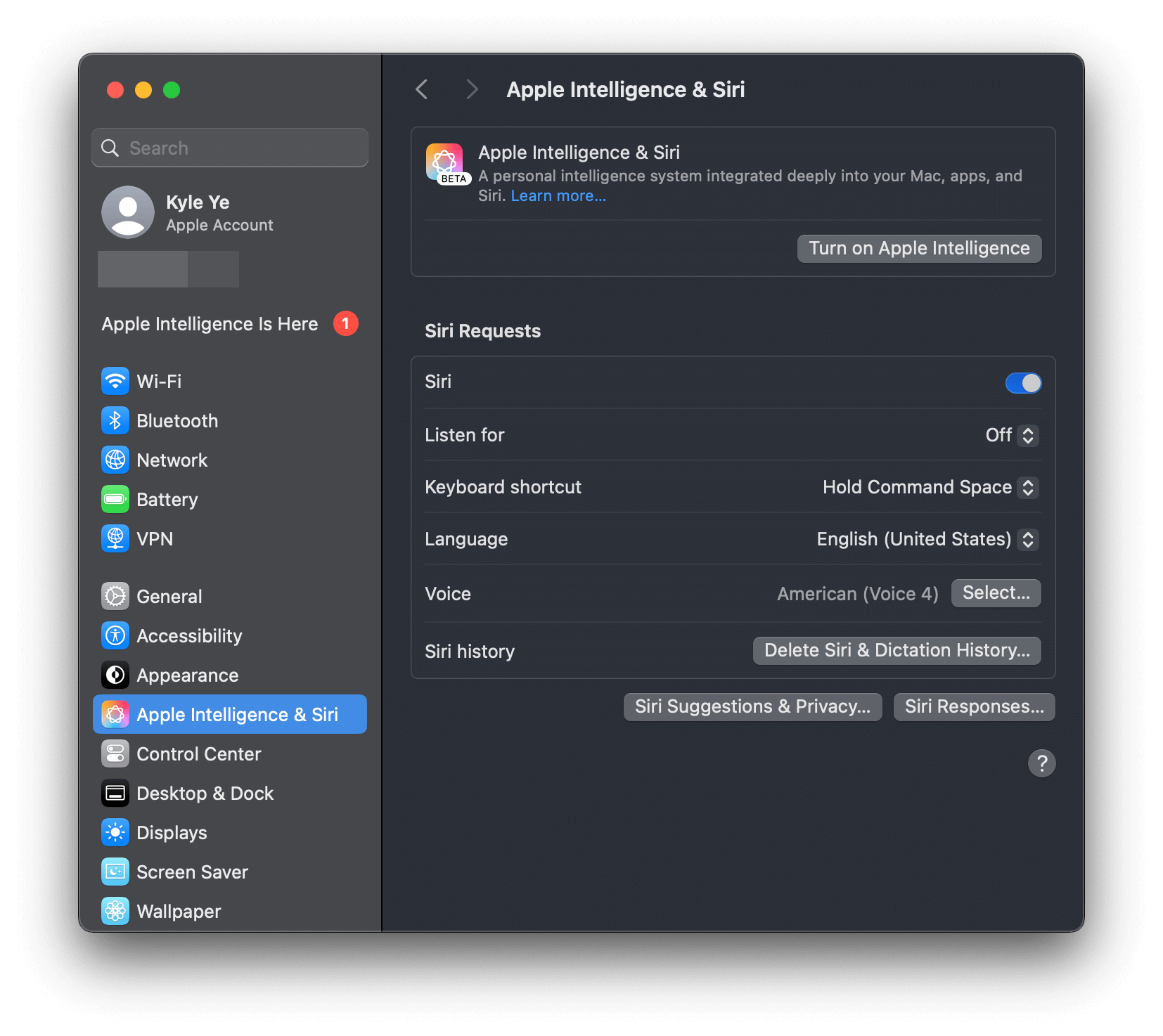
- 前往 Setting.app 并选择“Apple Intelligence & Siri”,点击“Join Apple Intelligence Waitlist”按钮。
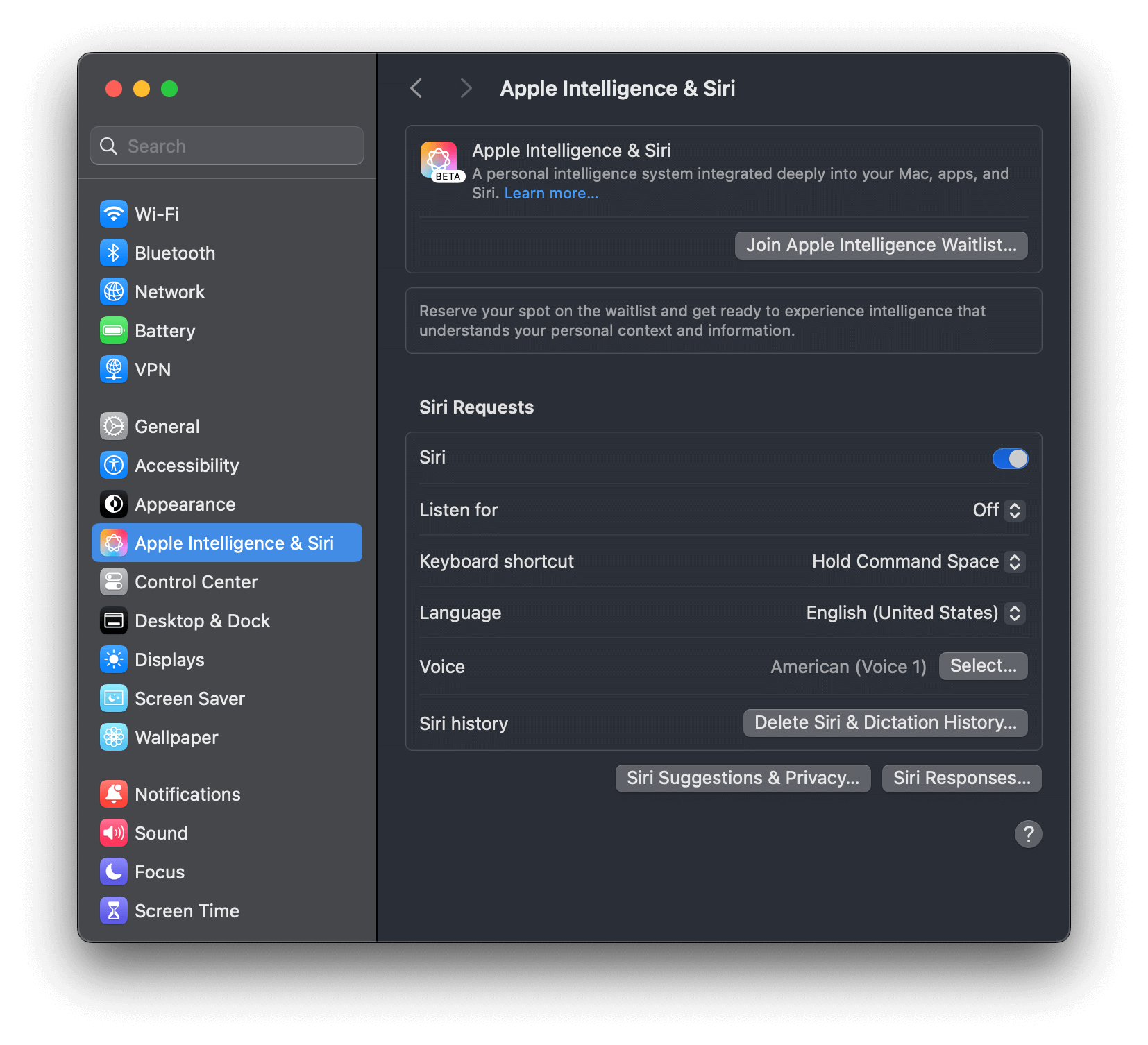
- 您会看到“已加入等待列表”标签,请等待一段时间。
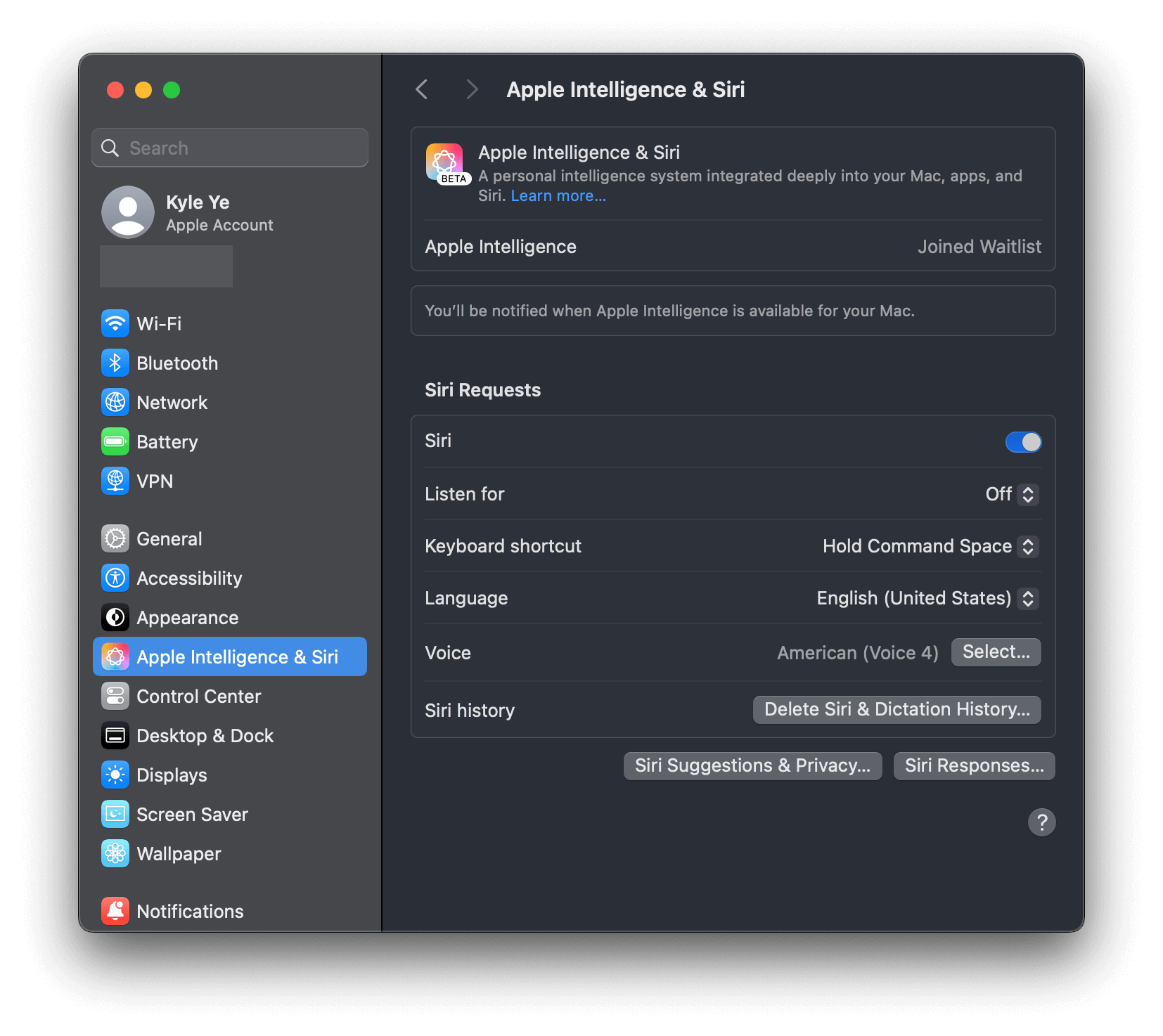
- 您将看到“Preparing”标签,并等待一段时间。
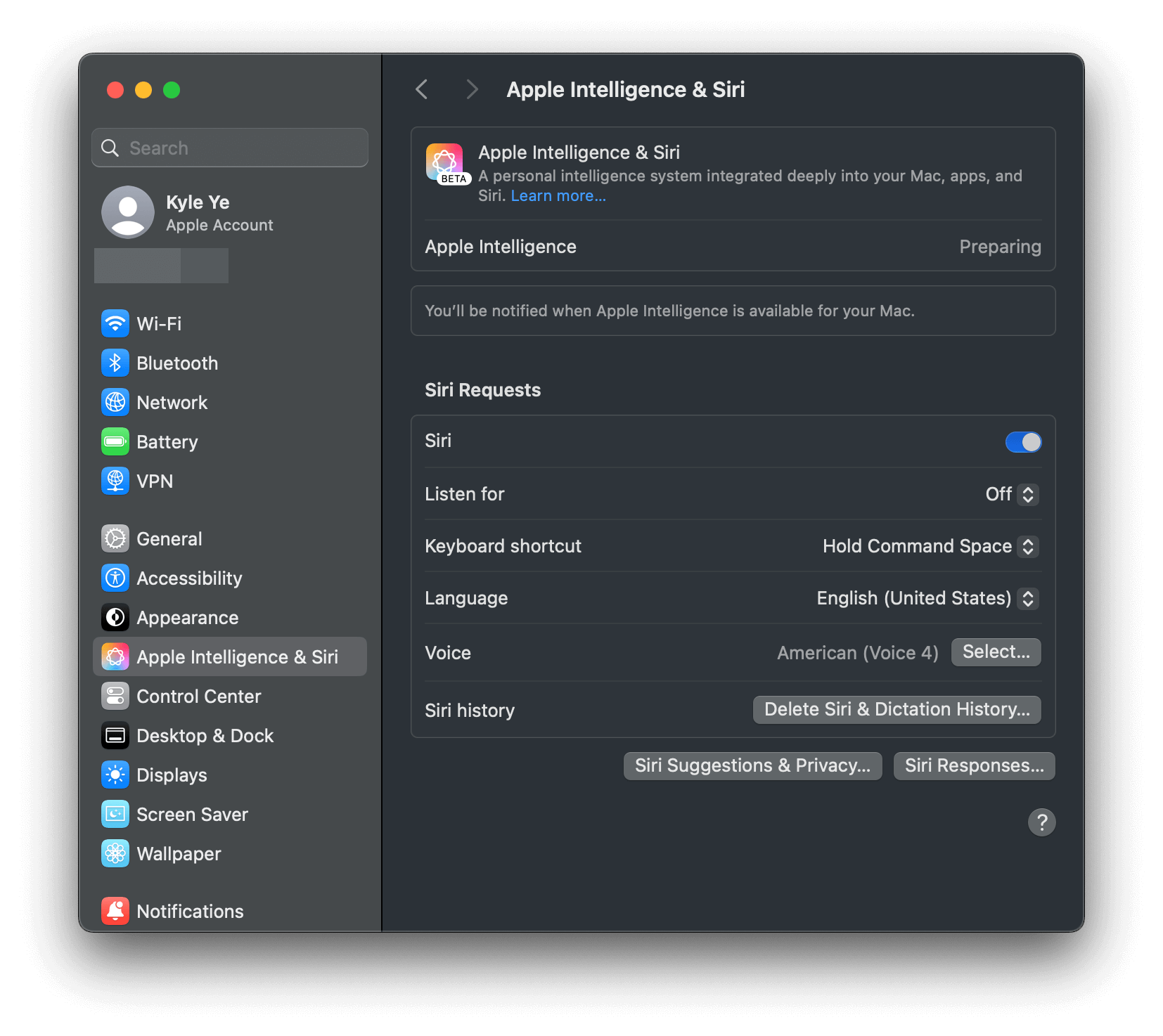
- 您将收到“Apple Intelligence 已上线”通知。
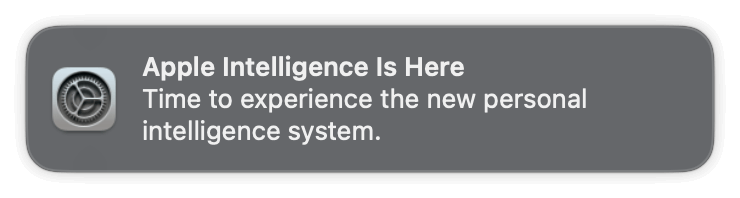
- 现在您可以开启 Apple Intelligence 以使用它。
常见问题解答
- 操作系统更新后,“资格覆盖”(Eligibility Override)是否仍然有效?
可能有效。操作系统更新后,您无需再次执行“资格覆盖”的步骤。
但 Apple 未来可能会更改资格机制,因此无法保证在操作系统更新后仍然有效。
- 为什么设置中没有 Apple Intelligence?
Apple Intelligence 仅在 macOS 15.1 及更高版本上可用。
- 为什么设置中没有与 ChatGPT 相关的选项?
ChatGPT 集成仅在 macOS 15.2 及更高版本上可用。
- 为什么启用 Apple Intelligence 后,Siri 仍然使用百度的服务(与中国相关)?
Siri 的搜索引擎由您的地区语言设置和网络环境决定。请参阅互联网上的其他资源以获取适当的网络代理配置。
例如:https://github.com/VirgilClyne/iRingo
- Apple Intelligence 卡在下载阶段。
请在禁用 SIP 后尝试禁用并删除 AssetsV2 文件夹,然后重新启用 SIP。
# Disable SIP (Run on RecoveryOS mode)
csrutil disable
csrutil authenticated-root disable
# Reboot into normal macOS
# Turn off Apple Intelligence in settings
# Run on normal macOS
sudo rm -rf /System/Library/AssetsV2/*
# Enable SIP (Run on RecoveryOS mode)
csrutil enable
csrutil authenticated-root enable
# Turn on Apple Intelligence in settings to download it again (com.apple.MobileAsset.UAF.FM.GenerativeModels)
参见 #62。
- 为什么我可以在 Apple Intelligence 中使用 ChatGPT?
这可能是由网络问题引起的。如果您位于不支持的地区,请确保使用全球网络代理或其他手段来访问该服务。
- 对于 Shadowrocket,请使用全局代理模式。
- 对于其他代理工具,请参阅其官方文档。
[!NOTE] 仅代理 Web 的网络流量是不够的。请在操作系统或本地网络(路由器)层面进行代理。
您可以直接启动终端并运行
ping google.com或curl cip.cc来验证您的代理是否正常工作。(警告:cip.cc是第三方服务。请自行酌情使用。)有关更多详细信息,请参见 #60。
相关链接
-
https://gist.github.com/Kyle-Ye/4ad1aa92df3a31bd812487af65e16947
-
https://gist.github.com/unixzii/6f25be1842399022e16ad6477a304286
Star History
许可证
MIT。详见 LICENSE 文件。