

OmniDocBench AMD Windows





中文文档 · Architecture · Pitfalls KB · AGENTS.md · Governance · Release
Setting up OmniDocBench CDM took us 20+ debugging sessions. This repo distills them into one command.
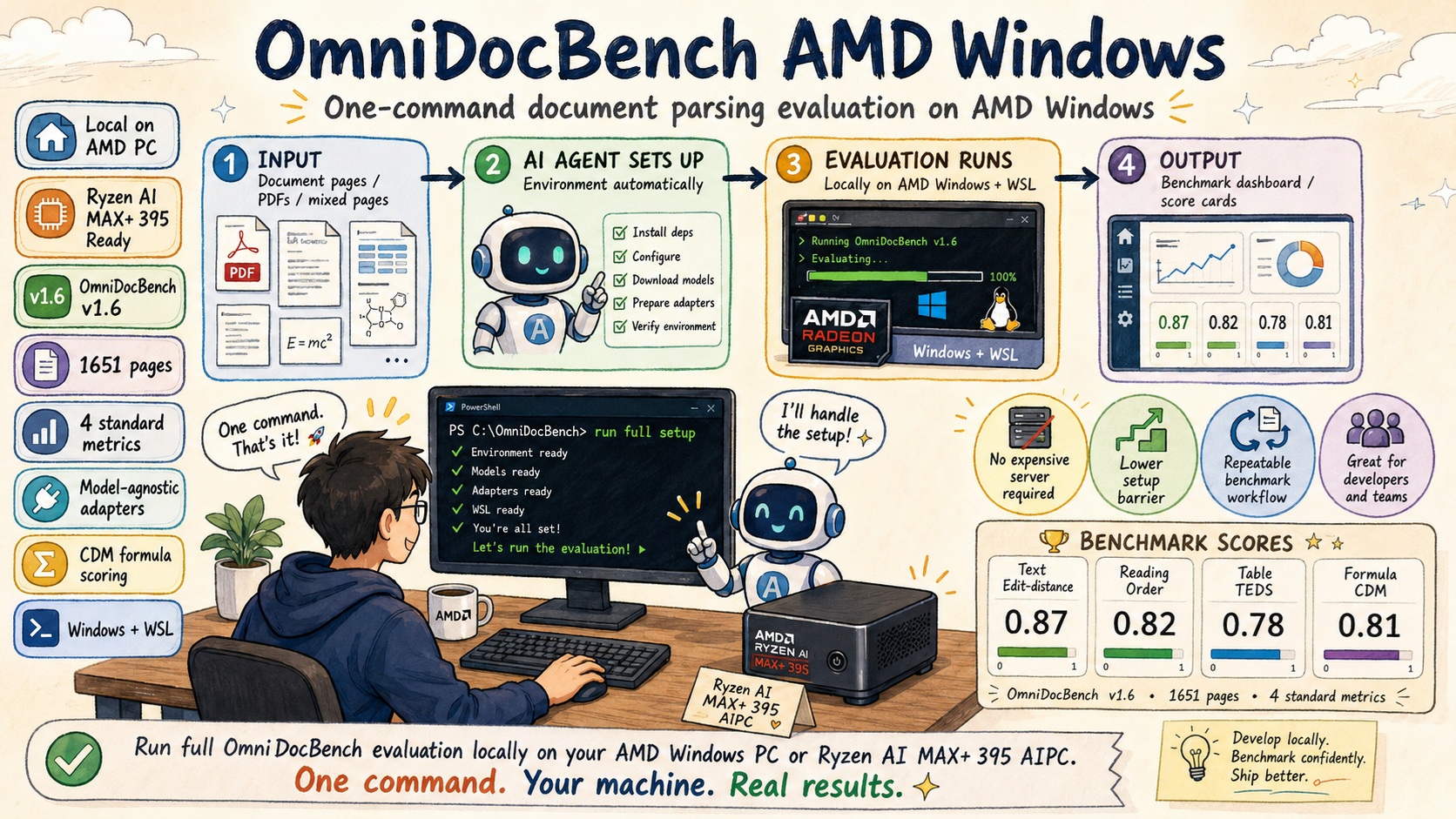
One unified entry point for a full OmniDocBench v1.6
evaluation (1651 pages) on Windows + AMD Radeon GPUs (ROCm/HIP) — all four
standard metrics (text Edit-distance, reading-order Edit-distance, table TEDS,
formula CDM) behind three formal profiles and a complete evidence pack.
"One command" means one orchestrator (scripts\reproduce.ps1); the human may
still be needed for first-run downloads, UAC/driver prompts, WSL or a reboot
(see the ⚠️ gates in AGENTS.md) — it never silently pretends to
be unattended.
What is verified today: PaddleOCR-VL-1.6 on a Radeon 8060S (gfx1151) is the
validated one-command reference profile, with a full-set result labelled
validated resumed (not clean-room). Scoring and adapter output contracts
are model-agnostic; MinerU uses a documented adapter workflow with its own
human-intervention gate (Python 3.12 + ROCm torch). See
docs/hardware-support.md and the
evidence levels.
| Model | Backend | Run | Coverage | Text Edit-dist ↓ | Reading-order Edit-dist ↓ | Table TEDS ↑ | Formula CDM ↑ | Evidence |
|---|---|---|---|---|---|---|---|---|
| PaddleOCR-VL-1.6 1.6 | llama.cpp GGUF (ROCm/HIP) | validated resumed | 0.9988 | 0.0353 | 0.1293 | 92.9792 | 96.5605 | docs/reproduction-full1651-hip-2026-08-06.md |
| PaddleOCR-VL-1.6 1.6 | llama.cpp GGUF (ROCm/HIP) | validated resumed | 0.9988 | 0.0354 | 0.1295 | 92.9766 | 96.6490 | docs/reproduction-full1651-hip-2026-08-03.md |
| PaddleOCR-VL-1.6 1.6 | llama.cpp GGUF (ROCm/HIP) | smoke | 1.0000 | 0.0143 | — | 100.0000 | 99.3280 | docs/reproduction-hip-smoke-2026-08-02.md |
| MinerU2.5-Pro-2605-1.2B 2605-1.2B | llama.cpp GGUF (HIP) | validated resumed | — | 0.0373 | 0.1225 | 93.1100 | 97.0100 | docs/benchmarks/leaderboard-evidence-2026-08-01.md |
| MinerU 3.4.4 3.4.4 | ROCm PyTorch + ONNX DirectML | validated resumed | — | 0.0566 | 0.1531 | 82.0400 | 83.3900 | docs/benchmarks/mineru-sample81-gate-2026-08-01.md |
| PaddleOCR-VL-1.6 1.6 | llama.cpp GGUF (ROCm/HIP) | validated resumed | 0.9988 | 0.0349 | 0.1288 | 94.0900 | 97.3600 | docs/release-paddleocr-vl-1.6-amd-windows-2026-07-16.md |
| PaddleOCR-VL-1.6 1.6 | llama.cpp GGUF (ROCm/HIP) | validated resumed | 0.9988 | 0.0340 | 0.1282 | 94.3222 | 96.9219 | docs/windows-native-cdm-verification-2026-07-11.md |
| PaddleOCR-VL-1.6 1.6 | llama.cpp GGUF (ROCm/HIP), official doc_parser engine | validated resumed | 0.9988 | 0.0344 | 0.1295 | 94.2393 | 96.5022 | docs/release-paddleocr-vl-1.6-amd-windows-2026-07-16.md |
Measured results
The table above is generated from the single source of truth
benchmarks/index.json (see
docs/benchmarks/); hand-edited benchmark numbers drift and
are rejected in CI. Metric conventions: text/reading-order Edit-distance and
TEDS/CDM use the raw 0-1 metric_result.json values (displayed 0-100); "Run"
labels the evidence level:
| Level | Meaning |
|---|---|
validated resumed | Full-set run resumed from the repo's own artifacts with provenance-verified inputs; not yet a clean-room run |
clean-room | Full 1651-page run on a fresh checkout (requires the Release Gate; none published yet) |
independent | Same, executed by a second machine (none published yet) |
smoke | 10-page acceptance evidence, not a benchmark |
PaddleOCR-VL-1.6 rows: llama.cpp GGUF (ROCm/HIP) on this machine (AI MAX+ 395 /
Radeon 8060S). MinerU rows use quick-match CDM; MinerU2.5 numbers are
cross-checked against the MinerU-ROCm windows-hip model card (1e-6) and the
MinerU 3.4.4 pipeline numbers are validated by a 130-page stratified-sample
gate (verdict ACCEPT). PaddleOCR-VL official-engine comparison (official-local
Formula CDM 96.5022; one deterministic VLM-500 page tracked upstream as
PaddleOCR issue #18248):
see the evidence docs.
Reproduction thresholds: Text Edit-dist < 0.10, Reading-order < 0.20, TEDS > 85, CDM > 85 (in raw
metric_result.json, TEDS/CDM correspond to> 0.85). G4 inference speedup: 1.7x (27-page stratified benchmark, 9 categories, 0 structural mismatches) — the defaultvlm_max_workers=8in PaddleOCR-VL-ROCm enables it automatically. Overall = (Text accuracy + CDM + TEDS) / 3, where Text accuracy = (1 − Edit_dist) × 100. Reading order is excluded from Overall (layout metric, not content accuracy).
System Requirements
| Component | Minimum | Recommended |
|---|---|---|
| OS | Windows 11 (WSL2) | Same |
| GPU | AMD Radeon with ROCm/HIP support | Radeon 8060S / RX 7900 XT+ |
| GPU VRAM | 2 GB (layout ONNX) + VLM model size (~1.7 GB GGUF + ctx/mmproj) | 8 GB+ |
| RAM | 16 GB | 32 GB+ |
| Disk | ~50 GB (dataset ~3 GB + GGUF 1.7 GB + TeX Live ~5 GB + IM7 + WSL rootfs) | 100 GB SSD |
| CPU cores | 4 (TEDS/CDM workers scale with cores) | 8+ |
| WSL | Ubuntu 22.04 (rootfs import or Store) | Same |
| Python | 3.10 or 3.11 (not 3.12/3.13 — OmniDocBench breaks) | 3.11 |
| Python environment | uv | Latest stable |
| PowerShell | Windows PowerShell 5.1 (built in) or PowerShell 7+ | Same |
Wall-clock estimates for the full 1651-page run: Step 1 (dataset download) ~15-20 min on China networks; Step 2 (CDM environment) ~30 min (TeX Live is the bulk); Step 3 (adapter inference) depends on GPU (CPU ~hours, Radeon HIP ~tens of minutes); Step 4 (scoring) ~5 min (Edit_dist+TEDS) + ~20-30 min (CDM, per-formula LaTeX).
Measured end-to-end timings and resource data from the reference machine
(Ryzen AI MAX+ 395 + Radeon 8060S + 128 GB unified memory):
docs/benchmarks/strix-halo-ai-max395.md.
Verified result on a weaker machine (Radeon 860M, 200-page CPU run)
On 2026-07-26, a Ryzen AI 7 PRO 350 / Radeon 860M machine completed an exact 200-page CPU fallback run. This is machine-capability evidence, not a 1651-page leaderboard result.
| Metric | Verified 200-page result |
|---|---|
| Overall (official notebook aggregation) | 96.6362 |
| Text Edit-distance | 0.02446 |
| Reading-order Edit-distance | 0.11668 |
| Table TEDS | 96.2597 |
| Formula CDM | 96.0949 |
Windows and WSL shared metrics were identical after deterministic single-worker
scoring; CDM/TEDS recorded zero timeout, error, or exception cases. Commands,
denominators, raw values, limitations, and hashes are in
docs/reproduction-cpu-200-2026-07-26.md.
The Radeon 860M (gfx1152) cannot run the tested official Windows HIP llama.cpp
binaries: b9637 and b10107 fail with ROCm error: invalid device function. Use
-Variant cpu on this GPU class unless you have a gfx1152-compatible build.
This forced the verified run to fall back to CPU. The Windows HIP packaging
gap has been reported upstream as
ggml-org/llama.cpp#26127;
local reproduction details are in
docs/llama-cpp-radeon-860m-gfx1152-issue-draft-2026-07-26.md.
Quick Start
Clone and run one of the three reproduction profiles. Each profile is a
declarative definition (name, backend, pages, prediction dir, manifests,
scoring configs, save name, port, coverage and failed-page budgets, metric
thresholds) under scripts/profiles/; reproduce.ps1 is a generic
profile-driven orchestrator, so no path or stage is duplicated per profile.
git clone https://github.com/AIwork4me/omnidocbench-amd-windows
cd omnidocbench-amd-windows
The profile command is the authoritative dependency bootstrap. Its
environment.mirrors stage runs scripts\detect-mirrors.ps1; only the next
environment.python stage consumes mirrors.json and locks\manifest.json
by calling the real Invoke-UvCatalogSync helper. It tries the fixed uv
sources in this order:
pypi—https://pypi.org/simpletuna—https://pypi.tuna.tsinghua.edu.cn/simplealiyun—https://mirrors.aliyun.com/pypi/simple
Each candidate has its own tracked, single-source lock. Every fallback attempt
runs exactly uv sync --locked --all-groups against the matching lock; normal
source fallback never regenerates or edits any lock. Do not work around a lock
mismatch with --frozen, an unlocked sync, or a hand-edited lock. See
docs/pitfalls.md#uv-lock-mirror-mismatch
if a strict sync reports that the lockfile needs to be updated.
快速环境验证 — quick environment verification (CPU)
powershell -ExecutionPolicy Bypass -File scripts\reproduce.ps1 `
  -Profile cpu-smoke-10
Ten fixed CPU pages, Windows Edit-distance/TEDS plus WSL CDM, 100% prediction
coverage, resumable evidence under outputs/reproduction/cpu-smoke-10/. This
is a capability smoke test, not a leaderboard result.
快速 AMD GPU 验证 — quick AMD GPU verification
powershell -ExecutionPolicy Bypass -File scripts\reproduce.ps1 `
  -Profile hip-smoke-10
Ten fixed pages on the HIP llama.cpp backend with an automatic backend proof: variant markers, HIP binary evidence, locked tag, GPU offload and HIP/ROCm log evidence. No CPU fallback: if the proof or preflight fails, the profile fails. Windows metrics plus WSL CDM, 100% prediction coverage. Run this before starting a multi-hour full benchmark.
AMD GPU 全量 1651 页评测 — full 1651-page AMD GPU benchmark
powershell -ExecutionPolicy Bypass -File scripts\reproduce.ps1 `
  -Profile paddleocr-vl-hip-full-1651
The formal full benchmark: PaddleOCR-VL-1.6 lightweight pipeline, locked
OmniDocBench v1.6 dataset (exactly 1651 pages), HIP backend with backend
proof, all four standard metrics (text Edit-distance, reading-order
Edit-distance, table TEDS, formula CDM), mandatory WSL CDM, strict acceptance
(≥99.8% coverage, ≤2 failed pages, manifest/stats/result binding) and a
complete evidence pack under
outputs/reproduction/paddleocr-vl-hip-full-1651/.
Plan for hours. WSL CDM remains the default reference path. HIP support
depends on whether the locked binary covers your GPU architecture — the
Radeon 860M/gfx1152 class is not a supported locked HIP path (use
-Variant cpu there; see the Radeon 860M note above). Smoke results are
never leaderboard scores; full results must clear the strict evidence gates
documented in docs/architecture.md.
Machine-verified on a Ryzen AI MAX+ 395 / Radeon 8060S (2026-08-06): the full
profile passed officially — 1651 pages selected, 1649/1651 usable (0.9988),
2 budgeted peg-native failures (tracked upstream as
PaddlePaddle/PaddleOCR#18248),
empty predictions accepted for the dataset's genuinely empty-GT pages; scores
text 0.035251 / reading-order 0.129328 / TEDS 0.929792 (Windows) and CDM
0.965605 (WSL). Full record:
docs/reproduction-full1651-hip-2026-08-06.md.
An earlier validated-resumed record (2026-08-03) is at
docs/reproduction-full1651-hip-2026-08-03.md.
Use -Resume only after an interrupted run: it re-checks the input
fingerprint (profile, lock, manifest, configs, pipeline commit, repo state)
and resumes inference per page with --skip-existing, so completed pages are
never re-processed. The first run refuses existing profile artifacts; a fresh
run that must replace old predictions uses -ForceInference, which deletes
only this profile's predictions, owned manifest and save-name-scoped results.
powershell -ExecutionPolicy Bypass -File scripts\reproduce.ps1 -ListProfiles
powershell -ExecutionPolicy Bypass -File scripts\reproduce.ps1 -Profile cpu-smoke-10 -DryRun
See docs/upstream-lock.md for the executable input lock.
If the locked dataset/GGUF/layout files already exist in another checkout, avoid repeating bulk downloads while keeping inference and scoring fresh:
powershell -ExecutionPolicy Bypass -File scripts\reproduce.ps1 `
  -Profile cpu-smoke-10 `
  -SeedFrom "C:\path\to\existing\locked-checkout" `
  -SkipCdmSetup
The seed source and destination are both fully lock-verified; predictions,
scores, environments, checkouts, and .env.local are never copied.
Phase-by-phase command reference
This is a reference for inspecting or rerunning downstream stages, not a
second mirror-aware dependency bootstrap. Install uv, then use a profile
command: reproduce.ps1 runs environment.mirrors before
environment.python, where Invoke-UvCatalogSync consumes mirrors.json
and locks\manifest.json and creates .venv. A standalone root uv sync
does not consume that candidate/lock catalog. Each later setup.* remains
idempotent; run its matching verify.*. All commands assume the repo root
as CWD.
# Step 0: authoritative environment bootstrap + WSL
winget install --id astral-sh.uv -e
powershell -ExecutionPolicy Bypass -File scripts\reproduce.ps1 `
  -Profile cpu-smoke-10
# The profile's environment.python stage owns the strict dependency sync.
# The remaining commands are stage references, not follow-on requirements
# after a successful profile run.
powershell -ExecutionPolicy Bypass -File scripts\wsl-ensure.ps1
# Official Windows HIP binaries omit Radeon 860M/gfx1152, so select CPU there.
$gpuNames = @(Get-CimInstance Win32_VideoController | ForEach-Object Name)
$useCpu = ($gpuNames -match 'Radeon.*860M') -or -not ($gpuNames -match 'AMD|Radeon')
$variant = if ($useCpu) { 'cpu' } else { 'hip' }
powershell -ExecutionPolicy Bypass -File scripts\preflight.ps1 -CdmPath Wsl -Variant $variant
$repoWsl = (wsl -d Ubuntu2204 -- wslpath -a $PWD.Path).Trim()

# Step 1: OmniDocBench code + dataset
powershell -ExecutionPolicy Bypass -File eval-infra\01-omnidocbench\setup.ps1
powershell -ExecutionPolicy Bypass -File eval-infra\01-omnidocbench\verify.ps1

# Step 2: CDM environment (WSL compatibility/reference path)
wsl -d Ubuntu2204 bash "$repoWsl/eval-infra/02-cdm-environment/setup.sh"
wsl -d Ubuntu2204 bash "$repoWsl/eval-infra/02-cdm-environment/verify.sh"

# Step 3: reference adapter (PaddleOCR-VL-1.6)
# CPU users can choose the 200-page path below instead of this full 1651-page run.
powershell -ExecutionPolicy Bypass -File adapters\paddleocr-vl-1.6\01-vlm-server\setup.ps1 -Variant $variant
powershell -ExecutionPolicy Bypass -File adapters\paddleocr-vl-1.6\01-vlm-server\verify.ps1
powershell -ExecutionPolicy Bypass -File adapters\paddleocr-vl-1.6\02-layout-model\setup.ps1
powershell -ExecutionPolicy Bypass -File adapters\paddleocr-vl-1.6\02-layout-model\verify.ps1
powershell -ExecutionPolicy Bypass -File adapters\paddleocr-vl-1.6\00-install-deps\setup.ps1
.\.venv\Scripts\python.exe adapters\paddleocr-vl-1.6\run_adapter.py `
    --img-dir  eval-infra\01-omnidocbench\data\images `
    --out-dir  predictions\paddleocrvl_rocm

# Step 4: scoring + final verification
powershell -ExecutionPolicy Bypass -File eval-infra\03-scoring\score.ps1
powershell -ExecutionPolicy Bypass -File eval-infra\03-scoring\verify.ps1 `
  -WindowsOnly -SaveName paddleocrvl_rocm_quick_match
wsl -d Ubuntu2204 bash "$repoWsl/eval-infra/03-scoring/score-cdm.sh" v16-cdm.yaml predictions/paddleocrvl_rocm
powershell -ExecutionPolicy Bypass -File eval-infra\03-scoring\verify.ps1 `
  -WslOnly -RequireCdm -SaveName paddleocrvl_rocm_quick_match
powershell -ExecutionPolicy Bypass -File scripts\full-verify.ps1 `
  -PredictionDir predictions\paddleocrvl_rocm `
  -ScoreSaveName paddleocrvl_rocm_quick_match
Constrained-hardware 200-page path
For constrained hardware, v16-cpu-200.yaml and v16-cdm-cpu-200.yaml provide
an explicit 200-page capability path. Choose this instead of the full Step 3
inference, provision the CPU server, and stop deterministically after 200 images:
powershell -ExecutionPolicy Bypass -File adapters\paddleocr-vl-1.6\01-vlm-server\setup.ps1 -Variant cpu
powershell -ExecutionPolicy Bypass -File adapters\paddleocr-vl-1.6\01-vlm-server\verify.ps1
powershell -ExecutionPolicy Bypass -File adapters\paddleocr-vl-1.6\02-layout-model\setup.ps1
powershell -ExecutionPolicy Bypass -File adapters\paddleocr-vl-1.6\02-layout-model\verify.ps1
powershell -ExecutionPolicy Bypass -File adapters\paddleocr-vl-1.6\00-install-deps\setup.ps1
.\.venv\Scripts\python.exe adapters\paddleocr-vl-1.6\run_adapter.py `
    --img-dir eval-infra\01-omnidocbench\data\images `
    --out-dir predictions\paddleocrvl_cpu_860m_200 `
    --max-pages 200
.\.venv\Scripts\python.exe scripts\build_prediction_subset.py `
    --full-manifest eval-infra\01-omnidocbench\data\OmniDocBench.json `
    --pred-dir predictions\paddleocrvl_cpu_860m_200 `
    --output eval-infra\01-omnidocbench\data\OmniDocBench_cpu_200.json `
    --limit 200
.\.venv\Scripts\python.exe scripts\validate_predictions.py `
    --manifest eval-infra\01-omnidocbench\data\OmniDocBench_cpu_200.json `
    --pred-dir predictions\paddleocrvl_cpu_860m_200 `
    --min-coverage 1.0
powershell -ExecutionPolicy Bypass -File eval-infra\03-scoring\score.ps1 `
  -Config v16-cpu-200.yaml
For WSL CDM, pass the same prediction directory and CDM config to
score-cdm.sh, then bind final verification to the exact artifacts:
wsl -d Ubuntu2204 bash "$repoWsl/eval-infra/03-scoring/score-cdm.sh" `
  v16-cdm-cpu-200.yaml `
  predictions/paddleocrvl_cpu_860m_200
powershell -ExecutionPolicy Bypass -File scripts\full-verify.ps1 `
  -PredictionDir predictions\paddleocrvl_cpu_860m_200 `
  -PredictionManifest eval-infra\01-omnidocbench\data\OmniDocBench_cpu_200.json `
  -ScoreSaveName paddleocrvl_cpu_860m_200_quick_match
Never label this subset as a full-set score. The verified command provenance
and limitations are in
docs/reproduction-cpu-200-2026-07-26.md.
The ten-page smoke uses v16-cpu-smoke-10.yaml and
v16-cdm-cpu-smoke-10.yaml; use the single entry point above rather than
assembling those commands manually.
Windows-native CDM is supported when patches/omnidocbench/windows-cdm.patch
has been applied by eval-infra/01-omnidocbench/setup.ps1 and
eval-infra/02-cdm-environment/verify-windows.ps1 passes. This optional path
requires native TeX Live, ImageMagick, and Ghostscript. WSL CDM remains the
compatibility/reference path; users choosing WSL do not need native-CDM
verification. scripts/full-verify.ps1 runs the native check only with the
explicit -WindowsCdm opt-in. Optional native-CDM verification is separate
from the WSL quick-start path.
Prefer the agent-driven flow? Point Codex, Claude Code, OpenCode, or any
agent that reads AGENTS.md at this repo and say "按 AGENTS.md 搭建" /
"Read AGENTS.md and execute the setup flow." Full step-by-step with exception handling:
AGENTS.md.
Why this repo exists
Bringing OmniDocBench v1.6 up on AMD Windows hits 20+ landmines: restrictive
networks and mirror hunting, WSL Store unavailable, \mathcolor rendering black, ImageMagick 6
flattening color formulas to grayscale, two TeX Live trees disagreeing, Windows
codepage corrupting CJK JSON, and more. This repo distills every fix into
idempotent scripts plus a symptom-indexed knowledge base and an
AI-agent orchestration file so the next person (or agent) reproduces it
without re-debugging.
Architecture
Three layers. Only adapters/ is per-model; everything else is shared.
eval-infra/        ← model-agnostic infrastructure, set up once
  01-omnidocbench/    OmniDocBench code + v1.6 dataset (1651 pages) + config templates
  02-cdm-environment/ CDM toolchains: native Windows after windows-cdm.patch + verify-windows.ps1, or the WSL compatibility/reference stack
  03-scoring/         score.ps1 (Windows; +CDM with a CDM config after verify-windows.ps1) · score-cdm.sh (+CDM, WSL compatibility/reference) · verify.ps1

adapters/          ← model-specific, one directory per model
  _template/          minimal skeleton to copy
  paddleocr-vl-1.6/   validated reference (ONNX layout + llama.cpp GGUF VLM)
  mineru/             validated reference (MinerU 3.4.4 pipeline, ROCm PyTorch + ONNX DirectML)

scripts/           ← cross-cutting tools
  detect-mirrors.ps1  probe reachable mirrors → mirrors.env + mirrors.json
  verify_uv_lock_variants.py  verify the fixed uv lock catalog and graph
  wsl-ensure.ps1      guarantee a WSL Ubuntu 22.04 distro (handles Store-blocked)
  full-verify.ps1     chain every verify in dependency order

docs/
  pitfalls.md         knowledge base, indexed by symptom (the most valuable file)
  architecture.md     data-flow diagrams + the Windows/WSL boundary
The one architectural fact to remember: CDM has two supported toolchain
paths. Windows-native CDM is the local fast path after windows-cdm.patch is
applied and verify-windows.ps1 passes. WSL CDM remains the
compatibility/reference path with an isolated Linux TeX Live, ImageMagick, and
Ghostscript stack. See docs/architecture.md and
docs/pitfalls.md#posix.
Adapters: add a new model
You only touch adapters/. Every adapter declares an
adapter manifest (adapters/<adapter>/adapter.json) — the safety contract
the orchestrator validates before running any lifecycle stage: repo-relative
script paths inside the adapter dir, no .., backend-proof capability,
resume support, output contract (<image_stem>.md per page, UTF-8,
_run_stats.json) and required env vars. Conformance is enforced by
scripts/validate_adapter_manifest.py and the adapter conformance tests; the
orchestrator only runs lifecycle stages the manifest declares (MinerU skips the
VLM-server stages it does not have).
The scoring layer consumes those .md files and never imports the adapter.
Five steps (full detail in
adapters/_template/README.md):
cp -r adapters/_template adapters/<your-model>- Write
adapter.json(copy the reference manifest) andrun_adapter.py— implementrun_adapter(img_dir, out_dir, server_url)to call your model; writeout_dir/<image_stem>.mdper page atomically. Catch per-page failures so one bad page doesn't abort the run. - Edit
setup.ps1(or split into numbered sub-directories like the reference adapter) to provision weights / start a server. Write machine-local paths to a gitignored.env.local, never into committed code. - Run it (from the repo root):
python adapters\<your-model>\run_adapter.py --img-dir eval-infra\01-omnidocbench\data\images --out-dir predictions\<your-model> - Re-run the scorer unchanged (it only reads the prediction path):
eval-infra\03-scoring\score.ps1; for CDM, usescore.ps1 -Config v16-cdm.yamlafterverify-windows.ps1, or use WSLscore-cdm.sh, then runverify.ps1. For a one-command profile, add ascripts/profiles/*.profile.jsonthat binds your adapter and prediction dir.
Proven examples to copy from:
adapters/paddleocr-vl-1.6/ (ONNX layout +
llama.cpp GGUF VLM; includes the official-engine scoring notes) and
adapters/mineru/ (MinerU 3.4.4 pipeline, ROCm PyTorch +
ONNX DirectML).
Troubleshooting
Everything we hit, organized by symptom (Root Cause → Fix → Verify):
docs/pitfalls.md. Start at the table of contents and find
your symptom. The single most-deceptive failure is CDM F1 = 0 with no error
printed — everything succeeds yet the score is zero; the decision tree at
docs/pitfalls.md#cdm-zero resolves it.
For the agent-driven flow and the exception lookup table, see
AGENTS.md.
Scope
In scope: OmniDocBench v1.6, AMD Radeon / Windows, llama.cpp-served models, local single-machine setups, the four standard metrics.
Out of scope (by design — see spec §8): Docker-based setups (kept as a fallback, not the main path), OmniDocBench v1.5 (config template provided, not automated), and hosted validation of WSL, AMD GPUs, model/data downloads, CDM, scoring, or benchmarks. GitHub Actions runs deterministic tests and script syntax only; physical-machine evidence remains mandatory for hardware claims.
License
This repository's original code is Apache-2.0 under LICENSE.
Downloaded OmniDocBench code/dataset, PaddleOCR/PaddleOCR-VL model weights,
PP-DocLayoutV3, llama.cpp binaries, and system packages remain governed by
their respective upstream licenses and terms. Generated checkouts, datasets,
models, predictions, and results are gitignored and are not relicensed here.
Security reporting is documented in SECURITY.md; community
expectations are in CODE_OF_CONDUCT.md.