
Visual Studio Code 拼写检查器
一个适用于代码和文档的基础拼写检查器。
此拼写检查器的目标是在保持低误报率的同时,帮助捕获常见的拼写错误。
支持进一步开发




功能
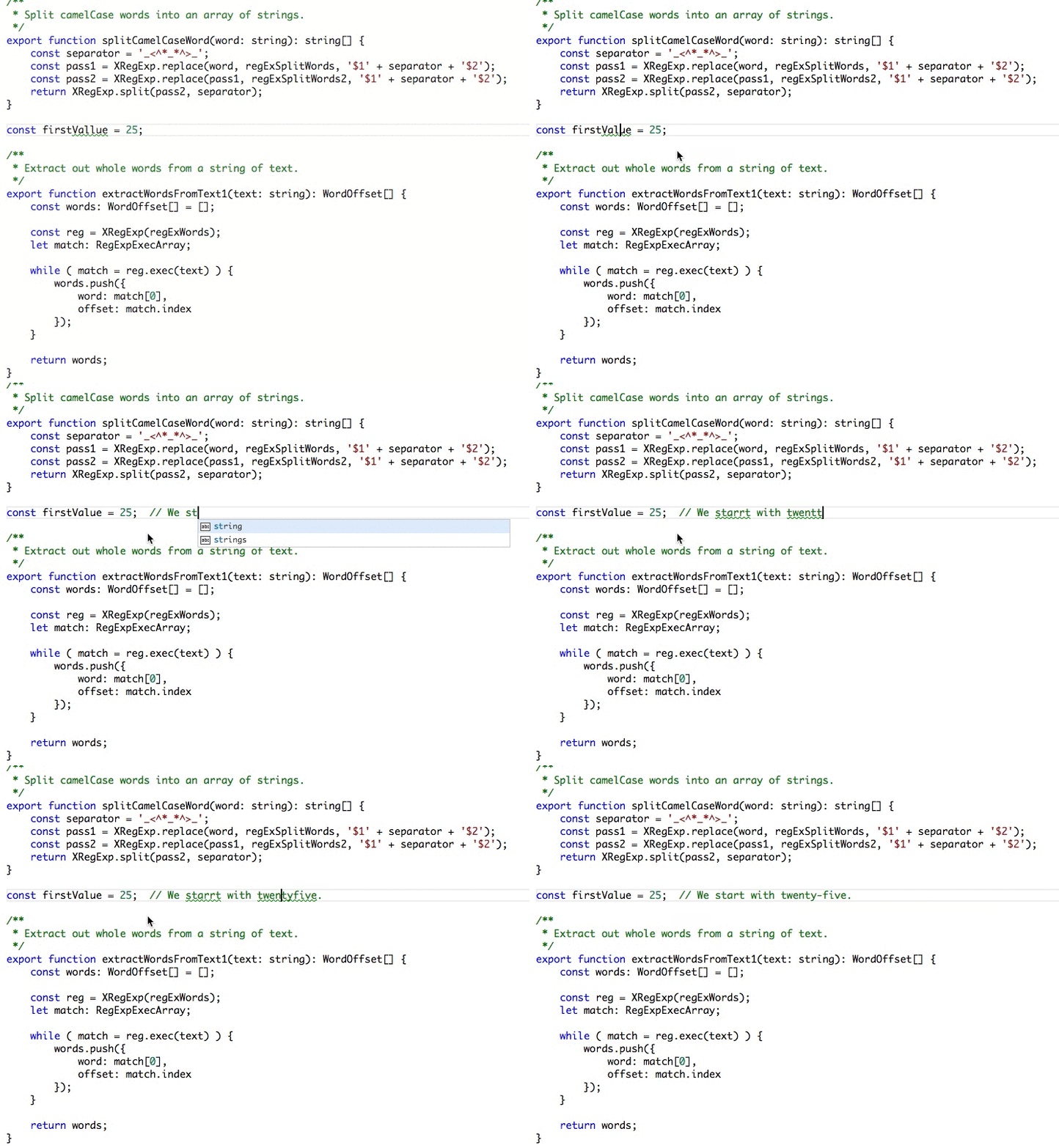
加载 TypeScript、JavaScript、文本等文件。词典文件中未收录的单词将显示波浪形下划线。
示例
建议
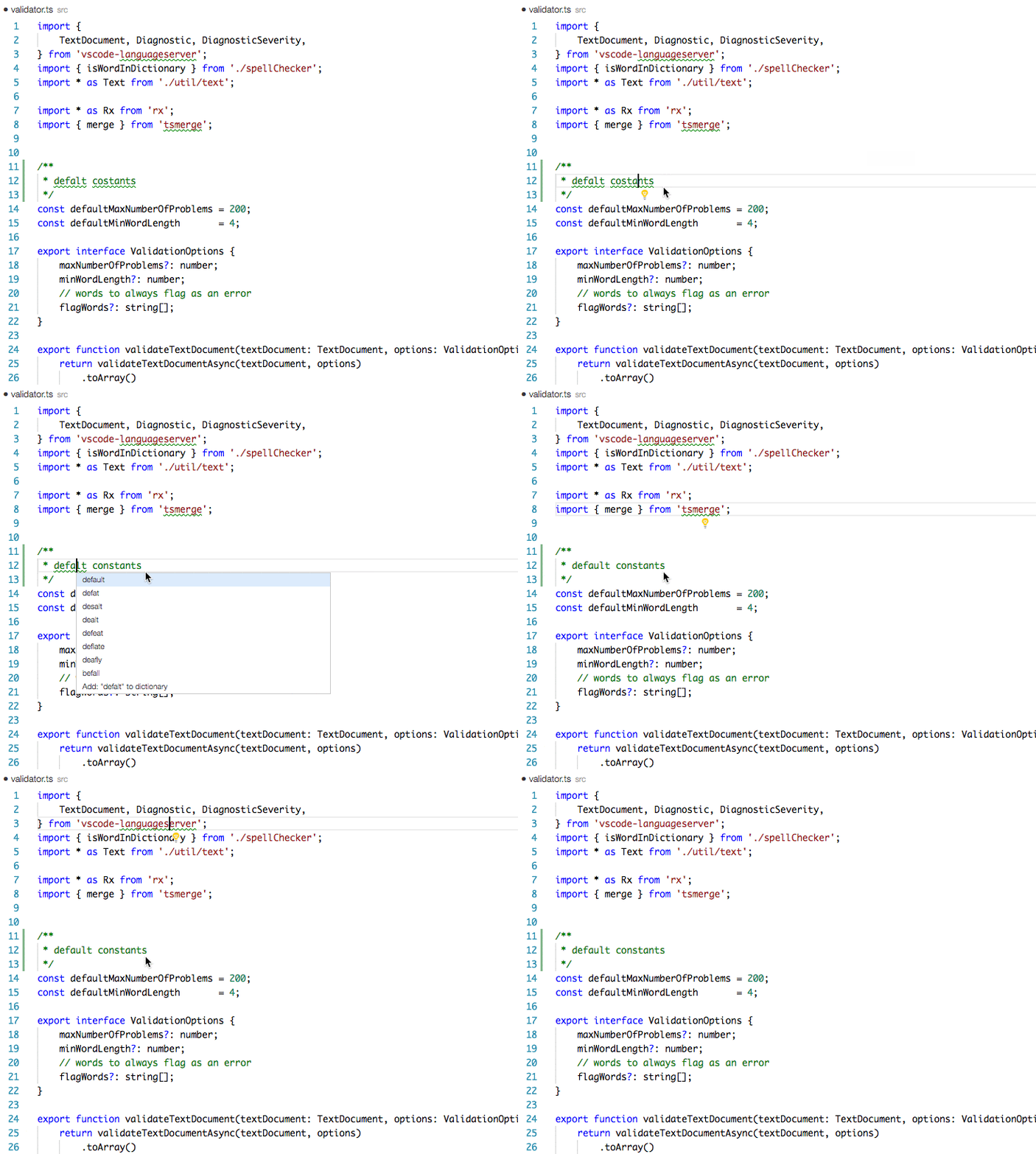
要查看建议列表:
将光标定位在单词中后,执行以下任一操作应会显示建议列表:
- 点击左侧边栏中的 💡(灯泡)。
Quick Fix编辑器操作命令:- Mac:
⌘+.或Cmd+. - PC:
Ctrl+.
- Mac:
安装
打开 VS Code,按下 F1 并输入 ext,选择安装,输入 code-spell-checker,按回车并重新加载窗口以启用。
支持的语言
- English (US)
- English (GB) - 通过将
"cSpell.language": "en"更改为"cSpell.language": "en-GB"来启用
附加词典
语言词典
- 古希腊语 - VS Code 的古希腊语词典扩展。
- 阿拉伯语 - VS Code 的阿拉伯语词典扩展。
- 亚美尼亚语 - VS Code 的亚美尼亚语词典扩展。
- 澳大利亚英语 - VS Code 的澳大利亚英语词典扩展。
- 奥地利德语 - VS Code 的奥地利德语词典扩展。
- 巴斯克语 - VS Code 的巴斯克语词典扩展。
- 英式英语 - VS Code 的英式英语词典扩展。
- 英式英语 - VS Code 的英式英语 -ise 词典扩展。
- 保加利亚语 - VS Code 的保加利亚语词典扩展。
- 加拿大英语 - VS Code 的加拿大英语词典扩展。
- 加泰罗尼亚语 - VS Code 的加泰罗尼亚语词典扩展。
- 克罗地亚语 - VS Code 的克罗地亚语词典扩展。
- 捷克语 - VS Code 的捷克语词典扩展。
- 丹麦语 - VS Code 的丹麦语词典扩展。
- 荷兰语 - VS Code 的荷兰语 / Nederlands 词典扩展。
- 世界语 - VS Code 的世界语词典扩展。
- 爱沙尼亚语 - VS Code 的爱沙尼亚语词典扩展。
- 芬兰语 - VS Code 的芬兰语词典扩展。
- 法语 - VS Code 的法语词典扩展。
- 法语 Réforme 90 - VS Code 的法语 Réforme 90 词典扩展。
- 加利西亚语 - VS Code 的加利西亚语词典扩展。
- 德语 - VS Code 的德语词典扩展。
- 希腊语 - VS Code 的希腊语词典扩展。
- 希伯来语 - VS Code 的希伯来语词典扩展。
- 匈牙利语 - VS Code 的匈牙利语词典扩展。
- 印度尼西亚语 - VS Code 的印度尼西亚语词典扩展。
- 意大利语 - VS Code 的意大利语词典扩展。
- 拉丁语 - VS Code 的拉丁语词典扩展。
- 拉脱维亚语 - VS Code 的拉脱维亚语词典扩展。
- 立陶宛语 - VS Code 的立陶宛语词典扩展。
- 马其顿语 - VS Code 的马其顿语词典扩展。
- 蒙古语 - VS Code 的蒙古语词典扩展。
- 挪威语(书面挪威语) - VS Code 的挪威语(书面挪威语)词典扩展。
- 波斯语 - VS Code 的波斯语词典扩展。
- 波兰语 - VS Code 的波兰语词典扩展。
- 葡萄牙语 - VS Code 的葡萄牙语词典扩展。
- 巴西葡萄牙语 - VS Code 的巴西葡萄牙语词典扩展。
- 罗马尼亚语 - VS Code 的罗马尼亚语词典扩展。
- 俄语 - VS Code 的俄语词典扩展。
- 塞尔维亚语 - VS Code 的塞尔维亚语词典扩展。
- 斯洛伐克语 - VS Code 的斯洛伐克语词典扩展。
- 斯洛文尼亚语 - VS Code 的斯洛文尼亚语词典扩展。
- 西班牙语 - Code Spell Checker 的西班牙语插件
- 瑞典语 - VS Code 的瑞典语词典扩展。
- 瑞士德语 - VS Code 的瑞士德语词典扩展。
- Turkish - VS Code 的土耳其语词典扩展。
- Ukrainian - VS Code 的乌克兰语词典扩展。
- Vietnamese - VS Code 的越南语词典扩展。
技术词典
支持的文件类型
- AsciiDoc
- C, C++
- C#
- css, less, scss
- Dart
- Elixir
- Go
- Html
- Java
- JavaScript
- JSON / JSONC
- LaTeX
- Markdown
- PHP
- PowerShell
- Pug / Jade
- Python
- reStructuredText
- Ruby
- Rust
- Scala
- Text
- TypeScript
- YAML
- SQL
启用 / 禁用文件类型
要为某种文件类型 启用 或 禁用 拼写检查:
- 点击状态栏中的拼写检查器状态:

- 在信息屏幕上,点击复选框。

与 camelCase 的配合方式
概念很简单,在将 camelCase 单词与已知英语单词列表进行比对之前,先对其进行拆分。
- camelCase -> camel case
- HTMLInput -> html input -- 注意
I与Input关联,而不是与HTML关联 - snake_case_words -> snake case words
- camel2snake -> camel snake -- (2 被忽略)
全大写单词的特殊情况
有一些特殊情况,用于辅助全大写单词的常见拼写习惯。
尾部的 s、ing、ies、es、ed 会与前面的单词保留在一起。
- CURLs -> curls -- 尾部
s - CURLedRequest -> curled request -- 尾部
ed
注意事项
- 此拼写检查器不区分大小写。它不会捕获诸如 english 应为 English 之类的错误。
- 拼写检查器使用本地词典。它不会将任何内容发送到您的机器之外。
- 词典中的单词可能包含错误,且确实包含错误。
- 存在缺失的单词。
- 仅检查长度超过 3 个字符的单词。"jsj" 不会被检查,而 "jsja" 会被检查,并且由于它不存在于任何词典中,将被标记为错误。
- 所有符号和标点符号均被忽略。
在文档设置中
可以在源代码中添加拼写检查设置。 这有助于解决可能不适用于整个项目的特定文件问题。
所有设置均以 cSpell: 或 spell-checker: 为前缀。
disable-- 关闭代码某一部分的拼写检查器。enable-- 在关闭后重新开启拼写检查器。ignore-- 指定要忽略的单词列表。words-- 指定被视为正确的单词列表,这些单词将出现在建议列表中。locale-- 设置区域设置(示例:cSpell:locale fr,en以使用法语和英语)ignoreRegExp-- 任何匹配正则表达式的文本都不会进行拼写检查。includeRegExp-- 仅检查匹配 includeRegExp 集合的文本。enableCompoundWords/disableCompoundWords-- 允许 / 禁止诸如 "stringlength" 之类的单词。
启用 / 禁用代码部分的检查
可以通过在代码中添加注释来禁用 / 启用拼写检查器。
禁用检查
cSpell:disablespell-checker: disablespellchecker: disablecspell: disable-linecspell: disable-next-line
启用检查
cSpell:enablespell-checker: enablespellchecker: enable
JavaScript 示例
// cSpell:disable
const wackyWord = ['zaallano', 'wooorrdd', 'zzooommmmmmmm'];
/* cSpell:enable */

// Nest disable / enable is not Supported

// spell-checker:disable
// It is now disabled.

var liep = 1;

/* cspell:disable */
// It is still disabled

// cSpell:enable
// It is now enabled

const str = 'goededag'; // <- will be flagged as an error.

// spell-checker:enable <- doesn't do anything

// cSPELL:DISABLE <-- also works.

// if there isn't an enable, spelling is disabled till the end of the file.
const str = 'goedemorgen'; // <- will NOT be flagged as an error.
Markdown 示例
<!--- cSpell:disable --->

This text is not checked.

<!--- cSpell:enable --->

This text is checked.
Ignore
Ignore 允许你指定一个要在文档中忽略的单词列表。
// cSpell:ignore zaallano, wooorrdd
// cSpell:ignore zzooommmmmmmm
const wackyWord = ['zaallano', 'wooorrdd', 'zzooommmmmmmm'];
注意: 使用 ignore 定义的单词将在整个文件中被忽略。
单词
单词列表允许你添加将被视为正确并用作建议的单词。
// cSpell:words woorxs sweeetbeat
const companyName = 'woorxs sweeetbeat';
注意: 使用 words 定义的词语将在整个文件中被使用。
启用 / 禁用复合词
在某些编程语言中,将单词拼接在一起是常见的做法。
// cSpell:enableCompoundWords
char * errormessage;  // Is ok with cSpell:enableCompoundWords
int    errornumber;   // Is also ok.
注意: 复合词检查无法在同一文件中开启/关闭。 文件中的最后一个设置将决定整个文件的值。
排除和包含待检查的文本。
默认情况下,整个文档都会进行拼写检查。
上述的 cSpell:disable/cSpell:enable 允许您屏蔽文档中的某些部分。
ignoreRegExp 和 includeRegExp 使您能够忽略或包含特定的文本模式。
如果未提供标志,则默认会添加标志 gim。
拼写检查器按以下方式工作:
- 查找所有匹配
includeRegExp的文本 - 移除所有匹配
excludeRegExp的文本 - 检查剩余的文本。
排除示例
// cSpell:ignoreRegExp 0x[0-9a-f]+     -- will ignore c style hex numbers
// cSpell:ignoreRegExp /0x[0-9A-F]+/g  -- will ignore upper case c style hex numbers.
// cSpell:ignoreRegExp g{5} h{5}       -- will only match ggggg, but not hhhhh or 'ggggg hhhhh'
// cSpell:ignoreRegExp g{5}|h{5}       -- will match both ggggg and hhhhh
// cSpell:ignoreRegExp /g{5} h{5}/     -- will match 'ggggg hhhhh'
/* cSpell:ignoreRegExp /n{5}/          -- will NOT work as expected because of the ending comment -> */
/*
   cSpell:ignoreRegExp /q{5}/          -- will match qqqqq just fine but NOT QQQQQ
*/
// cSpell:ignoreRegExp /[^\s]{40,}/    -- will ignore long strings with no spaces.
// cSpell:ignoreRegExp Email           -- this will ignore email like patterns -- see Predefined RegExp expressions
var encodedImage = 'HR+cPzr7XGAOJNurPL0G8I2kU0UhKcqFssoKvFTR7z0T3VJfK37vS025uKroHfJ9nA6WWbHZ/ASn...';
var email1 = 'emailaddress@myfancynewcompany.com';
var email2 = '<emailaddress@myfancynewcompany.com>';
注意: ignoreRegExp 和 includeRegExp 应用于整个文件。它们不会开始和停止。
Include 示例
通常你不需要使用 includeRegExp。但如果你混合使用多种语言,它可能会有帮助。
# cSpell:includeRegExp #.*
# cSpell:includeRegExp /(["]{3}|[']{3})[^\1]*?\1/g
# only comments and block strings will be checked for spelling.
def sum_it(self, seq):
    """This is checked for spelling"""
    variabele = 0
    alinea = 'this is not checked'
    for num in seq:
        # The local state of 'value' will be retained between iterations
        variabele += num
        yield variabele
预定义的 RegExp 表达式
排除模式
Urls1 -- Matches urlsHexValues-- Matches common hex format like#aaa,0xfeef,\u0134EscapeCharacters1 -- matches special characters:\n,\tetc.Base641 -- matches base64 blocks of text longer than 40 characters.Email-- matches most email addresses.
包含模式
Everything1 -- By default we match an entire document and remove the excludes.string-- This matches common string formats like '...', "...", and `...`CStyleComment-- These are C Style comments /* */ and //PhpHereDoc-- This matches PHPHereDoc strings.
1. These patterns are part of the default include/exclude list for every file.
自定义
拼写检查器配置可通过 VS Code 首选项或 cspell.json 配置文件进行控制。
优先级顺序:
- Workspace Folder
cspell.json - Workspace Folder
.vscode/cspell.json - VS Code Preferences
cSpellsection.
向工作区词典添加单词
您可以选择将您自己的词汇添加到工作区词典中。最简单的方法是,将光标
放在您希望添加的单词上,当灯泡图标出现时,按 Ctrl+. (windows) / Cmd+. (Mac)。您将看到
建议列表以及添加该单词的选项。
您还可以输入要添加到字典中的单词:F1 add word -- 选择 Add Word to Dictionary 并输入您希望添加的单词。
cspell.json
添加到词典中的单词会放置在 workspace 文件夹中的 cspell.json 文件中。
请注意,cspell.json 中的设置将覆盖 VS Code settings.json 中对应的 cSpell 设置。
cspell.json 文件示例
// cSpell Settings
{
    // Version of the setting file.  Always 0.2
    "version": "0.2",
    // language - current active spelling language
    "language": "en",
    // words - list of words to be always considered correct
    "words": ["mkdirp", "tsmerge", "githubusercontent", "streetsidesoftware", "vsmarketplacebadge", "visualstudio"],
    // flagWords - list of words to be always considered incorrect
    // This is useful for offensive words and common spelling errors.
    // For example "hte" should be "the"
    "flagWords": ["hte"]
}
VS Code 配置设置
    //-------- Code Spell Checker Configuration --------
    // The Language locale to use when spell checking. "en", "en-US" and "en-GB" are currently supported by default.
    "cSpell.language": "en",

    // Controls the maximum number of spelling errors per document.
    "cSpell.maxNumberOfProblems": 100,

    // Controls the number of suggestions shown.
    "cSpell.numSuggestions": 8,

    // The minimum length of a word before checking it against a dictionary.
    "cSpell.minWordLength": 4,

    // Specify file types to spell check.
    "cSpell.enabledLanguageIds": [
        "csharp",
        "go",
        "javascript",
        "javascriptreact",
        "markdown",
        "php",
        "plaintext",
        "typescript",
        "typescriptreact",
        "yaml",
        "sql"
    ],

    // Enable / Disable the spell checker.
    "cSpell.enabled": true,

    // Words to add to dictionary for a workspace.
    "cSpell.words": [],

    // Enable / Disable compound words like 'errormessage'
    "cSpell.allowCompoundWords": false,

    // Words to be ignored and not suggested.
    "cSpell.ignoreWords": ["behaviour"],

    // User words to add to dictionary.  Should only be in the user settings.
    "cSpell.userWords": [],

    // Specify paths/files to ignore.
    "cSpell.ignorePaths": [
        "node_modules",        // this will ignore anything the node_modules directory
        "**/node_modules",     // the same for this one
        "**/node_modules/**",  // the same for this one
        "node_modules/**",     // Doesn't currently work due to how the current working directory is determined.
        "vscode-extension",    //
        ".git",                // Ignore the .git directory
        "*.dll",               // Ignore all .dll files.
        "**/*.dll"             // Ignore all .dll files
    ],

    // flagWords - list of words to be always considered incorrect
    // This is useful for offensive words and common spelling errors.
    // For example "hte" should be "the"`
    "cSpell.flagWords": ["hte"],

    // Set the delay before spell checking the document. Default is 50.
    "cSpell.spellCheckDelayMs": 50,

    // Set Diagnostic Reporting Level
    //   Error - Report Spelling Issues as Errors
    //   Warning - Report Spelling Issues as Warnings
    //   Information - Report Spelling Issues as Information (default)
    //   Hint - Report Spelling Issues as Hints, will not show up in Problems
    "cSpell.diagnosticLevel": "Information",
词典
拼写检查器包含一组默认词典。
通用词典
- wordsEn - 源自 Hunspell 美式英语词汇。
- wordsEnGb - 源自 Hunspell 英式英语词汇。
- companies - 知名公司列表
- softwareTerms - 软件术语和概念,如 "coroutine"、"debounce"、"tree" 等。
- misc - 不属于其他词典的术语。
编程语言词典
- typescript - Typescript 和 Javascript 的关键字
- node - 与使用 nodejs 相关的术语。
- php - php 关键字和库方法
- go - go 关键字和库方法
- python - python 关键字
- powershell - powershell 关键字
- html - html 相关关键字
- css - css、less 和 scss 相关关键字
其他词典
- fonts - 长字体列表 - 用于辅助 css
根据编程语言,将加载不同的词典。
以下是一些默认规则:
"*"匹配任何编程语言 / 文件类型。"locale"用于根据"cSpell.language"设置进行过滤。
{
    "cSpell.languageSettings": [
        { "languageId": "*", "locale": "en", "dictionaries": ["wordsEn"] },
        { "languageId": "*", "locale": "en-US", "dictionaries": ["wordsEn"] },
        { "languageId": "*", "locale": "en-GB", "dictionaries": ["wordsEnGb"] },
        { "languageId": "*", "dictionaries": ["companies", "softwareTerms", "misc"] },
        { "languageId": "python", "dictionaries": ["python"] },
        { "languageId": "go", "dictionaries": ["go"] },
        { "languageId": "javascript", "dictionaries": ["typescript", "node"] },
        { "languageId": "javascriptreact", "dictionaries": ["typescript", "node"] },
        { "languageId": "typescript", "dictionaries": ["typescript", "node"] },
        { "languageId": "typescriptreact", "dictionaries": ["typescript", "node"] },
        { "languageId": "html", "dictionaries": ["html", "fonts", "typescript", "css"] },
        { "languageId": "php", "dictionaries": ["php", "html", "fonts", "css", "typescript"] },
        { "languageId": "css", "dictionaries": ["fonts", "css"] },
        { "languageId": "less", "dictionaries": ["fonts", "css"] },
        { "languageId": "scss", "dictionaries": ["fonts", "css"] }
    ]
}
如何添加你自己的词典
cSpell.customDictionaries
interface Settings {
    'cSpell.customDictionaries': {
        [name: string]: CustomDictionary;
    };
}

interface CustomDictionary {
    /**
     * @title Name of Dictionary
     * The reference name of the dictionary.
     *
     *
     * Example: `My Words` or `custom`
     *
     *
     * If they name matches a pre-defined dictionary, it will override the pre-defined dictionary.
     * If you use: `typescript` it will replace the built-in TypeScript dictionary.
     */
    name?: DictionaryId;

    /**
     * @title Description of the Dictionary
     * Optional: A human readable description.
     */
    description?: string;

    /**
     * @title Path to Dictionary Text File
     * Define the path to the dictionary text file.
     *
     *
     * **Note:** if path is `undefined` the `name`d dictionary is expected to be found
     * in the `dictionaryDefinitions`.
     *
     *
     * File Format: Each line in the file is considered a dictionary entry.
     * Case is preserved while leading and trailing space is removed.
     * The path should be absolute, or relative to the workspace.
     *
     * **Example:** relative to User's folder
     *
     * ```
     * ~/dictionaries/custom_dictionary.txt
     * ```
     *
     * **Example:** relative to the `client` folder in a multi-root workspace
     *
     * ```
     * ${workspaceFolder:client}/build/custom_dictionary.txt
     * ```
     *
     * **Example:** relative to the current workspace folder in a single-root workspace
     *
     * **Note:** this might no as expected in a multi-root workspace since it is based upon the relative
     * workspace for the currently open file.
     *
     * ```
     * ${workspaceFolder}/build/custom_dictionary.txt
     * ```
     *
     * **Example:** relative to the workspace folder in a single-root workspace or the first folder in
     * a multi-root workspace
     *
     * ```
     * ./build/custom_dictionary.txt
     * ```
     */
    path?: FsPath;

    /**
     * @title Add Words to Dictionary
     * Indicate if this custom dictionary should be used to store added words.
     * @default true
     */
    addWords?: boolean;

    /**
     * @title Scope of dictionary
     * Options are
     * - `user` - words that apply to all projects and workspaces
     * - `workspace` - words that apply to the entire workspace
     * - `folder` - words that apply to only a workspace folder
     */
    scope?: CustomDictionaryScope | CustomDictionaryScope[];
}
全局词典
若要添加全局词典,你需要修改用户设置。
定义词典
在用户设置中,你需要告知拼写检查器在哪里找到你的单词列表。
示例:添加医学术语,以便能够找到像 acanthopterygious 这样的单词。
VS Code 设置
"cSpell.customDictionaries": {
  "myWords": {
    "name": "myWords",
    "path": "~/my-words.txt",
    "scope": "user",
    "addWords": true
  }
}
解释: 在此示例中,我们已告知拼写检查器在哪里找到我们名为 myWords 的个人词典。
name- 这是词典的名称,对该词典的所有引用均通过名称进行。path- 这是词典文件的路径。由于它位于用户设置中,我们必须使用绝对路径或使用~/相对于用户目录的路径。scope- (可选)用于将词典“限定”于user、workspace或folder。作用域用于帮助传达词典的预期用途。addWords- (可选)默认值 -true- 用于显示/隐藏词典作为添加单词的可能目标。
使用 cspell.json 的项目/工作区词典
要在项目级别添加词典,应在 cspell.json 文件中定义,以便与 cspell 命令行工具配合使用。
此文件可以位于项目根目录或 .vscode 目录中。
添加医学术语的示例,其中术语已检入项目,且我们只想在 .md 文件中使用它。
{
    "dictionaryDefinitions": [
        { "name": "medicalTerms", "path": "./dictionaries/medicalterms-en.txt" },
        { "name": "cities", "path": "./dictionaries/cities.txt" }
    ],
    "dictionaries": ["cities"],
    "languageSettings": [
        { "languageId": "markdown", "dictionaries": ["medicalTerms"] },
        { "languageId": "plaintext", "dictionaries": ["medicalTerms"] }
    ]
}
解释: 在此示例中,定义了两个字典:cities 和 medicalTerms。 路径是相对于 cSpell.json 文件的位置。这允许将字典检入项目。
cities 字典用于所有文件类型,因为它被添加到了 dictionaries 列表中。 medicalTerms 字典仅在编辑 markdown 或 plaintext 文件时使用。
DictionaryDefinition
interface DictionaryDefinition {
    /**
     * This is the name of a dictionary.
     *
     * Name Format:
     * - Must contain at least 1 number or letter.
     * - Spaces are allowed.
     * - Leading and trailing space will be removed.
     * - Names ARE case-sensitive.
     * - Must not contain `*`, `!`, `;`, `,`, `{`, `}`, `[`, `]`, `~`.
     */
    name: DictionaryId;
    /** Optional description. */
    description?: string;
    /** Path to custom dictionary text file. */
    path: CustomDictionaryPath;
    /**
     * Defines the scope for when words will be added to the dictionary.
     * Scope values: `user`, `workspace`, `folder`.
     */
    scope?: CustomDictionaryScope | CustomDictionaryScope[];
    /**
     * When `true`, let's the spell checker know that words can be added to this dictionary.
     */
    addWords: boolean;
}
使用 VS Code 设置的项目 / 工作区字典
VS Code 设置
"cSpell.customDictionaries": {
  "project-words": {
    "name": "project-words",
    "path": "${workspaceRoot}/project-words.txt",
    "description": "Words used in this project",
    "addWords": true
  },
  "medicalTerms": {
    "name": "medicalTerms",
    "path": "/Users/guest/projects/cSpell-WordLists/dictionaries/medicalterms-en.txt",
    "addWords": false // Do not add words to this dictionary
  },
  "companyTerms": {
    "name": "companyTerms",
    "path": "${workspaceFolder}/../company/terms.txt"
    // "addWords": true -- is implied
  },
  "custom": true, // Enable the `custom` dictionary
  "internal-terms": false // Disable the `internal-terms` dictionary
}
常见问题
参见:FAQ
提供
 Street Side Software