
SCT - Scylla 集群测试
SCT 测试旨在高读写负载下,在物理/虚拟服务器上测试 Scylla 数据库。 目前,测试使用内置的 unittest 运行 这些测试会自动创建:
- Scylla 集群 - 运行 Scylla 数据库
- 加载器机器 - 用于运行 cassandra-stress 等负载生成器
- 监控服务器 - 使用官方 Scylla 监控 repo 来监控 Scylla 集群和加载器
快速入门
选项 1 - 使用 OKTA 配置 AWS(推荐选项)
选项 2 - 使用 AWS 凭证配置 AWS
# install aws cli
sudo apt install awscli # Debian/Ubuntu
sudo dnf install awscli # Redhat/Fedora
# or follow amazon instructions to get it: https://docs.aws.amazon.com/cli/latest/userguide/getting-started-install.html

# Ask your AWS account admin to create a user and access key for AWS) and then configure AWS

> aws configure
AWS Access Key ID [****************7S5A]:
AWS Secret Access Key [****************5NcH]:
Default region name [us-east-1]:
Default output format [None]:

# if using OKTA, use any of the tools to create the AWS profile, and export it as such,
# anywhere you are gonna use hydra command (replace DeveloperAccessRole with the name of your profile):
export AWS_PROFILE=DeveloperAccessRole

# Install hydra (docker holding all requirements for running SCT)
sudo ./install-hydra.sh

# if using podman, we need to disable enforcing of short name usage, without it monitoring stack won't run from withing hydra
echo 'unqualified-search-registries = ["registry.fedoraproject.org", "registry.access.redhat.com", "docker.io", "quay.io"]
short-name-mode="permissive"
' > ~/.config/containers/registries.conf
运行测试
禁用 Argus(如果测试不需要)
要在测试期间禁用 Argus 报告,请设置以下环境变量:
export SCT_ENABLE_ARGUS=false日志位置
测试运行期间生成的所有日志都可以在 ~/sct-results 目录中找到。
使用 test-cases/PR-provision-test.yaml 配置文件通过 Hydra 运行测试的示例
使用 AWS 后端在本地运行测试:
export SCT_SCYLLA_VERSION=5.2.1
# Test fails to report to Argus. So we need to disable it
export SCT_ENABLE_ARGUS=false
# configuration is needed for running from a local development machine (default communication is via private addresses)
hydra run-test longevity_test.LongevityTest.test_custom_time --backend aws --config test-cases/PR-provision-test.yaml --config configurations/network_config/test_communication_public.yaml

# Run with IPv6 configuration
hydra run-test longevity_test.LongevityTest.test_custom_time --backend aws --config test-cases/PR-provision-test.yaml --config configurations/network_config/all_addresses_ipv6_public.yaml
使用 SCT Runner 和 AWS 后端运行测试:
hydra create-runner-instance --cloud-provider <cloud_name> -r <region_name> -z <az> -t <test-id> -d <run_duration>

export SCT_SCYLLA_VERSION=5.2.1
# For choose correct network configuration, check test jenkins pipeline.
# All predefined configurations are located under `configurations/network_config`
hydra --execute-on-runner <runner-ip|`cat sct_runner_ip> "run-test longevity_test.LongevityTest.test_custom_time --backend aws --config test-cases/PR-provision-test.yaml"
使用 GCE 后端在本地运行测试:
export SCT_SCYLLA_VERSION=5.2.1
export SCT_IP_SSH_CONNECTIONS="public"
hydra run-test longevity_test.LongevityTest.test_custom_time --backend gce --config test-cases/PR-provision-test.yaml
使用 Azure 后端在本地运行测试:
export SCT_SCYLLA_VERSION=5.2.1
hydra run-test longevity_test.LongevityTest.test_custom_time --backend azure --config test-cases/PR-provision-test.yaml
使用 docker 后端在本地运行测试:
如果您希望在本地机器上运行测试,请确保已安装并正在运行 Docker。 如有必要,通过以下方式设置更高的异步 I/O 值:
echo "fs.aio-max-nr=3000000" | sudo tee /etc/sysctl.d/99-sct-aio.conf
sudo sysctl --system
为了调试 nemesis 的简单逻辑,例如,建议使用 Docker 后端。
# **NOTE:** user should be part of sudo group, and setup with passwordless access,
# see https://unix.stackexchange.com/a/468417 for example on how to setup

# example of running specific docker version
export SCT_SCYLLA_VERSION=5.2.1
hydra run-test longevity_test.LongevityTest.test_custom_time --backend docker --config test-cases/PR-provision-test-docker.yaml
使用 ScyllaDB Cloud (xcloud) 后端运行测试:
export SCT_SCYLLA_VERSION=2025.3.0
export SCT_XCLOUD_PROVIDER=aws
export SCT_XCLOUD_ENV=lab

hydra run-test longevity_test.LongevityTest.test_custom_time --backend xcloud --config test-cases/PR-provision-test.yaml
有关 xcloud 后端的更多详细信息,请参阅 xcloud 后端文档
您可以通过以下方式指定特定的 scylla 版本:
# Simple version (release)
export SCT_SCYLLA_VERSION=2025.1

# Branch version (nightly)
export SCT_SCYLLA_VERSION=master:latest

# Full version tag (specific build with commit hash)
export SCT_SCYLLA_VERSION=2024.2.5-0.20250221.cb9e2a54ae6d-1
有关完整版本标签支持的详细信息,请参阅 docs/full-version-tag-usage.md
要调试标准的 nemesis 配置,你可以直接使用默认的 nemesis 配置。 使用如下 yaml 文件,参见 https://github.com/scylladb/scylla-cluster-tests/blob/master/jenkins-pipelines/oss/nemesis/longevity-5gb-1h-AbortRepairMonkey-docker.jenkinsfile:
hydra run-test longevity_test.LongevityTest.test_custom_time --backend docker \
-c configurations/nemesis/longevity-5gb-1h-nemesis.yaml \
-c configurations/nemesis/AbortRepairMonkey.yaml \
-c configurations/nemesis/additional_configs/docker_backend.yaml
要调试特定的 nemesis 配置,你可以编辑要运行的 nemesis 配置。 像下面这样修改 test-cases/PR-provision-test-docker.yaml 中的相关参数:
test_duration: 60
stress_cmd: "cassandra-stress write cl=QUORUM duration=5m -schema 'replication(strategy=NetworkTopologyStrategy,replication_factor=3) ' -mode cql3 native -rate threads=10 -pop seq=1..100000 -log interval=5"
n_db_nodes: 4
nemesis_class_name: 'SisyphusMonkey'
nemesis_selector: 'DecommissionMonkey'  # Filter to run only DecommissionMonkey
nemesis_interval: 5
nemesis_class_name 指定运行器(例如 SisyphusMonkey),而 nemesis_selector 使用布尔标志表达式或类名来筛选要包含的 nemesis 类。
有关 nemesis 架构、标志和配置的更多详细信息,请参阅 Nemesis 开发者指南。
有关 docker 后端支持的 nemesis,请查看 docker 后端特定内容。
#### You can also enter the containerized SCT environment using:
```bash
hydra bash
List resources being used by user:
# 注意:仅当你的本地使用与你的 okta/电子邮件用户名相同时,才使用 `whoami`
hydra list-resources --user `whoami`
Reuse already running cluster:
export SCT_REUSE_CLUSTER=$(cat ~/sct-results/latest/test_id)
hydra run-test longevity_test.LongevityTest.test_custom_time --backend aws --config test-cases/PR-provision-test.yaml --config configurations/network_config/test_communication_public.yaml
More details on reusing a cluster can be found in reuse_cluster
Clear resources:
hydra clean-resources --user `whoami`
# 默认情况下,它只清理 aws 资源
# 要清理其他后端,请手动指定
hydra clean-resources --user `whoami` -b gce
Clear resources being used by the last test run:
SCT_CLUSTER_BACKEND= hydra clean-resources --test-id `cat ~/sct-results/latest/test_id`安装本地开发环境
常见问题解答 (FAQ)
贡献指南
PR 上的 AI 代码审查
Claude 代码审查是按需进行的。要获取审查,请在 pull request 上评论 @claude please review this PR
。该功能可供 scylladb 组织成员和协作者使用。
详见 Claude AI 代码审查是如何工作的?。
支持的后端
-
aws- 最常用的后端,大多数长期运行任务基于此后端 -
gce- 大多数工件和滚动升级基于此后端运行 -
azure- -
docker- 应用于本地开发 -
baremetal- 实验性 — 可用于在已配置好的集群上运行 -
xcloud- ScyllaDB Cloud 托管集群 -
k8s-eks- -
k8s-gke- -
k8s-local-kind- 用于在本地运行 k8s 功能测试 -
k8s-local-kind-gce- 用于在 GCE 上本地运行 k8s 功能测试 -
k8s-local-kind-aws- 用于在 AWS 上本地运行 k8s 功能测试
配置测试运行配置 YAML
查看 test-cases/PR-provision-test.yaml 文件。它包含许多
可配置的测试参数,例如 DB 集群实例类型和 AMI ID。
在此示例中,我们假设您已将 test-cases/PR-provision-test.yaml
复制到 test-cases/your_config.yaml。
所有测试运行配置都存储在 test-cases 目录中。
重要提示:由于某些测试的性质,它们使用自定义硬编码操作,
因此这些测试不会遵循 test-cases/your_config.yaml 中的设置。
配置文档
- SCT 配置指南 - 关于配置系统工作原理以及如何添加新选项的综合指南
- 配置选项参考 - 所有可用配置选项的自动生成列表
- 跨云实例规格 - 基于约束的跨 AWS、GCE、Azure 和 OCI 的实例选择
开发计划
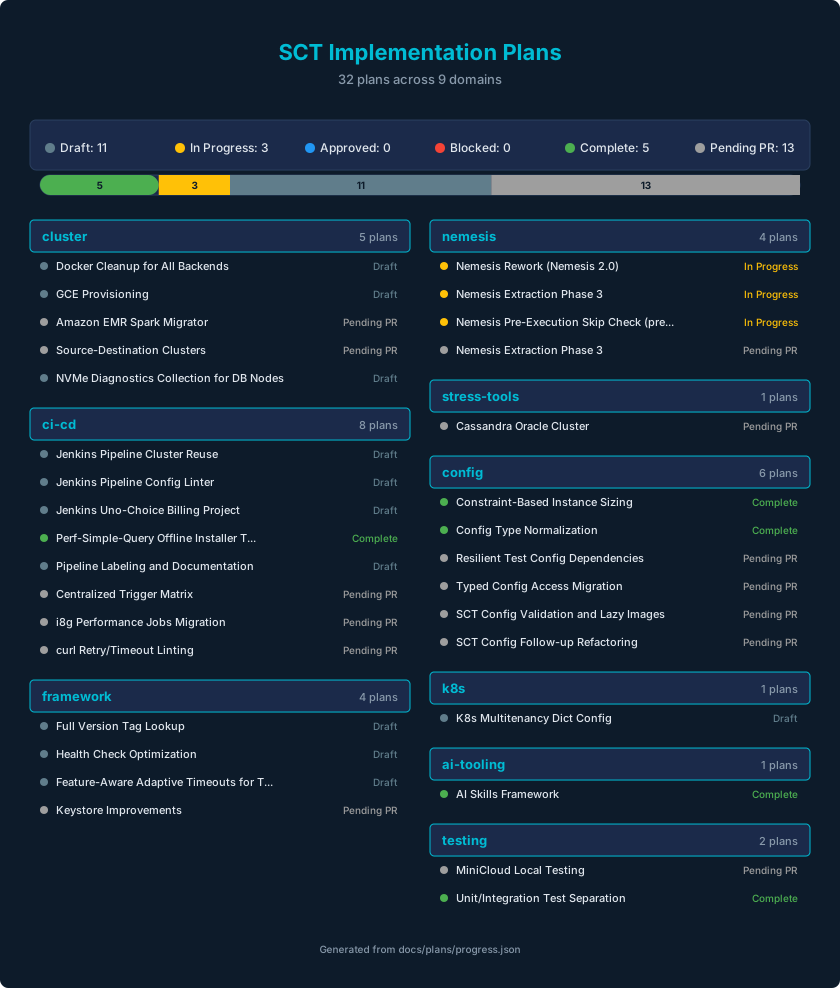
SCT 的活跃实施计划记录在 docs/plans/MASTER.md。 有关创建新计划的指南,请参阅 docs/plans/INSTRUCTIONS.md。