

FaceChain
新闻
- 我们的论文 FaceChain-MMID 已被 Pattern Recognition 接收!(2025年5月30日 UTC)
- 关于 FaceChain-FACT 免训练人像生成的更多技术细节,请参阅 论文。(2024年10月17日 UTC)
- 我们的论文 TopoFR 已被 NeurIPS 2024 接收!(2024年9月26日 UTC)
- 我们提供了新风格的训练脚本,支持对新风格 LoRA 的自动训练,并提供相应的风格提示词,以及无限风格人像生成标签页中的一键调用功能!(2024年7月3日 UTC)
- 🚀🚀🚀 我们将 [FACT] 发布到主分支,提供 10 秒的惊人速度,并与标准的即用型 LoRA 和 ControlNet 无缝集成,同时提升了指令遵循能力!原有的基于训练的 FaceChain 已移至 (https://github.com/modelscope/facechain/tree/v3.0.0 )。(2024年5月28日 UTC)
- 我们的论文 FaceChain-ImagineID 和 FaceChain-SuDe 已被 CVPR 2024 接收!(2024年2月27日 UTC)
简介
如果您熟悉中文,可以阅读中文版本的README。
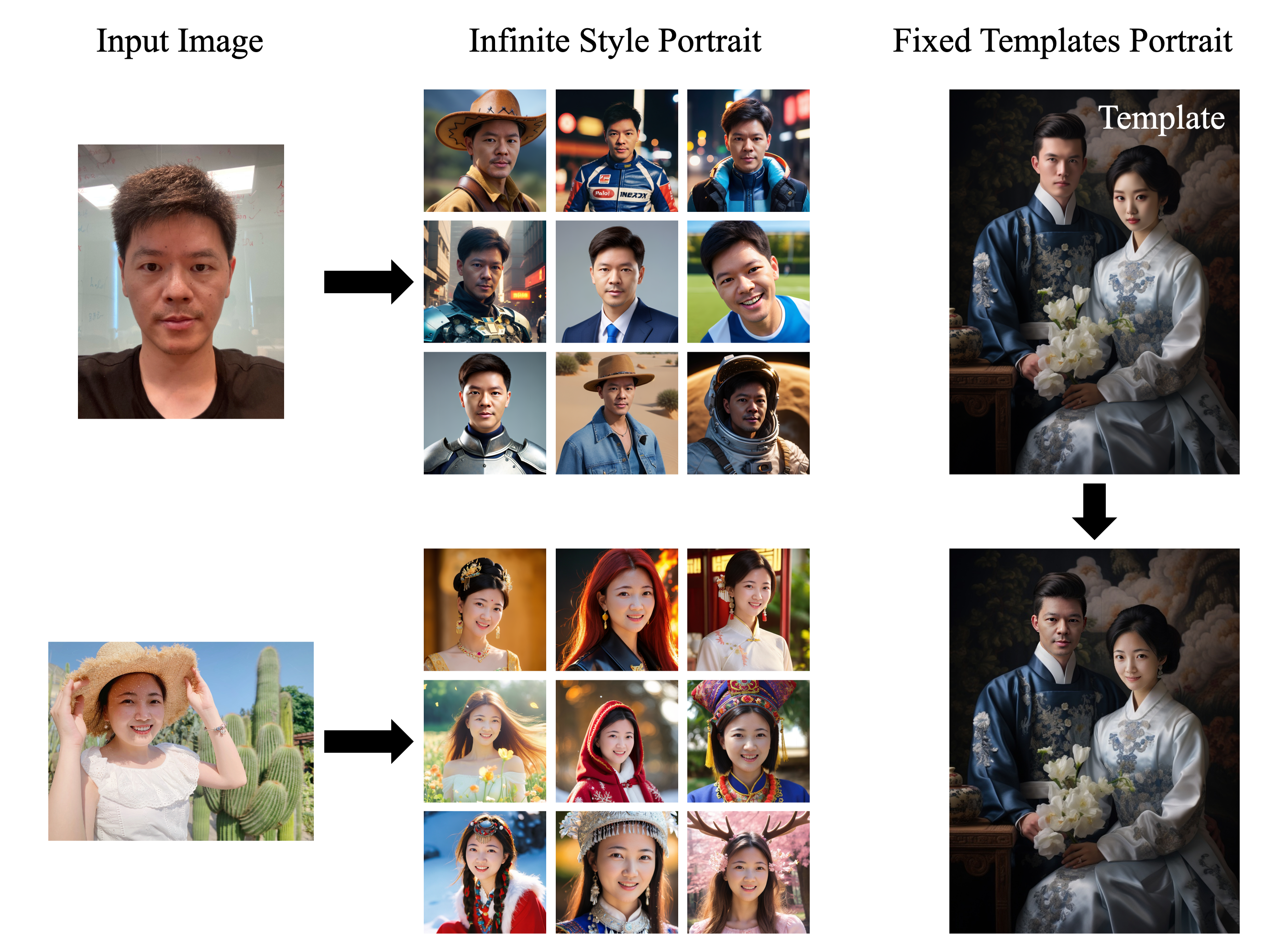
FaceChain 是一个用于生成保持身份一致的人像的新型框架。在最新的 FaceChain FACT(Face Adapter with deCoupled Training)版本中,仅需 1 张照片和 10 秒,即可在不同场景下生成个人肖像(现已支持多种风格!)。FaceChain 在人像生成方面兼具高可控性和真实性,包括基于文本生成图像和修复的流水线,并与 ControlNet 和 LoRAs 无缝兼容。您可以通过 FaceChain 的 Python 脚本、熟悉的 Gradio 界面或 sd webui 来生成肖像。 FaceChain 由 ModelScope 提供支持。
ModelScope Studio 🤖 |API 🔥 | SD WebUI | HuggingFace Space 🤗


新闻
-
我们的论文 FaceChain-MMID 被 Pattern Recognition 接收!(2025年5月30日 UTC)
-
关于 FaceChain-FACT 免训练人像生成的更多技术细节,请参阅 Paper。(2024年10月17日 UTC)
-
我们的论文 TopoFR 被 NeurIPS 2024 接收!(2024年9月26日 UTC)
-
我们提供了新风格的训练脚本,支持新风格 LoRA 的自动训练以及相应的风格提示词,并在无限风格人像生成标签页中提供一键调用功能!(2024年7月3日 UTC)
-
🚀🚀🚀 我们推出了 [FACT],提供令人印象深刻的10秒速度,与标准即用型 LoRA 和 ControlNet 无缝集成,并提升了指令遵循能力!(2024年5月28日 UTC)
-
我们的论文 FaceChain-ImagineID 和 FaceChain-SuDe 被 CVPR 2024 接收!(2024年2月27日 UTC)
-
🏆🏆🏆阿里巴巴年度优秀开源项目,阿里巴巴年度开源先锋(刘洋、孙百贵)。(2024年1月20日 UTC)
-
我们与 NUS 团队共同撰写的论文 InfoBatch 被 ICLR 2024(Oral) 接收!(2024年1月16日 UTC)
-
🏆OpenAtom 2023 年度快速成长开源项目奖。(2023年12月20日 UTC)
-
新增 SDXL 流水线🔥🔥🔥,图像细节显著改善。(2023年11月22日 UTC)
-
支持超分辨率🔥🔥🔥,提供多种分辨率选择 (512512, 768768, 10241024, 20482048)。(2023年11月13日 UTC)
-
🏆FaceChain 入选 BenchCouncil Open100 (2022-2023) 年度排名。 (2023年11月8日 UTC)
-
新增虚拟试穿模块。 (2023年10月27日 UTC)
-
新增 wanx 版本 在线免费应用。 (2023年10月26日 UTC)
-
🏆1024 程序员节 AIGC 应用工具最具商业价值奖。 (2023-10-24, 2023 UTC)
-
支持在 stable-diffusion-webui 中使用 FaceChain🔥🔥🔥。 (2023年10月13日 UTC)
-
支持单人和双人高性能 inpainting,简化用户界面。 (2023年9月9日 UTC)
-
更多技术细节请参阅 论文。 (2023年8月30日 UTC)
-
为 Lora 训练新增 validate & ensemble 功能,并新增 InpaintTab(目前在 gradio 中隐藏)。 (2023年8月28日 UTC)
-
新增姿态控制模块。 (2023年8月27日 UTC)
-
新增鲁棒人脸 lora 训练模块,提升单图训练 & style-lora 混合的性能。 (2023年8月27日 UTC)
-
HuggingFace Space 现已上线!您可以直接通过 🤗 体验 FaceChain (2023年8月25日 UTC)
-
新增精选提示词!参考:awesome-prompts-facechain (2023年8月18日 UTC)
-
以即插即用方式支持一系列新的风格模型。 (2023年8月16日 UTC)
-
支持自定义提示词。 (2023年8月16日 UTC)
-
Colab notebook 现已上线!您可以直接通过
 体验 FaceChain。 (2023年8月15日 UTC)
待办事项
- 全身数字人
引用
如果 FaceChain 和 FaceChain-FACT 对您的研究有所帮助,请在您的出版物中引用它们
@article{liu2023facechain,
  title={FaceChain: A Playground for Identity-Preserving Portrait Generation},
  author={Liu, Yang and Yu, Cheng and Shang, Lei and Wu, Ziheng and
          Wang, Xingjun and Zhao, Yuze and Zhu, Lin and Cheng, Chen and
          Chen, Weitao and Xu, Chao and Xie, Haoyu and Yao, Yuan and
          Zhou,  Wenmeng and Chen Yingda and Xie, Xuansong and Sun, Baigui},
  journal={arXiv preprint arXiv:2308.14256},
  year={2023}
}
@article{yu2024facechain,
  title={FaceChain-FACT: Face Adapter with Decoupled Training for Identity-preserved Personalization},
  author={Yu, Cheng and Xie, Haoyu and Shang, Lei and Liu, Yang and Dan, Jun and Sun, Baigui and Bo, Liefeng},
  journal={arXiv preprint arXiv:2410.12312},
  year={2024}
}
安装
兼容性验证
我们已在以下环境中验证了端到端执行:
- python: py3.8, py3.10
- pytorch: torch2.0.0, torch2.0.1
- CUDA: 11.7
- CUDNN: 8+
- OS: Ubuntu 20.04, CentOS 7.9
- GPU: Nvidia-A10 24G
内存优化
建议安装 Jemalloc 以将内存从 30G 以上优化到 20G 以下。以下是在 Modelscope notebook 中安装 Jemalloc 的示例。
apt-get install -y libjemalloc-dev
export LD_PRELOAD=/lib/x86_64-linux-gnu/libjemalloc.so
安装指南
支持以下安装方法:
1. ModelScope notebook【推荐】
ModelScope Notebook 提供免费层级,允许 ModelScope 用户以最少配置运行 FaceChain 应用,请参阅 ModelScope Notebook
# Step1: 我的notebook -> PAI-DSW -> GPU环境
# Note: Please use: ubuntu20.04-py38-torch2.0.1-tf1.15.5-modelscope1.8.1

# Step2: Entry the Notebook cell,clone FaceChain from github:
!GIT_LFS_SKIP_SMUDGE=1 git clone https://github.com/modelscope/facechain.git --depth 1

# Step3: Change the working directory to facechain, and install the dependencies:
import os
os.chdir('/mnt/workspace/facechain')    # You may change to your own path
print(os.getcwd())

!pip3 install gradio==3.47.1
!pip3 install controlnet_aux==0.0.6
!pip3 install python-slugify
!pip3 install diffusers==0.29.0
!pip3 install peft==0.11.1
!pip3 install modelscope -U
!pip3 install datasets==2.16

# Step4: Start the app service, click "public URL" or "local URL", upload your images to
# train your own model and then generate your digital twin.
!python3 app.py
或者,您也可以购买 PAI-DSW 实例(使用 A10 资源),选择 ModelScope 镜像,按照类似步骤运行 FaceChain。
2. Docker
如果您熟悉使用 docker,我们推荐采用此方式:
# Step1: Prepare the environment with GPU on local or cloud, we recommend to use Alibaba Cloud ECS, refer to: https://www.aliyun.com/product/ecs

# Step2: Download the docker image (for installing docker engine, refer to https://docs.docker.com/engine/install/)
# For China Mainland users:
docker pull registry.cn-hangzhou.aliyuncs.com/modelscope-repo/modelscope:ubuntu20.04-cuda11.7.1-py38-torch2.0.1-tf1.15.5-1.8.1
# For users outside China Mainland:
docker pull registry.us-west-1.aliyuncs.com/modelscope-repo/modelscope:ubuntu20.04-cuda11.7.1-py38-torch2.0.1-tf1.15.5-1.8.1

# Step3: run the docker container
docker run -it --name facechain -p 7860:7860 --gpus all registry.cn-hangzhou.aliyuncs.com/modelscope-repo/modelscope:ubuntu20.04-cuda11.7.1-py38-torch2.0.1-tf1.15.5-1.8.1 /bin/bash
# Note: you may need to install the nvidia-container-runtime, follow the instructions:
# 1. Install nvidia-container-runtime:https://docs.nvidia.com/datacenter/cloud-native/container-toolkit/latest/install-guide.html
# 2. sudo systemctl restart docker

# Step4: Install the gradio in the docker container:
pip3 install gradio==3.47.1
pip3 install controlnet_aux==0.0.6
pip3 install python-slugify
pip3 install diffusers==0.29.0
pip3 install peft==0.11.1
pip3 install modelscope -U
pip3 install datasets==2.16

# Step5 clone facechain from github
GIT_LFS_SKIP_SMUDGE=1 git clone https://github.com/modelscope/facechain.git --depth 1
cd facechain
python3 app.py
# Note: FaceChain currently assume single-GPU, if your environment has multiple GPU, please use the following instead:
# CUDA_VISIBLE_DEVICES=0 python3 app.py

# Step6
Run the app server: click "public URL" --> in the form of: https://xxx.gradio.live
3. stable-diffusion-webui
-
选择
Extensions Tab,然后选择Install From URL(官方插件集成已整合,请目前从 URL 安装)。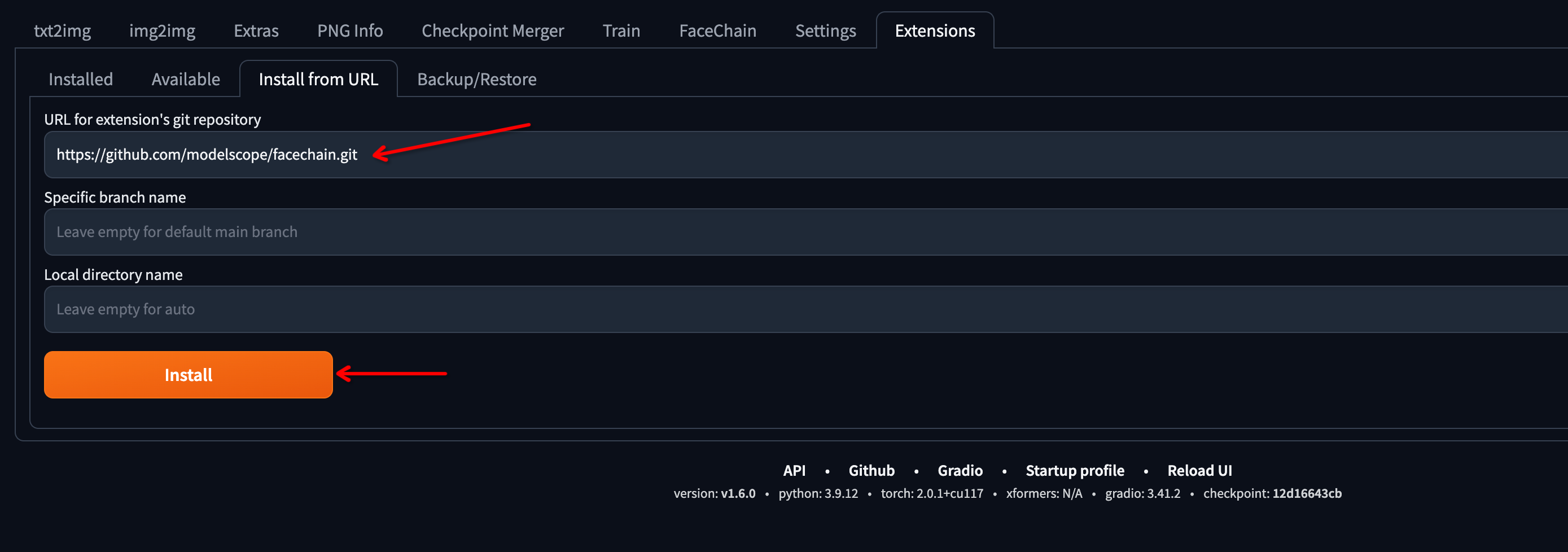
-
切换到
Installed,检查 FaceChain 插件,然后单击Apply and restart UI。安装依赖项和下载模型可能需要一些时间。请确保 "CUDA Toolkit" 已正确安装,否则 "mmcv" 包无法成功安装。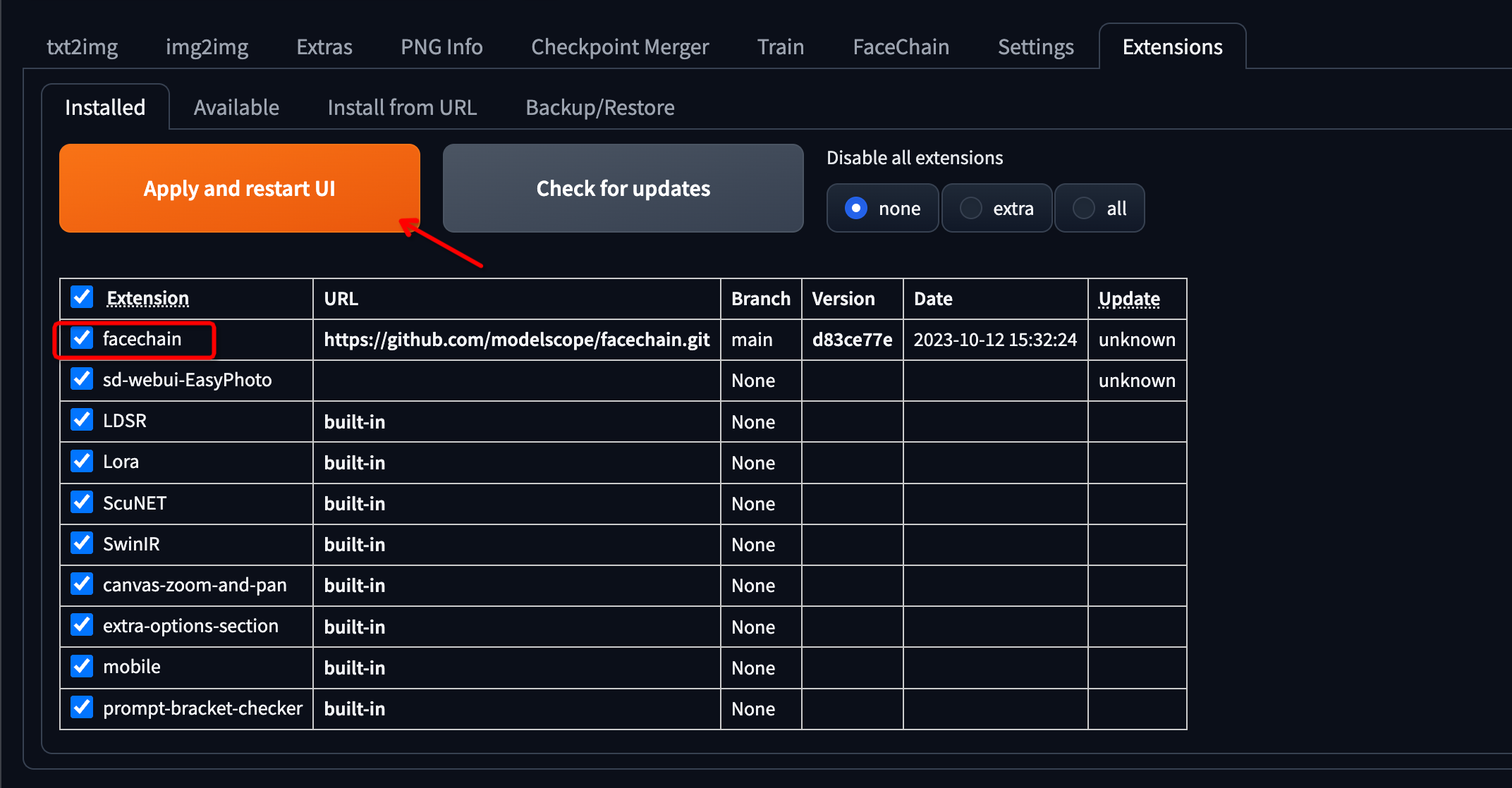
-
页面刷新后,
FaceChain选项卡的出现表示安装成功。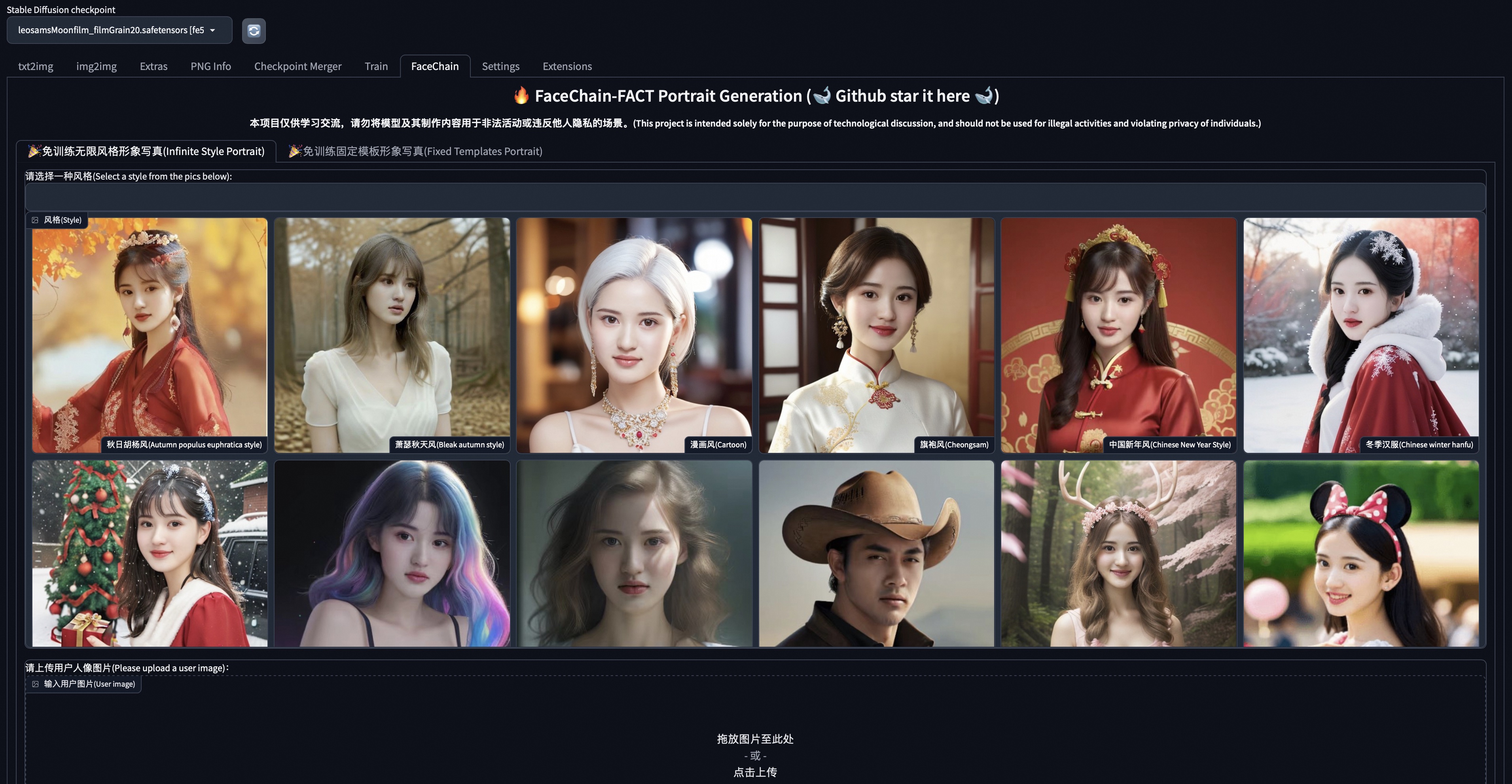
脚本执行
FaceChain 支持在 python 环境中直接进行推理。在进行 Infinite Style Portrait 生成推理时,请编辑 run_inference.py 中的代码:
# Use pose control, default False
use_pose_model = False
# The path of the input image containing ID information for portrait generation
input_img_path = 'poses/man/pose2.png'
# The path of the image for pose control, only effective when using pose control
pose_image = 'poses/man/pose1.png'
# The number of images to generate in inference
num_generate = 5
# The weight for the style model, see styles for detail
multiplier_style = 0.25
# Specify a folder to save the generated images, this parameter can be modified as needed
output_dir = './generated'
# The index of the chosen base model, see facechain/constants.py for detail
base_model_idx = 0
# The index of the style model, see styles for detail
style_idx = 0
然后执行:
python run_inference.py你可以在 output_dir 中找到生成的个人数字形象照片。
在进行 Fixed Templates Portrait 生成的推理时,请编辑 run_inference_inpaint.py 中的代码。
# Number of faces for the template image
num_faces = 1
# Index of face for inpainting, counting from left to right
selected_face = 1
# The strength for inpainting, you do not need to change the parameter
strength = 0.6
# The path of the template image
inpaint_img = 'poses/man/pose1.png'
# The path of the input image containing ID information for portrait generation
input_img_path = 'poses/man/pose2.png'
# The number of images to generate in inference
num_generate = 1
# Specify a folder to save the generated images, this parameter can be modified as needed
output_dir = './generated_inpaint'
然后执行:
python run_inference_inpaint.py你可以在 output_dir 中找到生成的个人数字形象照片。
算法介绍
AI 肖像生成的能力源自 Stable Diffusion 等大型生成模型及其微调技术。由于大模型具有强大的泛化能力,通过针对特定类型的数据和任务进行微调,可以在保留模型整体文本遵循和图像生成能力的同时,执行下游任务。基于训练和无训练 AI 肖像生成的技术基础在于对生成模型应用不同的微调任务。目前,大多数现有的 AI 肖像工具采用两阶段“先训练后生成”的流程,其中微调任务是“生成固定角色 ID 的肖像照片”,相应的训练数据是该固定角色 ID 的多张图片。此类基于训练流程的有效性取决于训练数据的规模,因此需要一定的图像数据支持和训练时间,这也增加了用户的成本。
与基于训练的流水线不同,免训练流水线将微调任务调整为“生成指定角色 ID 的人像照片”,即角色 ID 图像(面部照片)被用作额外输入,输出则是保留输入 ID 的人像照片。此类流水线完全将离线训练与在线推理分离,允许用户仅凭一张照片,在 10 秒内直接基于微调后的模型生成人像,从而避免了大量数据和训练时间的成本。免训练 AI 人像生成的微调任务基于适配器模块。面部照片通过具有固定权重的图像编码器和参数高效的特征投影层进行处理,以获取对齐的特征,随后通过类似于文本条件的注意力机制输入到 Stable Diffusion 的 U-Net 模型中。此时,面部信息作为独立的分支条件,与文本信息一同输入模型进行推理,从而使生成的图像能够保持 ID 保真度。
基于 face adapter 的基本算法能够实现免训练 AI 肖像,但仍需进行一定调整以进一步提升其效果。现有的免训练肖像工具普遍存在以下问题:肖像图像质量差、肖像的文本遵循和风格保持能力不足、肖像面部的可控性和丰富性差,以及与 ControlNet 和风格 Lora 等扩展的兼容性差。为了解决这些问题,FaceChain 将其归因于现有免训练 AI 肖像工具的微调任务与角色 ID 之外的过多信息耦合在一起,并提出具有解耦训练的 FaceChain Face Adapter(FaceChain FACT)来解决这些问题。通过在数百万肖像数据上微调 Stable Diffusion 模型,FaceChain FACT 能够为指定的角色 ID 实现高质量的肖像图像生成。FaceChain FACT 的整个框架如下图所示。
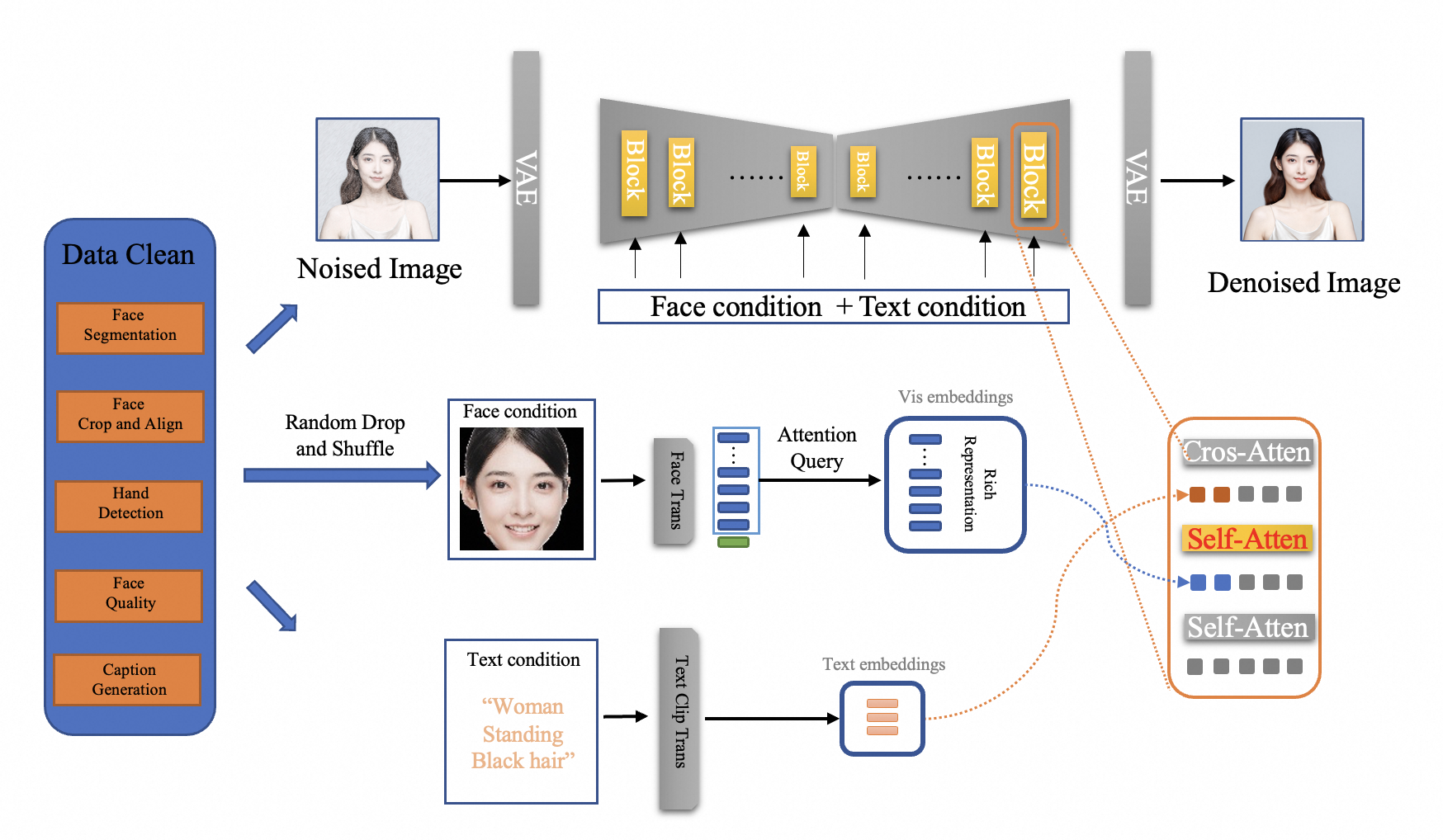
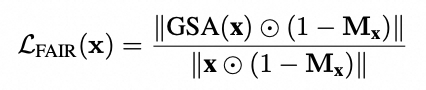
FaceChain FACT 的解耦训练由两部分组成:将人脸从图像中解耦,以及将身份(ID)从人脸中解耦。现有方法通常将去噪人像图像作为微调任务,这使得模型难以准确聚焦于人脸区域,从而影响基础 Stable Diffusion 模型的文本到图像生成能力。FaceChain FACT 借鉴了换脸算法的顺序处理和区域控制优势,并从结构和训练策略两个方面实现了将人脸从图像中解耦的微调方法。在结构上,与使用并行交叉注意力机制处理人脸和文本信息的现有方法不同,FaceChain FACT 采用了一种顺序处理方法,作为插入到原始 Stable Diffusion 块中的独立适配器层。这样,人脸适配在去噪过程中充当类似于换脸的独立步骤,避免了人脸条件和文本条件之间的干扰。在训练策略方面,除了原始的 MSE 损失函数外,FaceChain FACT 引入了人脸适配增量正则化(FAIR)损失函数,该函数控制适配器层中人脸适配步骤的特征增量,以聚焦于人脸区域。在推理期间,用户可以通过修改人脸适配器的权重来灵活调整生成效果,在保持 Stable 的文本到图像生成能力的同时,平衡人脸的保真度和泛化能力
扩散。FAIR 损失函数定义如下:
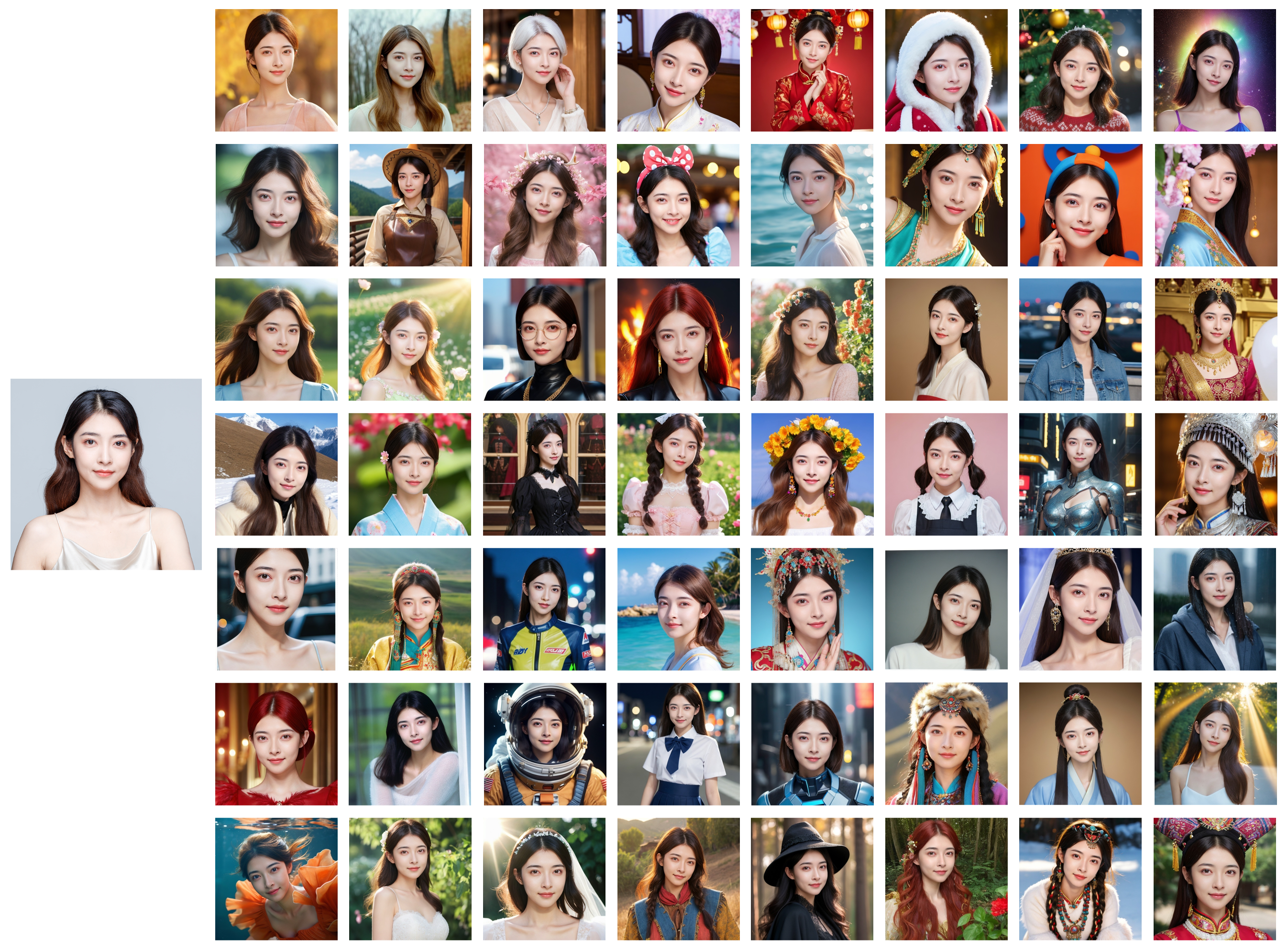
此外,针对生成人脸可控性和丰富度不足的问题,FaceChain FACT 提出了一种将 ID 与人脸解耦的训练方法,使得肖像过程仅保留角色 ID,而非整个人脸。首先,为了更好地从人脸中提取 ID 信息,同时保持某些关键的面部细节,并更好地适应 Stable Diffusion 的结构,FaceChain FACT 采用了一个名为 TransFace 的人脸特征提取器,该提取器基于 Transformer 架构,并在大规模人脸数据集上进行预训练。随后,倒数第二层的所有 token 被输入到一个简单的注意力查询模型中进行特征投影,从而确保提取的 ID 特征满足上述要求。此外,在训练过程中,FaceChain FACT 使用 Classifier Free Guidance (CFG) 方法对同一 ID 的不同肖像图像进行随机打乱和丢弃,从而确保用于去噪的输入人脸图像和目标图像可能具有相同 ID 但不同的面部,进而进一步防止模型对人脸的非 ID 信息过拟合。因此,FaceChain FACT 与 FaceChain 的大量精美风格具有高度兼容性,如下所示。
模型列表
FaceChain 中使用的模型:
[1] 人脸识别模型 TransFace:https://www.modelscope.cn/models/iic/cv_vit_face-recognition
[2] 人脸检测模型 DamoFD:https://modelscope.cn/models/damo/cv_ddsar_face-detection_iclr23-damofd
[3] 人体解析模型 M2FP:https://modelscope.cn/models/damo/cv_resnet101_image-multiple-human-parsing
[4] 皮肤修复模型 ABPN:https://www.modelscope.cn/models/damo/cv_unet_skin_retouching_torch
[5] 人脸融合模型:https://www.modelscope.cn/models/damo/cv_unet_face_fusion_torch
[6] FaceChain FACT 模型: https://www.modelscope.cn/models/yucheng1996/FaceChain-FACT
[7] 人脸属性识别模型 FairFace: https://modelscope.cn/models/damo/cv_resnet34_face-attribute-recognition_fairface
更多信息
ModelScope 库为构建 ModelScope 的模型生态系统提供基础,包括将各种模型集成到 ModelScope 中的接口和实现。
许可证
本项目基于 Apache License (Version 2.0) 授权。