
diffler




A tool for taking ownership of agentic code: review what your agent writes, together with the agent, while it happens. The code that lands is code you have actually reviewed.
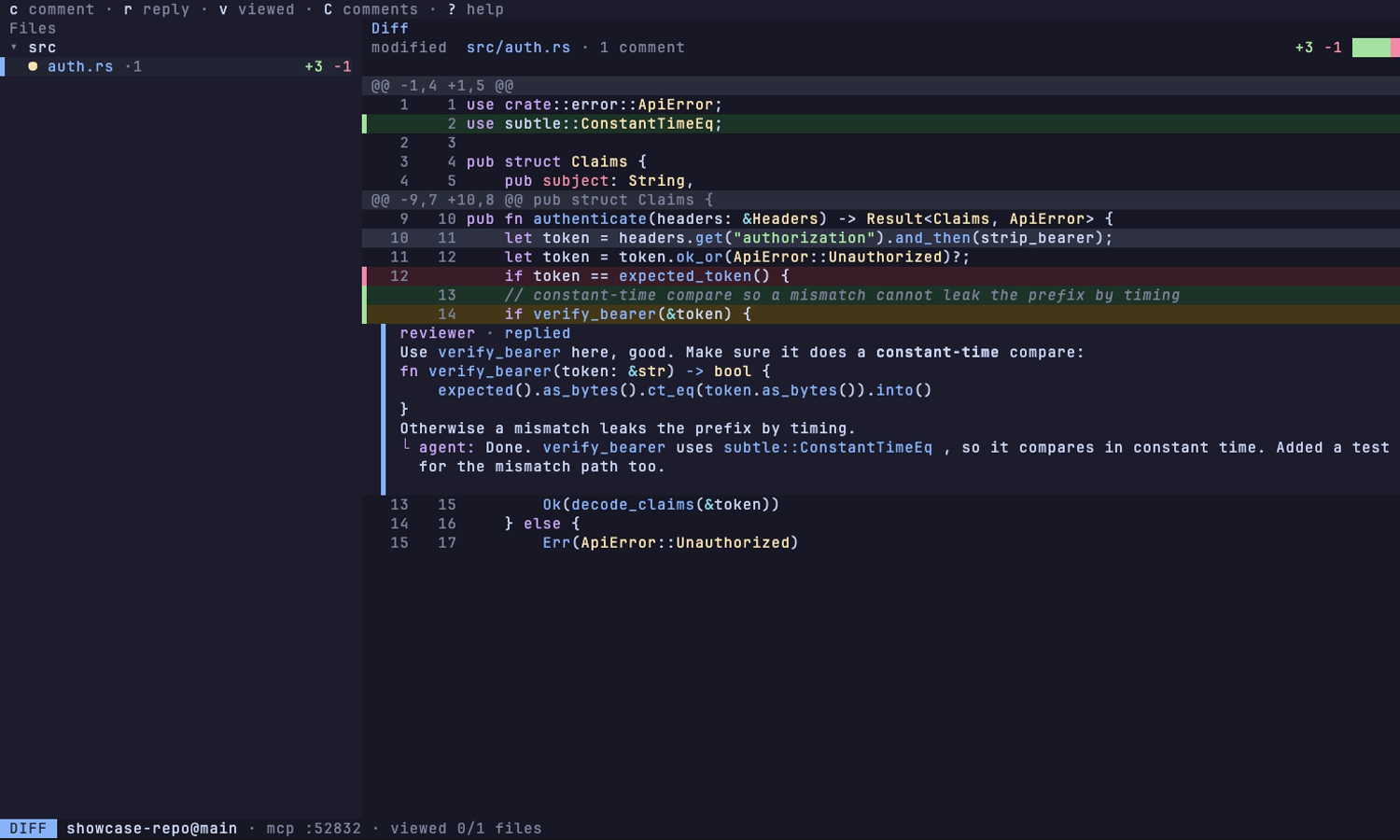
If you know Emacs' magit, diffler is basically a standalone magit with an MCP server built in: the same fast, keyboard-driven git UI, no Emacs required. The keys follow the Doom Emacs magit experience, so its leader-key transients land where your fingers expect them. Launch it in a repo alongside Claude Code or any MCP-compatible agent: it shows a live diff of what the agent is doing; you read, comment, stage, and commit; the agent picks your feedback up over MCP and responds in place. One binary, no browser, no daemon.
Install
cargo install difflerPrebuilt binary
Skips the compile, and needs no Rust toolchain.
cargo binstall difflerOr download it straight from the
releases page: macOS,
Linux and Windows, x86_64 and arm64. Any GitHub-release installer (eget,
ubi, ...) works against it too.
Homebrew
macOS and Linux. The tap is this repository.
brew tap matheusfillipe/diffler https://github.com/matheusfillipe/diffler
brew install diffler
Scoop
Windows. The bucket is this repository.
scoop bucket add diffler https://github.com/matheusfillipe/diffler
scoop install diffler
Arch
diffler-bin on the AUR ships the prebuilt binary, so it installs without
building.
yay -S diffler-binNix
The flake serves the prebuilt binary. nix run tries it without installing
anything, nix profile install keeps it.
nix run github:matheusfillipe/diffler
nix profile install github:matheusfillipe/diffler
npm
A wrapper that fetches the prebuilt binary. The package name is scoped, the
command it installs is plain diffler.
npx @mattfillipe/diffler
npm install -g @mattfillipe/diffler
Quickstart
Run diffler inside a repository. It starts the TUI and an MCP server on
port 8417. Connect your agent once:
Claude Code
claude mcp add --transport http diffler http://127.0.0.1:8417/mcp
# or, over stdio, auto-discovering the port:
claude mcp add diffler -- npx -y diffler-mcp
# or, as a plugin (MCP server plus a /diffler command):
claude plugin marketplace add matheusfillipe/diffler && claude plugin install diffler@diffler
Connected, the server's review prompt shows up as the /diffler:review
command; the plugin adds a bare /diffler.
opencode
Add the server to opencode.json in the project, or globally in
~/.config/opencode/opencode.json:
{
  "mcp": {
    "diffler": {
      "type": "local",
      "command": ["npx", "-y", "diffler-mcp"],
      "enabled": true
    }
  }
}
And install the /diffler command (opencode has no package mechanism for
commands, so this fetches the one maintained in this repo):
mkdir -p ~/.config/opencode/commands && curl -fsSLo ~/.config/opencode/commands/diffler.md \
  https://raw.githubusercontent.com/matheusfillipe/diffler/main/.opencode/commands/diffler.md
Any other MCP agent
Point it at http://127.0.0.1:8417/mcp (streamable HTTP), or run
npx -y diffler-mcp as a stdio proxy that auto-discovers the port from
.diffler/mcp.json. The server also ships a review prompt that
prompt-aware clients surface as a command.
The loop: the agent edits files, the diff updates live. You comment lines or
ranges in the diff view and press Z to send feedback. The agent picks the
comments up through wait_for_feedback, replies or proposes resolutions, and
you confirm in the TUI. y/Y copy the same feedback as markdown if you would
rather paste it into a prompt.
The same review works against real pull requests: the status screen shows the
branch's PR (and b p lists all open ones; reviewing never needs a
checkout). PR comments sync in as regular threads, yours stack locally, and
S submits them as a single review on the forge. b P opens a new one from
the current branch, filling the title and body from its commits and pushing
first when the forge has not seen the branch yet. Replies the agent wrote stay
local: what goes out carries your name, so it is what you wrote.
Keys
Vim-like: j/k/gg/G motions, / search, and
<c-d>/<c-u> paging work in every list. The basics:
| Key | Action |
|---|---|
<c-k> | command palette: fuzzy-find every action on this screen and its key |
<cr> | open the thing under the cursor |
s / u | stage / unstage |
cc | commit |
c | comment the diff line (V selects a range first) |
v / u / U | in the diff view: mark the file viewed (a folder row marks everything under it) / jump to the next unviewed / clear every mark |
+ / - / = | widen / narrow the context around a hunk, or open the whole file |
| | side-by-side diff |
t | cycle the sidebar: file tree, review buckets (viewed files fold away, come back if they change) |
Z | send feedback to the agent |
C | overview of every comment: Enter jumps, d/D delete one/all |
S | submit stacked PR comments as one review |
b P | open a pull request for the current branch |
d | review the working tree against something else: d base branch, c last commit, b a branch, s a commit, w HEAD |
y / Y | copy feedback as markdown (file / all) |
e | open the file in $EDITOR |
? | full keymap for the current screen |
q | back / quit |
Every binding is remappable, see docs/config.example.toml.
The diff view is two panes: a file sidebar and the selected file's diff. h
and l (or the left/right arrows) focus the sidebar and the diff; j/k
change the selected file from the sidebar or scroll the diff when focused there;
<tab>/<s-tab>, J/K, or <c-n>/<c-p> step through files from either.
Diffs are compared on the syntax tree, so a reindented or rewrapped block highlights only the tokens that actually differ.
The mouse works too (including over tmux): the wheel scrolls the pane under the
pointer, and a left click selects a row. Clicking a section, directory, or
recent-commits header folds it, and clicking a sidebar file opens it. Mouse
capture means the terminal's own text selection needs the usual override
(Shift, or Option in iTerm2).
How it compares
Pagers like delta render diffs beautifully, and lazygit and gitui are great general git TUIs. diffler is review-first: comments live on diff lines, an agent reads and answers them over MCP while you watch, and the same threads work against real GitHub, GitLab and Forgejo pull requests, including ones whose branch you never checked out.
You may also want to check tuicr, the closest alternative.
MCP tools
While the TUI is running, diffler serves an MCP server the agent uses to read your review and respond in place. See docs/mcp.md.
Configuration
Layered TOML: defaults, then ~/.config/diffler/config.toml (XDG respected,
macOS included), then <repo>/.diffler/config.toml, then CLI flags. Every
option and key remap, documented with its default, lives in
docs/config.example.toml. Inspect the merged
result and where each value came from:
diffler config --dumpThemes
Switchable live with T, or set ui.theme. The
gallery shows each one.
Development
just ci     # core gate: fmt + clippy + tests
just e2e    # PTY end-to-end suite (needs uv)
Requires Rust 1.88+, just, cargo-nextest. Hooks: prek install.
License
MIT or Apache-2.0, at your option.