
PVE-UPS
GUI-based UPS shutdown appliance for Proxmox VE — a NUT alternative with a web wizard and no config files.
Deutsche Fassung: README.de.md
PVE-UPS monitors one or more UPS devices — with an SNMP network card (standard RFC 1628 or a vendor MIB such as APC PowerNet) or through a NUT server, which is how USB and serial UPS devices are read — and, on a power outage, shuts down one or more standalone Proxmox VE hosts in an orderly fashion. The modern replacement for vendor-locked appliances such as APC PowerChute Network Shutdown. Everything is configured through a web wizard; monitoring is available as REST/JSON.
Why not NUT?
NUT has excellent hardware support, but for the common
"shut my Proxmox hosts down when the UPS runs low" case it means upsd/upsmon config
files and custom shutdown scripting on every host. PVE-UPS takes the appliance approach
instead — and where NUT hardware support is what you need, it uses NUT as a driver
rather than replacing it:
- One LXC, one installer — an unprivileged Debian container (~256 MB RAM) created by a single command on the PVE host.
- No config files — a web wizard with test buttons for every step; settings apply live.
- No agents on the hosts — shutdown goes through the Proxmox API using a dedicated,
revocable API token with only the
Sys.PowerMgmtprivilege. No root SSH anywhere. - Vendor-neutral, but not naive about vendors — the standard RFC 1628 UPS MIB via SNMP v1/v2c/v3 (pure-Python, no net-snmp), automatically switching to a vendor MIB where the standard falls short (APC PowerNet), or any existing NUT server as a read-only client.
- NUT stays a driver, never the brain — PVE-UPS only ever reads variables from
upsd. Noupsmon, noupssched, no shutdown scripts: the thresholds, the host policy and the decision stay in the appliance, where you can see them.
Screenshots
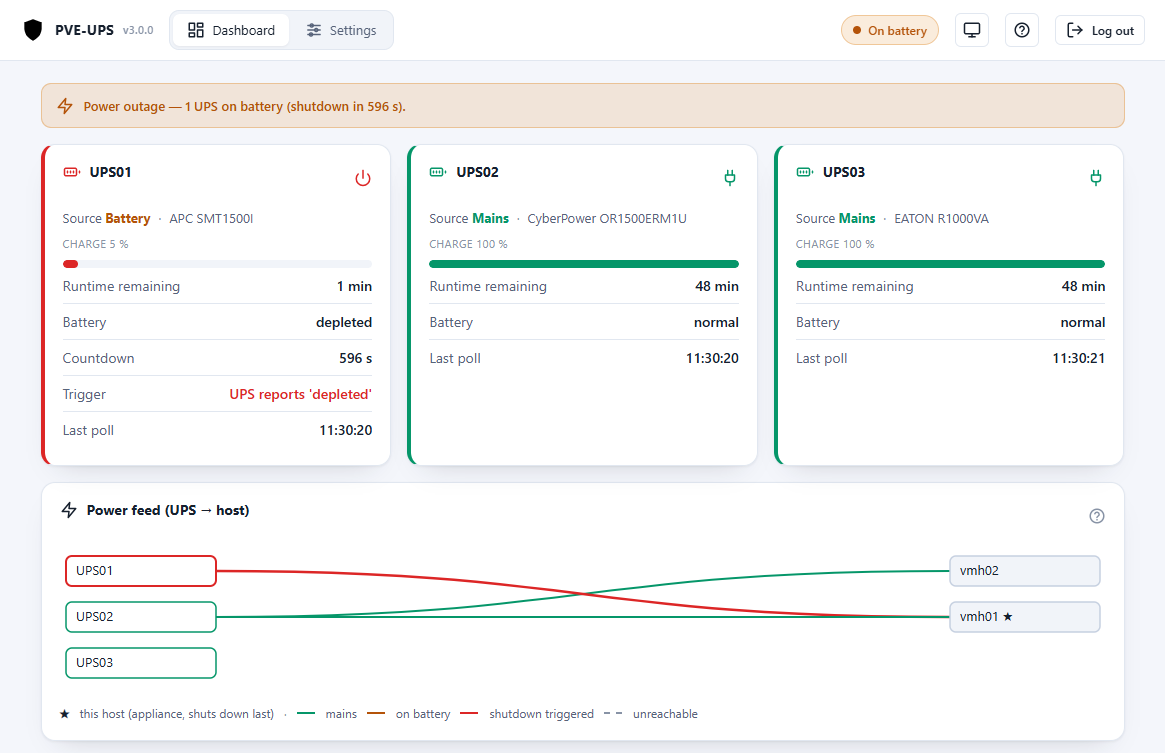
Dashboard during a power outage — one UPS on battery, shutdown countdown running:
More screenshots (UPS status, feed diagram, UPS & host settings)
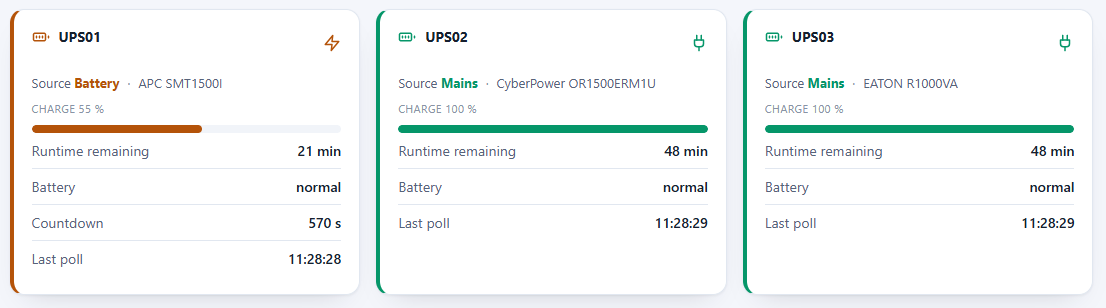
UPS status cards:
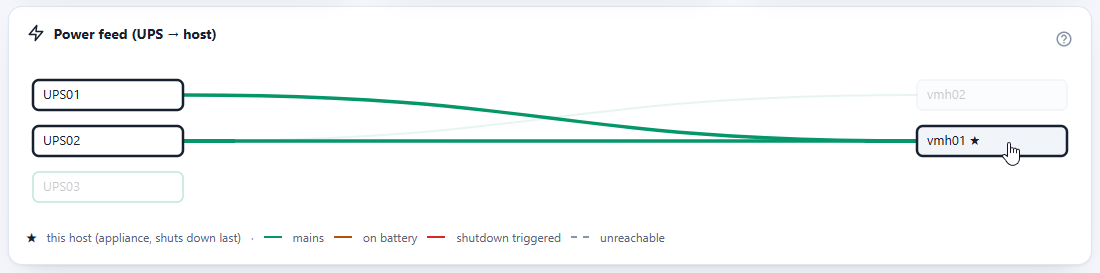
Live power-feed diagram (UPS → host):
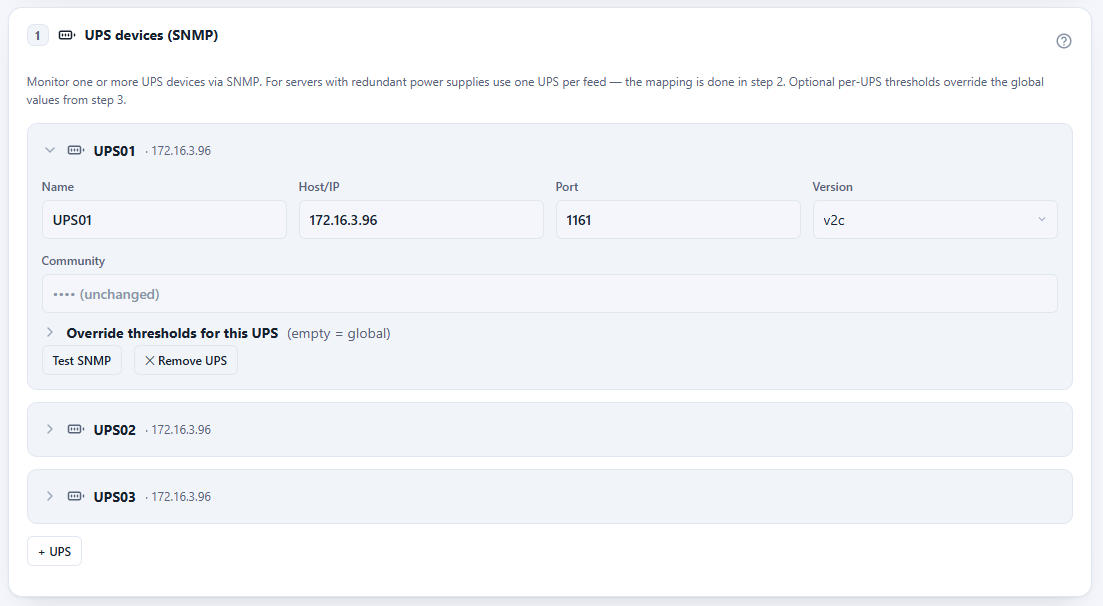
UPS settings with per-UPS threshold overrides:
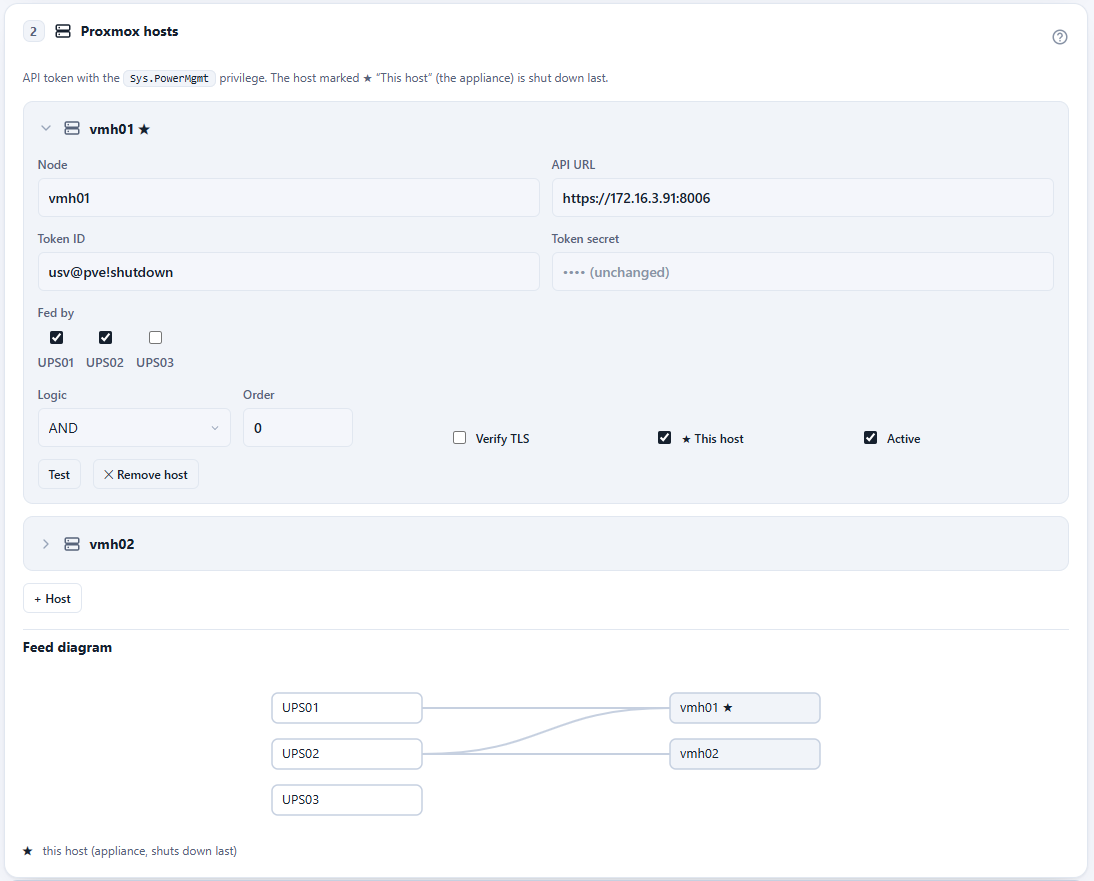
Host settings (API token, feeds, AND/OR logic):
Installation
Run in the Proxmox node shell (web UI → node → >_ Shell, as root). The script
downloads the latest release, unpacks it and creates the LXC:
bash -c "$(curl -fsSL https://github.com/ffind-dev/pve-ups/releases/latest/download/install.sh)"
# with options, e.g. a static IP:
curl -fsSL https://github.com/ffind-dev/pve-ups/releases/latest/download/install.sh | bash -s -- \
  --ctid 950 --ip 10.0.0.50/24 --gateway 10.0.0.1 --hostname pve-usv
Then open the web UI at http://<container-ip>:8080:
- Set the UI password.
- Walk through the wizard (UPS devices → hosts → thresholds → optional webhook).
- While dry-run is active nothing is shut down — ideal for testing.
- When everything checks out: disable dry-run (mode "ARMED").
The LXC typically runs on one of the protected hosts. Mark that host as "This host" in the host list — it is then guaranteed to shut down last.
Docker (alternative deployment)
Prefer not to run an LXC? A prebuilt image is published on every release to
ghcr.io/ffind-dev/pve-ups:
curl -fsSLO https://raw.githubusercontent.com/ffind-dev/pve-ups/main/docker-compose.example.yml
mv docker-compose.example.yml docker-compose.yml
docker compose up -d
This mounts two named volumes (/etc/pve-usv for the config, /var/lib/pve-usv for the
event log/state) so data survives container recreation. Open
http://<container-host>:8080 and run through the wizard as usual.
Docker mode has two differences from the LXC deployment, because there is no privileged companion process (no systemd) inside the image:
- No in-app updates. The "Upload update package" button is hidden; update by
pulling a new image tag and recreating the container
(
docker compose pull && docker compose up -d). Config and event log persist in the volumes. - No NTP/timezone management from the wizard. Time and timezone are the
Docker host's/orchestrator's responsibility — set
TZon the container (the example Compose file does). The self-test schedule runs in the container's local time, and withoutTZthe container runs in UTC.
If your network lies within
172.17.0.0/16–172.31.0.0/16, move Docker's default address pool before starting the container — Docker claims that range for its bridges, and the container would no longer reach a UPS or Proxmox host in it. In/etc/docker/daemon.json:{"bip":"10.210.0.1/24","default-address-pools":[{"base":"10.211.0.0/16","size":24}]}, thensystemctl restart docker.
Everything else (SNMP polling, Proxmox shutdown, thresholds, webhook, self-test) works identically to the LXC deployment. The LXC install (above) remains the primary, fully self-updating path.
Connecting a Proxmox host (API token)
The appliance shuts hosts down through the Proxmox API — no root SSH, no agent on the
host. Each host needs a dedicated user with a single privilege (Sys.PowerMgmt) and
an API token. Run once per host in the node shell (as root):
# 1) dedicated user (PVE realm)
pveum user add ups@pve

# 2) role that carries only the power-management privilege
pveum role add UpsShutdown -privs "Sys.PowerMgmt"

# 3) grant the role on /nodes (or narrower: /nodes/<name>)
pveum acl modify /nodes -user ups@pve -role UpsShutdown

# 4) create the API token — privilege separation OFF, so the token inherits the privilege
pveum user token add ups@pve shutdown --privsep 0
The last command prints the token ID (ups@pve!shutdown) and the secret (a UUID,
shown only this once — copy it now). Enter both in the wizard under Proxmox hosts
(API URL is https://<host-ip>:8006) and check the connection with Test.
- Leave Verify TLS off as long as the host uses Proxmox's self-signed certificate.
- The token is revocable at any time:
pveum user token remove ups@pve shutdown.
Features
- Multiple UPS devices per instance with host↔UPS mapping and per-host logic (AND = redundant power supplies, OR = split load), including a live feed diagram.
- Two UPS sources, freely mixable in one instance:
- SNMP v1/v2c and v3 (authPriv), read-only. Reads the standard RFC 1628 UPS MIB or a vendor MIB — currently APC PowerNet, which is what makes APC cards work that implement RFC 1628 partially (NMC2 below firmware sumx/sy v5.1.7) or not at all (NMC1: AP9617/AP9618/AP9619). Picked automatically per UPS; selectable by hand.
- NUT server (TCP 3493) as a read-only client — for UPS devices without a network card. Works with the UPS server built into a Synology/QNAP/TrueNAS NAS, a Raspberry Pi, OPNsense, or a NUT install on a Proxmox host.
- Web wizard for UPS devices, hosts, thresholds and notifications — with test buttons; the UPS test breaks its result down per object, so a missing OID or NUT variable, wrong credentials and a blocked port are told apart at a glance. It also names the trigger conditions the device cannot feed at all, so no threshold is left silently dead.
- Bilingual UI: English (default) and German, picked automatically from the browser language; user manual built in (both languages).
- Per-UPS threshold overrides on top of the global defaults.
- Webhook notifications (HTTP POST with subject/body/status JSON) on notable events.
- REST status (
/api/status,/api/health) — read-only, no auth, no secrets; event log of the last 48 h included. Event/webhook texts are uniformly English. - Config export/import, NTP/timezone setup, scheduled Proxmox connectivity self-test (start time plus an interval from 15 min to 24 h), in-place updates via package upload in the web UI.
Safety model
- Fail-safe by default: losing contact with the UPS is not a confirmed power outage — it raises an alarm and never shuts anything down. The same holds for a NUT server that answers with stale data because its driver died: that counts as unreachable, never as "on mains". Two explicit opt-ins refine this: continuing a confirmed on-battery countdown through a connection loss (default on), and treating a prolonged pure communication loss as an outage (default off).
- Dry-run by default: after installation the engine only logs what it would do. A test shutdown simulates the shutdown order without any effect.
- A confirmed trigger and the on-battery countdown are persisted to disk and survive a service restart.
- "Own host last": the host carrying the appliance is always shut down last.
- The app runs unprivileged; a slim privileged companion applies updates and NTP/timezone changes. Secrets never leave the appliance via the API.
Default triggers
One matching condition is enough (all editable in the wizard; empty field = off):
| Condition | Default |
|---|---|
| On battery longer than | 600 s |
| Runtime below | 10 min |
| Charge below | 30 % |
UPS reports battery low/depleted | on |
Poll interval: 30 s on mains, 8 s on battery.
Updates
Download the release asset (pve-usv-<version>.tar.gz) from the
releases page and upload it in the web UI
under Update. The configuration is preserved; the service restarts automatically.
Updating from 2.x works the same way (see the manual for the two behaviour changes).
Running in Docker instead? See Docker above —
updates there work by pulling a new image tag.
Note: the product name is PVE-UPS, but service and paths are technically named
pve-usv(systemctl status pve-usv,/etc/pve-usv/config.yaml,/var/lib/pve-usv/). This is intentional and keeps existing installations compatible.
Developing / testing without hardware
python -m venv .venv && . .venv/bin/activate
pip install -e ".[dev]"
pytest                       # unit tests, no hardware needed

# simulate an SNMP UPS (separate terminal); snapshots in ./snmpdata/:
snmpsim-command-responder --data-dir=./snmpdata --agent-udpv4-endpoint=127.0.0.1:1161

# ... or simulate a NUT server:
python -m tests.nutsim --port 3493 --scenario battery   # mains | battery | low | sparse

PVE_USV_CONFIG=./dev-config.yaml PVE_USV_DB=./dev-events.db python -m app.main
# UI: http://127.0.0.1:8080
#   SNMP: host 127.0.0.1, port 1161, community "public"  -> mains (100 %)
#                                    community "battery" -> outage -> triggers fire
#         The APC snapshots carry PowerNet OIDs only, i.e. a card without RFC 1628:
#                                    community "apc"         -> mains, MIB resolves to APC
#                                    community "apc-battery"  -> outage on the APC MIB
#   NUT:  host 127.0.0.1, port 3493, UPS name "ups"
Limits / assumptions
- Standalone hosts only (no cluster/HA-manager interaction) — a possible future extension.
- Reads the standard RFC 1628 UPS MIB, the APC PowerNet MIB, or a NUT server's variables. Other vendor MIBs are not implemented yet — a device outside those needs either RFC 1628 or a NUT driver. There is no direct USB/serial support in the appliance itself; a locally attached UPS is reached through a NUT server.
- The NUT protocol is unencrypted. Use it inside a trusted network, or point it at an
upsdlistening on the loopback interface of the same machine. - In the optional Docker deployment, in-app updates and NTP/timezone management are not available (see Docker) — everything else is identical.
License
MIT — Copyright © 2026 Florian Finder. See LICENSE.
Developed with AI assistance.