






Refitter
Refitter 是一个用于使用 Refit 库生成 C# REST API 客户端的工具。Refitter 可以从 OpenAPI 规范生成 Refit 接口和契约。Refitter 还可以将生成的 Refit 接口格式化为由 Apizr (v6+) 管理,并生成一些注册辅助方法。
正在升级到 v2.0.0? 请查阅 Breaking Changes (v2.0.0) 指南。源生成器项目现在可能需要显式的
Refit引用,并且 OpenAPI 解析器升级应被视为一个重新生成-审查-测试的迁移步骤,而不是一个完全经过验证的行为无操作。
Refitter 有 3 种形式:
- 一个通过 nuget.org 分发的 .NET CLI Tool,在磁盘上输出单个 C# 文件
- 一个通过 Refitter.MSBuild 包提供的 MSBuild Task,可无缝集成到您的构建管道中,并基于项目目录中的 .refitter 文件在构建时自动生成代码
- 一个通过 Refitter.SourceGenerator 包提供的 C# Source Generator,基于项目目录中的 .refitter 在编译时生成代码
CLI Tool
Installation
该工具以 .NET Tool 的形式打包并发布到 nuget.org。您可以按以下方式安装该工具的最新版本:
dotnet tool install --global Refitter或者,您可以使用 Docker 镜像:
docker pull christianhelle/refitter或直接运行:
docker run --rm -v $(pwd):/src christianhelle/refitter ./openapi.json --output ./GeneratedCode.cs用法
refitter --helpUSAGE:
refitter [URL or input file] [OPTIONS]
EXAMPLES:
refitter ./openapi.json
refitter https://petstore3.swagger.io/api/v3/openapi.yaml
refitter ./openapi.json --settings-file ./openapi.refitter --output ./GeneratedCode.cs
refitter ./openapi.json --namespace "Your.Namespace.Of.Choice.GeneratedCode" --output ./GeneratedCode.cs
refitter ./openapi.json --namespace "Your.Namespace.Of.Choice.GeneratedCode" --internal
refitter ./openapi.json --output ./IGeneratedCode.cs --interface-only
refitter ./openapi.json --output ./GeneratedContracts.cs --contract-only
refitter ./openapi.json --use-api-response
refitter ./openapi.json --cancellation-tokens
refitter ./openapi.json --no-operation-headers
refitter ./openapi.json --ignored-operation-headers "header-one" --ignored-operation-headers "Header-Two"
refitter ./openapi.json --no-accept-headers
refitter ./openapi.json --use-iso-date-format
refitter ./openapi.json --additional-namespace "Your.Additional.Namespace" --additional-namespace "Your.Other.Additional.Namespace"
refitter ./openapi.json --property-naming-policy PreserveOriginal
refitter ./openapi.json --multiple-interfaces ByEndpoint
refitter ./openapi.json --multiple-files --output ./Generated
refitter ./openapi.json --tag Pet --tag Store --tag User
refitter ./openapi.json --match-path '^/pet/.*'
refitter ./openapi.json --trim-unused-schema
refitter ./openapi.json --trim-unused-schema --keep-schema '^Model$' --keep-schema '^Person.+'
refitter ./openapi.json --no-deprecated-operations
refitter ./openapi.json --operation-name-template '{operationName}Async'
refitter ./openapi.json --optional-nullable-parameters
refitter ./openapi.json --use-polymorphic-serialization
refitter ./openapi.json --collection-format Csv
refitter ./openapi.json --simple-output
refitter ./openapi.json --no-inline-json-converters
refitter ./openapi.json --json-library-version 9.0
ARGUMENTS:
[URL or input file] URL or file path to OpenAPI Specification file
OPTIONS:
DEFAULT
-h, --help Prints help information
-v, --version Prints version information
-s, --settings-file Path to .refitter settings file. Specifying this will ignore all other settings (except for --output)
-n, --namespace GeneratedCode Default namespace to use for generated types
--contracts-namespace Default namespace to use for generated contracts
--property-naming-policy PascalCase Controls how generated contract properties are named. May be one of PascalCase, PreserveOriginal
-o, --output Output.cs Path to the generated file in single-file mode, or the output directory in multiple-file mode
--contracts-output Output directory for generated contracts. Enabling this automatically enables generating multiple files
--no-auto-generated-header Don't add <auto-generated> header to output file
--no-accept-headers Don't add <Accept> header to output file
--no-xml-doc-comments Don't generate XML doc comments for interfaces and operations
--interface-only Don't generate contract types
--contract-only Don't generate clients
--use-api-response Return Task<IApiResponse<T>> instead of Task<T>
--use-observable-response Return IObservable instead of Task
--internal Set the accessibility of the generated types to 'internal'
--cancellation-tokens Use cancellation tokens
--no-operation-headers Don't generate operation headers
--ignored-operation-headers A collection of headers to omit from operation signatures. May be set multiple times
--no-logging Don't log errors or collect telemetry
--additional-namespace Add additional namespace to generated types
--exclude-namespace Exclude namespace on generated types
--use-iso-date-format Explicitly format date query string parameters in ISO 8601 standard date format using delimiters (2023-06-15)
--multiple-interfaces Generate a Refit interface for each endpoint. May be one of ByEndpoint, ByTag
--multiple-files Generate multiple files instead of a single large file.
In this mode, --output and --contracts-output must be directory paths.
The output files can be the following:
- RefitInterfaces.cs
- DependencyInjection.cs
- Contracts.cs
--match-path Only include Paths that match the provided regular expression. May be set multiple times
--tag Only include Endpoints that contain this tag. May be set multiple times and result in OR'ed evaluation
--skip-validation Skip validation of the OpenAPI specification
--no-deprecated-operations Don't generate deprecated operations
--operation-name-template Generate operation names using pattern. When using --multiple-interfaces ByEndpoint, this is name of the Execute() method in the interface where all instances of the string '{operationName}' is replaced with 'Execute'
--optional-nullable-parameters Generate nullable parameters as optional parameters
--trim-unused-schema Removes unreferenced components schema to keep the generated output to a minimum
--keep-schema Force to keep matching schema, uses regular expressions. Use together with "--trim-unused-schema". Can be set multiple times
--include-inheritance-hierarchy Keep all possible inherited types/union types even if they are not directly used
--no-banner Don't show donation banner
--simple-output Generate simple, plain-text console output without ASCII art, tables, emojis, or color formatting (suitable for IDE output windows)
--skip-default-additional-properties Set to true to skip default additional properties
--allow-remote-refs Resolve remote (http/https) $ref references inside the document. Disabled by default to prevent generation-time SSRF
--collection-format Multi Determines the format of collection parameters. May be one of Multi, Csv, Ssv, Tsv, Pipes
--operation-name-generator Default The NSwag IOperationNameGenerator implementation to use.
May be one of:
- Default
- MultipleClientsFromOperationId
- MultipleClientsFromPathSegments
- MultipleClientsFromFirstTagAndOperationId
- MultipleClientsFromFirstTagAndOperationName
- MultipleClientsFromFirstTagAndPathSegments
- SingleClientFromOperationId
- SingleClientFromPathSegments
See https://refitter.github.io/api/Refitter.Core.OperationNameGeneratorTypes.html for more information
--immutable-records Generate contracts as immutable records instead of classes
--use-apizr Use Apizr by:
- Adding a final IApizrRequestOptions options parameter to all generated methods
- Providing cancellation tokens by Apizr request options instead of a dedicated parameter
- Using method overloads instead of optional parameters
See https://refitter.github.io for more information and https://www.apizr.net to get started with Apizr
--use-dynamic-querystring-parameters Enable wrapping multiple query parameters into a single complex one. Default is no wrapping.
See https://github.com/reactiveui/refit?tab=readme-ov-file#dynamic-querystring-parameters for more information
--use-polymorphic-serialization Use System.Text.Json polymorphic serialization.
Replaces NSwag JsonInheritanceConverter attributes with System.Text.Json JsonPolymorphicAttributes.
To have the native support of inheritance (de)serialization and fallback to base types when
payloads with (yet) unknown types are offered by newer versions of an API
See https://learn.microsoft.com/en-us/dotnet/standard/serialization/system-text-json/polymorphism for more information
--disposable Generate refit clients that implement IDisposable
--json-serializer-context Generate JsonSerializerContext for AOT compilation support
--no-inline-json-converters Don't inline JsonConverter attributes for enum types. When disabled, no [JsonConverter(typeof(JsonStringEnumConverter))] attributes are emitted. By default (enabled), the attribute is placed on the enum type declaration (not on properties), allowing custom converters to be registered via JsonSerializerOptions.Converters
--integer-type int The .NET type to use for OpenAPI integer types without a format specifier. Common values: 'int' (default), 'long'
--json-library-version JSON library version for System.Text.Json (default: 8.0). When set to 9.0 or higher, enables .NET 9+ JsonStringEnumMemberName support for custom enum value names. Cannot be used with a settings file that also specifies a non-default value
--custom-template-directory Custom directory with NSwag fluid templates for code generation. Default is null which uses the default NSwag templates. See <https://github.com/RicoSuter/NSwag/wiki/Templates>
--telemetry-source Report the telemetry source of this invocation. Used internally by the MSBuild integration.
--telemetry-file-count Report the total number of settings files in the current workload. Used internally by the MSBuild integration.
--telemetry-runtime Report the bundled runtime selected for this invocation. Used internally by the MSBuild integration.
--generate-authentication-header [STYLE] Controls generation of Authorization header support.
Options: None (no authentication code is generated),
Parameter (adds method parameters for authentication),
Method (generates a Refit [Headers] attribute for bearer token authentication).
Legacy boolean forms (true/false) and omitting the value are also accepted for compatibility.
--security-scheme Generate Authorization header for a specific security scheme. When omitted, authentication headers will be generated for all security schemes要从 OpenAPI 规范文件生成代码,请运行以下命令:
refitter [path to OpenAPI spec file] --namespace "[Your.Namespace.Of.Choice.GeneratedCode]"这将生成一个名为 Output.cs 的文件,其中包含使用 NSwag 生成的 Refit 接口和契约类
CLI 工具输出示例
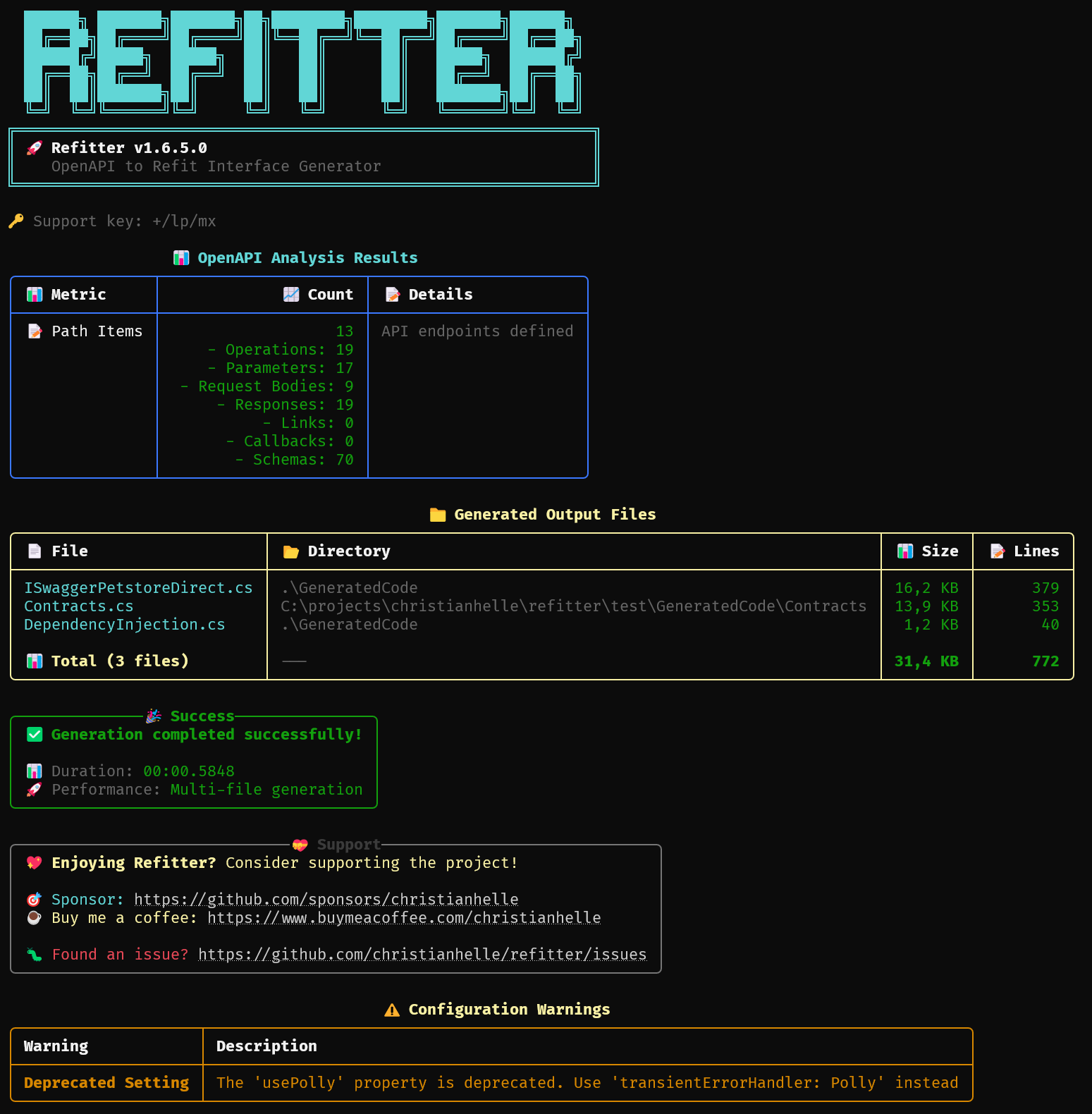
以下是运行 Refitter CLI 工具时控制台输出的样子:
简单输出模式
对于不支持富控制台格式的 IDE 和构建工具,Refitter 提供了一个 --simple-output 选项:
refitter ./openapi.json --simple-output此模式生成纯文本输出,不包含:
- ASCII 艺术和横幅
- 彩色文本和富格式
- Unicode 字符和表情符号
- 表格和面板
这在以下情况下特别有用:
- 从 Visual Studio 扩展中运行 Refitter
- 与捕获控制台输出的构建系统集成
- 使用不支持 ANSI 转义序列的工具
- 在控制台功能有限的环境中运行
属性命名策略
生成的契约属性默认为 PascalCase。要保留有效的 OpenAPI 字段名称,例如 payMethod_SumBank,请使用 --property-naming-policy PreserveOriginal 或在 .refitter 文件中设置 "propertyNamingPolicy": "PreserveOriginal"。
Refitter 仍然会发出用于序列化的 [JsonPropertyName] 属性,使用 @ 转义保留的 C# 关键字,并将无效标识符最小化地清理为可编译的名称(例如 class → @class,123-value → _123_value)。
遥测
Refitter 收集匿名使用遥测和错误报告以改进该工具。可以使用 --no-logging 禁用遥测。
以下选项为高级/内部选项,由 MSBuild 集成用于为遥测标记来源:
--telemetry-source <value>— 报告调用的来源,例如msbuild。当设置为msbuild(不区分大小写)时,会发出专用的msbuild-invocation事件。--telemetry-file-count <n>— 报告当前工作负载中设置文件的总数。--telemetry-runtime <tfm>— 报告为此调用选择的捆绑运行时,例如net9.0。
这些值是自报的且仅供参考,因为它们是用户可控的 CLI 选项:--telemetry-source=msbuild 表示调用方声称具有 MSBuild 来源,而非已证实的来源。需要可靠归属的调用方应通过受保护的、非用户可控的通道传递来源信息,而不是依赖这些标志。
.Refitter 文件格式
以下是一个使用单个 OpenAPI 规范的 .refitter 文件示例
{
  "openApiPath": "/path/to/your/openAPI", // Required if openApiPaths is not specified
  "namespace": "Org.System.Service.Api.GeneratedCode", // Optional. Default=GeneratedCode
  "contractsNamespace": "Org.System.Service.Api.GeneratedCode.Contracts", // Optional. Default=GeneratedCode
  "propertyNamingPolicy": "PascalCase", // Optional. Values=PascalCase|PreserveOriginal. Default=PascalCase
  "naming": {
    "useOpenApiTitle": false, // Optional. Default=true
    "interfaceName": "MyApiClient" // Optional. Default=ApiClient
  },
  "generateContracts": true, // Optional. Default=true
  "generateClients": true, // Optional. Default=true
  "generateXmlDocCodeComments": true, // Optional. Default=true
  "generateJsonSerializerContext": false, // Optional. Default=false. Generate JsonSerializerContext for AOT compilation support
  "generateStatusCodeComments": true, // Optional. Default=true
  "addAutoGeneratedHeader": true, // Optional. Default=true
  "addAcceptHeaders": true, // Optional. Default=true
  "addContentTypeHeaders": true, // Optional. Default=true
  "returnIApiResponse": false, // Optional. Default=false
  "returnIObservable": false, // Optional. Default=false. Return IObservable instead of Task
  "responseTypeOverride": { // Optional. Default={}
    "File_Upload": "IApiResponse",
    "File_Download": "System.Net.Http.HttpContent"
  },
  "generateOperationHeaders": true, // Optional. Default=true
  "ignoredOperationHeaders": ["apiKey"], // Optional. Default=[]
  "typeAccessibility": "Public", // Optional. Values=Public|Internal. Default=Public
  "useCancellationTokens": false, // Optional. Default=false
  "useIsoDateFormat": false, // Optional. Default=false
  "multipleInterfaces": "ByEndpoint", // Optional. May be one of "ByEndpoint" or "ByTag"
  "generateDeprecatedOperations": false, // Optional. Default=true
  "operationNameTemplate": "{operationName}Async", // Optional. Must contain {operationName}. When multipleInterfaces == "ByEndpoint", this is name of the Execute() method in the interface where all instances of the string '{operationName}' is replaced with 'Execute'
  "optionalParameters": false, // Optional. Default=false
  "outputFolder": "../CustomOutput", // Optional. Default=./Generated
  "outputFilename": "RefitInterface.cs", // Optional. Default=Output.cs for CLI tool
  "contractsOutputFolder": "../Contracts", // Optional. Default=NULL
  "generateMultipleFiles": false, // Optional. Default=false
  "additionalNamespaces": [ // Optional
    "Namespace1",
    "Namespace2"
  ],
  "includeTags": [ // Optional. OpenAPI Tag to include when generating code
    "Pet",
    "Store",
    "User"
  ],
  "includePathMatches": [ // Optional. Only include Paths that match the provided regular expression
    "^/pet/.*",
    "^/store/.*"
  ],
  "trimUnusedSchema": false, // Optional. Default=false
  "keepSchemaPatterns": [ // Optional. Force to keep matching schema, uses regular expressions. Use together with trimUnusedSchema=true
    "^Model$",
    "^Person.+"
  ],
  "includeInheritanceHierarchy": false, // Optional. Default=false. Set to true to keep all possible type-instances of inheritance/union types. This works in conjunction with trimUnusedSchema.
  "generateDefaultAdditionalProperties": true, // Optional. default=true
  "allowRemoteReferences": false, // Optional. Default=false. When true, remote http/https $ref references inside the document are resolved
  "operationNameGenerator": "Default", // Optional. May be one of Default, MultipleClientsFromOperationId, MultipleClientsFromPathSegments, MultipleClientsFromFirstTagAndOperationId, MultipleClientsFromFirstTagAndOperationName, MultipleClientsFromFirstTagAndPathSegments, SingleClientFromOperationId, SingleClientFromPathSegments
  "immutableRecords": false,
  "useDynamicQuerystringParameters": true, // Optional. Default=false
  "usePolymorphicSerialization": true, // Optional. Default=false
  "collectionFormat": "Multi", // Optional. Default=Multi. The collection format for array query parameters. Possible values: Multi, Csv, Ssv, Tsv, Pipes
  "contractTypeSuffix": null, // Optional. Default=null. Suffix to append to all generated contract type names (e.g., "Dto" would rename Pet to PetDto)
  "generateDisposableClients": true, // Optional. Default=false
  "dependencyInjectionSettings": { // Optional
    "baseUrl": "https://petstore3.swagger.io/api/v3", // Optional. Leave this blank to set the base address manually
    "httpMessageHandlers": [ // Optional
        "AuthorizationMessageHandler",
        "TelemetryMessageHandler"
    ],
    "usePolly": true, // DEPRECATED - Use "transientErrorHandler": "None|Polly|HttpResilience" instead
    "useWindowsAuthentication": true, // Optional. Default=false
    "transientErrorHandler": "HttpResilience", // Optional. Set this to configure transient error handling with a retry policy that uses a jittered backoff. May be one of None, Polly, HttpResilience
    "maxRetryCount": 3, // Optional. Default=6
    "firstBackoffRetryInSeconds": 0.5 // Optional. Default=1.0
  },
  "apizrSettings": { // Optional
    "withRequestOptions": true, // Optional. Default=true
    "withRegistrationHelper": true, // Optional. Default=false
    "withCacheProvider": "InMemory", // Optional. Values=None|Akavache|MonkeyCache|InMemory|DistributedAsString|DistributedAsByteArray. Default=None
    "withPriority": true, // Optional. Default=false
    "withMediation": true, // Optional. Default=false
    "withOptionalMediation": true, // Optional. Default=false
    "withMappingProvider": "AutoMapper", // Optional. Values=None|AutoMapper|Mapster. Default=None
    "withFileTransfer": true // Optional. Default=false
  },
  "codeGeneratorSettings": { // Optional. Default settings are the values set in this example
    "requiredPropertiesMustBeDefined": true,
    "generateDataAnnotations": true,
    "anyType": "object",
    "dateType": "System.DateTimeOffset",
    "dateTimeType": "System.DateTimeOffset",
    "timeType": "System.TimeSpan",
    "timeSpanType": "System.TimeSpan",
    "arrayType": "System.Collections.Generic.ICollection",
    "dictionaryType": "System.Collections.Generic.IDictionary",
    "arrayInstanceType": "System.Collections.ObjectModel.Collection",
    "dictionaryInstanceType": "System.Collections.Generic.Dictionary",
    "arrayBaseType": "System.Collections.ObjectModel.Collection",
    "dictionaryBaseType": "System.Collections.Generic.Dictionary",
    "integerType": "Int32", // Optional. Default="Int32". The .NET type for OpenAPI integers without a format. Possible values: "Int32", "Int64"
    "propertySetterAccessModifier": "",
    "generateImmutableArrayProperties": false,
    "generateImmutableDictionaryProperties": false,
    "handleReferences": false,
    "jsonSerializerSettingsTransformationMethod": null,
    "generateJsonMethods": false,
    "enforceFlagEnums": false,
    "inlineNamedDictionaries": false,
    "inlineNamedTuples": true,
    "inlineNamedArrays": false,
    "generateOptionalPropertiesAsNullable": false,
    "generateNullableReferenceTypes": false,
    "generateNativeRecords": false,
    "generateDefaultValues": true,
    "inlineNamedAny": false,
    "inlineJsonConverters": true, // Optional. Default=true. Set to false to not generate JsonConverter attributes for enum properties
    "dateFormat": "yyyy-MM-dd",
    "dateTimeFormat": "yyyy-MM-dd",
    "excludedTypeNames": [
      "ExcludedTypeFoo",
      "ExcludedTypeBar"
    ],
    "customTemplateDirectory": "./path/to/directory/" // Optional. See <https://github.com/RicoSuter/NSwag/wiki/Templates>
    "jsonLibraryVersion": 8.0 // Optional. Default=8.0. JSON library version for System.Text.Json. When set to 9.0 or higher, enables .NET 9+ JsonStringEnumMemberName support for custom enum value names
  }
}
以下是一个使用多个 OpenAPI 规范并合并为单个客户端的 .refitter 文件示例
{
  "openApiPaths": [ // Required if openApiPath is not specified. Documents are merged; first spec wins on duplicates
    "/path/to/your/openAPI/v1",
    "/path/to/your/openAPI/v2"
  ],
  "namespace": "Org.System.Service.Api.GeneratedCode"
}openApiPath- 指向 OpenAPI Specifications 文件。这可以是磁盘上存储的文件路径,相对于.refitter文件。这也可以是远程文件的 URL,将通过 HTTP/HTTPS 下载。如果未指定openApiPaths,则此项为必填。openApiPaths- 指向多个 OpenAPI Specifications 文件的路径数组。指定时,文档将被合并为单个客户端。数组中的第一个文档作为基础;后续文档中的路径、组件模式、定义(OpenAPI 2.x)和标签将被合并。当存在重复项(相同的路径键或模式名称)时,保留第一个文档的条目。当希望从多个 API 版本生成单个客户端时,请使用此项代替openApiPath。如果未指定openApiPath,则此项为必填。namespace- 在生成的代码中使用的命名空间。如果未指定,默认值为GeneratedCodepropertyNamingPolicy- 控制生成的契约属性的命名方式。可能的值为PascalCase(默认)和PreserveOriginal。PreserveOriginal保持有效标识符不变,使用@转义保留的 C# 关键字,并将无效名称最小化地清理为可编译的标识符,同时仍输出[JsonPropertyName]naming.useOpenApiTitle- 一个布尔值,指示是否应使用 OpenApi 标题。默认值为truenaming.interfaceName- 生成的接口的名称。生成的代码会自动为此名称添加I前缀,因此如果设置为MyApiClient,则生成的接口名为IMyApiClient。默认值为ApiClientgenerateContracts- 一个布尔值,指示是否应生成契约。此功能的一个用例是多个 API 客户端使用相同的契约。默认值为truegenerateClients- 一个布尔值,指示是否应生成客户端。此功能的一个用例是将客户端和契约分离到两个独立的生成运行中。默认值为truegenerateDisposableClients- 一个布尔值,指示是否生成实现IDisposable的客户端。默认值为falsegenerateXmlDocCodeComments- 一个布尔值,指示是否应生成 XML 文档注释。默认值为truegenerateJsonSerializerContext- 一个布尔值,指示是否生成用于 AOT 编译支持的JsonSerializerContext。默认值为false。该上下文在契约命名空间中发出,在文件模式下,写入其自身的*SerializerContext.cs文件generateStatusCodeComments- 一个布尔值,指示ApiException和IApiResponse的 XML 文档是否包含每个已记录状态码的详细说明。默认值为trueaddAutoGeneratedHeader- 一个布尔值,指示是否应生成 XML 文档注释。默认值为trueaddAcceptHeaders- 一个布尔值,指示是否添加接受头 [Headers("Accept: application/json")]。默认值为trueaddContentTypeHeaders- 一个布尔值,指示是否添加内容类型头 [Headers("Content-Type: application/json")]。默认值为truereturnIApiResponse- 一个布尔值,指示是否返回IApiResponse<T>对象。默认值为falsereturnIObservable- 一个布尔值,指示是否返回IObservable<T>而不是Task<T>。默认值为falseresponseTypeOverride- 一个字典,包含操作 ID(如 OpenAPI 文档中指定)以及要使用的特定返回类型。这些类型被包装在任务中,但其他方面未作修改(因此请确保指定或导入它们的命名空间)。默认值为{}generateOperationHeaders- 一个布尔值,指示是否在生成的方法中使用操作头。默认值为trueignoredOperationHeaders- 要从操作签名中省略的头集合。默认值为[]typeAccessibility- 生成类型的可访问性。可能的值为Public和Internal。默认值为PublicuseCancellationTokens- 在生成的方法中使用取消令牌。默认值为falseuseIsoDateFormat- 设置为true以使用分隔符显式将日期查询字符串参数格式化为 ISO 8601 标准日期格式(例如:2023-06-15)。默认值为falsemultipleInterfaces- 设置为ByEndpoint以为每个端点生成一个接口,或设置为ByTag以按它们的 Tag 对端点进行分组(类似于 SwaggerUI 的分组方式)。outputFolder- 一个描述所需输出文件夹相对路径的字符串。在多文件模式下,这必须是一个目录路径。默认值为./GeneratedoutputFilename- 输出文件名。当从 CLI 工具使用时,默认值为Output.cs,否则为 .refitter 文件名。因此Petstore.refitter变为Petstore.cs。contractsOutputFolder- 一个描述生成契约文件所在文件夹相对路径的字符串。启用此选项会自动启用生成多个文件。这必须是一个目录路径。默认值为NULLgenerateMultipleFiles- 一个布尔值,指示是否生成多个文件而不是单个大文件。Refit 接口将写入RefitInterfaces.cs,契约写入Contracts.cs,依赖注入写入DependencyInjection.cs。在此模式下使用 CLI--output时,请提供目录路径。默认为falseadditionalNamespaces- 要包含在生成文件中的附加命名空间集合。一个用例是您希望重用来自与生成代码不同命名空间的契约。默认为空includeTags- 用作筛选器的标签集合,用于包含包含此标签的端点。includePathMatches- 用于筛选路径的正则表达式集合。generateDeprecatedOperations- 一个布尔值,指示是否生成或跳过已弃用的操作。默认为trueoperationNameTemplate- 使用模式生成操作名称。这必须包含字符串 {operationName}。此用法的一个示例可以是{operationName}Async,以在所有方法名称后添加 Async 后缀。当使用多个接口配合ByEndpoint时,这是接口中 Execute() 方法的名称,其中字符串 '{operationName}' 的所有实例都被替换为 'Execute'optionalParameters- 将非必需参数生成为可空可选参数trimUnusedSchema- 移除未引用的组件模式,以保持生成的输出最小化keepSchemaPatterns: 强制保留匹配模式的正则表达式集合。这与trimUnusedSchema一起使用includeInheritanceHierarchy: 设置为 true 以保留继承/联合类型的所有可能类型实例。如果为 false,则仅保留直接引用的类型。此功能与trimUnusedSchema配合使用allowRemoteReferences- 一个布尔值,控制是否解析 OpenAPI 文档中的远程(http/https)$ref引用。默认禁用,以防止生成时的 SSRF 和远程文件包含。本地$ref引用始终限制在输入文档的目录树内。顶层远程文档 URL 仍然允许。默认值为falsegenerateDefaultAdditionalProperties: 设置为false以跳过默认的附加属性。默认值为trueoperationNameGenerator: 要使用的 NSwagIOperationNameGenerator实现。参见 https://refitter.github.io/api/Refitter.Core.OperationNameGeneratorTypes.htmlimmutableRecords: 设置为true以将契约生成为不可变记录而不是类。默认值为falseuseDynamicQuerystringParameters: 设置为true以将多个查询参数包装为单个复杂参数。默认值为false(不包装)。更多信息参见 https://github.com/reactiveui/refit?tab=readme-ov-file#dynamic-querystring-parameters。usePolymorphicSerialization: 设置为true以使用 System.Text.Json 多态序列化。用System.Text.JsonJsonPolymorphicAttributes替换 NSwagJsonInheritanceConverter特性。默认值为false。参见 https://learn.microsoft.com/en-us/dotnet/standard/serialization/system-text-json/polymorphismcollectionFormat- 数组查询参数的集合格式。可能的值:Multi、Csv、Ssv、Tsv、Pipes。默认值为MulticontractTypeSuffix- 一个可选后缀,附加到所有生成的契约类型名称。例如,将其设置为Dto会将Pet重命名为PetDto。默认值为null(无后缀)dependencyInjectionSettings- 设置此项将为IServiceCollection生成扩展方法,用于配置 Refit 客户端,包括可选的 Windows 身份验证支持baseUrl- 用作 HttpClient 的基础地址。留空以手动设置基础 URLhttpMessageHandlers- 添加到 HttpClient 管道中的HttpMessageHandler集合usePolly- 将此设置为true以配置 HttpClient 使用 Polly 并采用带抖动退避的重试策略。 此选项已弃用,请改用transientErrorHandlertransientErrorHandler: 设置此项以配置使用带抖动退避的重试策略的瞬态错误处理。参见 https://refitter.github.io/api/Refitter.Core.TransientErrorHandler.htmlfirstBackoffRetryInSeconds- 这是初始重试退避的持续时间。默认为 1 秒
apizrSettings- 设置此项将使 Refit 接口由 Apizr 管理。更多信息参见 https://www.apizr.netwithRequestOptions- 指示 Refit 接口方法是否应包含一个最终的 IApizrRequestOptions 选项参数withRegistrationHelper- 指示 Refitter 是否应生成 Apizr 注册辅助方法(若设置了 dependencyInjectionSettings 则为扩展方法,否则为静态方法)withCacheProvider- 设置要使用的缓存提供程序withPriority- 指示 Apizr 是否应处理请求优先级withMediation- 指示 Apizr 是否应处理请求中介(仅限扩展方法)withOptionalMediation- 指示 Apizr 是否应处理可选请求中介(仅限扩展方法)withMappingProvider- 设置要使用的映射提供程序withFileTransfer- 指示 Apizr 是否应处理文件传输
codeGeneratorSettings- 设置此项允许自定义 NSwag 生成的类型和契约requiredPropertiesMustBeDefined- 默认为 true,generateDataAnnotations- 默认为 true,anyType- 默认为object,dateType- 默认为System.DateTimeOffset,dateTimeType- 默认为System.DateTimeOffset,timeType- 默认为System.TimeSpan,timeSpanType- 默认为System.TimeSpan,arrayType- 默认为System.Collections.Generic.ICollection,dictionaryType- 默认为System.Collections.Generic.IDictionary,arrayInstanceType- 默认为System.Collections.ObjectModel.Collection,dictionaryInstanceType- 默认为System.Collections.Generic.Dictionary,arrayBaseType- 默认为System.Collections.ObjectModel.Collection,dictionaryBaseType- 默认为System.Collections.Generic.Dictionary,integerType- 默认为Int32。用于 OpenAPI 整数类型(无格式说明符)的 .NET 类型。可能的值:Int32、Int64propertySetterAccessModifier- 默认为 ``,generateImmutableArrayProperties- 默认为 false,generateImmutableDictionaryProperties- 默认为 false,handleReferences- 默认为 false,jsonSerializerSettingsTransformationMethod- 默认为 null,generateJsonMethods- 默认为 false,enforceFlagEnums- 默认为 false,inlineNamedDictionaries- 默认为 false,inlineNamedTuples- 默认为 true,inlineNamedArrays- 默认为 false,generateOptionalPropertiesAsNullable- 默认为 false。当希望可选契约属性变为可空时,请显式设置此项generateNullableReferenceTypes- 默认为 false。这不会隐式启用generateOptionalPropertiesAsNullablegenerateNativeRecords- 默认为 falsegenerateDefaultValues- 默认为 trueinlineNamedAny- 默认为 falseinlineJsonConverters- 默认为 true。当设置为 false 时,枚举属性将不包含[JsonConverter(typeof(JsonStringEnumConverter))]特性dateFormat- 默认为 nulldateTimeFormat- 默认为 nullexcludedTypeNames- 默认为空jsonLibraryVersion- 默认为8.0。System.Text.Json 的 JSON 库版本。当设置为9.0或更高版本时,启用 .NET 9+ 对自定义枚举值名称的JsonStringEnumMemberName支持
MSBuild
这是在构建时从 OpenAPI 规范生成代码的推荐方法。MSBuild 方法可无缝集成到您的构建流水线中,并在构建时自动生成代码
为什么选择 MSBuild 而非 Source Generator?
与 Source Generator 相比,MSBuild 任务具有多项优势:
- 构建时生成:代码在预构建过程中生成,这确保了 Refit 源生成器无需第二次重新构建即可正常工作。
- 无需手动提交:生成的文件在构建期间自动创建,消除了将生成代码提交到源代码控制的需要
- 无需额外工具:开箱即用,无需单独安装 CLI 工具
安装
MSBuild 任务以 NuGet 包的形式分发:
dotnet add package Refitter.MSBuild用法
安装完成后,MSBuild 任务将自动扫描项目中的 .refitter 文件,并在构建期间生成代码。只需在项目目录中创建一个包含 OpenAPI 规范设置的 .refitter 文件即可。
MSBuild 包包含一个自定义的 .target 文件,用于执行 RefitterGenerateTask 自定义任务:
<UsingTask TaskName="RefitterGenerateTask"
           AssemblyFile="$(MSBuildThisFileDirectory)Refitter.MSBuild.dll"
           Condition="Exists('$(MSBuildThisFileDirectory)Refitter.MSBuild.dll')" />
<Target Name="RefitterGenerate" BeforeTargets="BeforeCompile">
    <RefitterGenerateTask ProjectFileDirectory="$(MSBuildProjectDirectory)"
                          DisableLogging="$(RefitterNoLogging)"
                          SkipValidation="$(RefitterSkipValidation)">
        <Output TaskParameter="GeneratedFiles" ItemName="RefitterGeneratedFiles" />
    </RefitterGenerateTask>
    <ItemGroup>
        <Compile Include="@(RefitterGeneratedFiles)" />
    </ItemGroup>
</Target>
RefitterGenerateTask 任务将扫描项目文件夹中的 .refitter 文件并执行它们。
配置
默认情况下,遥测数据收集已启用。若要退出,请在您的 .csproj 文件中添加以下内容:
<PropertyGroup>
  <RefitterNoLogging>true</RefitterNoLogging>
</PropertyGroup>
你还可以通过设置以下内容来跳过 OpenAPI 验证:
<PropertyGroup>
  <RefitterSkipValidation>true</RefitterSkipValidation>
</PropertyGroup>
要将 MSBuild 生成限制为特定的 .refitter 文件,请将 RefitterIncludePatterns 设置为以分号分隔的精确文件名、精确的项目相对路径或精确的完整路径列表:
<PropertyGroup>
  <RefitterIncludePatterns>petstore.refitter;apis\admin.refitter</RefitterIncludePatterns>
</PropertyGroup>
RefitterIncludePatterns 仅针对文件名、相对于项目根目录的路径或完整路径进行精确匹配。它不支持子串匹配或通配符匹配,因此 petstore 不会匹配 petstore.refitter。
示例
在你的项目中创建一个 .refitter 文件:
{
  "openApiPath": "https://petstore3.swagger.io/api/v3/openapi.json",
  "namespace": "Petstore.Api",
  "outputFolder": "./Generated"
}
现在,每次你构建项目时,Refitter 都会根据你的 OpenAPI 规范自动生成 API 客户端代码。
替代方案:使用 CLI 与 MSBuild Exec 任务
如果你希望拥有更多控制权或需要直接使用 CLI 工具,你可以从 MSBuild 预构建事件中调用 Refitter CLI:
<Target Name="Refitter" AfterTargets="PreBuildEvent">
    <Exec WorkingDirectory="$(ProjectDir)" Command="dotnet tool restore" />
    <Exec WorkingDirectory="$(ProjectDir)" Command="refitter --settings-file .refitter --skip-validation" />
</Target>
这种方法要求使用清单文件将 Refitter 安装为本地工具,如本教程]中所述。
Source Generator
注意: 我们建议使用 MSBuild] 方法而不是 Source Generator,因为代码在预编译时生成,确保 Refit 源生成器将从添加到编译中的 Refit 接口生成代码
Refitter 可作为 C# Source Generator 使用,它使用 Refitter.Core] 库来使用 Refit] 库生成 REST API 客户端。Refitter 可以从 OpenAPI 规范生成 Refit 接口。Refitter 可以将生成的 Refit 接口格式化为由 Apizr] 管理,并生成一些注册辅助工具。
安装
源生成器以 NuGet 包的形式分发,应安装到将包含生成代码的项目中
dotnet add package Refitter.SourceGenerator
dotnet add package Refit
Refitter.SourceGenerator 将其对 Refit 的依赖保持为私有,因此使用该项目的项目必须自行添加对 Refit 的直接包引用。如果您使用生成的依赖注入辅助工具(例如 ConfigureRefitClients()),也请显式添加 Refit.HttpClientFactory。
用法
安装该包后,请在您的项目中添加一个或多个 .refitter 文件。
Refitter.SourceGenerator 会通过其包属性自动将 **/*.refitter 作为 Roslyn AdditionalFiles 包含在内,因此除非您有意覆盖该默认行为,否则无需手动添加 <AdditionalFiles Include="..." /> 条目。
使用生成的代码
以下是使用默认设置从 Swagger Petstore 示例 生成的输出示例
CLI 工具
refitter ./openapi.json --namespace "Your.Namespace.Of.Choice.GeneratedCode"Source Generator .refitter 文件
{
  "openApiPath": "./openapi.json",
  "namespace": "Your.Namespace.Of.Choice.GeneratedCode"
}
输出(片段)
完整输出可在此处查看](docs/DefaultOutput.cs)
using Refit;
using System.Collections.Generic;
using System.Text.Json.Serialization;
using System.Threading.Tasks;

namespace Your.Namespace.Of.Choice.GeneratedCode
{
    [System.CodeDom.Compiler.GeneratedCode("Refitter", "1.0.0.0")]
    public partial interface ISwaggerPetstore
    {
        /// <summary>Update an existing pet</summary>
        /// <remarks>Update an existing pet by Id</remarks>
        /// <param name="body">Update an existent pet in the store</param>
        /// <returns>Successful operation</returns>
        /// <exception cref="ApiException">
        /// Thrown when the request returns a non-success status code:
        /// <list type="table">
        /// <listheader>
        /// <term>Status</term>
        /// <description>Description</description>
        /// </listheader>
        /// <item>
        /// <term>400</term>
        /// <description>Invalid ID supplied</description>
        /// </item>
        /// <item>
        /// <term>404</term>
        /// <description>Pet not found</description>
        /// </item>
        /// <item>
        /// <term>405</term>
        /// <description>Validation exception</description>
        /// </item>
        /// </list>
        /// </exception>
        [Headers("Accept: application/xml, application/json")]
        [Put("/pet")]
        Task<Pet> UpdatePet([Body] Pet body);

        ...
    }
}
以下是根据 Swagger Petstore 示例 配置为将返回类型包装在 IApiResponse<T> 中生成的示例输出
CLI 工具
refitter ./openapi.json --namespace "Your.Namespace.Of.Choice.GeneratedCode" --use-api-responseSource Generator .refitter 文件
{
  "openApiPath": "./openapi.json",
  "namespace": "Your.Namespace.Of.Choice.GeneratedCode",
  "returnIApiResponse": true
}
输出(片段)
完整输出可在此处查看](docs/IApiResponseOutput.cs)
using Refit;
using System.Collections.Generic;
using System.Text.Json.Serialization;
using System.Threading.Tasks;

namespace Your.Namespace.Of.Choice.GeneratedCode
{
    [System.CodeDom.Compiler.GeneratedCode("Refitter", "1.0.0.0")]
    public partial interface ISwaggerPetstore
    {
        /// <summary>Update an existing pet</summary>
        /// <remarks>Update an existing pet by Id</remarks>
        /// <param name="body">Update an existent pet in the store</param>
        /// <returns>
        /// A <see cref="Task"/> representing the <see cref="IApiResponse"/> instance containing the result:
        /// <list type="table">
        /// <listheader>
        /// <term>Status</term>
        /// <description>Description</description>
        /// </listheader>
        /// <item>
        /// <term>200</term>
        /// <description>Successful operation</description>
        /// </item>
        /// <item>
        /// <term>400</term>
        /// <description>Invalid ID supplied</description>
        /// </item>
        /// <item>
        /// <term>404</term>
        /// <description>Pet not found</description>
        /// </item>
        /// <item>
        /// <term>405</term>
        /// <description>Validation exception</description>
        /// </item>
        /// </list>
        /// </returns>
        [Headers("Accept: application/xml, application/json")]
        [Put("/pet")]
        Task<IApiResponse<Pet>> UpdatePet([Body] Pet body);

        ...
    }
}
以下是根据 Swagger Petstore 示例 配置生成的示例输出,该配置为每个端点生成一个接口
CLI 工具
refitter ./openapi.json --namespace "Your.Namespace.Of.Choice.GeneratedCode" --multiple-interfaces ByEndpointSource Generator .refitter 文件
{
  "openApiPath": "./openapi.json",
  "namespace": "Your.Namespace.Of.Choice.GeneratedCode",
  "multipleInterfaces": "ByEndpoint"
}
输出(片段)
完整输出可在此处
/// <summary>Update an existing pet</summary>
[System.CodeDom.Compiler.GeneratedCode("Refitter", "1.0.0.0")]
public partial interface IUpdatePetEndpoint
{
    /// <summary>Update an existing pet</summary>
    /// <remarks>Update an existing pet by Id</remarks>
    /// <param name="body">Update an existent pet in the store</param>
    /// <returns>Successful operation</returns>
    /// <exception cref="ApiException">
    /// Thrown when the request returns a non-success status code:
    /// <list type="table">
    /// <listheader>
    /// <term>Status</term>
    /// <description>Description</description>
    /// </listheader>
    /// <item>
    /// <term>400</term>
    /// <description>Invalid ID supplied</description>
    /// </item>
    /// <item>
    /// <term>404</term>
    /// <description>Pet not found</description>
    /// </item>
    /// <item>
    /// <term>405</term>
    /// <description>Validation exception</description>
    /// </item>
    /// </list>
    /// </exception>
    [Headers("Accept: application/xml, application/json")]
    [Put("/pet")]
    Task<Pet> Execute([Body] Pet body);
}
以下是根据 Swagger Petstore 示例 配置生成的示例输出,该配置用于生成带有动态查询字符串参数的接口
CLI 工具
refitter ./openapi.json --namespace "Your.Namespace.Of.Choice.GeneratedCode" --use-dynamic-querystring-parameters输出(片段)
完整输出可在此处查看](docs/DynamicQueryStringParameters.cs)
[System.CodeDom.Compiler.GeneratedCode("Refitter", "1.0.0.0")]
public partial interface ISwaggerPetstoreOpenAPI30
{
    /// <summary>Updates a pet in the store with form data</summary>
    /// <param name="petId">ID of pet that needs to be updated</param>
    /// <param name="queryParams">The dynamic querystring parameter wrapping all others.</param>
    /// <returns>A <see cref="Task"/> that completes when the request is finished.</returns>
    /// <exception cref="ApiException">
    /// Thrown when the request returns a non-success status code:
    /// <list type="table">
    /// <listheader>
    /// <term>Status</term>
    /// <description>Description</description>
    /// </listheader>
    /// <item>
    /// <term>405</term>
    /// <description>Invalid input</description>
    /// </item>
    /// </list>
    /// </exception>
    [Post("/pet/{petId}")]
    Task UpdatePetWithForm(long petId, [Query] UpdatePetWithFormQueryParams queryParams);
}

public class UpdatePetWithFormQueryParams
{
    /// <summary>
    /// Name of pet that needs to be updated
    /// </summary>
    [Query]
    public string Name { get; set; }

    /// <summary>
    /// Status of pet that needs to be updated
    /// </summary>
    [Query]
    public string Status { get; set; }
}
RestService
以下是上述生成代码的使用示例
using Refit;
using System;
using System.Threading.Tasks;

namespace Your.Namespace.Of.Choice.GeneratedCode;

internal class Program
{
    private static async Task Main(string[] args)
    {
        var client = RestService.For<ISwaggerPetstore>("https://petstore3.swagger.io/api/v3");
        var pet = await client.GetPetById(1);

        Console.WriteLine("## Using Task<T> as return type ##");
        Console.WriteLine($"Name: {pet.Name}");
        Console.WriteLine($"Category: {pet.Category.Name}");
        Console.WriteLine($"Status: {pet.Status}");
        Console.WriteLine();

        var client2 = RestService.For<WithApiResponse.ISwaggerPetstore>("https://petstore3.swagger.io/api/v3");
        var response = await client2.GetPetById(2);

        Console.WriteLine("## Using Task<IApiResponse<T>> as return type ##");
        Console.WriteLine($"HTTP Status Code: {response.StatusCode}");
        Console.WriteLine($"Name: {response.Content.Name}");
        Console.WriteLine($"Category: {response.Content.Category.Name}");
        Console.WriteLine($"Status: {response.Content.Status}");
    }
}
RestService 类生成一个 ISwaggerPetstore 的实现,该实现使用 HttpClient 来执行其调用。
上述代码运行时,输出内容如下:
## Using Task<T> as return type ##
Name: Gatitotototo
Category: Chaucito
Status: Sold

## Using Task<IApiResponse<T>> as return type ##
HTTP Status Code: OK
Name: Gatitotototo
Category: Chaucito
Status: Sold
ASP.NET Core 和 HttpClientFactory
下面是一个使用 Refit.HttpClientFactory 库的 Minimal API 示例:
using Refit;
using Your.Namespace.Of.Choice.GeneratedCode;

var builder = WebApplication.CreateBuilder(args);
builder.Services.AddEndpointsApiExplorer();
builder.Services.AddSwaggerGen();
builder.Services
    .AddRefitClient<ISwaggerPetstore>()
    .ConfigureHttpClient(c => c.BaseAddress = new Uri("https://petstore3.swagger.io/api/v3"));

var app = builder.Build();
app.MapGet(
        "/pet/{id:long}",
        async (ISwaggerPetstore petstore, long id) =>
        {
            try
            {
                return Results.Ok(await petstore.GetPetById(id));
            }
            catch (Refit.ApiException e)
            {
                return Results.StatusCode((int)e.StatusCode);
            }
        })
    .WithName("GetPetById")
    .WithOpenApi();

app.UseHttpsRedirection();
app.UseSwaggerUI();
app.UseSwagger();
app.Run();
.NET Core 支持通过 HttpClientFactory 注册生成的 ISwaggerPetstore 接口
以下是对上述 API 的请求
curl -X 'GET' 'https://localhost:5001/pet/1' -H 'accept: application/json'返回一个类似以下内容的响应:
{
  "id": 1,
  "name": "Special_char_owner_!@#$^&()`.testing",
  "photoUrls": [
    "https://petstore3.swagger.io/resources/photos/623389095.jpg"
  ],
  "tags": [],
  "status": "Sold"
}
依赖注入
Refitter 支持生成引导代码,允许用户通过调用单个扩展方法,方便地配置所有生成的 Refit 接口 IServiceCollection。
这通过 .refitter 设置文件启用,如下所示:
{
  "openApiPath": "../OpenAPI/v3.0/petstore.json",
  "namespace": "Petstore",
  "dependencyInjectionSettings": {
    "baseUrl": "https://petstore3.swagger.io/api/v3",
    "httpMessageHandlers": [ "TelemetryDelegatingHandler" ],
    "transientErrorHandler": "Polly",
    "maxRetryCount": 3,
    "firstBackoffRetryInSeconds": 0.5
  }
}
这将生成一个名为 ConfigureRefitClients() 的扩展方法,用于 IServiceCollection。生成的扩展方法依赖于 Refit.HttpClientFactory 库,其形式如下:
public static IServiceCollection ConfigureRefitClients(
    this IServiceCollection services,
    Action<IHttpClientBuilder>? builder = default,
    RefitSettings? settings = default)
{
    var clientBuilderISwaggerPetstore = services
        .AddRefitClient<ISwaggerPetstore>(settings)
        .ConfigureHttpClient(c => c.BaseAddress = new Uri("https://petstore3.swagger.io/api/v3"))
        .AddHttpMessageHandler<TelemetryDelegatingHandler>();

    clientBuilderISwaggerPetstore
        .AddPolicyHandler(
            HttpPolicyExtensions
                .HandleTransientHttpError()
                .WaitAndRetryAsync(
                    Backoff.DecorrelatedJitterBackoffV2(
                        TimeSpan.FromSeconds(0.5),
                        3)));

    builder?.Invoke(clientBuilderISwaggerPetstore);

    return services;
}
这在生成多个接口时尤其有用,例如按标签或端点生成。例如,以下 .refitter 设置文件
{
  "openApiPath": "../OpenAPI/v3.0/petstore.json",
  "namespace": "Petstore",
  "multipleInterfaces": "ByTag",
  "dependencyInjectionSettings": {
    "baseUrl": "https://petstore3.swagger.io/api/v3",
    "httpMessageHandlers": [ "TelemetryDelegatingHandler" ],
    "transientErrorHandler": "Polly",
    "maxRetryCount": 3,
    "firstBackoffRetryInSeconds": 0.5
  }
}
将生成一个 ConfigureRefitClients() 扩展方法,其中可能包含针对多个接口的依赖注入配置代码,如下所示
public static IServiceCollection ConfigureRefitClients(
    this IServiceCollection services,
    Action<IHttpClientBuilder>? builder = default,
    RefitSettings? settings = default)
{
    var clientBuilderIPetApi = services
        .AddRefitClient<IPetApi>(settings)
        .ConfigureHttpClient(c => c.BaseAddress = new Uri("https://petstore3.swagger.io/api/v3"))
        .AddHttpMessageHandler<TelemetryDelegatingHandler>();

    clientBuilderIPetApi
        .AddPolicyHandler(
            HttpPolicyExtensions
                .HandleTransientHttpError()
                .WaitAndRetryAsync(
                    Backoff.DecorrelatedJitterBackoffV2(
                        TimeSpan.FromSeconds(0.5),
                        3)));

    builder?.Invoke(clientBuilderIPetApi);

    var clientBuilderIStoreApi = services
        .AddRefitClient<IStoreApi>(settings)
        .ConfigureHttpClient(c => c.BaseAddress = new Uri("https://petstore3.swagger.io/api/v3"))
        .AddHttpMessageHandler<TelemetryDelegatingHandler>();

    clientBuilderIStoreApi
        .AddPolicyHandler(
            HttpPolicyExtensions
                .HandleTransientHttpError()
                .WaitAndRetryAsync(
                    Backoff.DecorrelatedJitterBackoffV2(
                        TimeSpan.FromSeconds(0.5),
                        3)));

    builder?.Invoke(clientBuilderIStoreApi);

    var clientBuilderIUserApi = services
        .AddRefitClient<IUserApi>(settings)
        .ConfigureHttpClient(c => c.BaseAddress = new Uri("https://petstore3.swagger.io/api/v3"))
        .AddHttpMessageHandler<TelemetryDelegatingHandler>();

    clientBuilderIUserApi
        .AddPolicyHandler(
            HttpPolicyExtensions
                .HandleTransientHttpError()
                .WaitAndRetryAsync(
                    Backoff.DecorrelatedJitterBackoffV2(
                        TimeSpan.FromSeconds(0.5),
                        3)));

    builder?.Invoke(clientBuilderIUserApi);

    return services;
}
就我个人而言,我使用 Refitter 是为每个端点生成一个接口,因此当为大型且复杂的 API 生成代码时,我可能会有多个接口。
Apizr
Apizr 是一个 Refit 客户端管理器,提供一组功能以增强请求体验,包括弹性、缓存、优先级、调解、映射、日志记录、身份验证、文件传输能力以及更多……
生成接口
Refitter 支持生成 Apizr 格式的 Refit 接口,这些接口随后可以由 Apizr (v6+) 进行管理。
您可以通过以下方式启用 Apizr 格式的 Refit 接口生成:
- 使用
--use-apizr命令行参数 - 在
.refitter设置文件中设置apizrSettings部分
请注意,--use-apizr 使用默认的 Apizr 设置,并建议将 withRequestOptions 设置为 true,而 .refitter 设置文件允许您进行更深入的配置。
在这两种情况下,它都会将生成的 Refit 接口格式化为 Apizr 就绪状态,具体方式为:
- 为所有生成的方法添加一个最终的 IApizrRequestOptions options 参数(如果
withRequestOptions设置为true) - 通过 Apizr 请求选项提供取消令牌,而不是使用专用参数(如果
withRequestOptions设置为true) - 使用方法重载而不是可选参数(注意,将
useDynamicQuerystringParameters设置为true可改善重载体验)
从这里开始,您完全可以自由地通过注册、配置和使用 Apizr 的格式化接口,并遵循 Apizr 文档。但 Refitter 可以更进一步,通过生成一些辅助工具来简化配置。
生成辅助工具
Refitter 支持生成 Apizr (v6+) 引导代码,允许用户通过调用单个方法方便地配置所有生成的 Apizr 格式化 Refit 接口。
如果设置了 DependencyInjectionSettings,它可以是 IServiceCollection 的扩展方法,否则可以是静态构建器方法。
Extended
要为 IServiceCollection 启用 Apizr 注册代码生成,您至少需要将 withRegistrationHelper 属性设置为 true,并在 .refitter 设置文件中配置 DependencyInjectionSettings 部分。
根据您配置的不同,.refitter 设置文件可能如下所示:
{
  "openApiPath": "../OpenAPI/v3.0/petstore.json",
  "namespace": "Petstore",
  "useDynamicQuerystringParameters": true,
  "dependencyInjectionSettings": {
    "baseUrl": "https://petstore3.swagger.io/api/v3",
    "httpMessageHandlers": [ "MyDelegatingHandler" ],
    "transientErrorHandler": "HttpResilience",
    "maxRetryCount": 3,
    "firstBackoffRetryInSeconds": 0.5
  },
  "apizrSettings": {
    "withRequestOptions": true, // Recommended to include an Apizr request options parameter to Refit interface methods
    "withRegistrationHelper": true, // Mandatory to actually generate the Apizr registration extended method
    "withCacheProvider": "InMemory", // Optional, default is None
    "withPriority": true, // Optional, default is false
    "withMediation": true, // Optional, default is false
    "withOptionalMediation": true, // Optional, default is false
    "withMappingProvider": "AutoMapper", // Optional, default is None
    "withFileTransfer": true // Optional, default is false
  }
}
这将生成一个名为 ConfigurePetstoreApiApizrManager() 的扩展方法,用于 IServiceCollection。生成的扩展方法依赖于 Apizr.Extensions.Microsoft.DependencyInjection 库,其形式如下:
public static IServiceCollection ConfigurePetstoreApiApizrManager(
    this IServiceCollection services,
    Action<IApizrExtendedManagerOptionsBuilder>? optionsBuilder = null)
{
    optionsBuilder ??= _ => { }; // Default empty options if null
    optionsBuilder += options => options
        .WithBaseAddress("https://petstore3.swagger.io/api/v3", ApizrDuplicateStrategy.Ignore)
        .WithDelegatingHandler<MyDelegatingHandler>()
        .ConfigureHttpClientBuilder(builder => builder
            .AddStandardResilienceHandler(config =>
            {
                config.Retry = new HttpRetryStrategyOptions
                {
                    UseJitter = true,
                    MaxRetryAttempts = 3,
                    Delay = TimeSpan.FromSeconds(0.5)
                };
            }))
        .WithInMemoryCacheHandler()
        .WithAutoMapperMappingHandler()
        .WithPriority()
        .WithOptionalMediation()
        .WithFileTransferOptionalMediation();

    return services.AddApizrManagerFor<IPetstoreApi>(optionsBuilder);
}
这在生成多个接口时尤其有用,例如按标签或端点生成。例如,以下 .refitter 设置文件
{
  "openApiPath": "../OpenAPI/v3.0/petstore.json",
  "namespace": "Petstore",
  "useDynamicQuerystringParameters": true,
  "multipleInterfaces": "ByTag",
  "naming": {
    "useOpenApiTitle": false,
    "interfaceName": "Petstore"
  },
  "dependencyInjectionSettings": {
    "baseUrl": "https://petstore3.swagger.io/api/v3",
    "httpMessageHandlers": [ "MyDelegatingHandler" ],
    "transientErrorHandler": "HttpResilience",
    "maxRetryCount": 3,
    "firstBackoffRetryInSeconds": 0.5
  },
  "apizrSettings": {
    "withRequestOptions": true, // Recommended to include an Apizr request options parameter to Refit interface methods
    "withRegistrationHelper": true, // Mandatory to actually generate the Apizr registration extended method
    "withCacheProvider": "InMemory", // Optional, default is None
    "withPriority": true, // Optional, default is false
    "withMediation": true, // Optional, default is false
    "withOptionalMediation": true, // Optional, default is false
    "withMappingProvider": "AutoMapper", // Optional, default is None
    "withFileTransfer": true // Optional, default is false
  }
}
将生成一个单一的 ConfigurePetstoreApizrManagers() 扩展方法,其中可能包含针对多个接口的依赖注入配置代码,如下所示
public static IServiceCollection ConfigurePetstoreApizrManagers(
    this IServiceCollection services,
    Action<IApizrExtendedCommonOptionsBuilder>? optionsBuilder = null)
{
    optionsBuilder ??= _ => { }; // Default empty options if null
    optionsBuilder += options => options
        .WithBaseAddress("https://petstore3.swagger.io/api/v3", ApizrDuplicateStrategy.Ignore)
        .WithDelegatingHandler<MyDelegatingHandler>()
        .ConfigureHttpClientBuilder(builder => builder
            .AddStandardResilienceHandler(config =>
            {
                config.Retry = new HttpRetryStrategyOptions
                {
                    UseJitter = true,
                    MaxRetryAttempts = 3,
                    Delay = TimeSpan.FromSeconds(0.5)
                };
            }))
        .WithInMemoryCacheHandler()
        .WithAutoMapperMappingHandler()
        .WithPriority()
        .WithOptionalMediation()
        .WithFileTransferOptionalMediation();

    return services.AddApizr(
        registry => registry
            .AddManagerFor<IPetApi>()
            .AddManagerFor<IStoreApi>()
            .AddManagerFor<IUserApi>(),
        optionsBuilder);

}此处,IPetApi、IStoreApi 和 IUserApi 是生成的接口,它们共享从 .refitter 文件中定义的相同公共配置。
Static
要启用 Apizr 静态构建器代码生成,您至少需要将 withRegistrationHelper 属性设置为 true,并在 .refitter 设置文件中将 DependencyInjectionSettings 部分保留为 null。
根据您配置的不同,.refitter 设置文件可能如下所示:
{
  "openApiPath": "../OpenAPI/v3.0/petstore.json",
  "namespace": "Petstore",
  "useDynamicQuerystringParameters": true,
  "apizrSettings": {
    "withRequestOptions": true, // Recommended to include an Apizr request options parameter to Refit interface methods
    "withRegistrationHelper": true, // Mandatory to actually generate the Apizr registration extended method
    "withCacheProvider": "Akavache", // Optional, default is None
    "withPriority": true, // Optional, default is false
    "withMappingProvider": "AutoMapper", // Optional, default is None
    "withFileTransfer": true // Optional, default is false
  }
}
这将生成一个名为 BuildPetstore30ApizrManager() 的静态 builder 方法。生成的 builder 方法依赖于 Apizr 库,其形式如下:
public static IApizrManager<ISwaggerPetstoreOpenAPI30> BuildPetstore30ApizrManager(Action<IApizrManagerOptionsBuilder> optionsBuilder)
{
    optionsBuilder ??= _ => { }; // Default empty options if null
    optionsBuilder += options => options
        .WithAkavacheCacheHandler()
        .WithAutoMapperMappingHandler(new MapperConfiguration(config => { /* YOUR_MAPPINGS_HERE */ }))
        .WithPriority();

    return ApizrBuilder.Current.CreateManagerFor<ISwaggerPetstoreOpenAPI30>(optionsBuilder);
}
这在生成多个接口时特别有用,例如按标签或端点生成。例如,以下 .refitter 设置文件
{
  "openApiPath": "../OpenAPI/v3.0/petstore.json",
  "namespace": "Petstore",
  "useDynamicQuerystringParameters": true,
  "multipleInterfaces": "ByTag",
  "naming": {
    "useOpenApiTitle": false,
    "interfaceName": "Petstore"
  },
  "dependencyInjectionSettings": {
    "baseUrl": "https://petstore3.swagger.io/api/v3",
    "httpMessageHandlers": [ "MyDelegatingHandler" ],
    "transientErrorHandler": "HttpResilience",
    "maxRetryCount": 3,
    "firstBackoffRetryInSeconds": 0.5
  },
  "apizrSettings": {
    "withRequestOptions": true, // Recommended to include an Apizr request options parameter to Refit interface methods
    "withRegistrationHelper": true, // Mandatory to actually generate the Apizr registration extended method
    "withCacheProvider": "InMemory", // Optional, default is None
    "withPriority": true, // Optional, default is false
    "withMediation": true, // Optional, default is false
    "withOptionalMediation": true, // Optional, default is false
    "withMappingProvider": "AutoMapper", // Optional, default is None
    "withFileTransfer": true // Optional, default is false
  }
}
将生成一个可能包含多个接口配置代码的单一 BuildPetstoreApizrManagers() 构建器方法,如下所示
public static IApizrRegistry BuildPetstoreApizrManagers(Action<IApizrCommonOptionsBuilder> optionsBuilder)
{
    optionsBuilder ??= _ => { }; // Default empty options if null
    optionsBuilder += options => options
        .WithAkavacheCacheHandler()
        .WithAutoMapperMappingHandler(new MapperConfiguration(config => { /* YOUR_MAPPINGS_HERE */ }))
        .WithPriority();

    return ApizrBuilder.Current.CreateRegistry(
        registry => registry
            .AddManagerFor<IPetApi>()
            .AddManagerFor<IStoreApi>()
            .AddManagerFor<IUserApi>(),
        optionsBuilder);
}在此,IPetApi、IStoreApi 和 IUserApi 是生成的接口,它们共享由 .refitter 文件定义的相同通用配置。
自定义配置
您可能需要调整 apis 配置,例如,为请求添加自定义标头。这可以在调用生成的方法时使用 Action<TApizrOptionsBuilder> 参数来完成。
要了解如何让 Apizr 满足您的需求,请参阅 Apizr 文档。
使用管理器
一旦您调用了生成的方法,您将获得一个 IApizrManager<T> 实例,您可以使用它向 API 发起请求。以下是使用它的示例:
var result = await petstoreManager.ExecuteAsync((api, opt) => api.GetPetById(1, opt),
    options => options // Whatever final request options you want to apply
        .WithPriority(Priority.Background)
        .WithHeaders(["HeaderKey1: HeaderValue1"])
        .WithRequestTimeout("00:00:10")
        .WithCancellation(cts.Token));
请前往 Apizr 文档 以获取更多信息。
系统要求
.NET 8.0 或 .NET 9.0
测试
Refitter 使用 TUnit 作为其测试框架,而非 xUnit。选择 TUnit 是因为其卓越的性能,与 xUnit 相比,测试执行速度提升了 3 倍。这显著改善了在本地和 CI/CD 管道中运行测试套件时的开发者体验。
要运行测试:
dotnet test --solution src/Refitter.slnx -c Release贡献
如果您想为该项目做出贡献,请阅读我们的贡献指南。


