
Quasimorph Red's Optional Modifications Mod
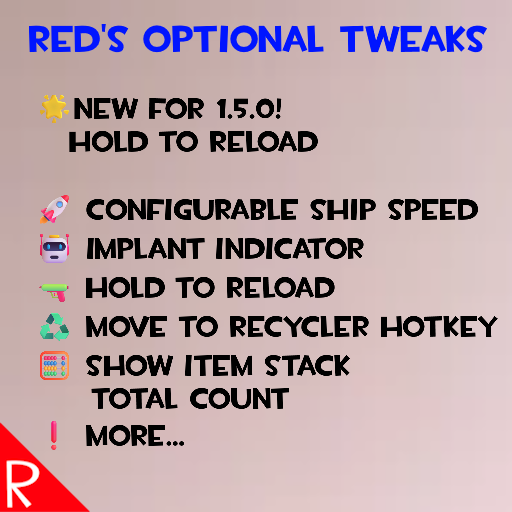
Modifications Overview
Below is a list of functionality in mod.
By default, each individual piece of functionality has to be turned on in the Mods -> Red's Optional Tweaks screen. This allows the user to choose only the changes they want.
| Type | Name | Description |
|---|---|---|
| Balance | Ship Speed Boost | Increase the speed of ship travel. |
| QoL | Always Highlight Loot | Always highlights look when in a raid. Similar to always holding the alt key |
| QoL | Implant Indicator | Changes the yellow "has augment" dot to green if the inspected creature has an implant |
| QoL | Recycle Hotkey Quick Move | Hold R while hovering over items in the ship cargo to move that item to the recycler tab. |
| QoL | Stack Total Inventory Count | When holding the alt key, the count on stacks will show the total amount of that item owned. This is identical to the number that is shown in the item's tooltip |
| QoL | Hold Reload | Can hold the reload key to keep reloading when waiting and moving. Useful for single load weapons |
| QoL | Mouse Quick Toss Rebind | Change the key bind for what the game calls "Fast Toss". By default the game uses the Control key to move items between storage panes. |
| QoL | QMeter Visual | When in a raid, changes the QMorphos state name to yellow when above 800. This matches the music intensity change in the game at this level. |
| QoL | Show Station Info | When a station has a mission, hold the alt key to see the station info. Important! Must hold down alt before entering the station's UI rectangle. |
| QoL | Split Stacks Hotkeys | Adds hotkeys for amount presets and adds "increase" and "decrease" hotkeys. |
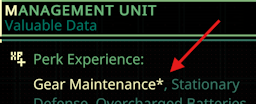
| QoL | Show Experience Maxed | Adds an asterisk to the Experience Item gain tooltip if the merc has the perk, but is already at the max level |
🧪 More items in the future...
For details on each modification, see the related section below.
Maximum Compatibility
Each modification works like its own mini-mod. Disable one, and it's as if it was never there. This is useful for working around bugs or handling conflicts with other mods.
See the Compatibility - Technical section for details.
Modifications
Always Highlight Loot
The same as always holding the alt key when in a raid.
Q-Meter Visual
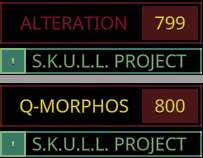
Changes the color of the Q-Meter text to yellow once the level gets over 800. If the user is playing with the background music off, they do not have the music change as an indicator of a high Q-Meter.
Ship Speed Boost
Changes the ship's speed to decrease travel times. By default this sets the ship to 2x the speed.
Implant Indicator
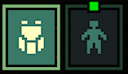
When inspecting a creature during a raid, the yellow "has augment" indicator will be green if there is an implant installed.
Mouse Quick Toss Rebind
Allows the user to bind the "quick toss" key. This is where the user can hold the ctrl key down while the mouse is over an item to move the item to the other inventory. By default it is remapped to middle mouse button (AKA Mouse2).
Hold Reload
When moving or waiting a turn, holding the Reload key will continue to reload. For example, if a shotgun requires a reload, the user can hold the Reload key while moving. For each step, a reload will occur as long as the user is still holding the Reload key. Note that when holding reload, the reload doesn't actually start until the user ends the action.
If you are looking for an automated version of the reload, check out Traveler's "Walk and Auto Reload" mod found here
The purpose of my modification is to mirror the base game's requirement to remember to reload, but remove the need to spam the Reload key. I think that forgetting to reload makes some memorable situations.
Show Experience Maxed
Show Station Info
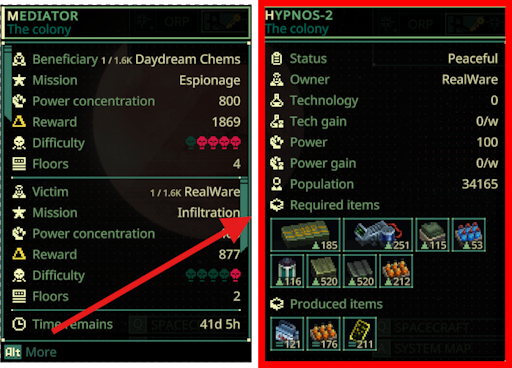
Allows the user to see the station info, even when there is a mission. Note that the alt screen will always show the station as peaceful. This is a quirk of the patch.
Important! Currently you must hold the alt key down before hovering over the station.
Split Stacks Hotkeys
When a stack of items is being split, the split dialog is shown. This modification adds the following:
Adds increase and decrease hotkeys to change the value by one. By default it is A and D.
Adds up to five preset amounts. For example, the user can press 1 and the dialog will change the "keep" amount (the number on the right) to 10. By default, 1 is set to 10, and 2 is set to 5.
Recycle Hotkey Quick Move
Hold R while hovering over items in the ship cargo to move that item to the recycler tab. Avoids needing to move each item to the recycler with drag and drop.
Stack Total Inventory Count
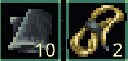
When in a screen that shows item stacks, holding alt will show the total amount of each item type that are owned. This is the same count as found in the tooltip when hovering an item.
Normal count showing how many items are in the stack:
Holding alt shows the amount currently owned.
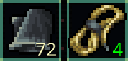
This allows the user to quickly determine if they want to pickup item X or item Y depending on how much of each they already have back in the ship.
The green color indicates that the user owns 20 or less of that item. The value can be completely turned off by setting the threshold value to zero.
This number is identical to what is shown on the tooltip, so items that are dropped off in the shuttle or drop pod are not included in the count.
Compatibility - Technical
For modders, here are the technical details.
Each modification contains their own patches and uses the enabled flag in the Harmony Prepare function to enable the modification. Non Harmony patches are gated by the same enable flag.
Configuration
The configuration can be changed with either the Mod Configuration Menu's "Mods" button on the main menu, or directly in the config file. The "Mods" button is the preferred route.
The config file is found at is found at %AppData%\..\LocalLow\Magnum Scriptum Ltd\Quasimorph_ModConfigs\RedsOptionalTweaks\config.json and will be created the first time the game is run. Changes will be applied when the game is restarted.
For any key binding items, see the Key List section below.
Key List
The list of valid keyboard keys can be found at the bottom of https://docs.unity3d.com/ScriptReference/KeyCode.html Beware that numbers 0-9 are Alpha0 - Alpha9. Most of the other keys are as expected such as X for X. Use "None" to not bind the key.
Enjoying the Mods?
If you enjoy my mods and want to buy me a coffee, check out my Ko-Fi page. Thanks!
Source Code
Source code is available on GitHub at https://github.com/NBKRedSpy/RedsOptionalTweaks
Changes
See the https://github.com/NBKRedSpy/RedsOptionalTweaks/blob/main/CHANGELOG.md for the list of changes.
Credits
- Special thanks to Crynano for his excellent Mod Configuration Menu.
- The TF2 RedSpy icon is from the reddit user iwilding from the post found here
- The Ship Speed Boost is based on Steam user critic's mod Ship Speed Boost. The functionality is replicated with permission.
- TF2 Font is from fontriver