
ArchitectUI React Bootstrap 管理仪表盘模板(免费)
兼容 React 19 - 一个基于 React 19、Bootstrap 5 和全面组件库构建的现代、响应式管理仪表盘模板。
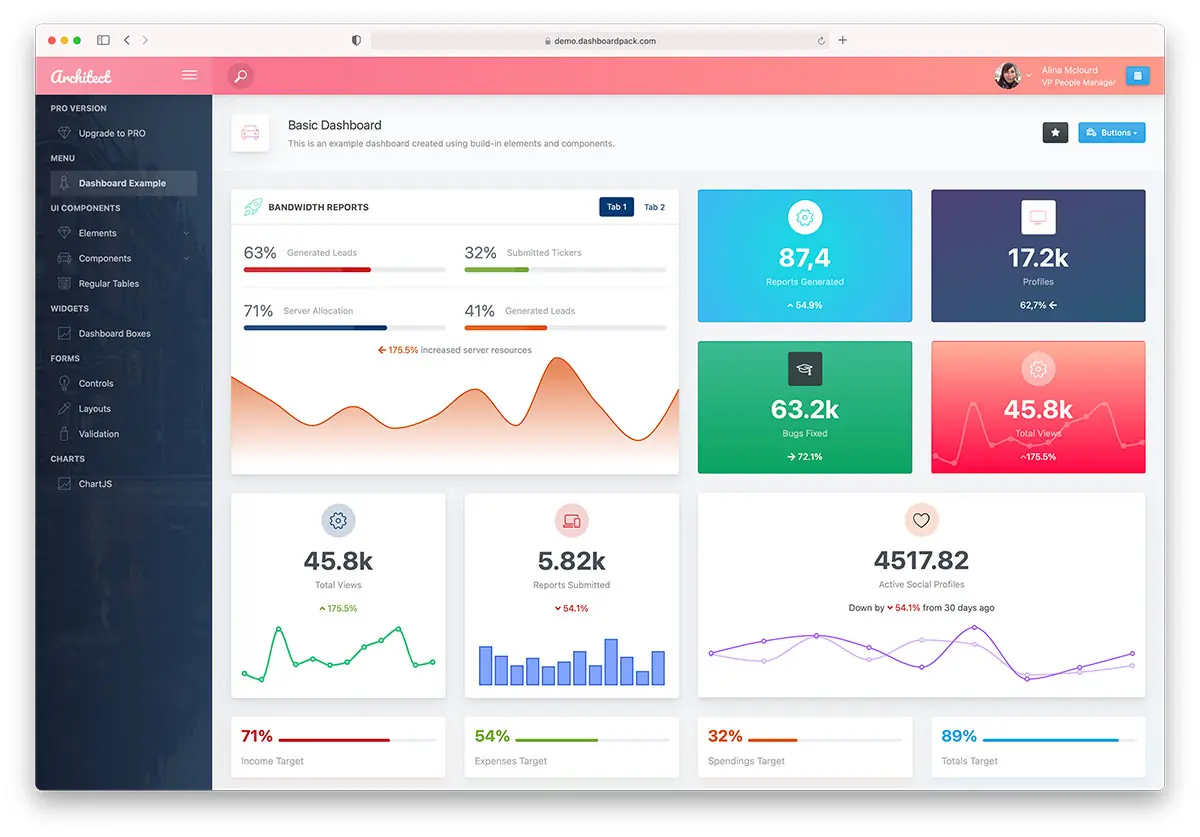
概述
ArchitectUI React 是一个功能丰富、免费的后台管理仪表盘模板,专为现代 Web 应用而设计。基于最新的 React 19 和 Bootstrap 5 构建,它为创建专业的管理面板、仪表盘和 Web 应用提供了坚实的基础。
此模板提供简洁、响应式的设计,并包含一套全面的 UI 组件、图表、表单和布局选项。非常适合初创企业、大型企业和寻求生产就绪管理仪表板解决方案的开发者。
4.8.0 的新增内容
安全更新版本 — 详见 Changelog.md 获取完整详情。
- 5 high-severity
npm auditvulnerabilities → 0, including the Dependabot-flagged PostCSS path traversal (GHSA-r28c-9q8g-f849) —postcssis now 8.5.25. react-router-dom→react-router8.3.0. The React Router RSC CSRF advisory affects the entire7.12.0 – 8.2.0range, andreact-router-domis discontinued at 7.18.2 pinned to a vulnerable 7.x. Since v7'sreact-router-domwas already a re-export shim, this is a pure import swap with no behaviour change.- ⚠️ Update your custom pages: change
from 'react-router-dom'tofrom 'react-router'.
- ⚠️ Update your custom pages: change
- Major bumps, all verified:
react-dropzone15 → 20,apexcharts5 → 6,@testing-library/jest-dom6 → 7,jsdom29 → 30. - React 19.2.8, Vite 8.2, Vitest 4.1.10, Sass 1.102 and the rest of the stack on latest.
- Now requires Node.js 22+ (
react-dropzone20,jest-dom7). - Verified green: 0 lint errors, 23/23 unit tests, clean production build.
- ESLint held at 9.x — its
react/jsx-a11yplugins still don't support ESLint 10.
上一个版本:4.7.0
- 6
npm auditvulnerabilities → 0;react-router7.18.0 andvite8.1.0 patched two high-severity advisories. Ratingcomponent rewritten to React's adjust-state-during-render pattern.
主要功能
核心技术
- React 19.2 - 性能与功能改进的最新 React
- Vite 8 - 支持即时 HMR 的极速构建工具
- Vitest 4 - 集成 React Testing Library 的第一方测试运行器
- Bootstrap 5.3.8 - 带有实用工具类的现代 CSS 框架
- Redux Toolkit - 状态管理
- React Router v8 - 导航与路由
- Sass/SCSS - 高级样式功能
UI 组件
- 30+ 即用型组件 - 表单、表格、图表、模态框等
- 多种仪表盘布局 - 分析、CRM、商务、销售及极简风格
- 高级表单元素 - 日期选择器、文件上传、文本编辑器、滑块
- 数据可视化 - ApexCharts、Chart.js、Recharts 集成
- 交互式地图 - Leaflet/OpenStreetMap 和矢量地图(无需 API 密钥)
- 响应式设计 - 移动优先策略,兼容所有设备
布局选项
- Flexible Sidebar - 可折叠,支持自定义主题
- Header Variations - 多种头部样式和配置
- Footer Components - 固定和动态页脚选项
- Theme Customization - 9 种预置配色方案
- Dark Mode Support - 专业深色主题选项
快速入门
先决条件
- Node.js(LTS 版本)- 在此下载
- npm 或 yarn 包管理器
安装
-
克隆或下载 该仓库
git clone https://github.com/DashboardPack/architectui-react-theme-free.git cd architectui-react-theme-free -
安装依赖项
npm install --legacy-peer-deps -
启动开发服务器
npm start
应用程序将在您的浏览器中打开,地址为 http://localhost:3001
构建生产环境
-
创建生产构建
npm run build -
预览生产构建
npm run preview
在 http://localhost:4173 查看生产构建
项目结构
architectui-react-theme-free/
├── .github/workflows/      # GitHub Actions CI workflow
├── public/                 # Static files
├── src/
│   ├── assets/             # SCSS entry, images, themes
│   ├── components/         # Reusable UI components
│   ├── config/             # Redux store configuration
│   ├── DemoPages/          # Demo pages and examples (lazy-loaded)
│   │   ├── Dashboards/     # Dashboard variations
│   │   ├── Components/     # UI component examples
│   │   ├── Forms/          # Form examples
│   │   └── Tables/         # Table examples
│   ├── Layout/             # Layout components
│   │   ├── AppHeader/      # Header components
│   │   ├── AppSidebar/     # Sidebar components
│   │   └── AppFooter/      # Footer components
│   ├── reducers/           # Redux slices (ThemeOptions)
│   └── utils/              # Small shared helpers
├── .env.example            # Documented VITE_* env vars
├── vite.config.js          # Vite configuration (env-driven)
├── vitest.config.js        # Vitest configuration
├── vitest.setup.js         # Shared test setup
├── eslint.config.js        # ESLint flat config
└── package.json            # Dependencies and scripts
可用脚本
| 命令 | 描述 |
|---|---|
npm start / npm run dev | 启动 Vite 开发服务器(默认端口 3001) |
npm run build | 在 build/ 中创建生产构建 |
npm run build:analyze | 构建并打开 Rollup 包可视化器 |
npm run preview | 在本地预览生产构建(端口 4173) |
npm run lint | 运行 ESLint |
npm run lint:fix | 运行 ESLint 并自动修复可修复的问题 |
npm run format | 以写入模式运行 Prettier |
npm run format:check | 以仅检查模式运行 Prettier |
npm test | 以监视模式运行 Vitest |
npm test -- --run | 运行一次测试套件(与 CI 使用的模式相同) |
npm run test:ui | 打开 Vitest UI |
npm run test:coverage | 运行一次套件并生成 v8 覆盖率报告 |
npm run test:e2e | 针对预览环境运行 Playwright 路由冒烟测试 |
npm run test:e2e:install | 一次性操作:安装 Playwright 使用的 Chromium 浏览器 |
环境变量
将 .env.example 复制到 .env.local 并根据需要调整。只有以 VITE_ 为前缀的键会暴露给浏览器包。
| 键 | 默认值 | 效果 |
|---|---|---|
VITE_PORT | 3001 | 开发服务器端口 |
VITE_BASE | ./ | 生产构建使用的公共基础路径(部署到子目录时设置为例如 "/architectui/") |
测试
两层测试:
单元测试 / 组件测试(Vitest + React Testing Library) — 测试文件与代码相邻,命名为 *.test.jsx:
npm test              # watch mode
npm test -- --run     # single run
npm run test:coverage # v8 coverage report under coverage/
共享配置(匹配器、RTL 清理、matchMedia / ResizeObserver / localStorage 垫片)位于 vitest.setup.js;配置位于 vitest.config.js。
端到端(Playwright) — e2e/routes.spec.js 启动 npm run preview 并遍历 24 个演示路由,若出现任何未捕获的页面错误或 "Element type is invalid" / "not a constructor" 控制台错误则测试失败。首次运行需要安装浏览器:
npm run test:e2e:install    # once
npm run test:e2e            # run the suite
配置位于 playwright.config.js。
可靠性特性
- 顶层
<ErrorBoundary>(src/components/ErrorBoundary.jsx) 捕获演示页面中的任何渲染时崩溃,并显示一个包含错误信息、组件堆栈(仅限开发环境)和重新加载按钮的友好卡片,而不是让屏幕变白。 - 主题偏好设置持久化到
localStorage(src/config/persistThemeOptions.js)。配色方案、固定头部 / 固定侧边栏 / 固定底部切换、背景图片、深色模式选择以及页面标题选项在刷新后均会保留。一个白名单控制哪些内容被写入,因此未持久化的 UI 状态保留在内存中。 - 深色模式 通过 Bootstrap 5.3 的
data-bs-theme实现。自动(跟随prefers-color-scheme)、浅色或深色 —— 从 ThemeOptions 侧边面板中选择并持久化。src/hooks/useDarkModeSync.js保持<html>同步,并在用户将偏好设置为自动时重新响应操作系统更改。 - 无障碍基础 —— 跳转到内容链接、
<header>/<nav>/<main>地标、:focus-visible环、图标按钮上的aria-label/aria-expanded/aria-pressed,以及移动覆盖层遮罩上的键盘激活。
启动新项目
参见 STARTER.md 获取完整的“精简至基础版”指南。简而言之:rm -rf src/DemoPages/,替换三个文件,最终仅保留 shell + 可靠性功能。
持续集成
GitHub Actions 在每次推送和拉取请求时运行,使用 .nvmrc 中固定的 Node 版本。流水线:
npm ci --legacy-peer-depsnpm run lintnpx vitest runnpm run buildnpx playwright install --with-deps chromiumnpx playwright test --project=chromium(Playwright report uploaded as an artifact if any step fails)
浏览器支持
ArchitectUI React 支持所有现代浏览器:
- Chrome(最新版)
- Firefox(最新版)
- Safari(最新版)
- Edge(最新版)
- Opera(最新版)
自定义
主题颜色
通过修改以下位置的 Sass 变量来自定义配色方案:
src/assets/themes/[theme-name]/_variables.scss
布局配置
在以下位置调整布局设置:
src/reducers/ThemeOptions.jsx
添加新组件
遵循以下现有组件结构:
src/DemoPages/Components/
可用版本
ArchitectUI 提供多种框架版本:
| 框架 | 仓库 | 状态 |
|---|---|---|
| React | 免费版本 | ✅ 活跃 |
| Vue.js | Vue 版本 | ✅ 可用 |
| Angular | Angular 版本 | ✅ 可用 |
| HTML/jQuery | HTML 版本 | ✅ 可用 |
专业版
升级至 ArchitectUI React PRO 以获取额外功能:
- 200+ 高级组件 - 丰富的控件和组件库
- 9+ 仪表盘布局 - 分析、CRM、商务、销售等
- 300+ 颜色组合 - 无限的自定义选项
- 高级图表库 - 高级数据可视化
- 扩展表单元素 - 丰富的表单控件和验证
- 专业支持 - 优先邮件支持
- 定期更新 - 持续改进和新功能
- 商业许可 - 可用于无限项目
价格: 起价 $69(个人版)、$149(开发者版)或 $349(终身版)
资源与模板
DashboardPack - 高级管理模板
DashboardPack.com 提供多种框架的专业管理仪表盘模板:
ArchitectUI 系列:
- ArchitectUI React PRO - React 19 + Bootstrap 5
- ArchitectUI Vue PRO - Vue.js + Bootstrap 5
- ArchitectUI Angular PRO - Angular + Bootstrap 5
- ArchitectUI HTML PRO - HTML/jQuery + Bootstrap 5
其他高级模板:
- Finance SaaS Dashboard
- Marketing Dashboard
- Sales Dashboard
- TailPanel (TailwindCSS)
Colorlib - 免费模板与资源
Colorlib.com 提供免费网页模板和实用文章:
推荐文章:
- 15 Best React Admin Dashboard Templates - React 仪表盘综合指南
- 42 Free Bootstrap Admin Dashboard Templates - Bootstrap 管理模板汇总
免费模板分类:
- 管理仪表盘
- 落地页
- 作品集模板
- 博客主题
技术细节
依赖项
- UI 框架: Bootstrap 5.3.8, Reactstrap 9.2.3
- 图表: ApexCharts 5.13, Chart.js 4.5, Recharts 3.8
- 地图: Leaflet 1.9, react-simple-maps 3.0
- 图标: FontAwesome 7.2, React Icons 5.6
- 表单: React Select, React Datepicker, @react-input/mask, rc-input-number
- 编辑器: react-simple-wysiwyg
- 通知: SweetAlert2, React Toastify
- 动画: Framer Motion 12.40
- 状态管理: Redux Toolkit 2.12, React Redux 9.3
- 构建工具: Vite 8, Sass 1.99
- 质量: ESLint 9 (flat config), Prettier 3, Vitest 4 + React Testing Library 16, Playwright 1.59
性能特性
- 极速 HMR - 基于 Vite 的即时热模块替换
- 代码分割 - 自动基于路由的代码分割
- Tree Shaking - 消除未使用的代码
- 优化构建 - 压缩和精简的资源
- 懒加载 - 组件按需加载
贡献
我们欢迎贡献。请阅读 CONTRIBUTING.md 了解完整的开发者工作流程(脚本、环境变量、测试、提交风格、PR 清单)。简版如下:
- Fork 该仓库
- 创建功能分支 (
git checkout -b feature/amazing-feature) - 确保
npm run lint、npm test -- --run和npm run build在本地全部通过 — 与 CI 运行的检查相同 - 提交你的更改 (
git commit -m 'Add amazing feature') - 推送到分支 (
git push origin feature/amazing-feature) 并发起 Pull Request
许可证
本项目基于 MIT License 授权 - 详见 LICENSE 文件。
MIT License

Copyright (c) 2023 DashboardPack

Permission is hereby granted, free of charge, to any person obtaining a copy
of this software and associated documentation files (the "Software"), to deal
in the Software without restriction, including without limitation the rights
to use, copy, modify, merge, publish, distribute, sublicense, and/or sell
copies of the Software...
支持与社区
获取帮助
- 文档:包含全面的指南和示例
- GitHub Issues:报告错误和请求功能
- 社区:加入我们的开发者社区
保持更新
- GitHub:收藏仓库以获取更新
- DashboardPack:关注以获取新模板发布
- 更新日志:查看 CHANGELOG.md 以了解版本历史
致谢
开发方:DashboardPack.com
设计:专业 UI/UX 团队
维护方:开源社区
为开发者社区精心打造